


Cuando un equipo de consultoría trabaja con varios clientes simultáneamente, la comunicación desorganizada suele ser un obstáculo insalvable.
Por eso, adoptar una plataforma de comunicación más práctica para consultores es clave para el éxito de una agencia.
Una aplicación de mensajería empresarial como Pumble by CAKE.com puede reducir la dependencia de un equipo de consultoría de los intercambios de correo electrónico fragmentados y lentos, que generan trabajo duplicado y pérdida de horas facturables.
Analicemos los problemas de comunicación más comunes que enfrentan los consultores en 2026 y cómo solucionarlos con Pumble.
Por qué las herramientas de comunicación generales no funcionan para equipos de alto riesgo
Cuando se inicia un negocio de consultoría, el tamaño de la operación suele facilitar la comunicación.
Con solo uno o dos consultores en el equipo y pocos clientes, es fácil gestionar la información y garantizar la transparencia y la seguridad.
Sin embargo, la situación se complica a medida que el equipo crece e incorpora nuevos clientes.
La información crucial puede perderse en correos electrónicos y herramientas de chat básicas que carecen de funciones especializadas para empresas. Esto dificulta que los nuevos miembros comprendan el contexto de las decisiones anteriores.
La falta de transparencia resultante puede ser especialmente perjudicial para los equipos de alto riesgo, que requieren confianza y responsabilidad para operar.
Además, las plataformas de comunicación exclusivamente textuales pueden ser especialmente problemáticas, ya que carecen de las opciones de comunicación de alta calidad (como mensajes de voz y vídeo y llamadas) que los consultores necesitan para garantizar la claridad.
Y estos son solo los problemas más evidentes que puede provocar el uso de una plataforma de comunicación inadecuada para la comunicación interna y externa.
El coste oculto del cambio constante de contexto y los correos electrónicos dispersos
Cuando una agencia gestiona varios clientes simultáneamente, mantener todas esas conversaciones por correo electrónico se vuelve prácticamente imposible.
Por un lado, tener que alternar entre diferentes plataformas para la comunicación interna y externa puede ralentizar y dificultar innecesariamente las tareas diarias.
Esto es especialmente cierto para las agencias que dependen principalmente del correo electrónico o de aplicaciones de chat básicas, que carecen de las funciones necesarias para establecer flujos de trabajo específicos para cada proyecto y una comunicación orientada al cliente.
En definitiva, estas pequeñas ineficiencias se acumulan y dan lugar a:
- Incertidumbre,
- Incumplimiento de plazos, y
- Desperdicio de horas facturables.
Además, el correo electrónico suele generar un exceso de comunicación, lo que puede provocar una sobrecarga de información en tu equipo.
Paradójicamente, saber que la mayoría de las personas no podrán seguir el rastro de información dispersa lleva a los líderes de equipo a compartir las mismas actualizaciones en diferentes cadenas de correos electrónicos y reuniones con la esperanza de que todos estén al tanto.
Sin embargo, a pesar de estos esfuerzos, muchas personas siguen sin estar informadas. Peor aún, ya que la información puede distorsionarse por repetición, este juego del teléfono puede provocar malentendidos.
Para combatir esto, las agencias de consultoría pueden usar Pumble para que la comunicación sea más eficaz, organizada y transparente.

🎓 CONSEJO PRO DE PUMBLE
¿Quieres saber cómo los equipos que trabajan en diferentes sectores pueden sacar el máximo provecho de una aplicación como Pumble by CAKE.com? Consulta estos recursos:
Las 6 maneras en que las agencias de consultoría usan Pumble by CAKE.com para garantizar la satisfacción del cliente
Los equipos de estrategia remotos pueden maximizar las funciones y beneficios de Pumble al:
- Priorizar la organización basada en el cliente con los canales de Pumble para eliminar la comunicación desorganizada,
- Fomentar una toma de decisiones más rápida con el historial de mensajes ilimitado y las conversaciones en hilos de Pumble,
- Garantizar la claridad con funciones de comunicación de alta fidelidad como las videollamadas de Pumble,
- Practicar una colaboración interna segura y transparente controlando el acceso a la información,
- Incorporar a los clientes con las cuentas de acceso de invitados de Pumble, y
- Aprovechar el ecosistema de CAKE.com para dar seguimiento a proyectos, tareas y horas facturables.
Sin más preámbulos, veamos cómo estas funciones pueden cambiar la forma en que te comunicas con tu equipo y con tus clientes.
1. Priorizar la organización basada en el cliente con los canales de Pumble
A medida que tu negocio de consultoría crece, necesitarás organizar tu comunicación.
Pumble te ayuda a lograrlo permitiéndote usar canales para mantener tus conversaciones centradas en el cliente y específicas del proyecto.
Incluso como usuario gratuito de Pumble, podrás crear un número ilimitado de canales privados o públicos, lo que te permitirá mantener tu comunicación organizada y segura.
Para que te tengas una idea más clara de cómo una agencia de consultoría podría aprovechar esta función, supongamos que tu empresa acaba de incorporar a un nuevo cliente: una marca de bienestar llamada Zest.
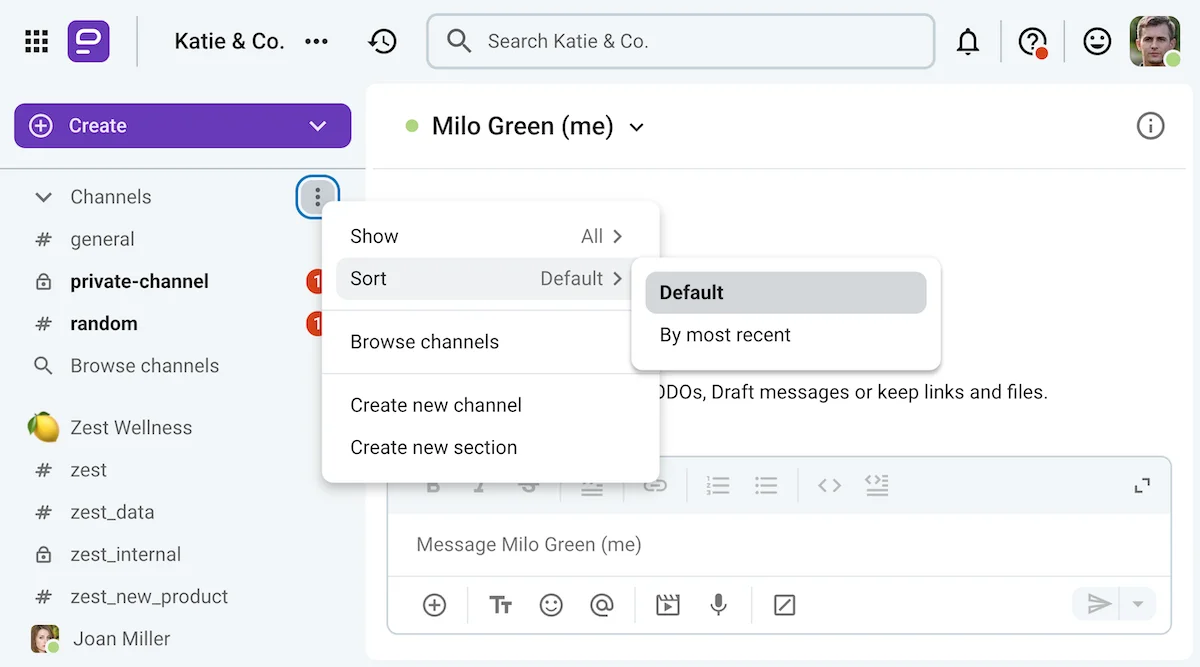
De entrada, puedes configurar varios canales, entre ellos:
- #zest, un canal oficial para comunicarte directamente con tu cliente o su representante (más información al respecto más adelante),
- #zest_interno, donde tu equipo puede compartir actualizaciones asíncronas y colaborar en presentaciones antes de mostrárselas al cliente,
- #zest_datos, un canal privado para analizar datos del cliente y revisar estudios del sector,
- #zest_nuevo_producto y canales similares que puedes usar para proyectos individuales que gestionarás para el cliente, etc.
Como los nombres de estos canales comienzan con el nombre de la organización de tu cliente, se agruparán en la vista predeterminada (alfabética) de la sección de canales de la barra lateral de Pumble.
Como alternativa, los usuarios de Pumble también pueden crear secciones separadas en su barra lateral, lo que les permite agrupar canales y chats relacionados, aunque no aparezcan juntos en la barra lateral.
Organiza tus mensajes con Pumble
2. Fomentar una toma de decisiones más rápida con el historial de mensajes ilimitado y las conversaciones en hilos de Pumble
Lo peor de usar el correo electrónico o aplicaciones de chat poco desarrolladas para comunicarse interna y externamente es que ambos métodos son lentos y difíciles de revisar.
Como ya comentamos, esto puede afectar el proceso de toma de decisiones y dificultar la comprensión de los motivos de decisiones anteriores.
Migrar a Pumble te permite crear un centro virtual que funciona como la "fuente única de información" de tu equipo.
Cuando un miembro del equipo tenga alguna pregunta sobre un proceso, podrá usar los filtros de búsqueda avanzada de Pumble para encontrar la respuesta.
Gracias al historial ilimitado de Pumble, disponible incluso en el plan gratuito, los usuarios no tienen que preocuparse de que los mensajes desaparezcan.
Ya que Pumble anima a los usuarios a tener conversaciones organizadas en hilos, en lugar de saturar sus canales y mensajes directos con respuestas desorganizadas, cualquier información que encuentren mediante la función de búsqueda se vinculará automáticamente con el contexto.
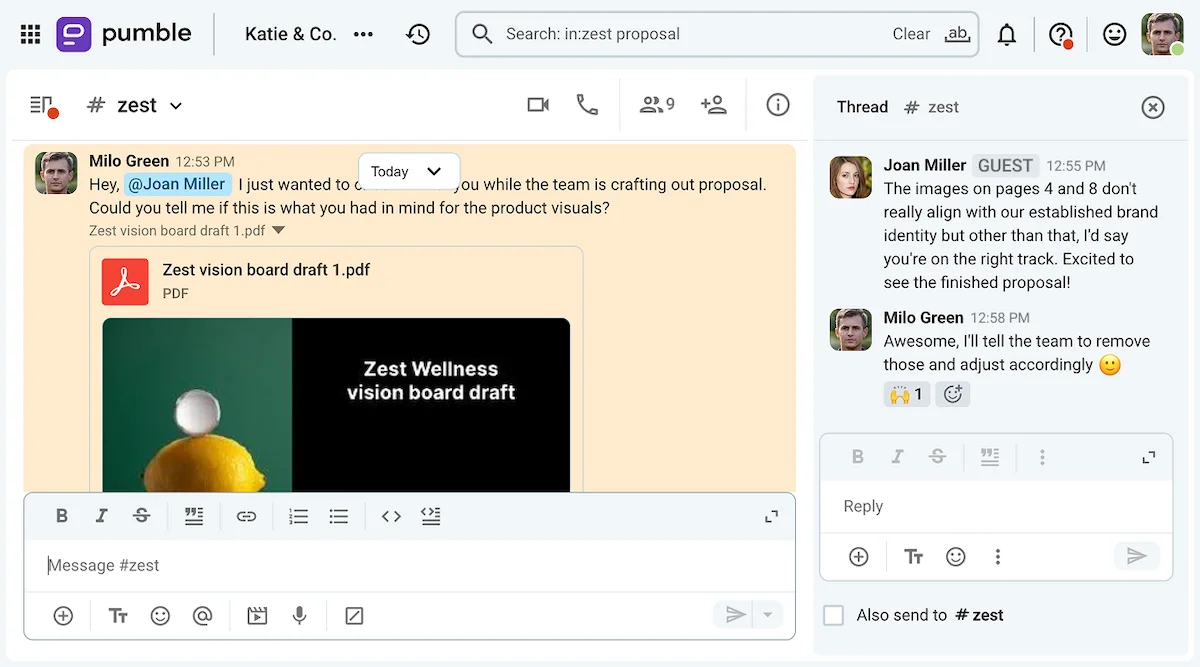
Por ejemplo, supongamos que un miembro de tu equipo busca el borrador original del tablero de visión que enviaste al representante de tu cliente.
Para encontrarlo, solo tiene que escribir "tablero de visión" en la barra de búsqueda de Pumble y asegurarse de hacer clic en el mensaje que incluye un archivo. Los resultados mostrarán inmediatamente el documento que busca.
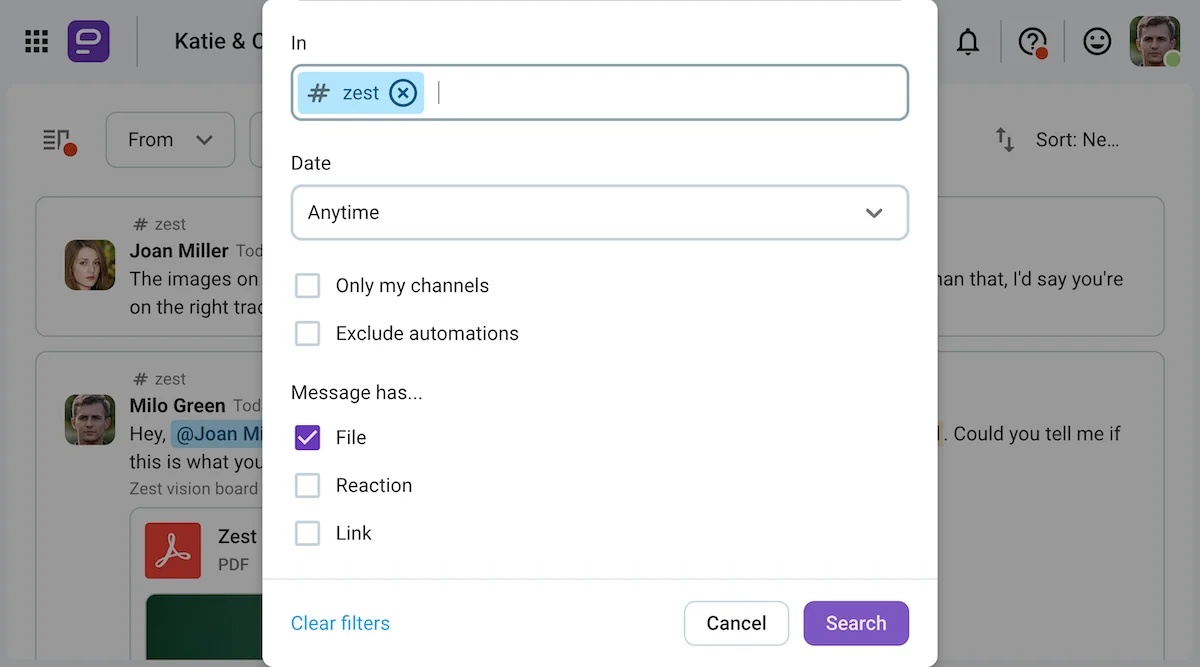
Al hacer clic en el resultado de la lista, el usuario será llevado al canal o chat donde se publicó originalmente el mensaje, lo que le permitirá ver las respuestas de la conversación, como se muestra a continuación.

3. Garantizar la claridad con funciones de comunicación de alta fidelidad como las videollamadas de Pumble
La claridad es, sin duda, uno de los pilares fundamentales del sector de la consultoría. Al fin y al cabo, el trabajo de un consultor suele requerir canales de comunicación de alta fidelidad que permitan transmitir el mensaje sin dar lugar a malentendidos.
Sin embargo, las herramientas basadas en texto, como el correo electrónico y las plataformas de mensajería simples, no te ayudarán a lograrlo.
En definitiva, tendrás que trasladar tus conversaciones a plataformas que admitan comunicación de alta fidelidad, como videollamadas y llamadas de voz.
Pero, ¿y si no tuvieras que cambiar de pestaña para conectarte a una llamada?
Por suerte, las capacidades de Pumble no se limitan a opciones de comunicación basadas en texto, como mensajes directos, canales y chats grupales.
Más bien, las funciones de videoconferencia de la aplicación te permiten iniciar reuniones individuales o grupales en segundos con solo hacer clic en el icono de llamada en los mensajes directos o canales, o programarlas con anticipación mediante los enlaces de reunión de Pumble.
Durante la reunión, podrás compartir tu pantalla para colaborar con tu equipo o mostrar a tus clientes el progreso del proyecto. Por eso, las videollamadas se convertirán en una parte fundamental de tu flujo de trabajo de consultoría, desde la incorporación de nuevos clientes hasta la presentación de los resultados finales.

Inicia una videollamada en Pumble
4. Practicar una colaboración interna segura y transparente controlando el acceso a la información
Usar Pumble como centro de conocimiento digital es una excelente manera de garantizar la transparencia y otorgar a los miembros del equipo acceso a información específica sin tener que repetirla.
Sin embargo, no todos necesitan tener acceso a todo lo que compartes en Pumble, especialmente los nuevos empleados.
Aquí es donde entran en juego los canales privados.
Al configurar algunos canales como privados, te asegurarás de que los mensajes y archivos compartidos en ellos no aparezcan en los resultados de búsqueda de quienes no son miembros.
Así, aunque Pumble será un centro de conocimiento fundamental para tu equipo, te permitirá controlar el acceso a la información confidencial, tanto interna como externamente.
De hecho, si quieres tener aún más control sobre tu espacio de trabajo en Pumble, puedes usar roles y permisos de miembros para elegir qué miembros del espacio de trabajo pueden publicar y enviar mensajes a otros usuarios.
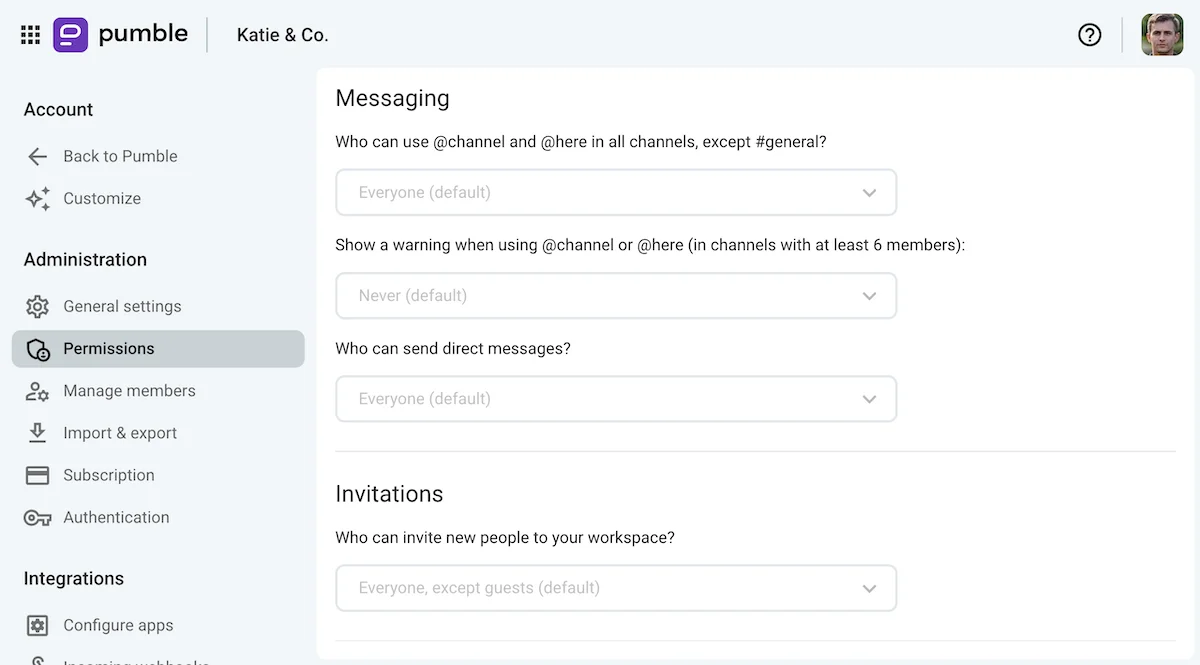
Como administrador, puedes mejorar aún más la seguridad de tu espacio de trabajo de Pumble con opciones de inicio de sesión único, ya que Pumble admite tanto el inicio de sesión único SAML como el OAuth.
Además, puedes tener la tranquilidad de saber que Pumble se diseñó pensando en la seguridad, lo que te ayudará a mantener la confidencialidad.
Protege tus mensajes con Pumble
🎓 CONSEJO PRO DE PUMBLE
Las agencias de consultoría no son las únicas empresas orientadas a proyectos que valoran la seguridad y la privacidad. Para ver cómo Pumble ayuda a equipos de diferentes sectores a practicar una comunicación segura, consulta estos artículos:
5. Incorporar a los clientes con las cuentas de acceso de invitados de Pumble
Reducir el correo electrónico en consultoría puede ser una tarea importante, especialmente porque la comunicación externa es una parte fundamental del trabajo.
Sin embargo, existe una forma de integrar a esos contactos externos a tu espacio de trabajo de Pumble: mediante cuentas de acceso para invitados.
Puedes tener hasta 5 invitados monocanal por cada puesto de pago en tu espacio de trabajo de Pumble. También puedes añadir un número ilimitado de invitados multicanal, que se facturan como usuarios regulares.
Por supuesto, tendrás control total sobre los canales a los que tus invitados tienen acceso, ya sea uno o varios, así como sobre sus permisos de publicación y mensajería.
Por ejemplo, supongamos que la marca Zest, que mencionamos anteriormente, ha designado a una o dos personas como representantes de la marca.
Para facilitar la comunicación a todos los implicados, puedes invitarlos a tu espacio de trabajo de Pumble como invitados monocanal y añadirlos al canal principal #zest. Esto facilitará compartir documentos, programar reuniones y colaborar, como se muestra a continuación.
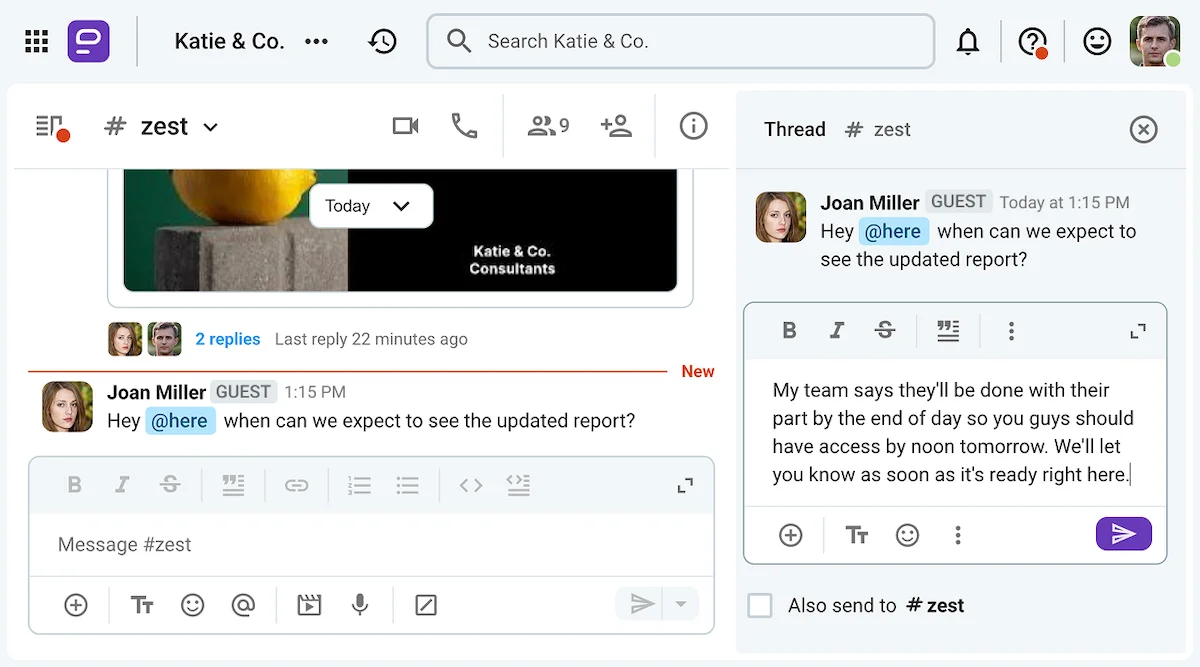
Si tus clientes también tienen un espacio de trabajo en Pumble, puedes usar cuentas de invitado para unirte. En ese caso, tú seleccionarías a un representante de tu equipo que actuará como enlace oficial en el espacio de trabajo de Pumble del cliente, y esta persona se encargaría de configurar el acceso y los permisos de la cuenta.
Prueba la función de cuenta de invitado de Pumble
🎓 CONSEJO PRO DE PUMBLE
Las cuentas de invitado también son útiles para interactuar con personas externas, como candidatos a puestos de trabajo, becarios y proveedores. Para saber cómo los empleados que interactúan con clientes externos pueden usar Pumble, consulta estos artículos:
6. Aprovechar el ecosistema de CAKE.com
Pumble no es la única aplicación de CAKE.com que facilita el trabajo de una consultora.
Sus dos integraciones nativas con la aplicación de control del tiempo Clockify, y el software de gestión de proyectos Plaky, hacen que el seguimiento de tareas y horas facturables sea mucho más intuitivo.
Puedes usar estas dos herramientas de organización de clientes junto con Pumble para mantener la transparencia y la responsabilidad:
- Plaky by CAKE.com, para llevar un registro de todas las tareas y proyectos que realizas para cada cliente, y
- Clockify by CAKE.com, para controlar y exportar las horas facturables por cliente o proyecto.
Para preparar tu colaboración con Zest, primero debes crear un cliente "Zest" en Clockify. Una vez hecho esto, podrás crear nuevos proyectos para ese cliente y que tu equipo registre su tiempo en dichos proyectos.
Este seguimiento de tiempo tan minucioso te permitirá exportar y compartir un informe sobre tus horas facturables y no facturables con tus clientes, para que tengan una mejor idea del trabajo que has realizado para ellos y, por supuesto, facturarles.
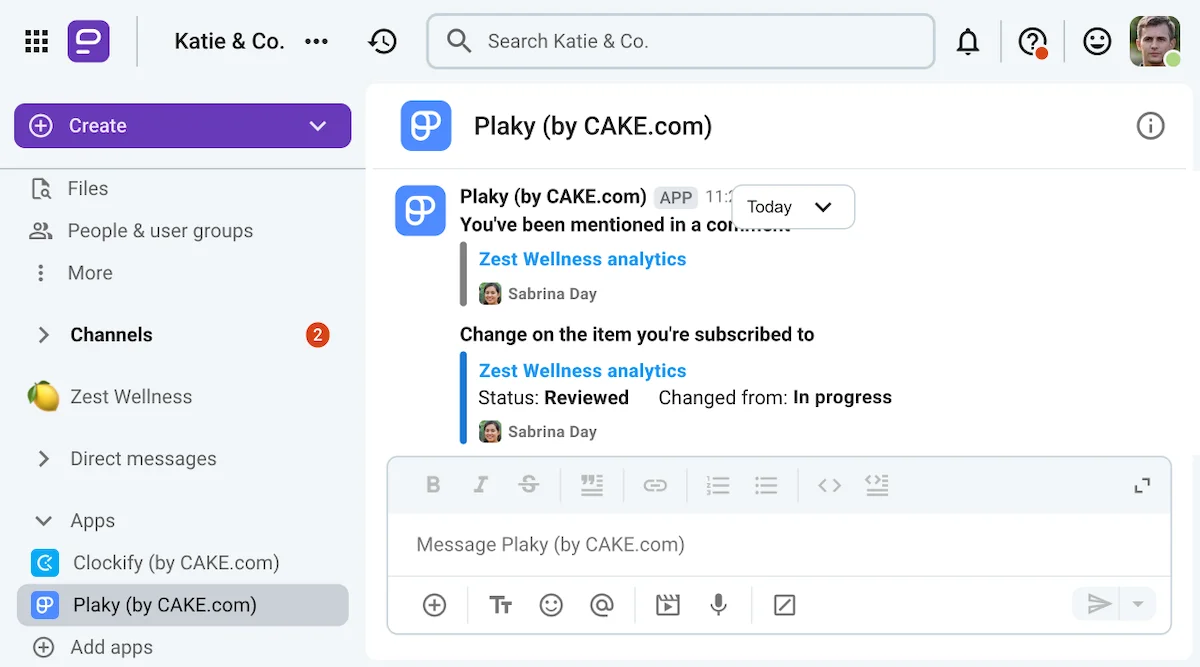
Además, Plaky puede ofrecer a tus clientes una visión aún más detallada del trabajo que has estado realizando. Puedes empezar creando un tablero para representar al cliente y luego usar grupos y tarjetas de elementos para representar los proyectos y tareas en los que trabaja tu equipo.
Gracias a la integración de Plaky con Pumble, ahorrarás tiempo al no tener que cambiar entre las dos aplicaciones, ya que recibirás notificaciones de todos los cambios realizados en tu tablero de Plaky a través de Pumble. Esto te permitirá ver las nuevas tareas que se te asignen, así como cualquier cambio en tus tarjetas de elementos existentes, sin salir de Pumble.

Transforma tu negocio de consultoría con Pumble by CAKE.com
Emprender un negocio de consultoría desde cero puede ser un reto, pero las herramientas adecuadas te prepararán para el éxito.
Pumble es un software de comunicación interna fantástico, con historial ilimitado y otras funciones gratuitas que te resultarán útiles en los inicios de tu negocio.
Una vez que tu equipo empiece a crecer, verás que los planes de pago de Pumble ofrecen ventajas reales, sobre todo si quieres aprovechar el acceso de invitados y las llamadas grupales.
Incluso puedes experimentar estas ventajas sin compromiso con una prueba gratuita de 7 días de las funciones Enterprise de Pumble.
Como alternativa, si quieres organizar tu flujo de trabajo y mostrar a tus clientes de forma transparente cómo utilizas tu tiempo, actualizar a la Suite de Productividad CAKE.com aportará aún más valor a tu negocio y completará el conjunto de herramientas tecnológicas que necesitas para garantizar un flujo de trabajo ininterrumpido. La Suite de Productividad de CAKE.com te ofrece acceso de nivel Enterprise a las 3 aplicaciones con una única suscripción asequible.
¿Estás listo para llevar tu negocio de consultoría al siguiente nivel?
Cómo revisamos esta publicación: Nuestros escritores y editores monitorean las publicaciones y las actualizan cuando hay nueva información disponible, para mantenerlas frescas y relevantes.