



Si diriges una organización sin fines de lucro, sabes bien lo que implica trabajar con recursos limitados, equipos remotos y una combinación de personal a tiempo completo y voluntarios.
Lamentablemente, depender de métodos de comunicación tradicionales puede ralentizar a tu equipo y crear silos innecesarios.
En esta guía, te mostraremos cómo utilizar Pumble by CAKE.com, uno de los mejores software gratuitos de colaboración para organizaciones sin fines de lucro, para simplificar la comunicación diaria y fomentar una mayor unión entre tus equipos.
¡Vamos a descubrir más detalles!
- Una estrategia de comunicación sólida permite que todos los miembros de una organización sin fines de lucro estén alineados en cuanto a sus roles y su misión compartida.
- Pumble es una herramienta de comunicación gratuita para organizaciones sin fines de lucro que incluye soporte humano 100 % y disponible las 24 horas, mensajería en tiempo real, videoconferencias, intercambio de archivos y mucho más.
- Todos los mensajes, archivos y enlaces compartidos en Pumble son totalmente rastreables, lo que ayuda a las organizaciones a mantener la transparencia.
- Pumble te permite coordinar fácilmente equipos remotos, gestionar voluntarios y compartir actualizaciones con toda la organización.
Por qué las organizaciones sin fines de lucro necesitan un software de colaboración dedicado
No es ningún secreto que la comunicación interna es la base del éxito en las organizaciones sin fines de lucro.
Si bien la recaudación de fondos y la vinculación con la comunidad suelen acaparar la atención pública, es lo que sucede detrás de escena lo que determina directamente el impacto que generas en el mundo.
Los estudios demuestran que las herramientas de comunicación modernas pueden mejorar la alineación de los equipos e impulsar significativamente la moral y la resiliencia en las organizaciones sin fines de lucro.
Aquí es donde entra en juego un potente software de comunicación para equipos como Pumble ayudándote a:
- Mantenerte conectado: Comparte actualizaciones rápidas, mantén la alineación y toma decisiones en conjunto.
- Coordinar voluntarios: Mantén sincronizados a los equipos distribuidos mediante chat en tiempo real y herramientas de colaboración flexibles.
- Ampliar tu impacto: Colabora de manera fluida con socios externos, donantes y partes interesadas.
Para que tus operaciones funcionen sin problemas, necesitas un software que ofrezca un historial ilimitado y con función de búsqueda para almacenar archivos, controles administrativos para mantener seguro tu espacio de trabajo y atención al cliente las 24 horas, los 7 días de la semana, para recibir asistencia rápida en cualquier momento y lugar.
Veamos por qué Pumble by CAKE.com debería ser tu opción número uno.
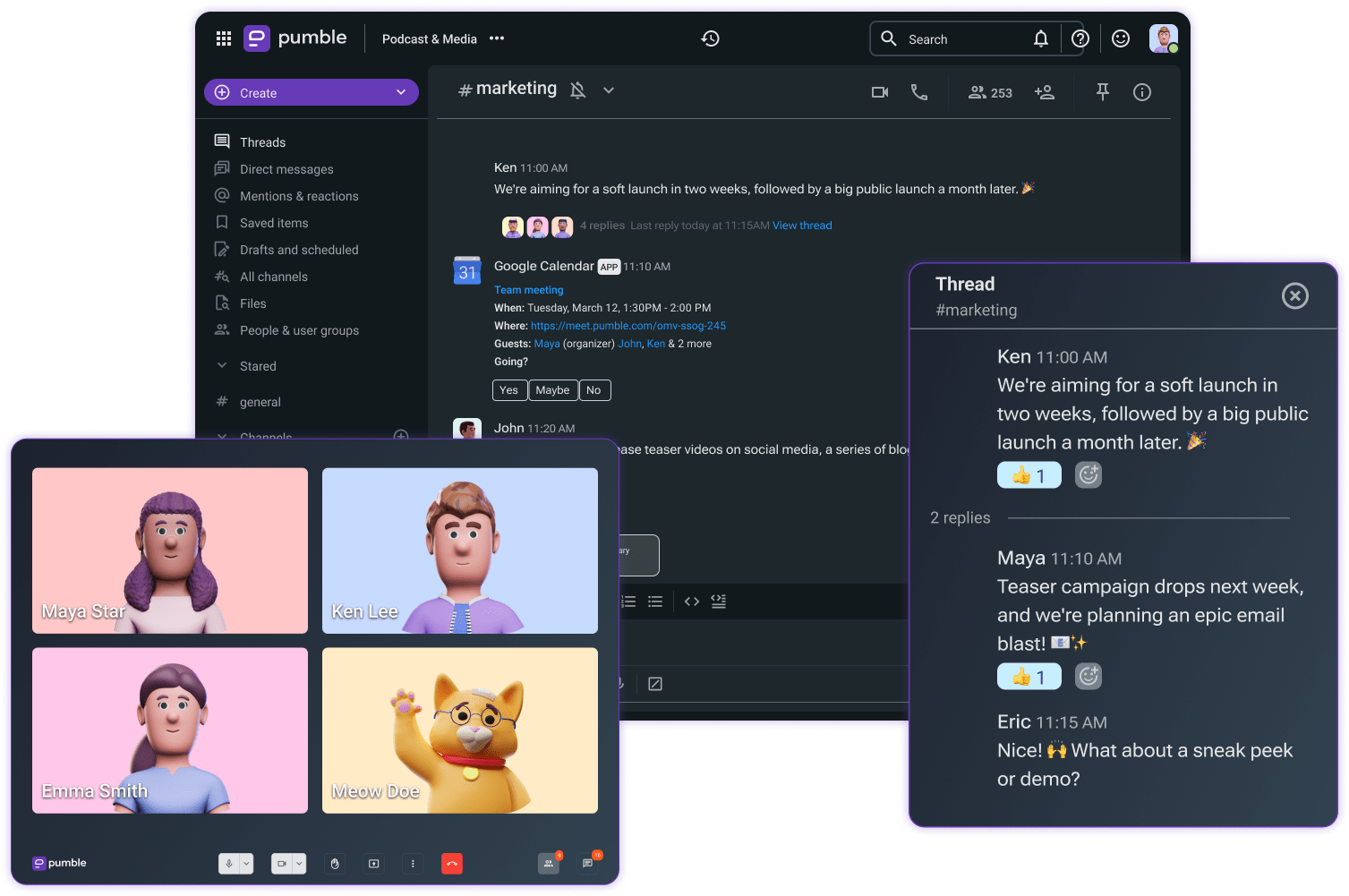
¿Qué es Pumble by CAKE.com? ¿Cuáles son sus principales funciones?
Pumble es una potente herramienta de colaboración diseñada para equipos que quieren mantenerse conectados, organizados y productivos, sin importar dónde se encuentren.
Ya sea que dirijas una organización sin fines de lucro con 5 personas o administres una red de 500 voluntarios y empleados, necesitas un chat de equipo confiable para organizaciones sin fines de lucro. Pumble funciona como una potente aplicación de comunicación para voluntarios y un centro de colaboración integral que te ayuda a comunicarse mejor, más rápido y de forma más inteligente.
¿Y lo mejor? Es una herramienta de comunicación asequible para organizaciones sin fines de lucro, con potentes funcionesy soporte al cliente las 24 horas, los 7 días de la semana, para que tu equipo nunca se quede sin ayuda.
Las principales funciones de Pumble que mejoran la colaboración en tu organización sin fines de lucro incluyen:
- Mensajería en tiempo real para una colaboración instantánea: tu equipo puede comunicarse al instante mediante mensajes directos y canales organizados.
- Videollamadas y llamadas de voz: realiza una presentación a donantes o comunícate con los trabajadores de campo directamente en Pumble.
- Historial de búsqueda ilimitado: comparte, almacena y accede de forma segura a todos los archivos y mensajes.
- Controles administrativos y roles de usuario: mantén tu espacio de trabajo seguro y organizado.
- Soporte al cliente 24/7: ten la seguridad de que siempre recibirás ayuda con solo un mensaje.
- Compartir pantalla: guía a los nuevos empleados durante la capacitación inicial o comparte actualizaciones con los accionistas.
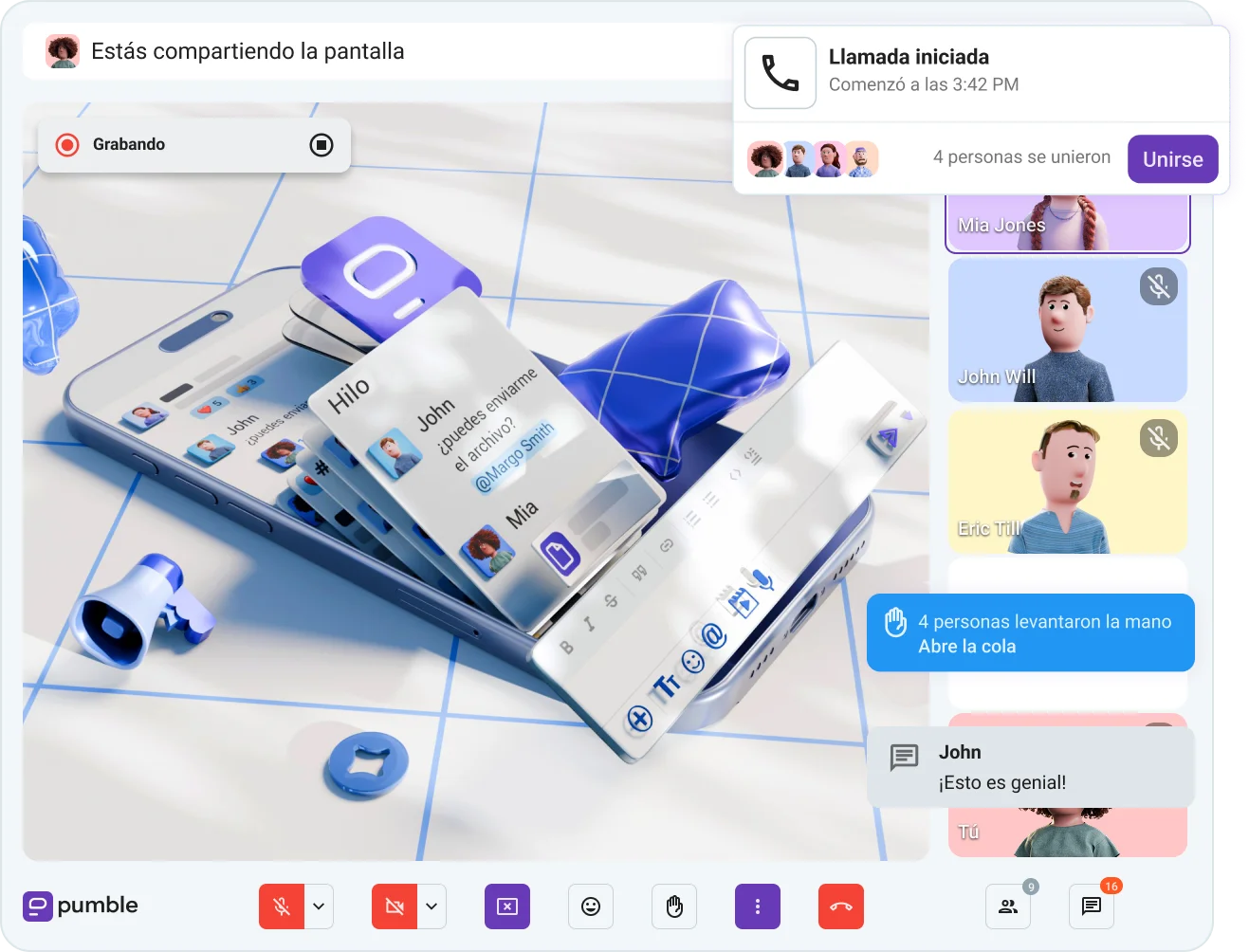
Beneficios de utilizar Pumble como plataforma de colaboración
Las organizaciones sin fines de lucro enfrentan desafíos únicos como presupuestos limitados, equipos distribuidos, alta rotación, y la presión constante de hacer más con menos.
En este tipo de entorno, la comunicación interna clara y eficiente puede mejorar dramáticamente cómo tu organización opera y qué tan eficiente entregas en tu misión.
Por eso, implementar una aplicación de colaboración como Pumble puede marcar una diferencia real.
1. Comunicación centralizada sin costes adicionales
Utilizar Pumble en tu organización sin fines de lucro significa contar con un espacio de trabajo centralizado para tu equipo. Está diseñado para gestionar todo lo relacionado con tu equipo:
- Actualizaciones: en canales, grupos, mensajes directos (MD) y mensajes de voz o vídeo
- Feedback: en mensajes directos o reuniones en tiempo real
- Colaboración: mediante videoconferencias o en canales específicos
- Reconocimiento: en canales públicos o privados, o mediante reacciones con emojis
Los presupuestos de las organizaciones sin fines de lucro fluctúan, por lo que pagar por software según el número de usuarios no siempre es viable.
Por eso el plan gratuito de Pumble destaca como una solución ideal que ofrece excelentes herramientas de colaboración sin coste alguno:
- Historial de mensajes, usuarios y canales ilimitados
- 10 GB de almacenamiento por espacio de trabajo
- Mensajes de voz y vídeo
- Llamadas de voz y vídeo individuales (1 a 1)
- Atención al cliente 24/7
Conservas todos tus mensajes y archivos durante el tiempo que necesites, sin preocuparte por límites de tiempo ocultos ni subidas repentinas de precio cuando se incorporen nuevos voluntarios.
Tú decides cuándo estás listo para cambiar a un plan superior según tus necesidades de colaboración. Y aun así, no tendrás que pagar por separado por una solución de mensajería y un software de videoconferencias.
Por ejemplo, una empresa sin fines de lucro puede reemplazar tanto Slack como Zoom cambiando a Pumble, ahorrando cientos de dólares al año mientras se mantienen todas las conversaciones, actualizaciones y llamadas del equipo en un solo lugar.
Y lo que es mejor: Pumble cuenta con integraciones nativas con el resto de la suite de CAKE.com, incluida la herramienta de control de tiempo Clockify y la aplicación de gestión de proyectos Plaky, por lo que tendrás un ecosistema de colaboración completo al alcance de tu mano.
Además, si organizas un evento de fin de semana o coordinas el lanzamiento de una campaña a altas horas de la noche, el equipo de soporte de Pumble, formado por personas reales y disponible las 24 horas, los 7 días de la semana, estará listo para ayudarte en cualquier momento.

2. Voluntarios y personal alineados en tiempo real
Los equipos de organizaciones sin fines de lucro a menudo trabajan en distintas regiones y zonas horarias, lo que dificulta la comunicación en tiempo real y debilita la conexión del equipo.
Tu organización necesita herramientas capaces de salvar las distancias y superar las diferencias horarias.
Aquí es donde entra en juego un software de comunicación interna como Pumble by CAKE.com, permitiéndote:
- Comunicarte en tiempo real mediante canales y mensajes directos para coordinar equipos distribuidos y voluntarios.
- Crear canales públicos y privados específicos para cada equipo, ubicación o proyecto.
- Realizar reuniones individuales y grupales para actualizaciones rápidas durante emergencias.
- Compartir archivos para colaborar en presentaciones para donantes. Es tan sencillo como arrastrarlos y soltarlos en el chat, donde quedan organizados en la pestaña de Archivos del canal.
- Acceder al historial completo de mensajes y archivos para mantener la transparencia y la rendición de cuentas en propuestas presupuestarias e informes de progreso.
- Utilizar la función de compartir pantalla para impartir sesiones de formación, integrar a nuevos voluntarios, realizar presentaciones para donantes, alinear criterios sobre documentos y recursos, etc.
Coordina equipos fácilmente en Pumble
Por ejemplo, el personal de campo puede publicar actualizaciones en tiempo real en un canal como #crisis-respuestas, mientras que la sede central puede compartir instrucciones y material de apoyo en un hilo de respuestas específico.
Los voluntarios suelen incorporarse de forma temporal o a tiempo parcial, por lo que la comunicación debe ser sencilla y rápida. Pumble elimina el caos de los correos electrónicos permitiéndote:
- Crear canales temporales o estacionales (como #voluntarios-verano-2026) para proyectos de corta duración.
- Anclar horarios o instrucciones importantes en la parte superior del chat.
- Compartir archivos PDF, formularios o cualquier otro enlace directamente en el chat para que todos puedan acceder a ellos desde el ordenador o el móvil.
También puedes incluir a voluntarios a tiempo parcial o becarios mediante el acceso de invitado en Pumble. Asigna diferentes permisos a los voluntarios e intégralos en tu espacio de trabajo sin darles acceso a archivos y conversaciones confidenciales.
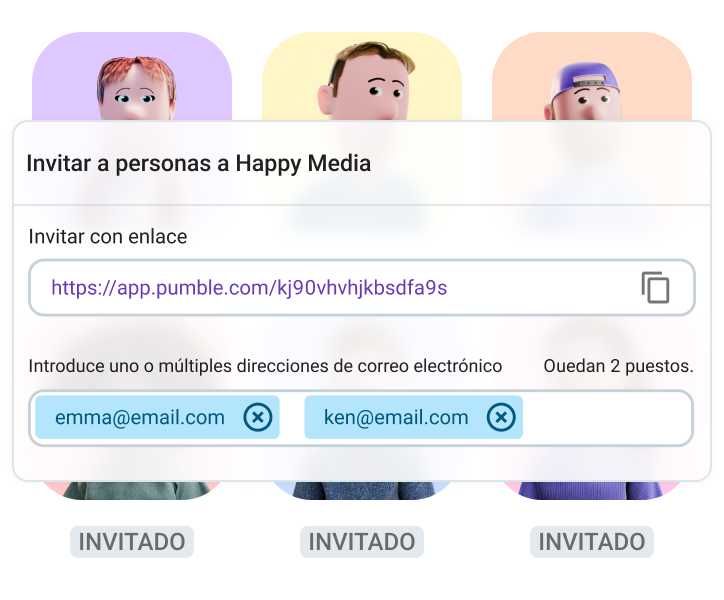
Chatea con invitados en Pumble
3. Historial con función de búsqueda para mayor transparencia y rendición de cuentas
Gracias al historial ilimitado con función de búsqueda, incluso en el plan gratuito, todos los mensajes, archivos o enlaces compartidos en Pumble son totalmente accesibles. Esto significa que no tendrás que lidiar con notas perdidas ni archivos adjuntos extraviados.
¿Necesitas encontrar esa hoja de registro de voluntarios de hace 3 meses? Solo escribe el nombre en la barra de búsqueda y ahí está.
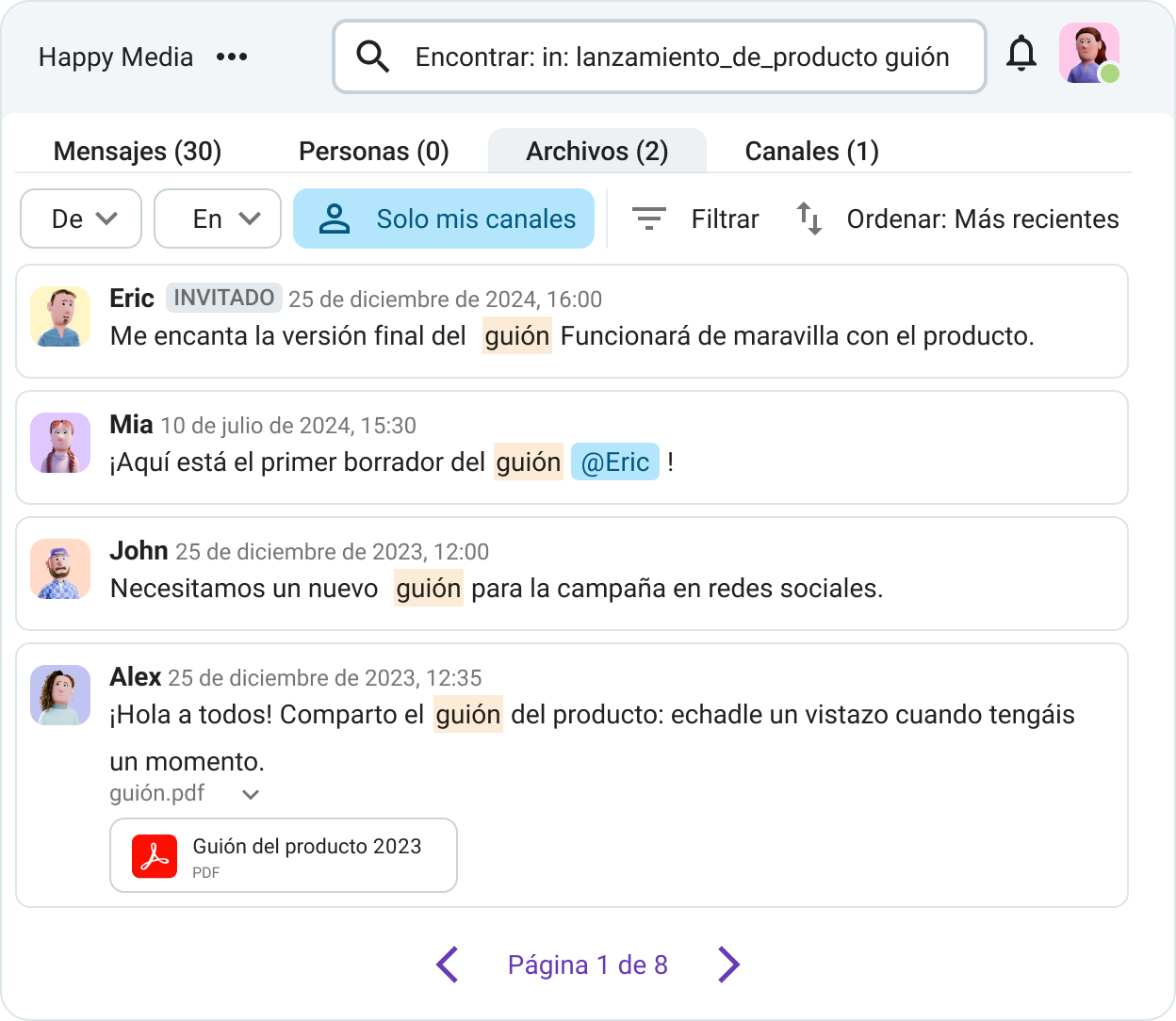
Esto también es clave para la transparencia entre tus equipos, ya que te permite:
- Seguir decisiones
- Consultar conversaciones anteriores
- Incorporar a nuevos miembros del equipo contando ya con el contexto necesario
Esto marca una gran diferencia para las organizaciones sin fines de lucro, donde:
- Se intercambian propuestas presupuestarias e informes de progreso entre equipos
- Los equipos necesitan acceso rápido a fotos, vídeos y materiales de marketing
- Se requiere un archivo fácil de usar de todo lo que se ha debatido
Mantén a todas informados con Pumble
4. Escalable para el crecimiento
A medida que tu organización crezca, aumentará su plantilla, el número de voluntarios y su impacto. Naturalmente, tus herramientas deberán adaptarse a este ritmo. Con Pumble, puedes:
- Ampliar equipos sin cambiar de plataforma
- Crear y archivar canales a medida que evoluciona el proyecto
- Mantener el control mediante permisos de administración y roles de usuario
Cuando tu equipo empiece a crecer, verás que no todos los miembros necesitan el mismo nivel de acceso. Pumble ofrece controles administrativos y roles de usuario flexibles, lo que te permite:
- Permitir que los voluntarios se unan únicamente a canales específicos
- Otorgar a los líderes de equipo permisos para gestionar conversaciones
- Proteger datos confidenciales mediante acceso restringido
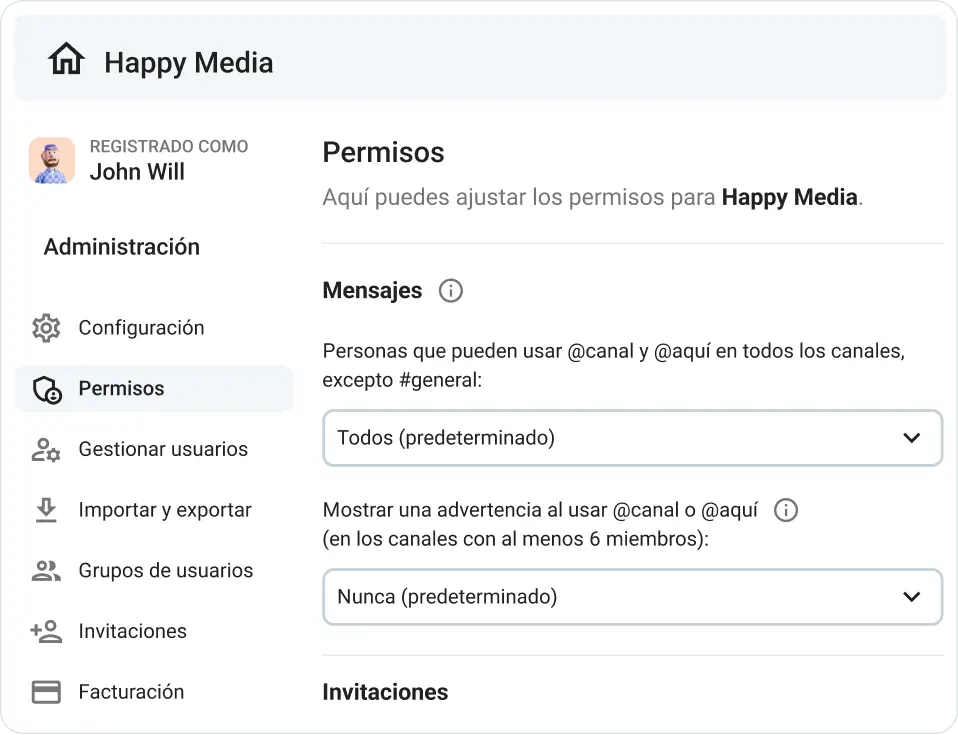
Esto mantiene tu espacio de trabajo seguro y organizado, lo que es especialmente útil cuando gestionas equipos grandes o rotativos.
Por ejemplo, imagina que eres una organización sin fines de lucro dedicada a la alfabetización a nivel nacional que comenzó con 10 usuarios en una sola ciudad. Un par de años después, te has expandido a 5 ciudades y cuentas con más de 100 usuarios. Puedes seguir utilizando el mismo espacio de trabajo de Pumble, con canales organizados por regiones y proyectos.
Cómo implementar Pumble by CAKE.com en tu organización sin fines de lucro
Elegir la herramienta de comunicación adecuada es solo la mitad de la batalla. Para experimentar verdaderamente lo que Pumble puede hacer para ti, se debe diseñar para tu equipo, estructura y flujo de trabajo diario.
A continuación te mostramos cómo adoptar Pumble de una manera que perdure, con disrupciones minimales y el impacto máximo.
1. Accede a las necesidades de comunicación de tu organización
Antes de introducir cualquier nueva plataforma a tu equipo, tómate un momento para entender:
- Cómo se comunica tu equipo de momento
- Qué funciona y qué no
- Dónde suelen ocurrir las dificultades y retrasos
- Cuántos usuarios necesitas
Además, puedes preguntar a tu equipo qué aspecto de la comunicación interna desearían que fuera más sencillo; así descubrirás puntos críticos que Pumble puede resolver directamente.
2. Elige la aplicación adecuada
El plan gratis de Pumble ya es poderoso, pero si tu organización sin fines de lucro necesita más almacenamiento, controles de administradores o funciones de cumplimiento, también puedes consultar las opciones de pago.
Aquí te explicamos cómo puedes decidir:
| Funciones necesarias | Recomendación del plan de Pumble |
|---|---|
| Mensajes, canales, videollamadas | Planes Gratis o Pro |
| Mayor almacenamiento de archivos y acceso de invitados | Plan Business |
| SSO, registros de auditoría, permisos avanzados | Plan Enterprise |
Puedes encontrar más información sobre las estructuras de planes de precios en la página de precios de Pumble.
Además, Pumble se integra con el software de seguimiento de tiempo Clockify y la herramienta de gestión de proyectos Plaky, ambos parte de la suite de herramientas de CAKE.com, lo que lo convierte en una opción rentable y fácil de gestionar.

3. Crea un espacio de trabajo y canales
Una vez que te registres, configura canales de espacio de trabajo que pueden cumplir con la estructura y el flujo de trabajo de tu equipo:
- Por departamento: #recaudación-de-fondos, #voluntarios, #marketing
- Por proyecto o campaña: #donaciones-verano-2026, #planificación-eventos
- Por ubicación: #equipo-remoto, #oficina-madrid, #en-el-campo
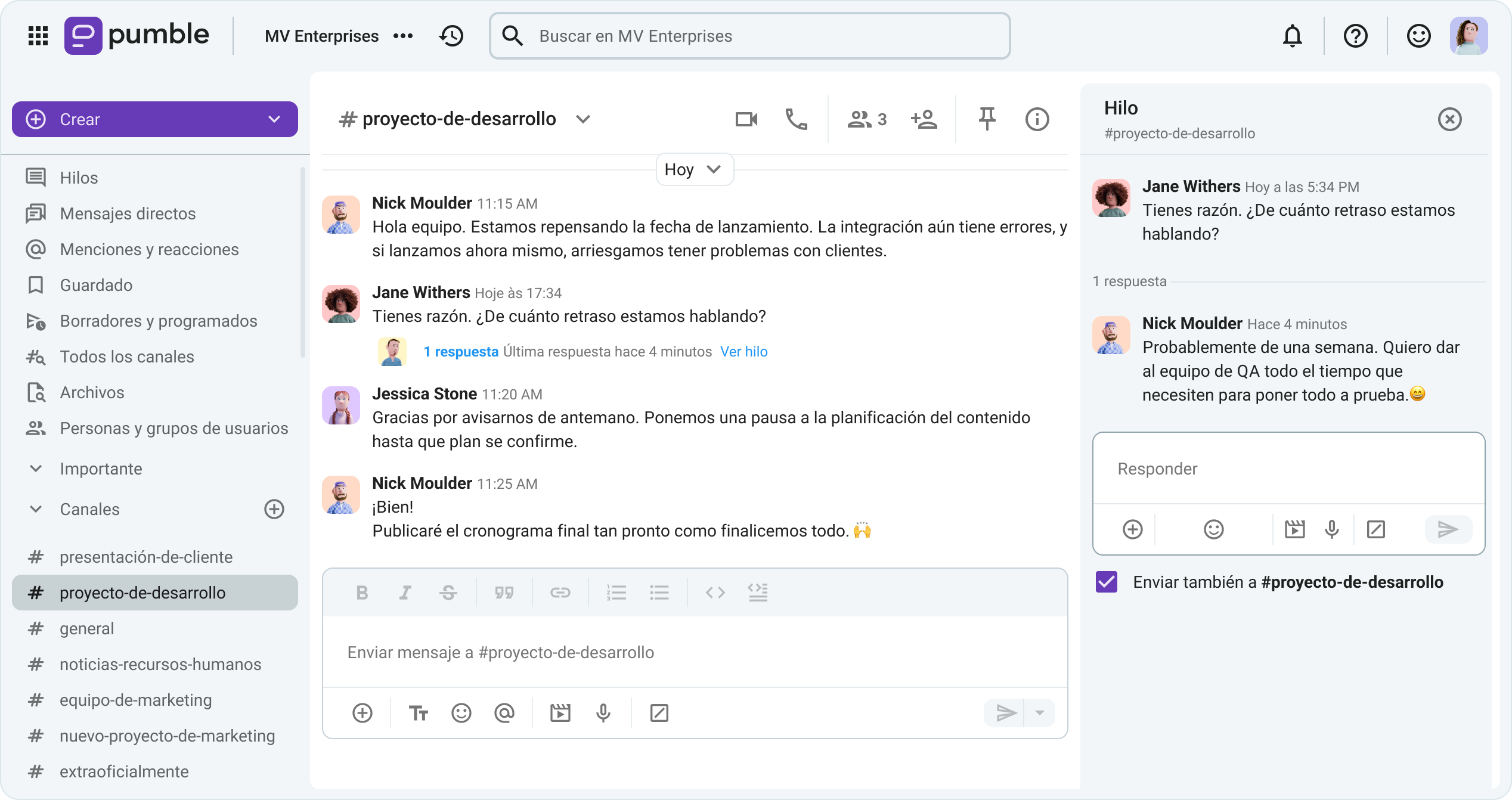
Utiliza nombres claros para los canales a fin de que los usuarios encuentren rápidamente lo que necesitan, y crea canales privados para aquellas conversaciones que requieran seguridad.
Para saber más sobre cómo funcionan los canales de Pumble y cómo utilizarlos para mantener las conversaciones claras y fáciles de seguir, consulta el siguiente vídeo.
4. Incorpora a los empleados y voluntarios sin problemas
Incluso las herramientas con más funciones no tendrán éxito si las personas no saben cómo utilizarlas. Desde las organizaciones sin fines de lucro donde los equipos a menudo incluyen el personal a tiempo parcial, voluntarios rotativos y usuarios no expertos en tecnología, la incorporación debe ser sencilla y brindar apoyo.
A continuación te mostramos cómo hacerlo:
- Crea un canal #onboarding donde puedes anclar recursos clave
- Comparte un breve mensaje de bienvenida con pasos sobre cómo usar la aplicación
- Usa mensajes de voz y vídeo para guíar a usuarios nuevos
- Planifica una sesión de entrenamiento en vivo a través de la función de videollamada de Pumble
5. Establece pautas y mejores prácticas de comunicación
Una herramienta es tan efectiva como los hábitos que se establecen en torno a ella. Implementar pautas que ayudan a tu equipo a mantenerse organizado, respetado y productivo.
A continuación se ofrecen algunas sugerencias sobre cómo hacerlo:
- Utiliza canales para temas específicos: #actualizaciones-de-donantes, #planificación-de-eventos
- Mantén el chat general amigable pero profesional estableciendo canales informales: #triunfos, #casual
- Fomenta el uso de hilos para discusiones detalladas para reducir el ruido
- Establece expectativas para el tiempo de respuesta: para actualizaciones urgentes utiliza @menciones
- Ancla mensajes clave, notas de reuniones o documentos en canales relevantes
Trampas comunes y cómo Pumble by CAKE.com te ayuda a evitarlas
La implementación de nuevas herramientas siempre conlleva riesgos. Afortunadamente, Pumble fue diseñado precisamente para resolver muchos de los problemas habituales que enfrentan las organizaciones sin fines de lucro.
1. Demasiadas herramientas
A menudo, estas organizaciones deben gestionar 3 o 4 aplicaciones simultáneamente para realizar su trabajo: correo electrónico para actualizaciones, Zoom para reuniones, Google Drive para archivos, WhatsApp para mensajes, etc. Si esta es la situación en tu organización, sabrás que la situación puede volverse abrumadora rápidamente.
Cómo Pumble resuelve esto
Pumble reúne todo en un solo lugar: mensajería instantánea empresarial, videoconferencias, intercambio de archivos, colaboración e integraciones con otras herramientas. Eso simplifica tu ecosistema tecnológico y ahorra tiempo.
2. Mensajes perdidos y falta de participación
Debido a la disponibilidad limitada y a una participación esporádica, es fácil que los voluntarios se pierdan actualizaciones clave o se sientan desconectados, lo cual puede afectar la moral y la productividad.
Cómo Pumble resuelve esto
Como una herramienta de comunicación interna, Pumble tiene las aplicaciones de iOS y Android. El uso de las aplicaciones y mensajes de hilos permite que cualquier persona pueda ponerse al día cuando tenga el tiempo.
Tanto los equipos de campo como los de oficina pueden personalizar las notificaciones de Pumble (tanto en escritorio como en dispositivos móviles) para priorizar las conversaciones más importantes y reducir las distracciones causadas por chats menos relevantes.
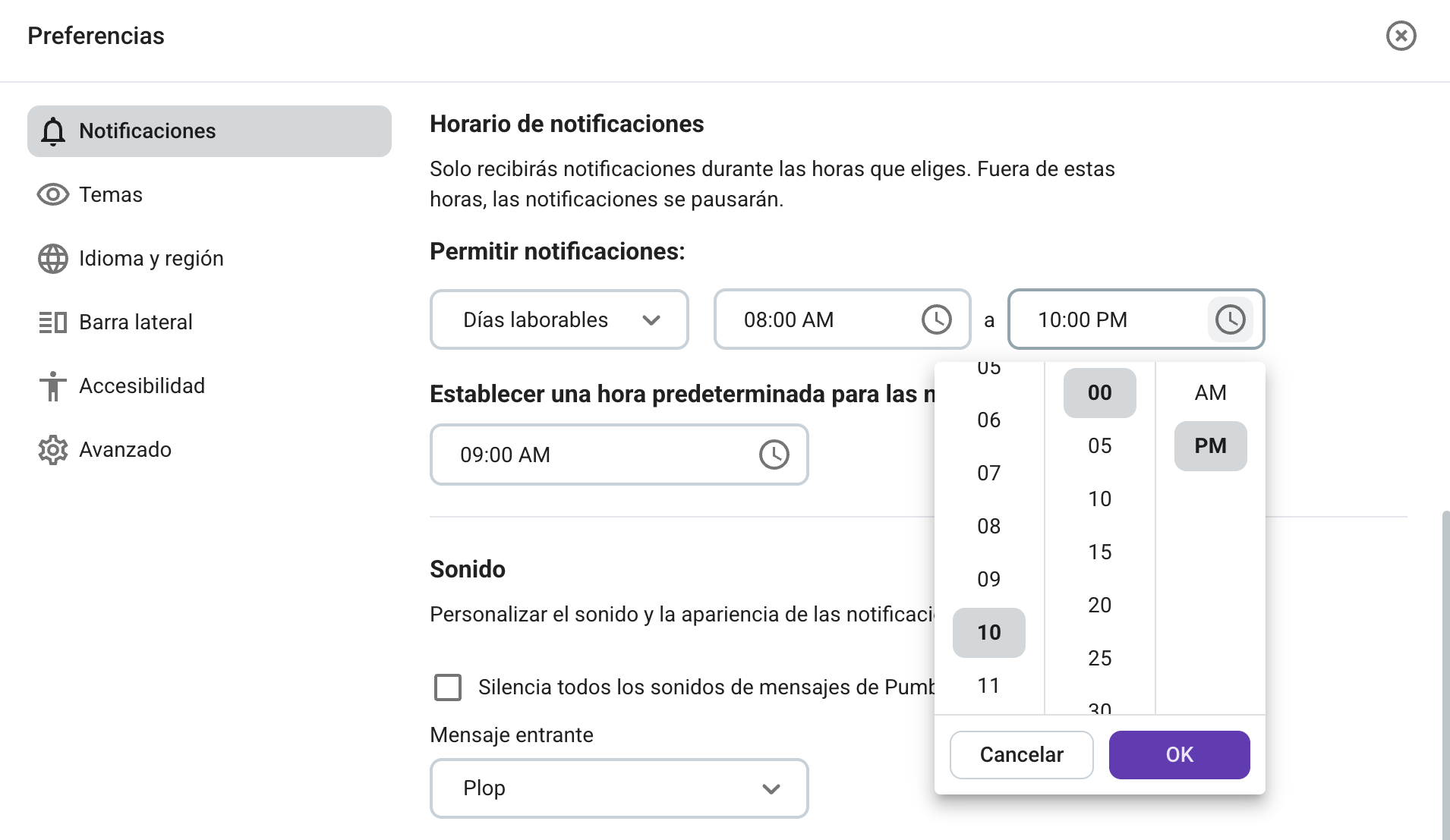
Pumble también te permite usar menciones para avisar a personas concretas o resaltar tareas. Además, puedes intercambiar mensajes de voz con equipos en situ, mientras que los canales y los hilos ayudan a mantener organizadas las actualizaciones y las respuestas.
No te pierdas ningún mensaje en Pumble
Dificultad para seguir las conversaciones
Sin una plataforma de búsqueda, los mensajes importantes quedan enterrados, el contexto se pierde, las tareas se repiten y la responsabilidad se rompe.
Cómo Pumble by CAKE.com resuelve esto
Pumble se posiciona como una de las mejores aplicaciones de mensajería para organizaciones sin ánimo de lucro gracias a su historial de mensajes ilimitado. Además, su función de búsqueda te permite encontrar cualquier cosa, incluso mensajes de hace seis meses. También puedes responder en hilos, usar reacciones y guardar o anclar mensajes importantes para reducir el desorden y la confusión.
4. Preocupaciones sobre privacidad de datos y cumplimiento normativo
Muchas aplicaciones gratuitas de chat para equipos no cumplen con los estándares básicos de protección de datos. Esto supone un riesgo para las organizaciones sin ánimo de lucro, especialmente para aquellas que manejan información de donantes, expedientes de casos o registros personales.
Cómo Pumble by CAKE.com resuelve esto
Pumble ofrece funciones de seguridad de nivel Enterprise, que incluyen:
- Control de acceso seguro
- Mensajes cifrados
- Gestión administrativa centralizada
Puedes gestionar los permisos fácilmente y controlar quién ve qué.

Los problemas que hemos mencionado ocurren a diario en los equipos de organizaciones sin ánimo de lucro de todo el mundo. La buena noticia es que tienen solución.
Pumble es una plataforma de comunicación diseñada específicamente para entender la complejidad de las organizaciones sin ánimo de lucro, ofreciendo la combinación ideal de estructura, flexibilidad, seguridad y soporte.
Preguntas frecuentes
Aquí encontrarás las respuestas a las preguntas más habituales sobre la colaboración en organizaciones sin ánimo de lucro.
¿Cuál es la mejor herramienta gratuita de colaboración para organizaciones sin ánimo de lucro?
La mejor herramienta gratuita de colaboración depende de las necesidades de tu equipo. Cada plataforma destaca en distintos tipos de trabajo, por lo que es importante elegir la que mejor se adapte a tu objetivo principal. Por ejemplo, Pumble es una excelente opción para organizaciones sin ánimo de lucro, ya que resuelve algunos de sus mayores desafíos de colaboración, como las limitaciones presupuestarias, el trabajo con equipos distribuidos y la rápida incorporación de usuarios con pocos conocimientos técnicos.
¿Cuáles son los 3 tipos de software de colaboración?
Los tres tipos principales de software de colaboración son: herramientas de comunicación, herramientas de colaboración en documentos y contenidos, y herramientas de gestión de proyectos. Al elegir Pumble, obtiene una solución 3 en 1, ya que incluye integración nativa con Plaky para la gestión de proyectos y con Google Drive para una colaboración fluida en documentos.
¿Cuáles son las 5 C de la colaboración?
Las 5 C de la colaboración son:
- Comunicación (Communication): intercambio de información claro, abierto y transparente que mantiene al equipo alineado y evita malentendidos
- Cooperación (o Cohesión) (Cooperation or Cohesion): creación de relaciones sólidas y confianza entre los miembros del equipo para aprovechar sus fortalezas individuales en pos de objetivos comunes
- Creatividad (Creativity): fomento de la innovación, el pensamiento original y la resolución creativa de problemas durante las sesiones de lluvia de ideas en grupo
- Compromiso (Commitment): implicación compartida en la visión y los objetivos del equipo
- Resolución de conflictos (Conflict resolution): formas constructivas y respetuosas de abordar los conflictos para mantener un ambiente de equipo saludable
¿Cuáles son los 9 tipos de colaboradores?
Los 9 tipos de colaboradores según los tipos de personalidad incluyen al Cabecilla, el Ninja Sigiloso, el Experto, el Ejecutivo, el Sociable, el Siloísta, el Escéptico, el Dinosaurio y el Capataz.
¿Cuáles son los 4 pilares de la colaboración?
Los 4 pilares de la colaboración son:
- Apoyo del liderazgo: los directivos y líderes deben demostrar continuamente una actitud colaborativa, defender la transparencia y promover una cultura unificada.
- Protocolos sólidos de RR. HH.: el departamento de recursos humanos debe establecer marcos que recompensen el trabajo en equipo además de los logros individuales, y definir directrices claras para la incorporación de personal y la creación de comunidad interna.
- Gestión competente: los gerentes y líderes de equipo necesitan habilidades para delegar eficazmente, aclarar roles, resolver conflictos de manera estratégica y fomentar una comunicación inclusiva.
- Estructura de equipo unificada: los equipos deben organizarse con dependencias claras, objetivos compartidos y acceso a un centro de operaciones centralizado que elimine los silos operativoss y los flujos de trabajo fragmentados.
Utiliza Pumble como tu software de colaboración y agiliza la comunicación
En el sector de las organizaciones sin fines de lucro, la comunicación es el elemento que mantiene todo unido: el equipo, los voluntarios, los socios y la misión.
Con una herramienta como Pumble by CAKE.com, tu organización puede pasar de conversaciones desorganizadas a una colaboración fluida y orientada a la misión, sin aumentar los costes.
Independientemente de si estás coordinando una campaña social o realizando programas globales, Pumble se adapta a tus necesidades, para que tú puedas centrarte en lo que más importa: tu misión.
Pumble by CAKE.com es el mejor software de colaboración para organizaciones sin fines de lucro, diseñado a medida para las necesidades reales de este tipo de labor. Te ayuda a:
- Mantener la organización y la eficiencia
- Fomentar la colaboración en tiempo real
- Reducir los costes de comunicación
- Proteger tus datos y a tu equipo
- Cumplir tu misión de manera más efectiva
Dale a tu equipo una oportunidad de mostrarte qué tan bien pueden colaborar con la herramienta adecuada.
Cómo revisamos esta publicación: Nuestros escritores y editores monitorean las publicaciones y las actualizan cuando hay nueva información disponible, para mantenerlas frescas y relevantes.