 Publicado: 16 de diciembre de 2025
¿Qué pasaría si la misma aplicación que tu equipo utiliza para la comunicación interna también pudiera usarse para facilitar la colaboración en atención al cliente?
Imagínatelo.
En lugar de tener que enviar correos electrónicos a lo largo de la cadena de mando, podrías reducir el tiempo de resolución de tickets y construir una base sólida de conocimientos para tu equipo for your team al mantener toda la correspondencia de soporte en canales dedicados en tu aplicación de comunicación.
Utilizar una plataforma de comunicación como Pumble by CAKE.com puede ayudar a tu equipo de atención al cliente a adoptar el futuro del soporte “swarming”, o colaboración interfuncional.
Pero, antes de explicarte cómo usar Pumble para lograrlo, dediquemos un momento a destacar las diferencias entre el soporte por niveles y el swarming.

Resuelve problemas complejos más rápido: Soporte por niveles vs. swarming
La diferencia entre el soporte por niveles y el swarming se encuentra esencialmente en la rapidez con la que quieres que tu equipo resuelva los tickets.
Tradicionalmente, muchos equipos de soporte han recurrido a la colaboración por niveles, un sistema desarrollado originalmente para optimizar el proceso de triaje de soporte y garantizar que solo se llamara a expertos si fuera necesario.
Al abordar problemas que no se pueden resolver mediante opciones de autoservicio o soporte básico, los agentes estaban capacitados para escalar los tickets a personas que pueden brindar soluciones más avanzadas, como desarrolladores o técnicos in situ.
En la práctica, sin embargo, el soporte por niveles suele resultar en una correspondencia interminable por correo electrónico, ya que los agentes intentan encontrar soluciones entre ellos antes de involucrar al personal técnico, mientras los clientes esperan respuestas.
Por el contrario, el modelo de swarming (o del enjambre) de atención al cliente se creó para:
- Reducir el tiempo de resolución de tickets y
- Garantizar la satisfacción del cliente.
En los equipos que adoptan el método de colaboración swarming para la atención al cliente, los agentes siguen estando capacitados para priorizar la resolución en el primer contacto (FCR, del inglés First Contact Resolution) al abordar los problemas más comunes.
Sin embargo, si reciben un ticket que les deja perplejos, en lugar de abrir su bandeja de entrada, simplemente publicarán el problema en un canal específico, donde podrán verlo los gerentes de producto, desarrolladores u otro personal cualificado.
Este modelo conecta eficazmente a los equipos de soporte con el personal técnico, eliminando las transferencias lentas y priorizando la colaboración interfuncional.
Lo mejor de todo es que puedes practicar la gestión de equipos de soporte sin tener que implementar una nueva plataforma de comunicación. Solo necesitarás realizar pequeños ajustes en la configuración de tu software de comunicación interna.
Pero, antes de compartir consejos específicos para configurar tu proceso de triaje de soporte, veamos cómo funcionaría el método de swarming en la práctica.
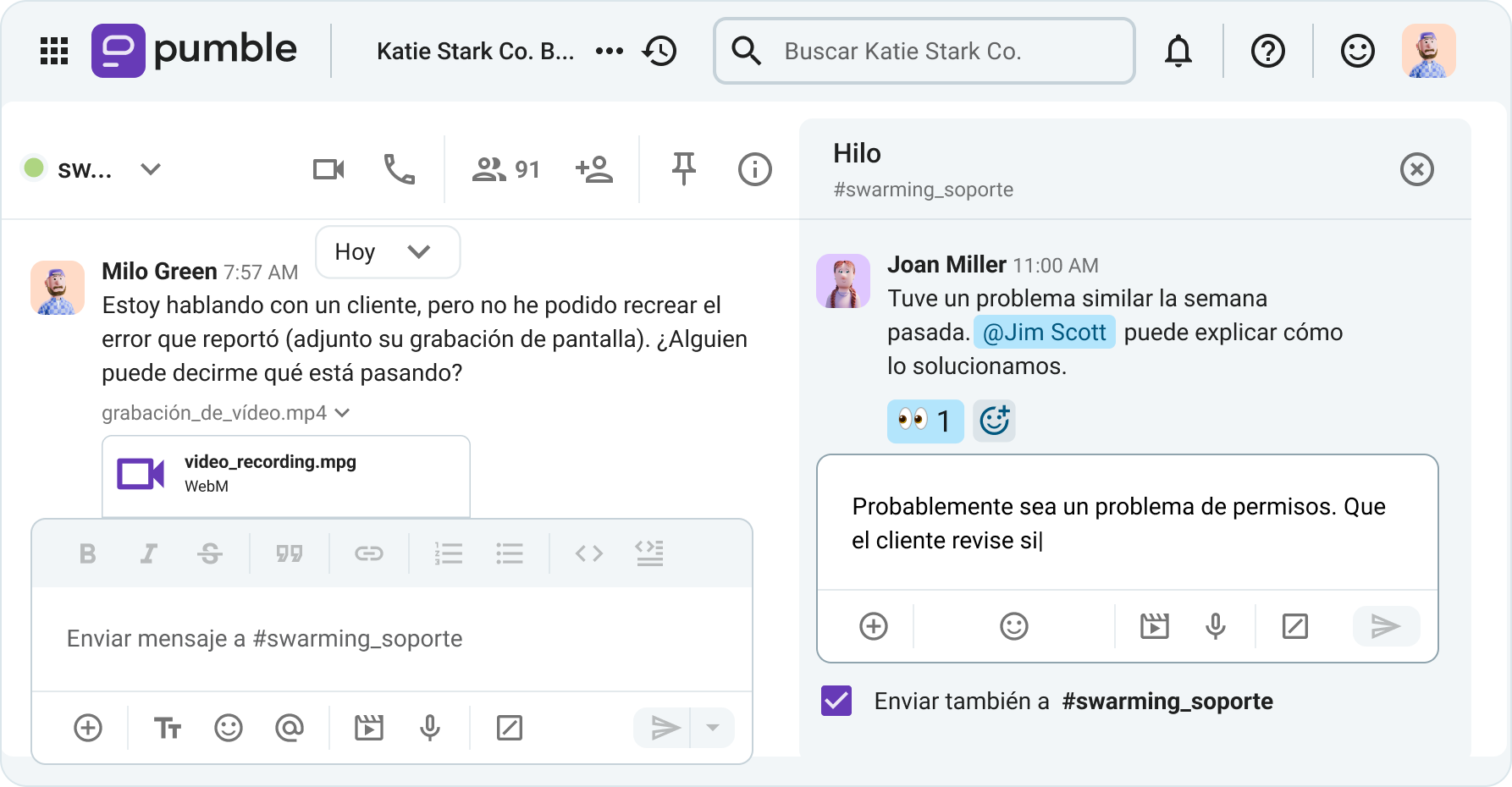

Cómo usar tu espacio de trabajo de Pumble para el swarming del equipo de soporte
Tras explicar las diferencias entre el swarming del equipo de soporte y el soporte por niveles, veamos cómo puedes incorporar Pumble en tu proceso de clasificación de soporte.
A continuación, te mostraremos cómo:
- Organizar tu espacio de trabajo con canales dedicados,
- Gestionar incidentes e interrupciones críticos manteniendo todas las actualizaciones en un solo lugar,
- Usar mensajes de vídeo para reportar errores visualmente,
- Mejorar tu experiencia en Pumble mediante la integración de la pila tecnológica, y
- Conectar con clientes VIP dándoles acceso de invitado a tu espacio de trabajo.
Comencemos por analizar algunos de los canales que podrías incorporar a tu espacio de trabajo de Pumble.
Paso 1: Organiza tu espacio de trabajo de soporte configurando canales dedicados en Pumble
A menos que te estés migrando a Pumble desde Slack (o una aplicación similar), lo más probable es que no tengas muchos canales en tu espacio de trabajo al principio.
De hecho, al empezar a usar Pumble, tu espacio de trabajo solo tendrá dos canales públicos: el canal #general y el canal #random, que se pueden usar para anuncios oficiales e intercambios informales, respectivamente.
A medida que te adaptes a tu espacio de trabajo digital, los diferentes equipos irán añadiendo más canales para debatir diversos temas.
Con esto en mente, queríamos sugerirte algunos canales que podrían ser útiles para promover la colaboración en la atención al cliente. Por ejemplo, podrías crear:
- Un canal sencillo de #soporte para anuncios del departamento,
- Un canal de #swarming_soporte para practicar la colaboración interfuncional en equipos,
- Un canal de #incidentes para discutir incidentes en curso o interrupciones del servicio,
- Un canal de #triaje_de_soporte para la gestión general de incidentes,
- Un canal de #feedback_de_clientes para compartir feedback positivo (o negativo) de los clientes con el resto del equipo de soporte, e incluso
- Un canal de #kudos_y_victorias para brindar reconocimiento a los empleados a mayor escala.
Además de estos, también podrías tener canales regionales o específicos de cada producto, según cómo decida tu equipo de soporte organizar su comunicación.
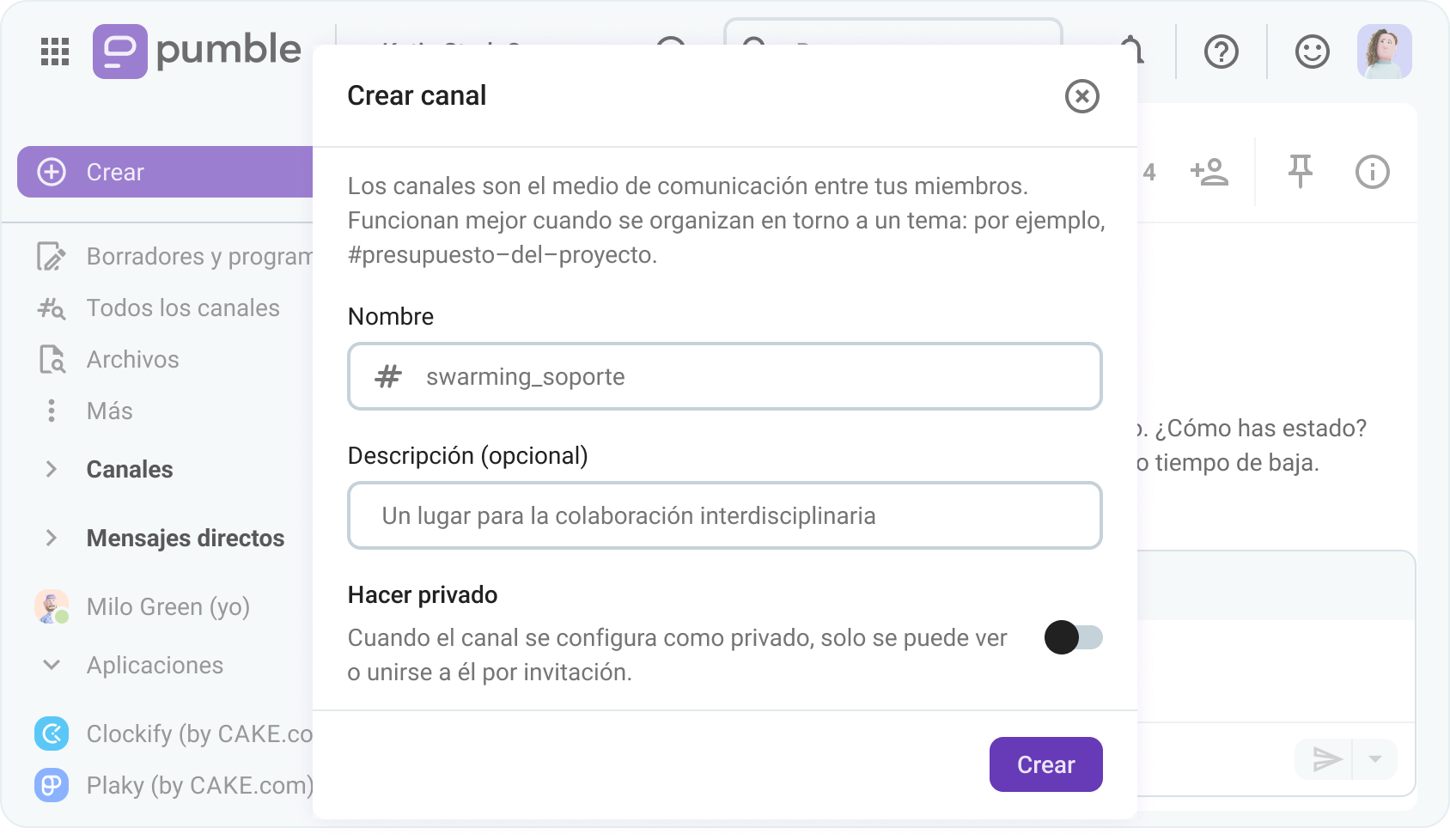
Centraliza la comunicación del equipo de soporte
Paso 2: Gestiona incidentes e interrupciones críticos con canales e hilos temporales para actualizaciones
En días particularmente agitados, trabajar en un equipo de soporte puede parecer como tener que gestionar un montón de cosas a la vez. Tienes que:
- Gestionar un número cada vez mayor de tickets, a la vez que
- Intentas mantenerte en contacto con el personal técnico, y
- Mantienes a los clientes informados sobre el estado de sus solicitudes.
Sin darte cuenta, te encuentras alternando entre:
- Llamadas de voz apresuradas con clientes agitados,
- Reuniones virtuales caóticas con el resto del equipo, y
- Mensajes directos interminables, mientras intentas sortear el caos.
Ojalá hubiera una manera de reducir el volumen de comunicación y, al mismo tiempo, asegurarse de que todas las partes relevantes tengan la información necesaria para realizar su trabajo.
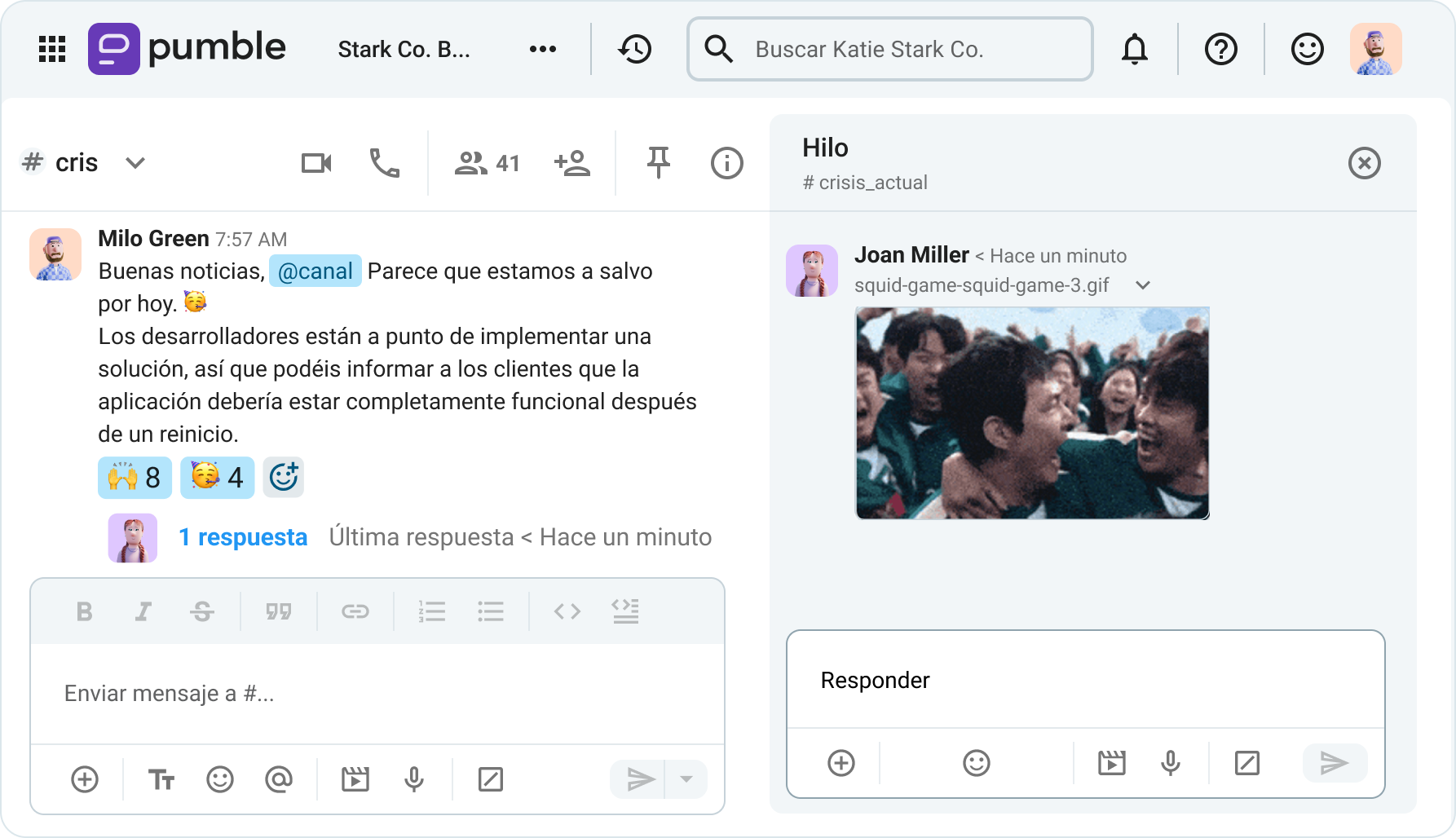
Bueno, resulta que crear canales temporales o incluso tener un canal permanente para discutir este tipo de incidentes puede ser una buena manera de mantener a todos al tanto.
En cualquier caso, ya que Pumble te permite crear un número ilimitado de canales privados o públicos, incluso como usuario gratuito, es la herramienta perfecta para implementar esta idea.
Después de crear el canal en cuestión, puedes usarlo para:
- Seguir los anuncios sobre problemas en curso o incluso solicitar actualizaciones de estado tú mismo,
- Responder en hilos para proporcionar o solicitar más información, y
- Compartir archivos o documentos que puedan arrojar luz sobre la situación.
Paso 3: Utiliza mensajes de vídeo para reportar visualmente los errores en Pumble
La mayoría de las veces, los problemas que reportan los clientes son algo que hay que ver para creer.
Por eso, los agentes de soporte suelen usar imágenes o, mejor aún, vídeos para comprender completamente los problemas que experimentan los clientes.
Después de todo, si una imagen vale más que mil palabras, imagina cuántas podrías reemplazar con un solo vídeo.
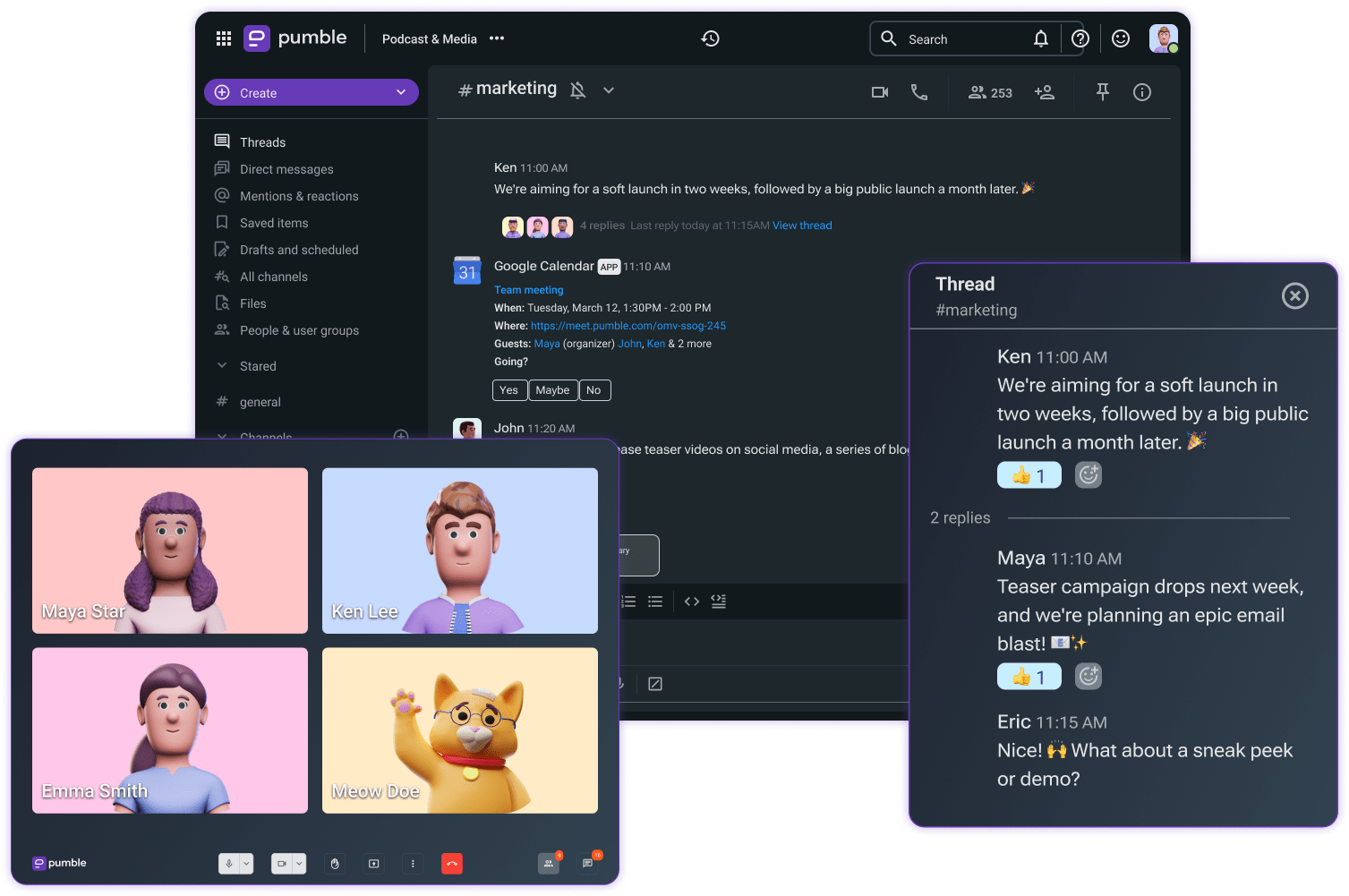
En la imagen a continuación, puedes ver cómo enviar mensajes de vídeo puede mejorar la colaboración en el soporte al cliente.
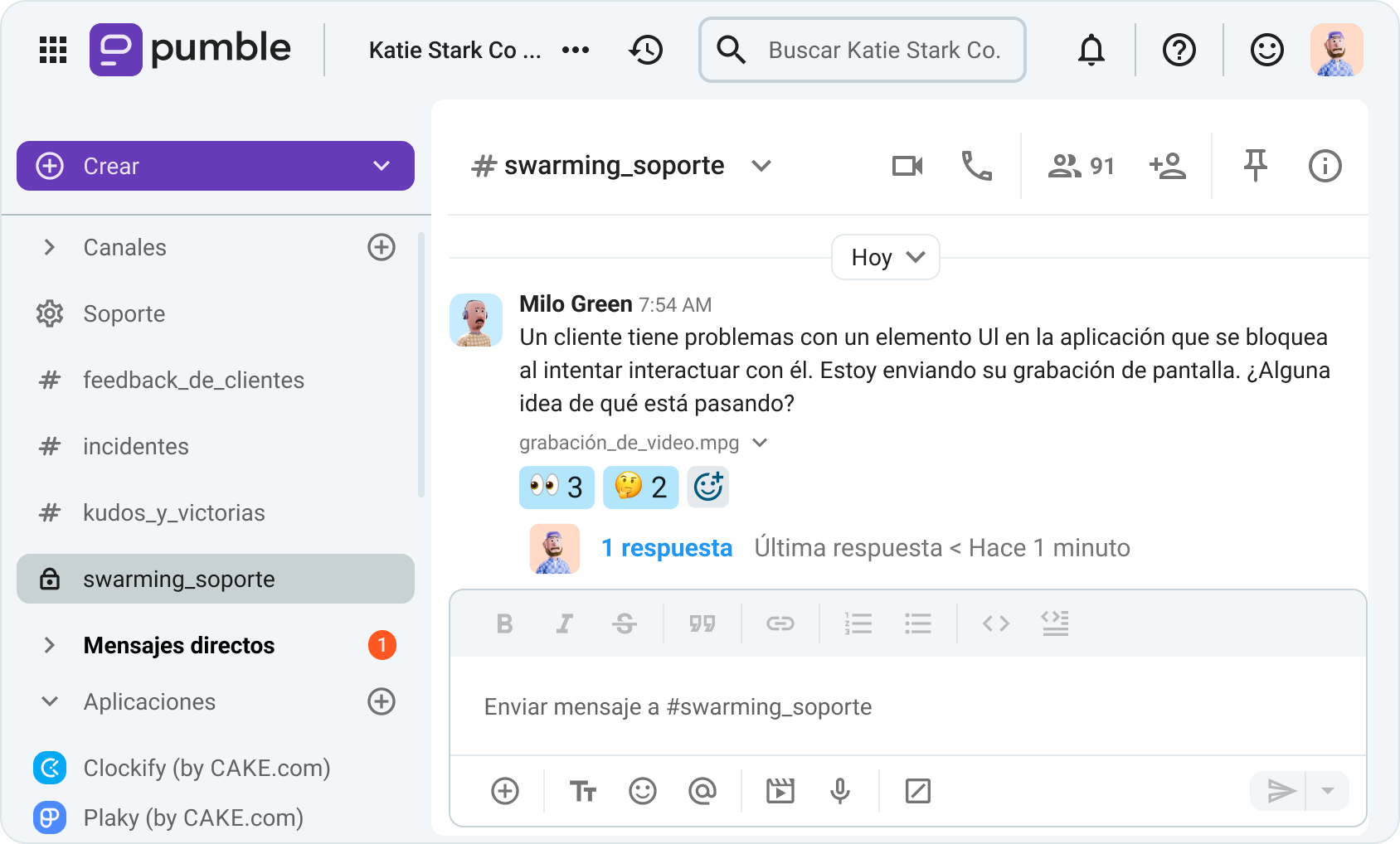
Es fundamental que los usuarios de Pumble también puedan compartir su pantalla mientras graban mensajes de vídeo, lo que puede ser útil para brindar a los clientes feedback específico e instrucciones que pueden usar para resolver problemas.
🎓 CONSEJO PRO DE PUMBLE
¿Quieres saber más sobre cómo los mensajes de vídeo y voz de Pumble están cambiando las reglas del juego? Consulta este artículo:
Mejora la atención al cliente con vídeos
Paso 4: Mejora la colaboración en atención al cliente con la integración de la pila tecnológica
Aunque Pumble es fantástico, el proceso de intervención de soporte a menudo requiere funciones que simplemente no están presentes en la mayoría de las herramientas de comunicación para equipos.
Aun así, la plataforma de comunicación que utiliza tu equipo de soporte debe ofrecer cierto grado de integración de la pila tecnológica, lo que permite a tu equipo acceder fácilmente a diferentes herramientas desde su aplicación de mensajería.
Afortunadamente, Pumble cuenta con todas las integraciones que tu equipo de soporte podría necesitar y más, aunque otras, como Zendesk, aún están en desarrollo.
Además de integrarse con aplicaciones de terceros como Zapier, Pumble también cuenta con dos integraciones nativas con:
Ambas están desarrolladas por el mismo equipo de CAKE.com que está detrás de Pumble.
Esta última resultará especialmente útil para los equipos de soporte, ya que Plaky también puede utilizarse como plataforma de tickets.
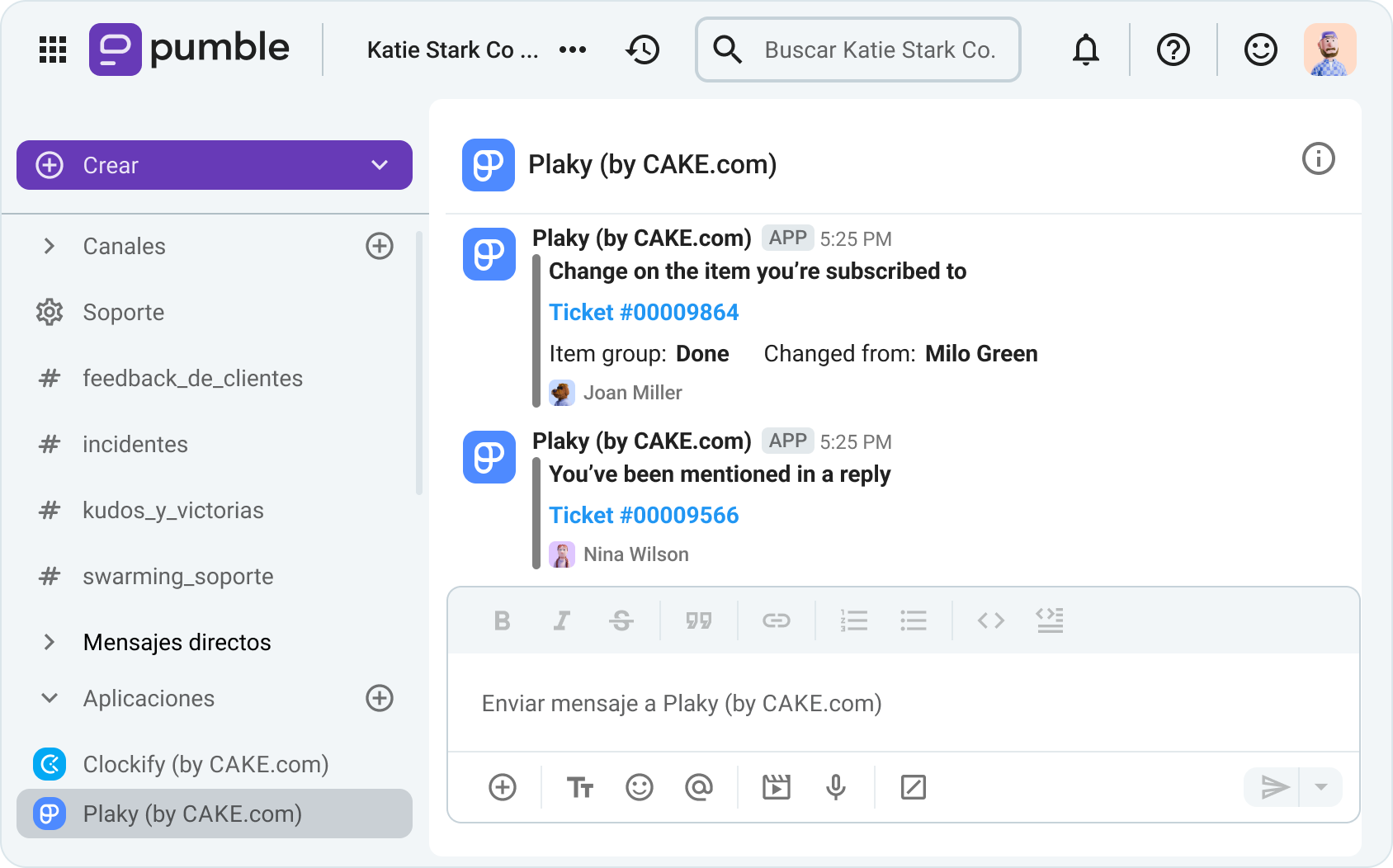
Con esto en mente, la integración de Plaky con Pumble permite a los agentes de soporte ver las actualizaciones de los tickets en los que trabajan dentro de Pumble, como se muestra a continuación.

Paso 5: Conéctate directamente con clientes VIP mediante el acceso de invitado de Pumble
Aunque el correo electrónico es una herramienta bastante inapropiada para la comunicación interna, sigue siendo un mal necesario para los agentes de atención al cliente, quienes a menudo deben intercambiar mensajes extensos con clientes.
Pero, en definitiva, no podemos decir que ninguna de las partes esté especialmente satisfecha con tener que depender del correo electrónico para comunicarse.
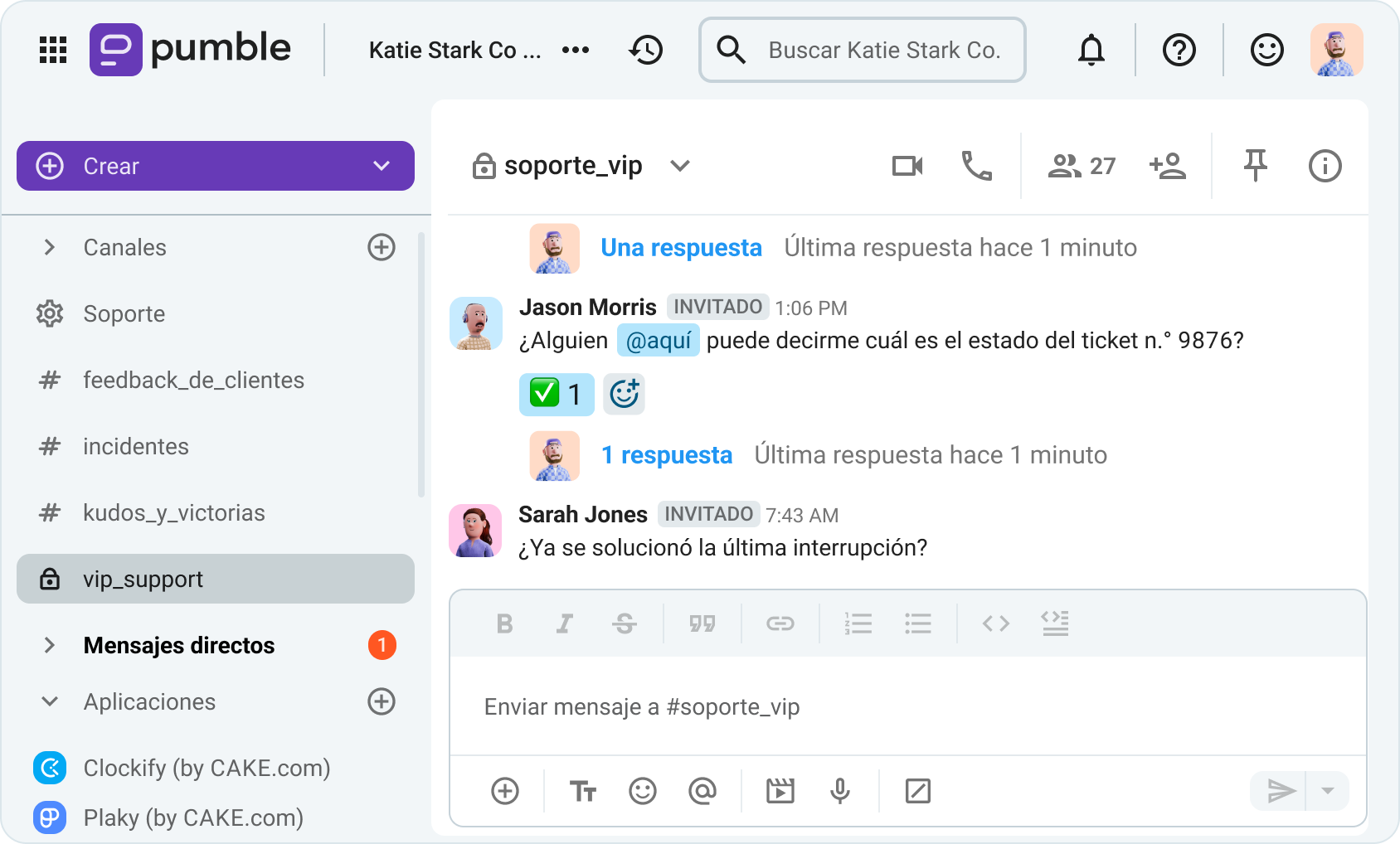
Si esto se convierte en un problema para algunos de tus clientes VIP, te alegrará saber que Pumble ofrece a los usuarios de los planes BUSINESS y ENTERPRISE una forma de evitar el correo electrónico por completo.
Es decir, si quieres ofrecer a tus clientes VIP una línea directa con tu equipo de soporte, puedes invitarlos a tu espacio de trabajo como invitados monocanal, lo que les permitirá:
- Ver o publicar mensajes en el canal al que han sido invitados,
- Ver y enviar mensajes directos a miembros del mismo canal, así como
- Iniciar o unirse a llamadas dentro del canal.
Lo mejor de todo es que podrás invitar hasta 5 invitados monocanal gratuitos por cada miembro regular del espacio de trabajo.
Sin embargo, si quieres que tus clientes tengan los privilegios y permisos adicionales otorgados a los invitados multicanal, debes saber que estos permisos se facturarán como usuarios regulares.
Aun así, para la colaboración en atención al cliente, el acceso de invitado monocanal debería ser suficiente.
🎓 CONSEJO PRO DE PUMBLE
¿Quieres saber más sobre la función de acceso de invitado de Pumble? Aquí tienes el resumen completo:
Comunícate eficazmente con los clientes
Ofrece a tu equipo el soporte que necesita: Facilita la colaboración en atención al cliente con Pumble by CAKE.com
Día tras día, los agentes de soporte se esfuerzan al máximo para responder preguntas y colaborar con diferentes departamentos para obtener resultados, asumiendo la mayor parte de la insatisfacción de los clientes.
Si lo piensas bien, es un trabajo de lo más ingrato.
Entonces, ¿hay alguna manera de simplificar el proceso de selección de soporte para todos los involucrados?
Pues bien, incluir Pumble debería ser la solución.
Pumble mejora la comunicación del equipon de atención al cliente al permitir a los agentes:
- Reducir el tiempo de resolución de tickets mediante el swarming del equipo,
- Colaborar fácilmente con el personal técnico, lo que se traduce en un lugar de trabajo más conectado, y
- Crear una base de conocimientos a la que puedan consultar a medida que surjan nuevos problemas, gracias al historial de mensajes ilimitado de Pumble, del que también pueden disfrutar los usuarios gratuitos.
Por lo tanto, prepara a tu equipo de soporte para el éxito.
Cómo revisamos esta publicación: Nuestros escritores y editores monitorean las publicaciones y las actualizan cuando hay nueva información disponible, para mantenerlas frescas y relevantes.