



Contar con un plan de comunicación fiable puede ayudarte a proteger y mejorar la reputación de tu organización ante las partes interesadas, tanto internas como externas.
Desafortunadamente, muchas empresas no tienen un plan de acción para gestionar diversas situaciones de comunicación hasta que se ven obligadas a implementarlo.
Si quieres asegurarte de que tu equipo tenga todo lo necesario para comunicarse eficazmente en diferentes circunstancias, necesitarás una buena plantilla de plan de comunicación.
Por supuesto, también necesitarás saber cómo usarla, y eso es precisamente lo que te enseñará este artículo.
Acceso rápido a plantillas de planes de comunicación:
⏬ Plantilla de plan de comunicación interna
⏬ Plantilla de plan de comunicación de marketing
⏬ Plantilla de plan de comunicación para el lanzamiento de un producto
⏬ Plantilla de plan de comunicación de crisis
⏬ Plantilla de plan de comunicación de proyectos
- Un plan de comunicación ayuda a organizar la forma en que transmitimos información a nuestro público objetivo.
- Determina qué, cómo y cuándo comunicamos, lo que resulta especialmente útil para manejar información sensible.
- Para desarrollar un plan de comunicación infalible, considera cuidadosamente su propósito, tu público objetivo y el mensaje central.
- Reevalúa el plan según sea necesario, utiliza una plantilla personalizable como punto de partida y elige los canales de comunicación más efectivos.
- A la hora de elegir el canal de comunicación empresarial adecuado, Pumble by CAKE.com es una excelente opción: es una plataforma fácil de usar que ayuda a todos a transmitir su mensaje sin esfuerzo.
¿Qué es un plan de comunicación?
Un plan de comunicación es un documento que describe cómo transmitimos información a un público objetivo específico.
Define los elementos principales del proceso de comunicación, incluyendo:
- Nuestros principales objetivos de comunicación para diferentes situaciones
- El público objetivo de los distintos mensajes clave
- Los canales de comunicación que se utilizarán para distribuir la información
- Los roles y responsabilidades de las diferentes personas dentro de la organización
- Notas adicionales, como el contexto y las posibles interferencias que puedan surgir durante el proceso
En esencia, un buen plan de comunicación busca prever y tener en cuenta el mayor número posible de variables para anticiparse a cualquier contratiempo.
Un plan de comunicación no es una idea general sobre cómo comunicarse interna o externamente, ni una perspectiva de alto nivel similar a una estrategia de comunicación.
Más bien, es un plan de acción que ayuda a mejorar la comunicación al definir cómo, cuándo, y por qué tú y tu equipo deberíais comunicaros para resolver un problema o completar una tarea.
Un plan de comunicación eficaz ofrece tres grandes beneficios:
- Mejor organización de la carga de trabajo, gracias a una mayor transparencia en roles y responsabilidades de todos los involucrados en el proceso de comunicación
- Minimización de riesgos, ya que los planes de comunicación requieren anticipar y corregir posibles malentendidos antes de que ocurran
- Mejor alineación de las partes interesadas, puesto que una mayor claridad reduce la confusión
Dicho esto, veamos qué debe incluir tu plan de comunicación.

Crear un plan de comunicación: Conceptos básicos
Los planes de comunicación pueden presentarse en forma de presentaciones, memorandos, documentos digitales, collages de ideas o cualquier otro formato.
El formato que elijas dependerá de varios factores: el estilo de comunicación habitual de tu organización y su nivel de formalidad, la composición de tu público objetivo, etc.
Por ejemplo, un plan de comunicación dirigido a tu equipo de desarrolladores será diferente de uno destinado a terceros, como clientes.
Aunque el formato varíe, los componentes básicos de tu plan de comunicación deberían ser prácticamente los mismos.
Tu plan de acción debe incluir:
- Los diferentes grupos de interés con los que trabajas
- Los objetivos que buscas alcanzar
- Los remitentes y destinatarios de los mensajes específicos
- Los canales que utilizarás durante el proceso
Además, tómate un momento para considerar si necesitas omitir algo. Evita añadir detalles innecesarios a tu plan de comunicación, ya que solo contribuirá a la sobrecarga de información.
Dicho esto, veamos cómo puedes redactar un plan de comunicación, con o sin plantilla.
Chatea con tu equipo en Pumble
Cómo escribir un plan de comunicación en 6 pasos
Ahora que ya sabes qué incluir en un plan de comunicación, solo tienes que:
- Identificar tu objetivo
- Crear un plan de acción
- Identificar a tu público objetivo
- Crear una estrategia
- Ajustar tu mensaje
- Evaluar el plan
A continuación, analizaremos estos pasos y veremos cómo se aplicarían a Joan, una gerente encargada de organizar un evento de teambuilding para su organización.
1. Identifica tu objetivo
Primero, debes explicar lo más precisamente posible el propósito principal de tu plan de comunicación.
En otras palabras:
- ¿Por qué es necesario tu plan de comunicación?
- ¿Cuál es el objetivo principal que intentas alcanzar?
- ¿Qué intentas cambiar o influenciar?
Tener una respuesta clara a estas preguntas es uno de los prerrequisitos para un plan de comunicación exitoso. Esto servirá como una guía para las etapas siguientes.
Dicho esto, veamos un ejemplo de plan de comunicación que comienza con este paso.
Ejemplo: Joan está organizando un evento de teambuilding con dos de sus compañeros, Milo y Nicole. El objetivo de su plan de comunicación es claro: quiere que asista la mayor cantidad posible de empleados.
Para lograrlo, necesita evaluar los recursos a su disposición: su equipo.
Elabora una lista de las fortalezas y debilidades de Nicole y Milo:
- Nicole se comunica muy bien, aunque a veces es un poco olvidadiza.
- Milo es organizado, pero no rinde bien bajo presión.
El plan de comunicación interna de Joan deberá aprovechar las fortalezas de sus compañeros, teniendo en cuenta también sus debilidades individuales.

2. Crea un plan de acción
Una vez que sepas qué quieres lograr, es hora de crear un plan de acción.
Para eso, deberás definir los roles y responsabilidades de los miembros de tu equipo, teniendo en cuenta sus fortalezas y debilidades.
Durante este proceso, intenta prever la mayor cantidad de variables posible consultando con las diferentes partes interesadas.
Y, sobre todo, asegúrate de mantener a todos informados sobre cualquier cambio en el plan.
Ejemplo: Joan creó un plan de acción que consideraba las fortalezas y debilidades de los miembros de su equipo. Ella mantendría una visión general de la situación y tomaría las decisiones importantes, mientras que:
- Milo se encargaría de tareas generales como coordinar con el lugar del evento y otros colaboradores externos.
- Nicole se encargaría de la comunicación diaria con todos los involucrados en el proceso.
Durante esta etapa de planificación, Joan se dio cuenta de que su evento solo podía realizarse un sábado. Esto se convertiría en uno de los mayores obstáculos de comunicación que tendrían que superar.
Soluciona problemas con tu equipo en Pumble
3. Identifica a tu público
A continuación, debes definir quién es tu público objetivo, es decir, con quién te comunicas.
Esto te ayudará a ajustar:
- El tono de tu mensaje
- Los canales de comunicación que utilizas
- El tipo de interacción que buscas con tu público
Si quieres comprender mejor a tu público y perfeccionar tu estrategia, quizás debas realizar un estudio de mercado.
Conocer a tu público también te ayudará a anticipar sus reacciones.
Ejemplo: En nuestro ejemplo de teambuilding, el público de Joan son los empleados de su empresa.
Tras saber que el evento que su equipo está organizando solo puede organizarse un sábado, Joan es consciente de que su plan de comunicación probablemente encontrará resistencia.
Aunque su objetivo es que asistan la mayor cantidad de empleados posible, también sabe que la mayoría no estará muy entusiasmada por pasar el fin de semana con sus compañeros de trabajo.
Ese es otro aspecto que su plan de comunicación deberá tener en cuenta.
4. Crea una estrategia
Una vez que conozcas tus principales objetivos de comunicación y tu público objetivo, es hora de elaborar una estrategia.
Necesitarás:
- Anticipar preguntas y reacciones
- Considerar el tono y el estilo de tus mensajes clave
- Prepararte para resolver posibles problemas sobre la marcha
- Definir los canales de comunicación principales y secundarios
- Considerar el tipo de comunicación que manejarás
El objetivo de este paso es crear fases separadas dentro de tu plan de comunicación para que sea más fácil de comprender para todos.
Si es necesario, incluso podrías tener un plan de comunicación general y varios subplanes para las diferentes etapas de la comunicación.
Ejemplo: Sabiendo que su público podría reaccionar negativamente al día elegido para el evento de teambuilding, Joan ha decidido generar expectativa antes de hacer un anuncio oficial.
Su plan de comunicación ahora incluye:
- Una campaña de correo electrónico con adelantos que insinúa algunos de los detalles más interesantes del evento, como el lugar o los artículos promocionales que recibirán los empleados, con la promesa de "Más detalles pronto"
- Una campaña de vídeo con fragmentos de eventos anteriores de la empresa, donde el último fotograma revela el mes en que se realizará el evento ("septiembre de 2026")
- Un anuncio oficial con los detalles del evento
Los adelantos buscan generar entusiasmo y recordarles cómo se sintieron en eventos anteriores, sin revelar que este se llevará a cabo un sábado.
Joan también deberá considerar qué canales serían los más efectivos para comunicarse durante cada etapa del proceso.
Olvídate del correo electrónico: prueba Pumble gratis
5. Perfecciona tu mensaje
Una vez que tengas tu estrategia definida, perfeccionar tus mensajes clave debería ser bastante fácil.
Pregúntate:
- ¿Qué quiero decir?
- ¿Cómo espero que la gente reaccione?
- ¿Cómo quiero que se reciba el mensaje?
Estas preguntas te ayudarán a crear el primer borrador de tu mensaje. Recuerda que debe ser breve y sencillo para evitar malentendidos.
También puedes compartirlo con algunas personas de confianza para obtener feedback antes de enviarlo a tu público principal.
Ejemplo: Mientras Milo se encarga de la organización del evento, Joan y Nicole trabajan en los mensajes que quieren incluir en las diferentes etapas de su plan de comunicación.
Para los avances, deciden que sean breves y misteriosos para generar expectación.
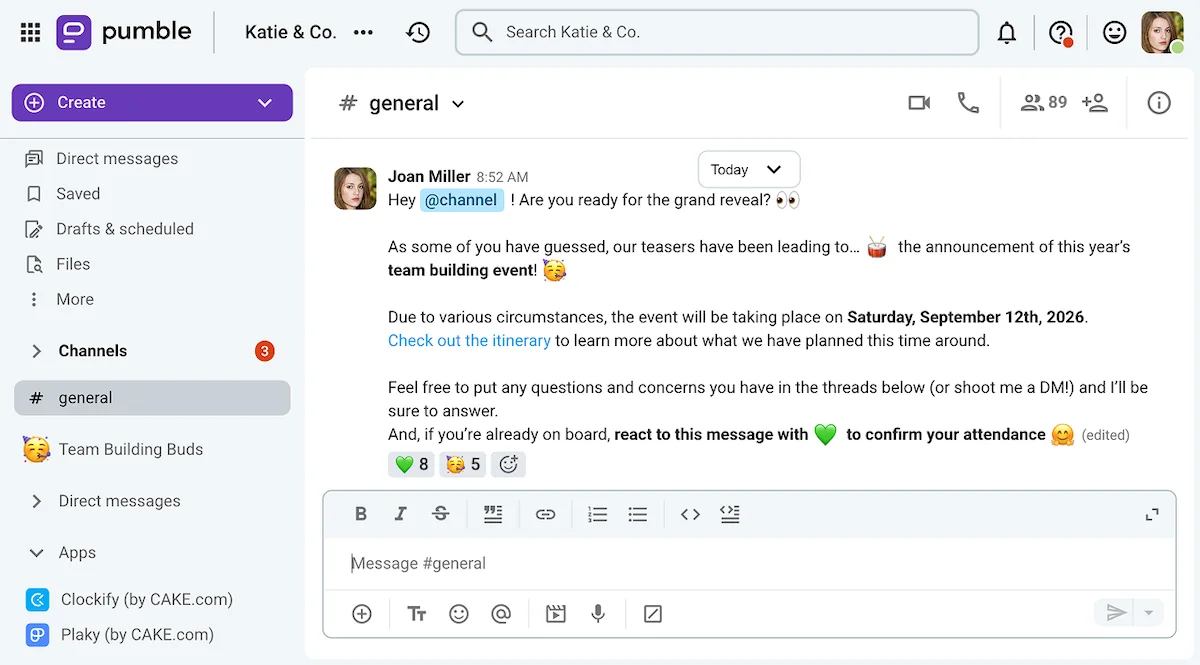
Pero llega el momento de revelarlo todo en el canal principal de la sede digital de la empresa: la aplicación de comunicación del equipo, Pumble by CAKE.com.
Elegir este canal para su anuncio principal les permite:
- Comunicarse con todos a la vez
- Ver las reacciones de los empleados en tiempo real
- Evitar una avalancha de confirmaciones de asistencia por correo electrónico
Así podría verse su mensaje en Pumble.
Publica los anuncios de la empresa en Pumble
6. Evalúa el plan
Al final del proceso o durante campañas largas, es recomendable detenerse y evaluar qué salió bien y qué salió mal para asegurarse de que se va por buen camino.
Evaluar tu trabajo objetivamente te ayudará a mejorar aún más en tu próxima campaña.
Ejemplo: El anuncio de Joan tuvo mejor acogida de lo que esperaba. Si bien algunas personas se negaron a asistir, muchas otras estaban lo suficientemente entusiasmadas como para sacrificar su sábado.
Aun así, Joan descubrió que los procesos de su equipo podrían mejorarse:
- Reemplazando algunas reuniones de estrategia con mensajes
- Realizando encuestas a los empleados para medir su interés durante todo el proceso
- Iniciando la planificación con anticipación para evitar conflictos de horario y asegurar que los eventos futuros se realicen en un día laborable
Pero si quieres implementar las conclusiones de Joan de inmediato, puedes hacerlo aprovechando al máximo tu herramienta de comunicación para equipos.

Cómo poner en práctica tu plan de comunicación con Pumble
Ahora que sabes qué implica crear un plan de comunicación sólido, hablemos de algunas de las funciones de Pumble que te ayudarán a implementarlo:
- Videoconferencias
- Hilos de mensajes
- Mensajes de voz
- Videomensajes
- Canales privados y públicos
- Programación de mensajes
A continuación, te mostramos cómo te pueden ser útiles al implementar tu plan de comunicación.
1. Organiza reuniones diarias de seguimiento en hilos de mensajes
Al crear e implementar tu plan de comunicación, es probable que tengas que organizar muchas reuniones.
Por suerte, Pumble cuenta con amplias funciones de videoconferencia, que te permiten:
- Configurar tus reuniones con enlaces
- Intercambiar mensajes durante la reunión
- Grabar la reunión
- Compartir tu pantalla e incluso crear anotaciones mientras presentas
Sin embargo, si te das cuenta de que pasas más tiempo del necesario en reuniones de sincronización, puedes trasladar algunas de esas reuniones a hilos de mensajes.
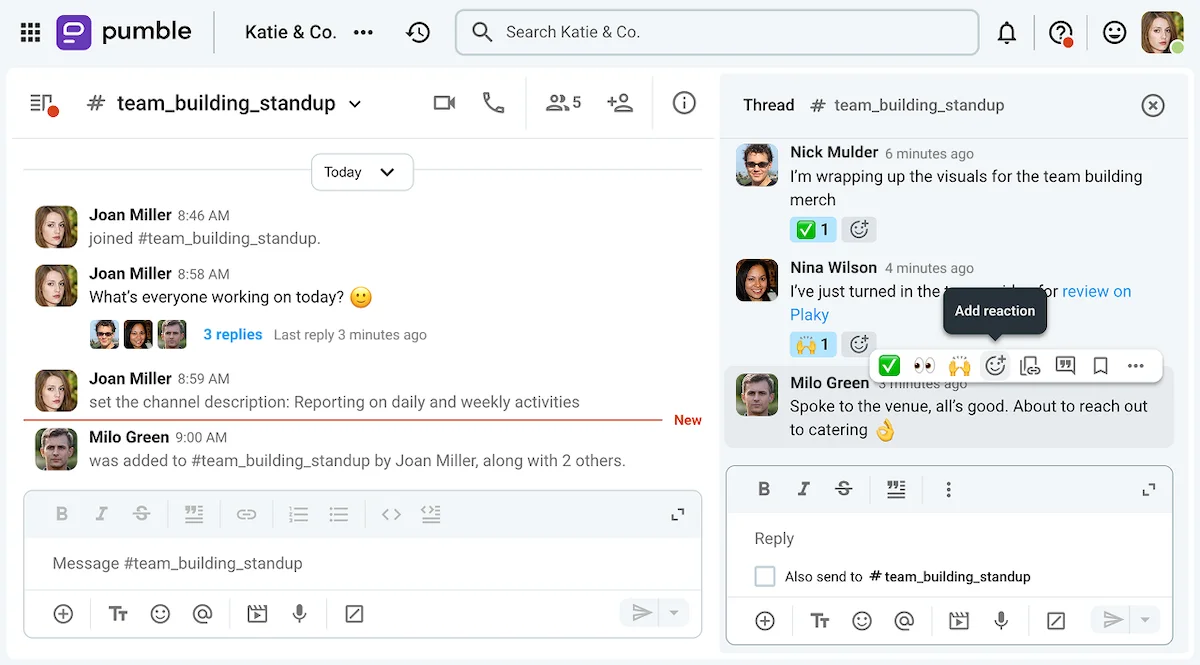
Crea un canal para el proyecto en el que estás trabajando y envía un mensaje diario pidiendo a los miembros del equipo que comenten en qué están trabajando.
Además de ahorrar tiempo valioso, esto también crea un registro escrito de las actividades de tu equipo.
Organiza tus mensajes con Pumble
2. Organiza una sincronización semanal con mensajes de voz
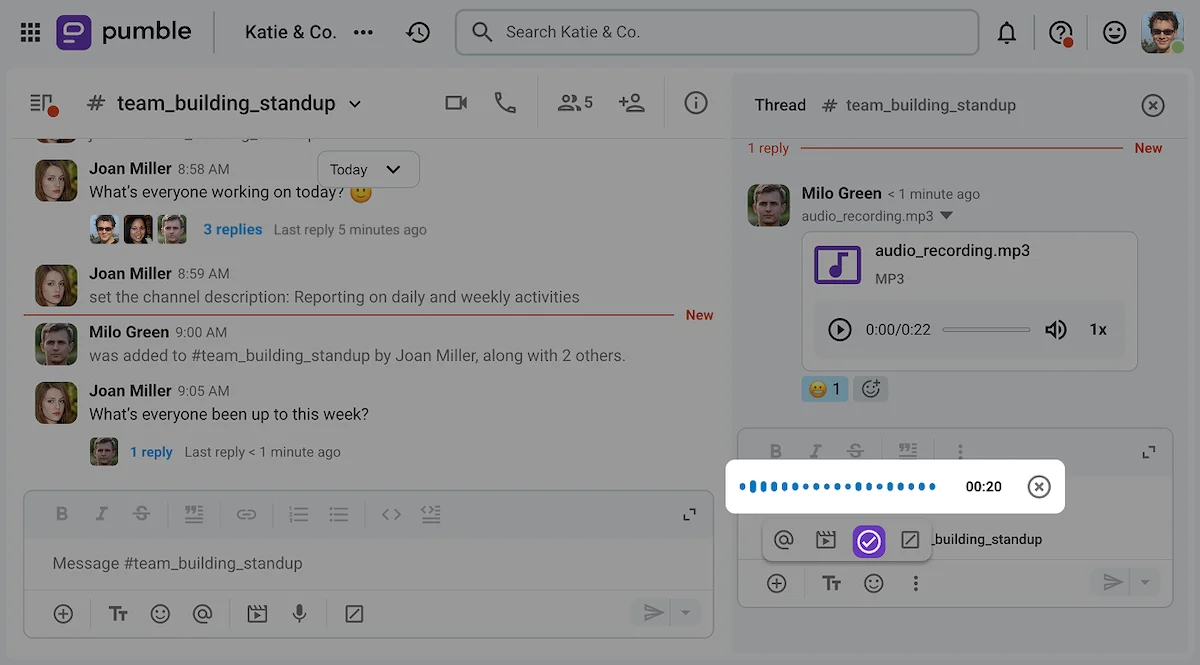
Si bien las reuniones frecuentes se pueden realizar por mensaje de texto, las reuniones de sincronización semanales se pueden reemplazar con mensajes de voz.
Esto es especialmente útil si gestionas un equipo remoto que trabaja en diferentes zonas horarias.
Los mensajes de voz permiten al remitente transmitir el tono y el contenido del mensaje, y a los receptores escucharlos cuando les convenga.
3. Usa mensajes de vídeo para actualizaciones de proyectos asíncronas
Algunas reuniones se pueden reemplazar con conversaciones y mensajes de voz, pero ¿qué sucede cuando necesitas mostrarle algo a tu equipo en tu pantalla?
Si quieres que esto suceda de forma asíncrona, tu equipo puede enviar mensajes de vídeo en lugar de realizar una llamada.
Con los mensajes de vídeo de Pumble, puedes compartir tu pantalla y mantener tu rostro visible mientras explicas lo que aparece en ella. Ya sea que estés demostrando cómo se hace algo o explicando una decisión que has tomado, esto hará que el mensaje se sienta menos formal.
En cualquier caso, el destinatario de tu mensaje podrá verlo y consultarlo cuando quiera.
Además, puedes incorporar esta función a tu plan de comunicación.
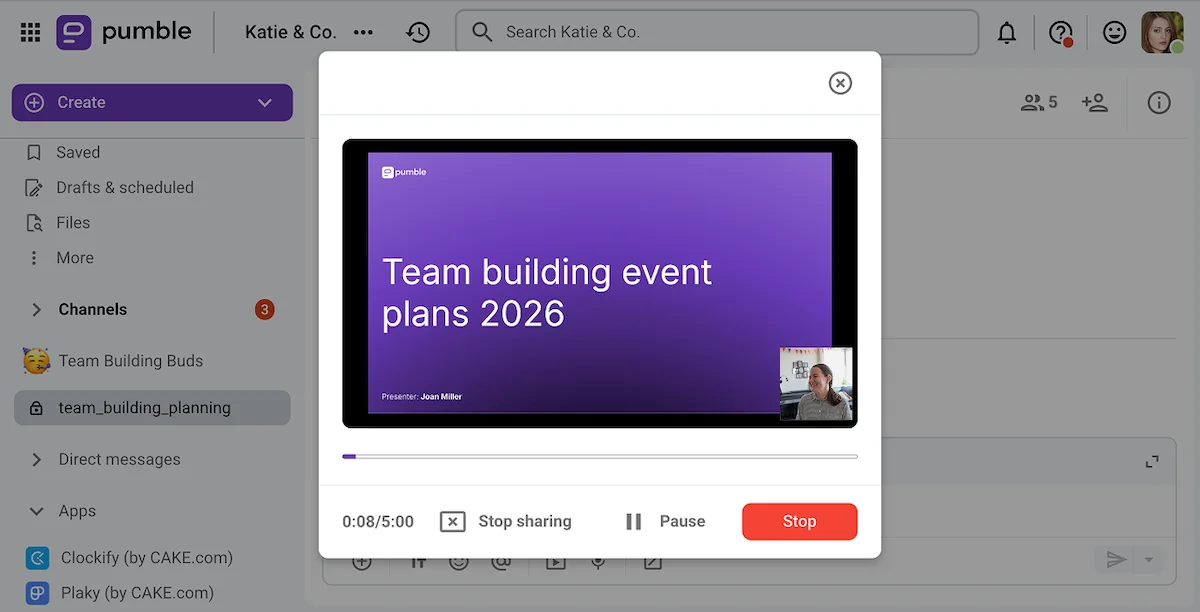
Graba un mensaje de vídeo en Pumble
4. Utiliza los canales de proyecto como fuente única de información
Ya sea que se trate de la comunicación del lanzamiento de un producto o la planificación de un evento, es recomendable agrupar toda la comunicación relacionada con el tema en un solo canal de Pumble.
Pumble te permite crear tantos canales privados o públicos como necesites, incluso con el plan Gratis.
Una vez que hayas creado tu canal de proyecto, podrás:
- Restringir el acceso a usuarios monocanal invitados a ese canal
- Consultar la tarjeta del canal para recuperar archivos y documentos relevantes
- Anclar mensajes importantes para futuras consultas
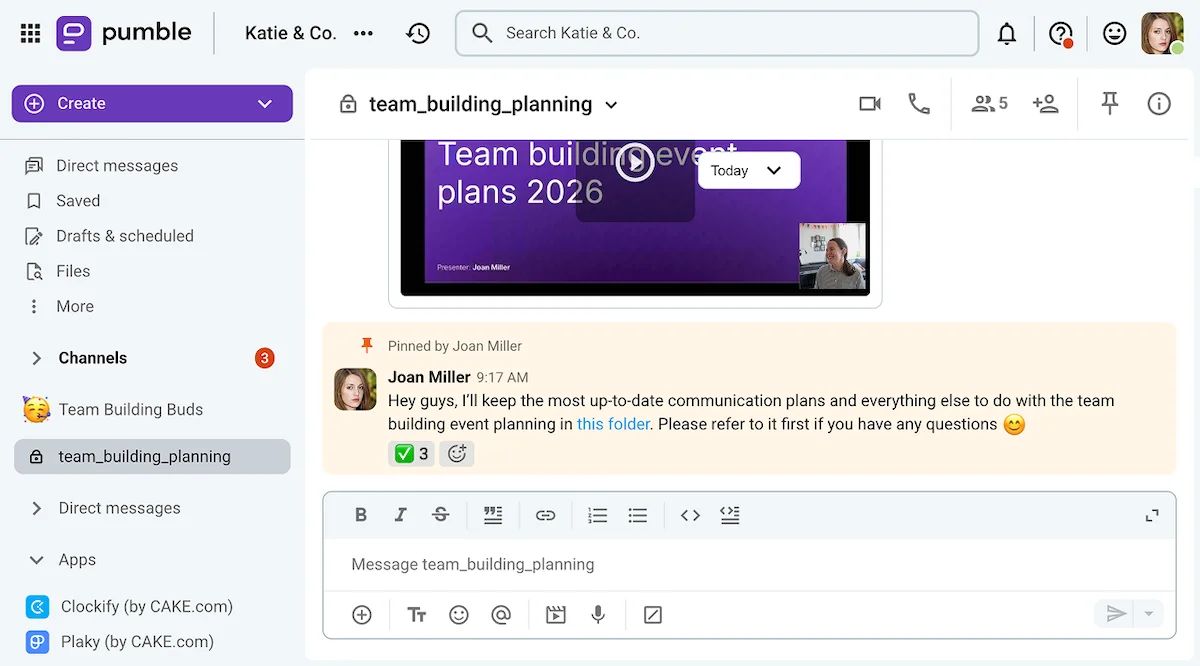
Organiza tu espacio de trabajo de Pumble
🎓 CONSEJO PRO DE PUMBLE
¿Quieres saber para qué más sirven los mensajes de voz y vídeo? Consulta esta guía:
5. Practica la gestión de zonas horarias con mensajes programados
Cuando estás en medio de un gran proyecto o intentando resolver una crisis, la comunicación puede ser lo último en lo que quieras pensar.
Sin embargo, mantenerte en contacto regularmente con el resto del equipo es fundamental para el éxito, independientemente de las circunstancias.
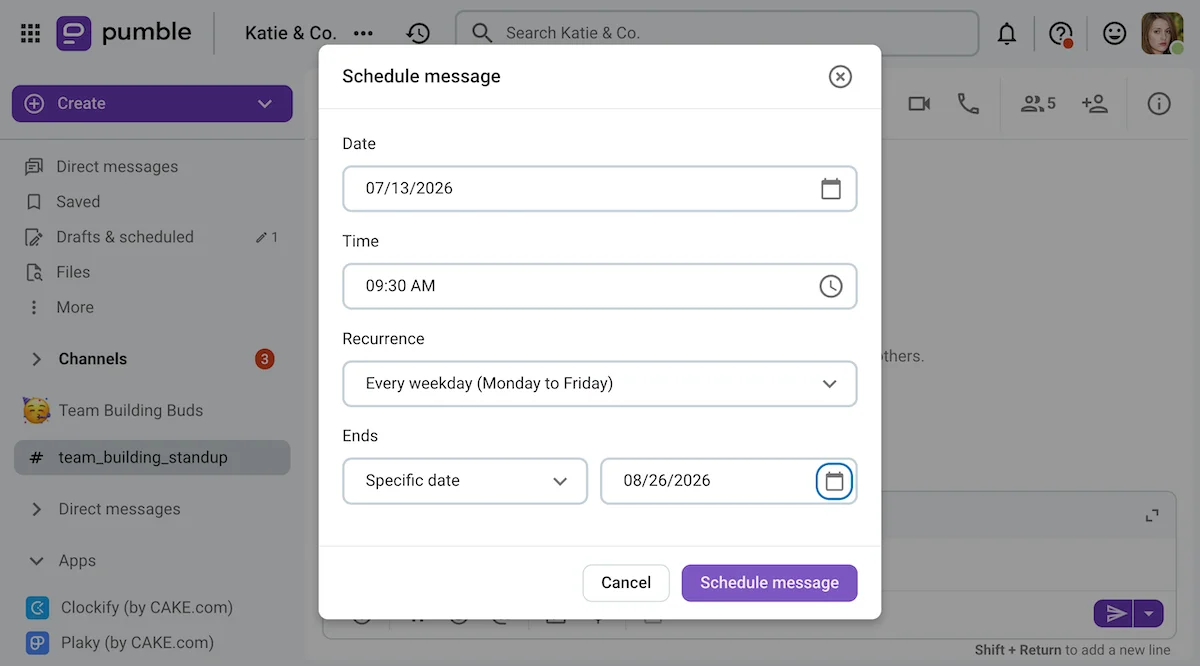
Por suerte, la función de programación de mensajes de Pumble te permite escribir mensajes cuando tengas tiempo y programar su envío teniendo en cuenta el horario laboral del destinatario.
Esto puede ser especialmente útil para gestionar a los miembros del equipo en diferentes zonas horarias.
Además, puedes usar la programación de mensajes de Pumble para configurar mensajes recurrentes, como se muestra a continuación.
Pumble no es el único producto de CAKE.com que puede ayudarte a gestionar mejor a tu equipo remoto. Sus aplicaciones hermanas, el rastreador del tiempo Clockify, y la plataforma de gestión de proyectos Plaky, pueden convertirse en herramientas igualmente importantes para tu equipo.
Ambas aplicaciones se integran con Pumble, lo que te permite recibir notificaciones sobre las actividades de los miembros de tu equipo en tiempo real. Además, podrás:
- Usar la integración con Clockify para aprobar o rechazar solicitudes de tiempo libre sin salir de Pumble
- Usar la integración con Plaky para ver vistas previas de las tarjetas de elementos de Plaky y consultar el progreso de las tareas sin interrumpir a los miembros de tu equipo

Los 5 ejemplos y plantillas de plan de comunicación
Cada situación requiere un enfoque diferente para la planificación de la comunicación.
Por esa razón, hemos creado 5 plantillas de planes de comunicación, que incluyen:
- Plantilla de plan de comunicación interna
- Plantilla de plan de comunicación de marketing
- Plantilla de plan de comunicación para el lanzamiento de un producto
- Plantilla de plan de comunicación de crisis
- Plantilla de plan de comunicación de proyecto
Tras elegir la plantilla que mejor se adapte a tus necesidades, copia el documento y personalízalo.
1. Plantilla de plan de comunicación interna
Un plan de comunicación interna tiene como objetivo influir en las opiniones y comportamientos de los grupos de interés internos de una empresa: sus empleados.
Aunque la planificación de la comunicación interna puede adoptar diversas formas, la plantilla que hemos preparado puede servir como guía general para el enfoque de tu organización ante diferentes situaciones de comunicación.
A partir de ahí, puedes crear planes de comunicación independientes para perfeccionar tu enfoque según la situación e incluso diseñar plantillas de mensajes internos específicos.
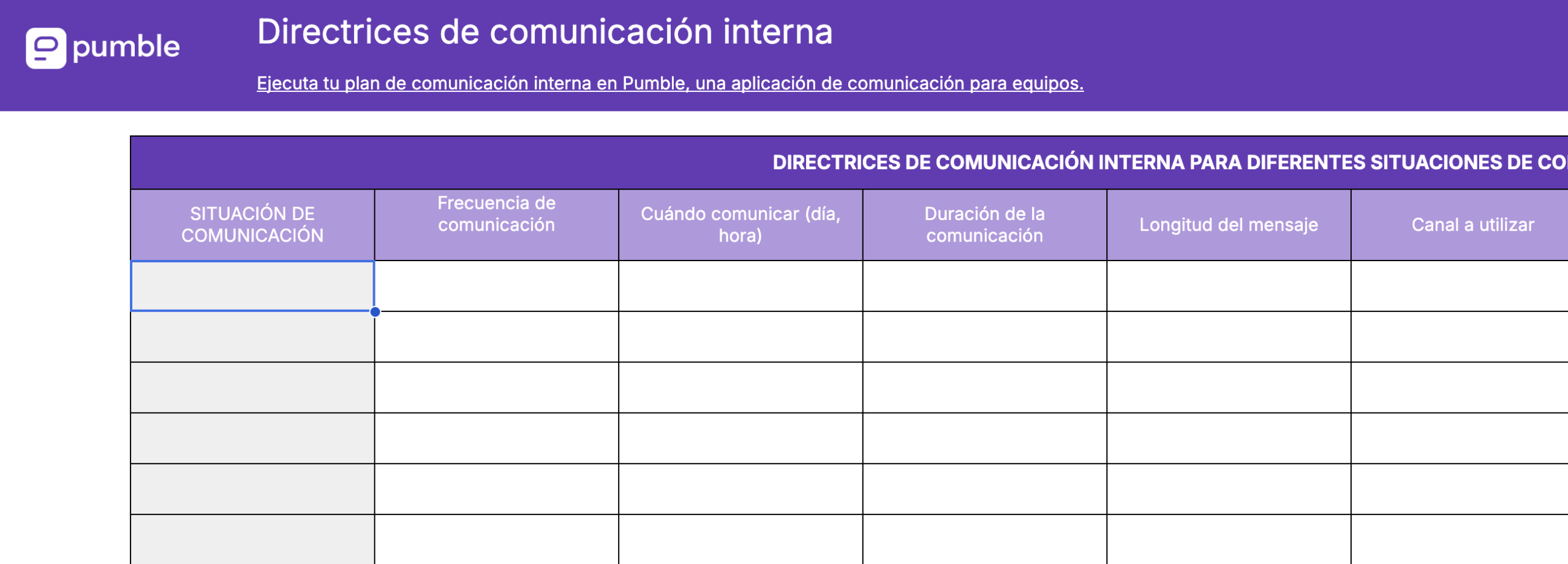
⏬ Descarga nuestra plantilla de plan de comunicación interna
Comunícate y colabora en Pumble
2. Ejemplo de plan de comunicación de marketing
Un plan de comunicación de marketing implica un plan detallado para comunicarte con tu público objetivo, tus clientes potenciales, socios de medios y otras partes interesadas externas.
Nuestra plantilla de plan de comunicación de marketing te permite especificar los objetivos de tu campaña, así como los entregables, plazos y canales específicos que utilizarás para llevarla a cabo.
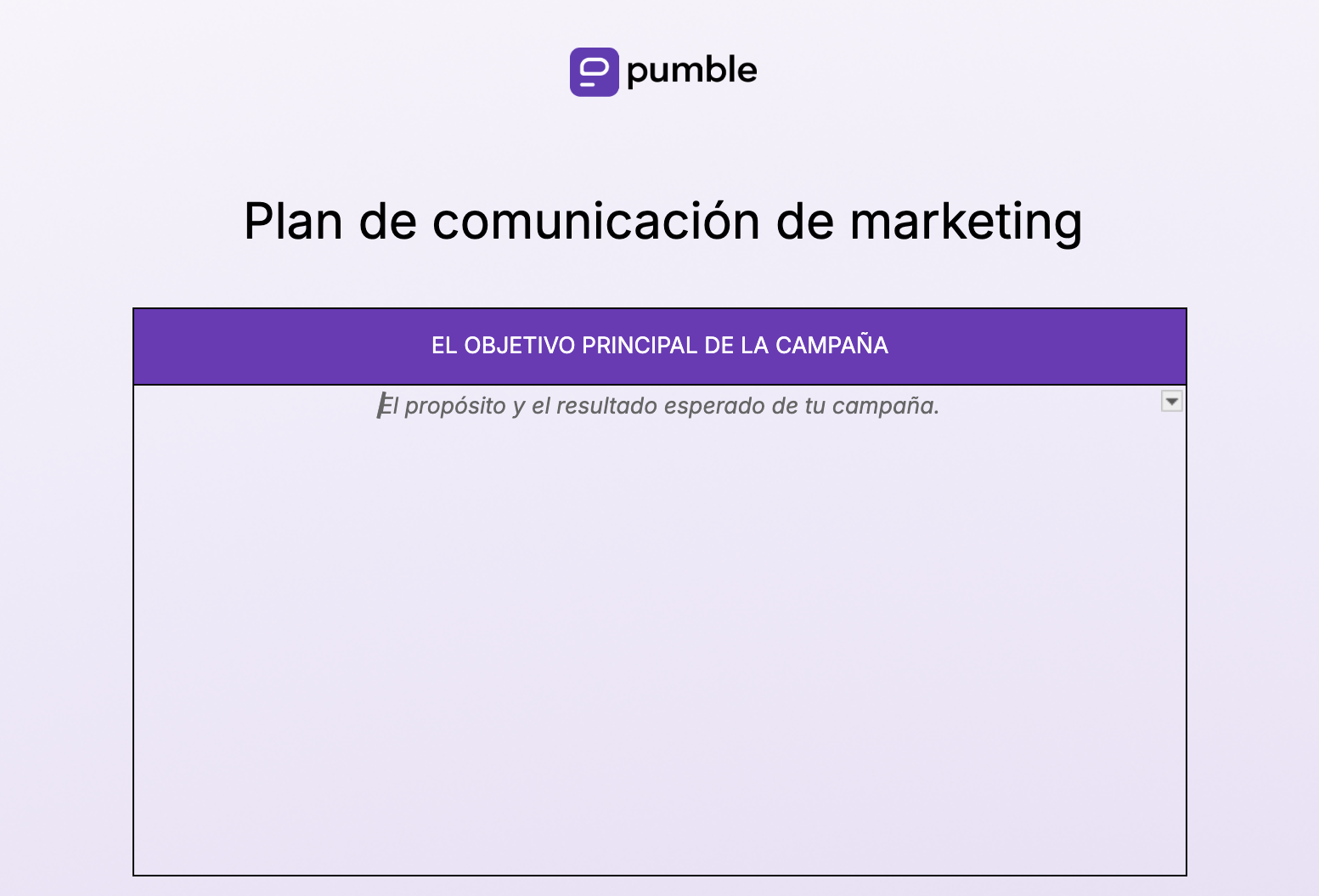
⏬ Descarga nuestra plantilla de plan de comunicación de marketing
Planifica tu campaña con Pumble
3. Ejemplo de plan de comunicación para el lanzamiento de un producto
Una plantilla de plan de comunicación para el lanzamiento de un producto te ayudará a coordinarte con tu equipo y otros colaboradores, manteniendo una comunicación coherente y alineada con los objetivos definidos para tu campaña de lanzamiento.
Contar con un plan de comunicación para el lanzamiento de un producto garantiza que todos estén al tanto del mensaje de la marca, los efectos previstos de la campaña y el progreso durante el lanzamiento.
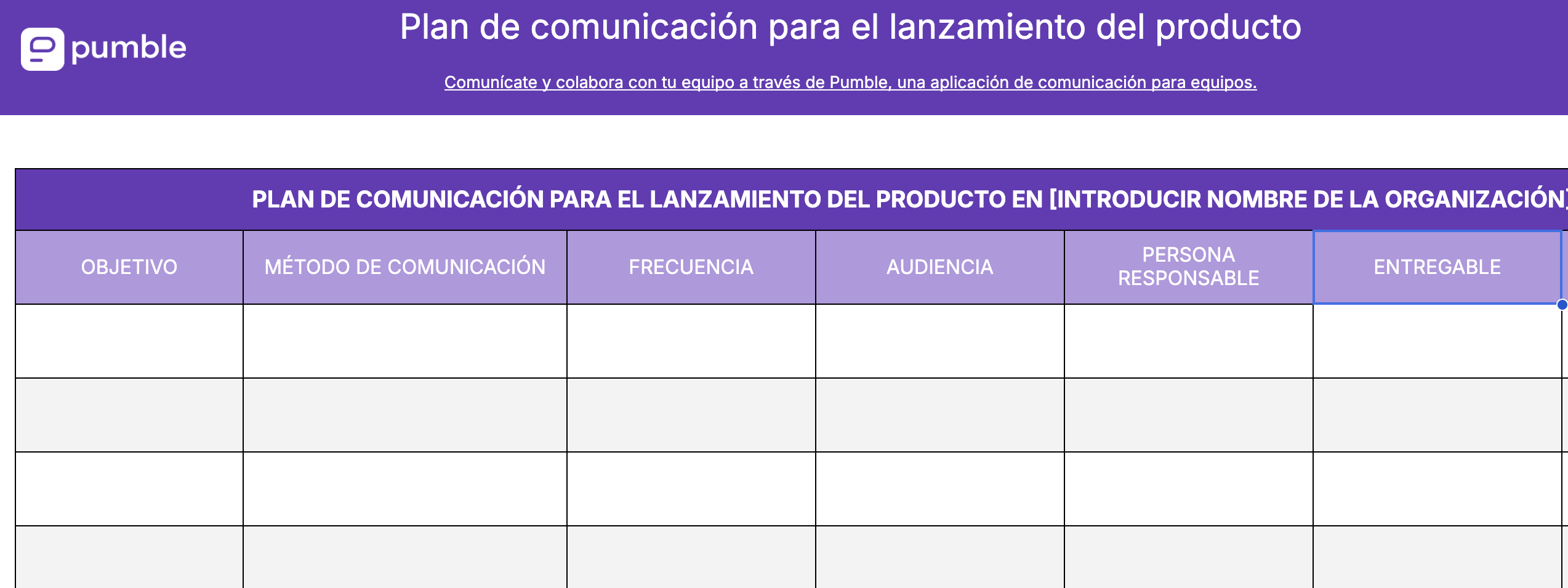
⏬ Descarga nuestro ejemplo de plan de comunicación para el lanzamiento del producto
Lanza tus productos con Pumble
4. Ejemplo de plan de comunicación de crisis
Un plan de comunicación de crisis es un conjunto de directrices que incluye información y recursos para facilitar una respuesta rápida y eficaz durante una crisis.
Este tipo de plan de comunicación abarca desde la identificación del problema hasta la evaluación posterior a la crisis. Reúne toda la información relevante en un solo lugar y puede ayudar a las organizaciones a formular una respuesta para superar una crisis, o al menos para afrontarla de la forma más fluida posible.
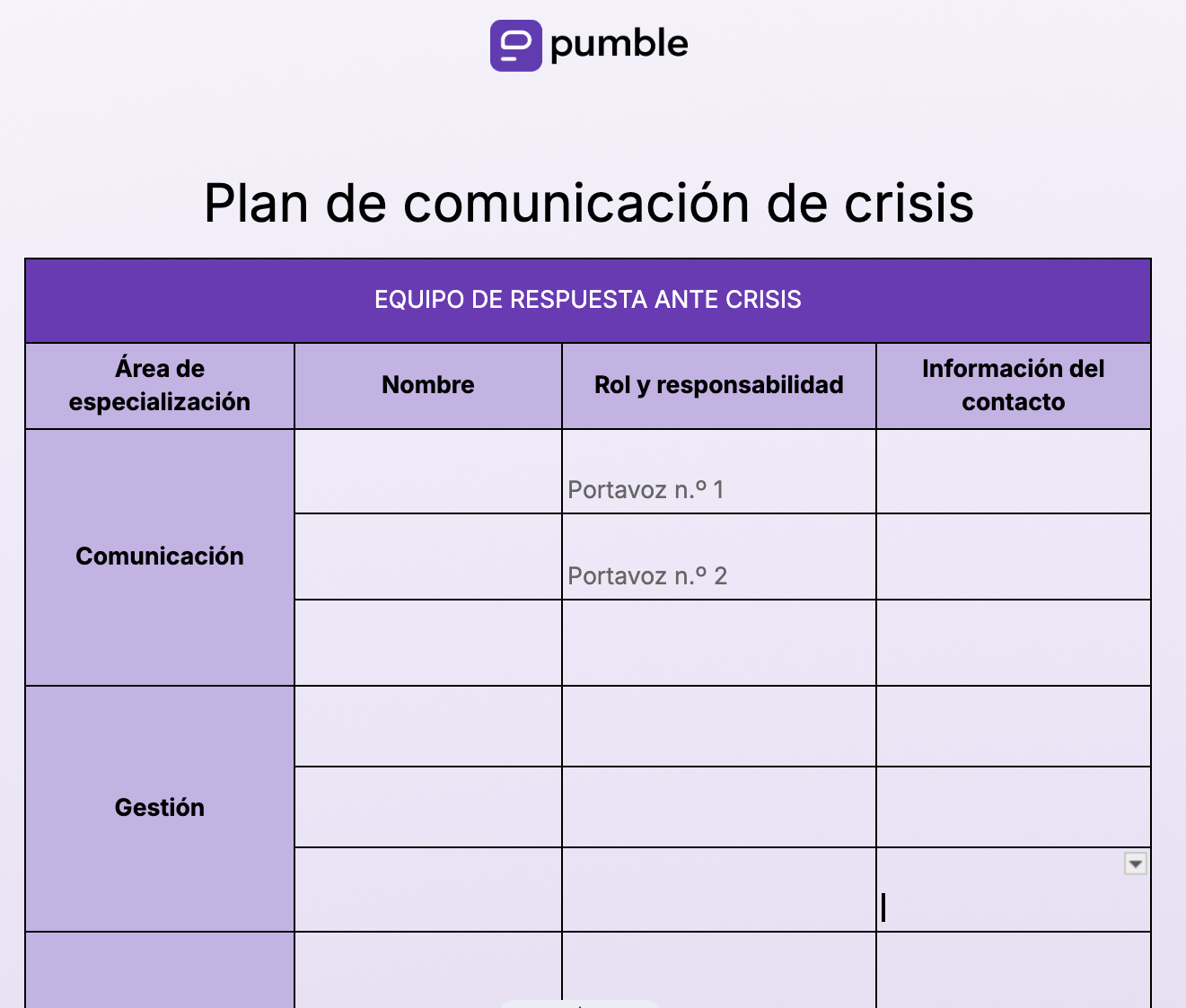
⏬ Descarga nuestro ejemplo de plan de comunicación de crisis
Haz de Pumble tu base de operaciones
5. Plan de comunicación del proyecto
Un plan de comunicación de proyecto se usa para habilitar la comunicación fluida en equipo durante la realización de un proyecto específico.
Describe a los principales miembros del equipo y los canales de comunicación que puedes usar para contactarlos, entre otras cosas.
La plantilla de plan de comunicación que hemos preparado para este caso de uso será especialmente útil para gestionar proyectos y facilitar la comunicación rápida entre equipos grandes o distribuidos.
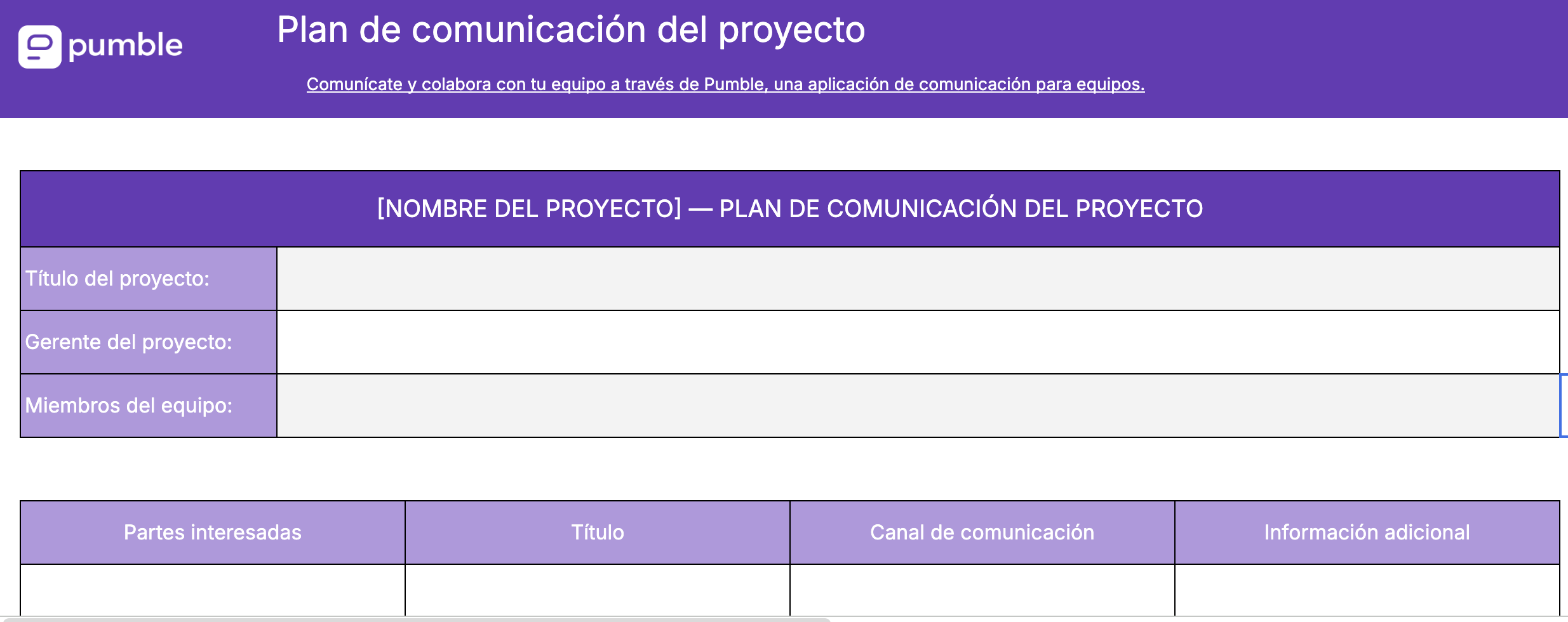
⏬ Descarga nuestra plantilla de plan de comunicación del proyecto
🎓 CONSEJO PRO DE PUMBLE
Si estás colaborando con personas de diferentes equipos o departamentos, descubre cómo puedes dominar la colaboración interfuncional:

Preguntas frecuentes sobre la planificación de la comunicación
¿Cuáles son los 5 tipos de planes de comunicación?
Los 5 tipos de planes de comunicación son:
- Planes de comunicación interna, que sirven como guía de comunicación para la empresa
- Planes de comunicación de marketing, que organizan la comunicación de las empresas con posibles grupos de interés externos, como clientes
- Planes de comunicación para el lanzamiento de productos, que organizan la comunicación relacionada con futuros lanzamientos de productos
- Planes de comunicación de crisis, que describen cómo deben comunicarse las organizaciones en una situación de crisis
- Planes de comunicación de proyectos, que facilitan una comunicación fluida entre los principales actores durante un proyecto en curso
¿Qué debe incluir un plan de comunicación?
Tu plan de comunicación debe incluir 5 elementos clave:
- Los objetivos de comunicación que quieres alcanzar
- Tu público objetivo
- Los mensajes clave que quieres transmitir
- Los canales de comunicación que utilizarás
- Las funciones y responsabilidades de las diferentes personas involucradas en la ejecución de tu plan de comunicación
¿Cuáles son los 5 pasos para planificar la comunicación?
Los 5 pasos para planificar la comunicación incluyen:
- Identificar qué se quiere lograr con la comunicación
- Crear un plan de acción que incluya todo lo que se espera lograr más allá de la comunicación, así como la forma en que la comunicación se integra en ese plan
- Identificar y familiarizarse con el público objetivo
- Crear una estrategia para comunicar los mensajes clave de la manera más efectiva
- Transmitir el mensaje a través de los canales de comunicación definidos
Después de ejecutar el plan de comunicación, también se puede evaluar el éxito y analizar cualquier inconveniente que haya surgido.
Mantén la comunicación sencilla con Pumble
Planifica tu comunicación con Pumble by CAKE.com
Un plan de comunicación claro y bien estructurado puede mejorar drásticamente tus procesos de comunicación internos y externos.
La buena comunicación en una organización es clave para:
- Mantener el rumbo
- Alcanzar los objetivos
- Gestionar situaciones imprevistas
- Mantener a todos eficientes y comprometidos
La mejor manera de lograr estos resultados sería contar con un centro dedicado a toda la comunicación interna, como Pumble by CAKE.com.
Pumble es la solución de comunicación perfecta, tanto si trabajas desde casa como si vas a la oficina. Te permite:
- Enviar mensajes directos o iniciar chats grupales
- Crear un número ilimitado de canales para proyectos
- Organizar videoconferencias para colaborar y generar ideas en tiempo real
- Compartir y recuperar archivos y mensajes fácilmente
- Programar mensajes o configurar recordatorios
Si buscas una app de comunicación para equipos que lleve tu planificación de comunicaciones al siguiente nivel, prueba Pumble.
Simplifica y mejora tus procesos de comunicación.
Cómo revisamos esta publicación: Nuestros escritores y editores monitorean las publicaciones y las actualizan cuando hay nueva información disponible, para mantenerlas frescas y relevantes.