



Pare de acumular ferramentas de colaboração. Faça de 2026 o ano em que você consolida seu espaço de trabalho para aumentar a produtividade e proteger seus resultados financeiros.
Você não precisa de mais aplicativos. Você precisa de um pacote integrado que ajude a evitar:
- Excesso de recursos desnecessários
- Fluxo de trabalho fragmentado
- Imposto de chat (ou custo do excesso de comunicação por chat)
Alternar entre ferramentas de vídeo, chat e gestão de projetos gera um custo alto em troca de contexto e perda de foco. Portanto, você precisa otimizar as operações com um ecossistema digital unificado e focado em valor.
O segredo é encontrar uma solução que não custe uma fortuna nem oculte recursos essenciais e o histórico de dados atrás de enormes barreiras de pagamento.
Vamos ver como fazer isso.
- Para otimizar as operações sem estourar o orçamento, as empresas precisam de um ecossistema digital unificado e focado em valor.
- Existem 4 categorias principais de tecnologia de colaboração em equipe: comunicação corporativa e mensagens, videoconferência e comunicação assíncrona, gerenciamento de projetos e tarefas e controle de tempo e recursos.
- Os 4 critérios que você precisa considerar antes de escolher um software de colaboração são: retenção de dados, previsibilidade de custos, colaboração externa e planos gratuitos generosos.
- O ecossistema da CAKE.com permite a coordenação entre diferentes áreas da empresa por meio de três ferramentas perfeitamente integradas: Pumble, Plaky e Clockify.
- Você pode obter acesso ao nível Enterprise das três ferramentas por menos da metade do custo de adquirir cada plano Enterprise separadamente. Em vez de pagar US$27,97 por usuário por mês, você pagará apenas US$12,99 — economizando 53%!
4 Categorias principais de tecnologias de colaboração para equipes
Tecnologias de colaboração são ferramentas e sistemas que usamos para viabilizar e facilitar a comunicação em grupo e o trabalho colaborativo.
No ambiente de trabalho remoto ou híbrido moderno, existem quatro categorias principais de tecnologia de colaboração em equipe:
- Comunicação empresarial e mensagens
- Videoconferência
- Gestão de projetos e tarefas
- Rastreamento de tempo e recursos
Compreendê-las ajudará você a avaliar ferramentas de colaboração. Então, vamos analisar cada uma delas mais a fundo.
#1 Comunicação corporativa e mensagens
A primeira e mais importante categoria de software de colaboração para equipes é a dos aplicativos de comunicação corporativa.
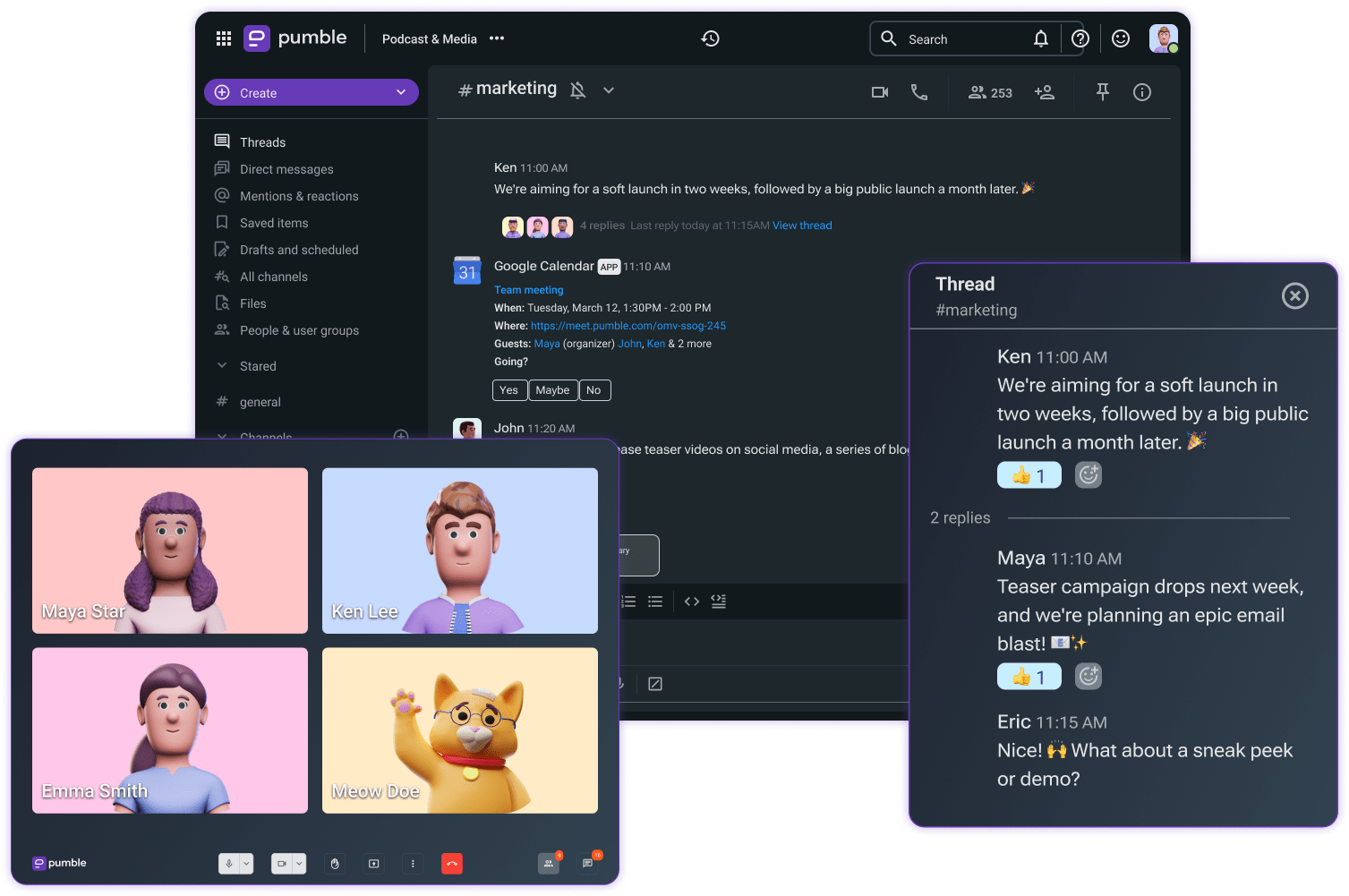
Os melhores aplicativos de chat para equipes, como o Pumble, mantêm as equipes conectadas e servem como a sede digital da empresa — um espaço onde todas as conversas, arquivos e decisões são armazenados.
Como esses aplicativos são a base de uma comunicação eficiente no ambiente de trabalho, eles precisam ser capazes de simplificar e organizar a comunicação. Bons aplicativos geralmente oferecem várias maneiras de fazer isso, como:
- Mensagens diretas
- Canais
- Threads
No Pumble, as mensagens diretas permitem conversas individuais ou em pequenos grupos. Elas são ideais para sessões rápidas e focadas de colaboração com uma pessoa ou um pequeno grupo.
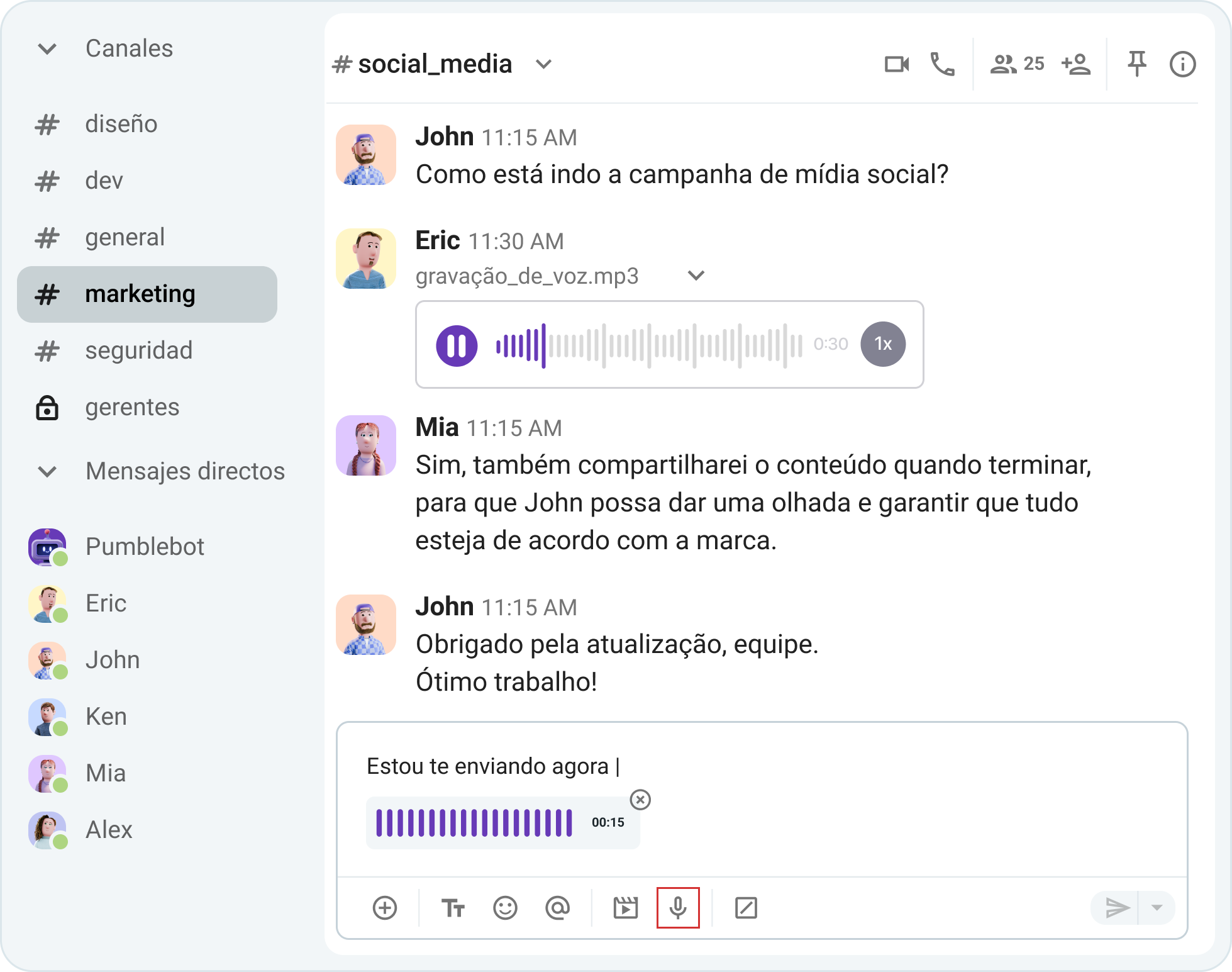
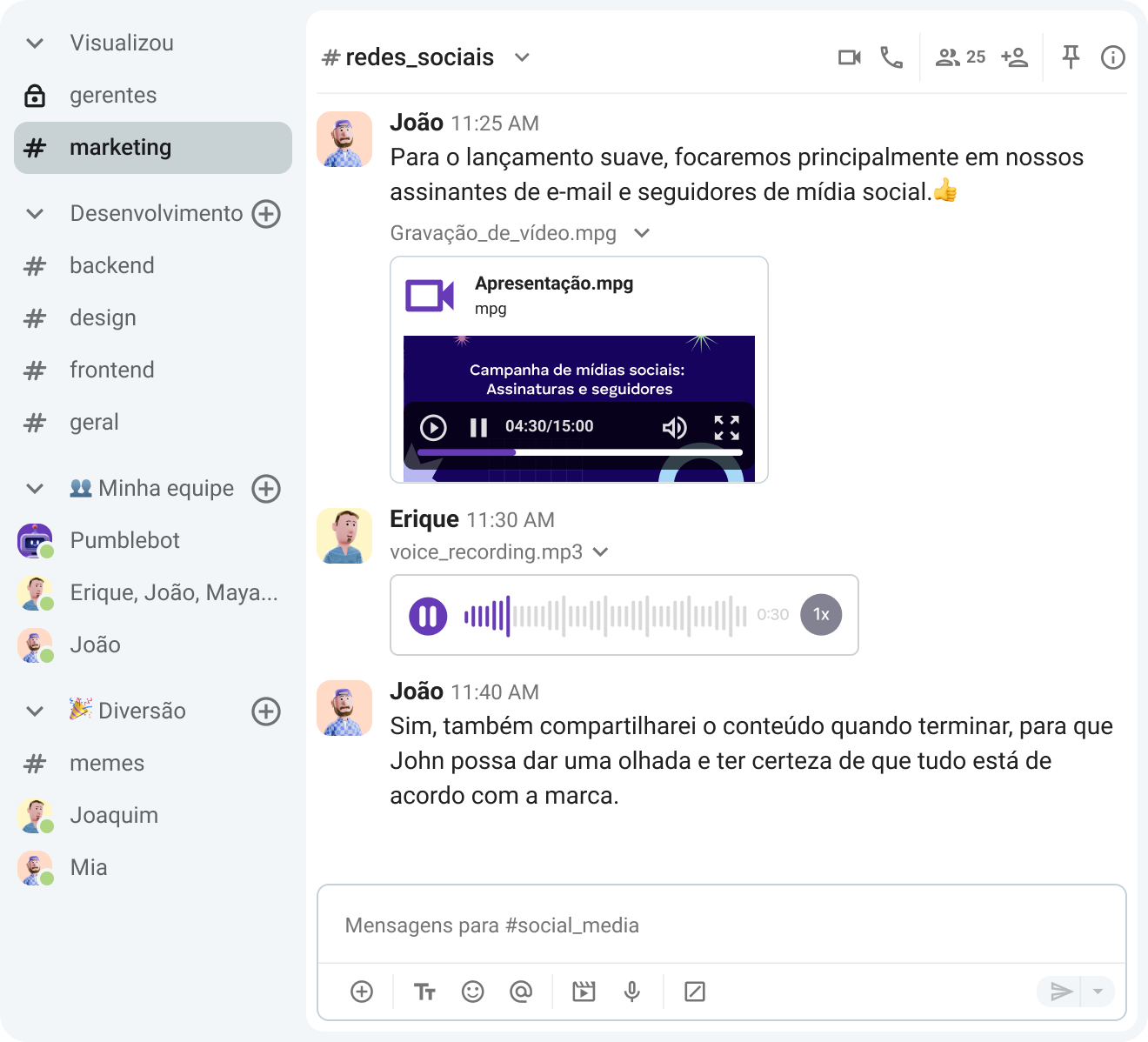
Ao contrário de uma mensagem direta, um canal é um espaço onde você pode conversar com várias pessoas. Os canais são a funcionalidade principal de qualquer bom aplicativo de comunicação para equipes, pois permitem uma comunicação transparente e uma colaboração eficaz.
Os canais podem ser organizados de acordo com:
- Equipe
- Projeto
- Tema
Este sistema permite que os usuários sempre saibam onde publicar mensagens e buscar informações ou decisões importantes tomadas anteriormente. Dessa forma, eles podem dedicar tempo e energia ao que realmente importa: a produtividade.
Comunique-se de forma eficiente com o Pumble
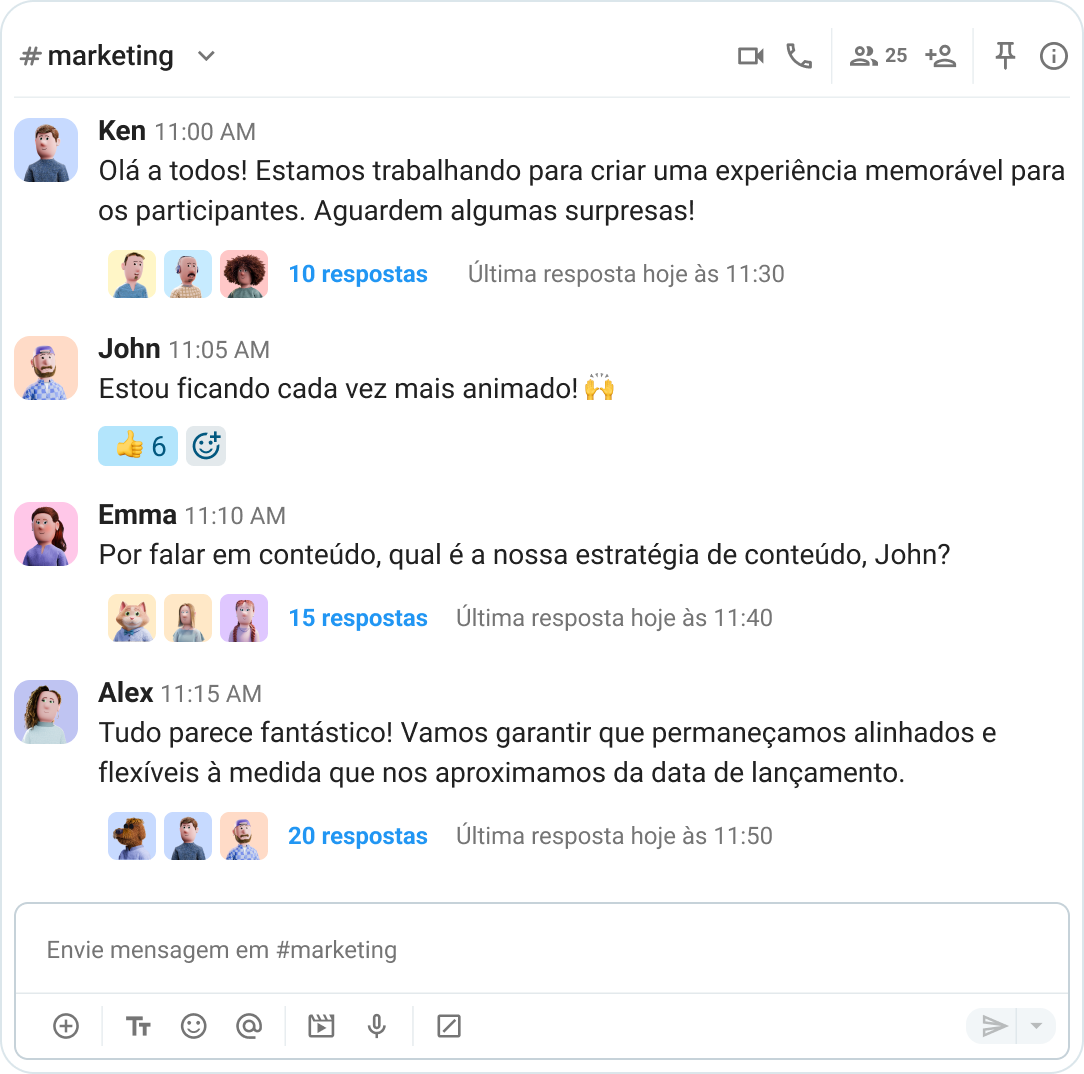
O último meio de organização da comunicação são os Threads. Ideais para discussões longas, as conversas em sequência permitem aprofundamento sem sobrecarregar o chat principal do canal. As respostas ficam agrupadas sob a mensagem original. Dessa forma, as discussões são mais fáceis de acompanhar e as conversas ficam mais focadas.
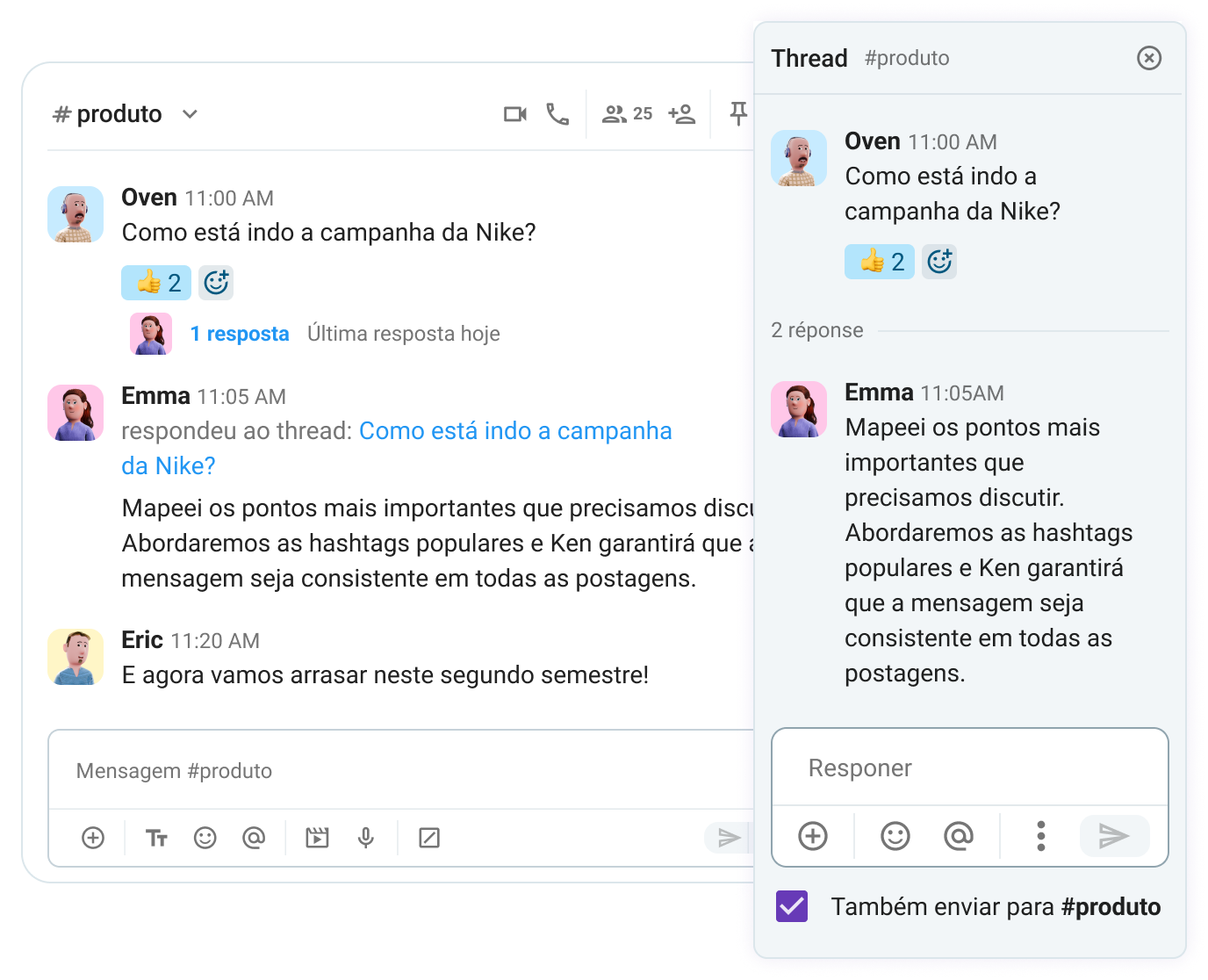
Os Threads não desviam o foco das conversas principais dentro de um canal. No entanto, se uma resposta em um thread for tão importante que precise ser compartilhada com todos, o Pumble permite que você também a envie para o canal.
#2 Videoconferência e mensagens de voz assíncronas
Embora eficazes, as mensagens instantâneas não podem ser o único meio de comunicação de uma equipe, e é por isso que muitas empresas optam por adicionar aplicativos de videoconferência ao seu conjunto de ferramentas. Dessa forma, elas podem superar a lacuna da comunicação remota.
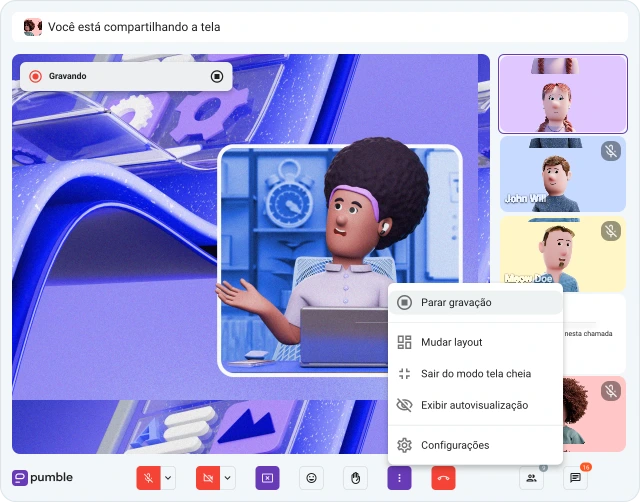
No entanto, adicionar outro software leva ao acúmulo de aplicativos desnecessários. Em um cenário ideal, o aplicativo de comunicação da sua equipe já teria videoconferência integrada, permitindo que você passe de uma mensagem direta para uma chamada de vídeo com apenas um clique.
Ter a facilidade de iniciar uma chamada a qualquer momento otimiza a comunicação, melhora a coordenação e acelera a tomada de decisões.
Explore as videochamadas do Pumble
É claro que, para facilitar a colaboração de forma eficaz, os aplicativos precisam oferecer mais do que apenas videochamadas. Recursos de software para colaboração em equipe, como mensagens de vídeo ou de voz, são muito úteis nesse caso. Você pode compartilhar ideias e informações sem precisar interromper o dia de trabalho e o momento de concentração de todos com mais uma reunião.
🎓 Dica profissional do Pumble
Procurando maneiras de melhorar a colaboração para equipes? Então confira este post:
#3 Gerenciamento de projetos e acompanhamento de tarefas
A comunicação é vital para o seu sucesso, mas, a menos que você tenha uma maneira de estruturar seu fluxo de trabalho — e não apenas a comunicação — você não chegará muito longe.
Ter um bom software de gerenciamento de projetos oferece uma visão clara de quem faz o quê, permitindo:
- Eliminar a confusão
- Centralizar a colaboração
- Criar uma responsabilidade clara
Você pode gerenciar tarefas, acompanhar o progresso, alinhar metas e supervisionar a carga de trabalho da sua equipe.
As ferramentas de gerenciamento de projetos oferecem transparência em tempo real. Uma boa ferramenta de gerenciamento de projetos lhe dará visibilidade de todo o cronograma do seu projeto, o que significa que você pode:
- Identificar problemas logo no início
- Resolver problemas rapidamente
- Gerenciar riscos de forma proativa
Os usuários do Pumble podem conectá-lo facilmente ao seu aplicativo irmão da CAKE.com, o Plaky — uma ferramenta de gerenciamento de projetos. Usar os dois aplicativos em conjunto reduz a troca de plataformas, aumenta a produtividade e permite que os usuários acompanhem todas as notificações de gerenciamento de projetos no Pumble.
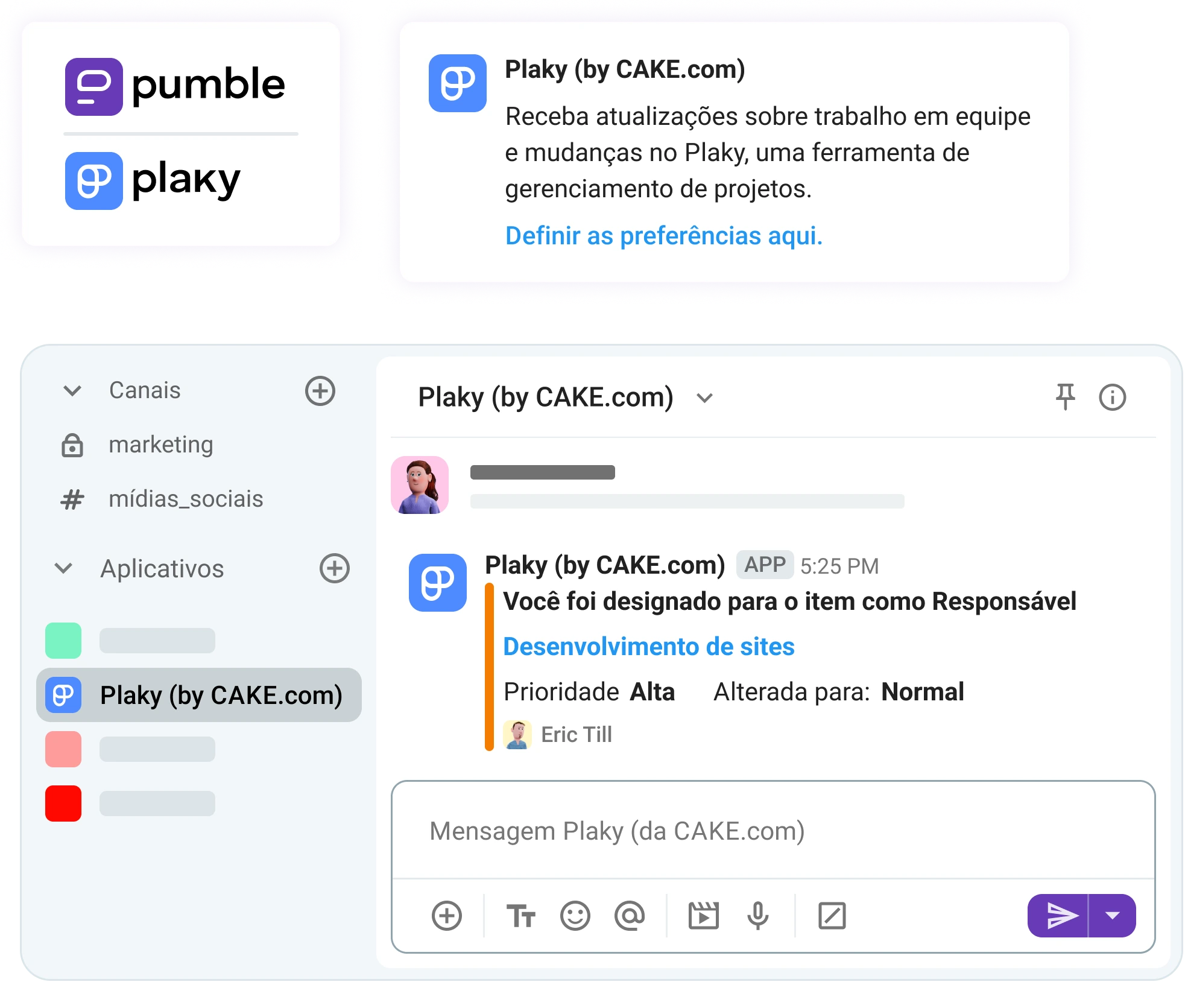
Conectar o Pumble e o Plaky oferece total transparência e economiza tempo, pois você pode acompanhar todo o progresso diretamente da sua central digital.

🎓 Dica profissional do Pumble
Quer saber o que os gerentes de projeto fazem e como o Pumble os ajuda a fazer isso? Então leia o artigo abaixo:
#4 Controle de tempo e gerenciamento de recursos
Por fim, a última categoria essencial das tecnologias de colaboração em equipe é o controle de tempo e o gerenciamento de recursos.
O gerenciamento de tempo e recursos permite um melhor planejamento da capacidade. Ao monitorar o tempo gasto em cada tarefa, você elimina as suposições e obtém dados objetivos sobre quanto tempo essa tarefa leva para ser concluída. Isso pode ajudar sua equipe a organizar sua carga de trabalho e definir suas prioridades.
Com um bom sistema de controle de tempo, sua equipe pode:
- Delegar tarefas de forma justa e equilibrada.
- Não perder tempo planejando reuniões, dedicando esse tempo em trabalho produtivo e profundo.
- Ter uma visão mais clara da disponibilidade de todos e aprimorar o agendamento de reuniões.
- Ver onde cada um está gastando mais tempo, identificar possíveis gargalos e otimizar o trabalho de acordo.
Os usuários do Pumble costumam conectar sua sede digital com outro aplicativo da família Pumble — o Clockify. Conectar os dois aplicativos permite que eles aproveitem o poder de ambos sem perder tempo alternando entre eles.
Com a integração Clockify-Pumble, você pode optar por receber notificações do Clockify em um canal do Pumble, reduzindo a perda de notificações e acompanhando a atividade da sua equipe com facilidade.
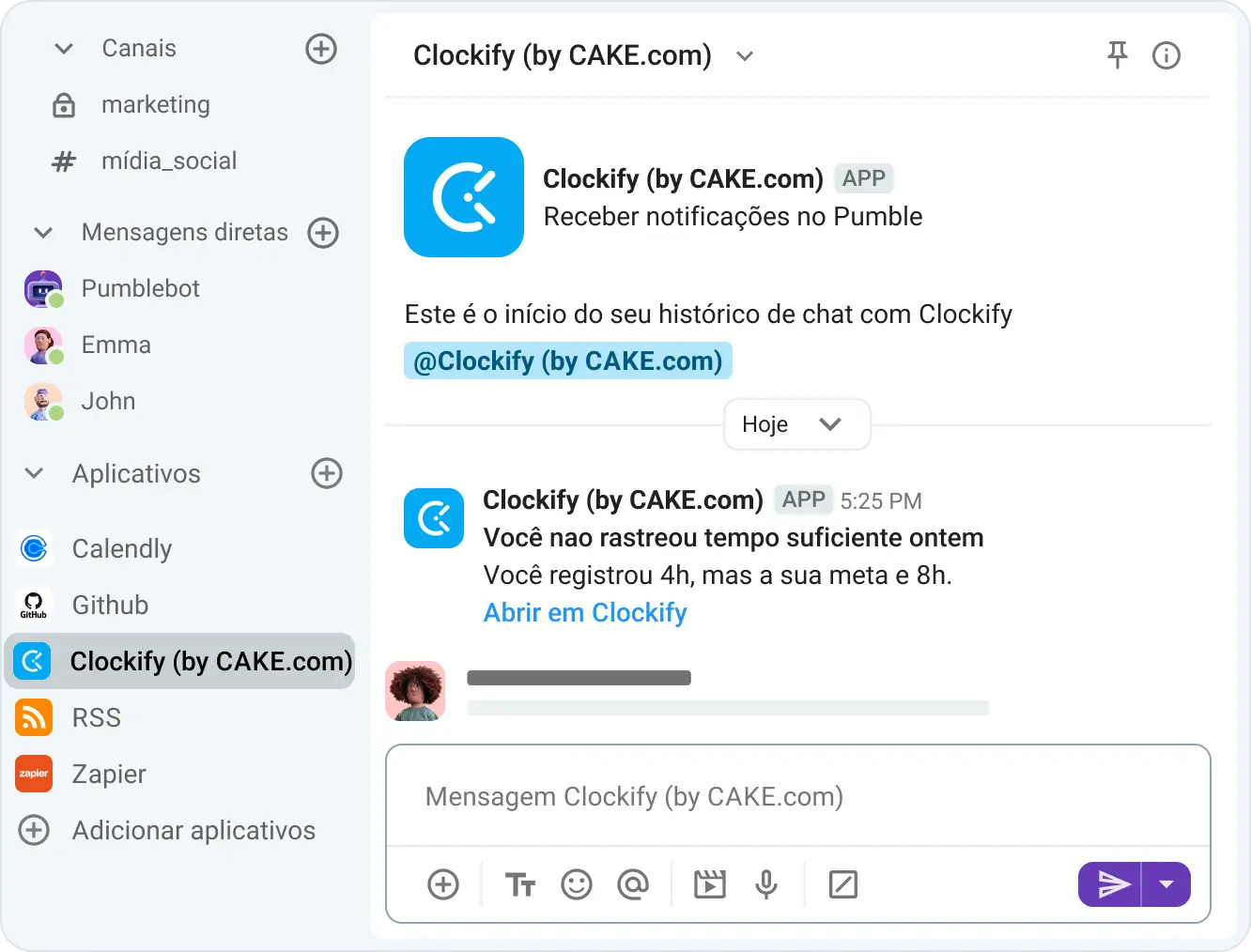
Ao otimizar os fluxos de trabalho com um aplicativo de controle de tempo e gerenciamento de recursos, você melhora a colaboração, o que, por sua vez, leva a maior produtividade e lucratividade.

Critérios essenciais de avaliação: Como escolher o software certo
Nem todos os aplicativos são iguais. É importante aprender quais recursos essenciais importam e quais são apenas enfeites dispensáveis.
Há quatro critérios que você precisa considerar antes de escolher um software de colaboração:
- Retenção de dados: Este aplicativo consegue armazenar todos os dados compartilhados nele?
Alguns aplicativos restringem funcionalidades importantes, como histórico de mensagens e arquivos, atrás de restrições de planos pagos. Isso pode levar à perda de informações e contexto. Ter acesso a todos os seus dados a qualquer momento proporciona um registro estruturado, essencial para conformidade, segurança e continuidade dos negócios.
- Previsibilidade de custos: É possível expandir sem ter que pagar um preço exorbitante por um plano corporativo?
Alguns aplicativos oferecem muitos recursos, mas os restringem a custos exorbitantes. A escalabilidade implica em aumentos significativos no preço por usuário — um aplicativo que custa apenas alguns dólares por usuário acaba consumindo todo o seu orçamento quando sua equipe cresce de 10 para 100 pessoas.
- Colaboração externa: É possível incluir pessoas de fora da sua organização?
A colaboração não acontece isoladamente e raramente se limita a uma única equipe. Na realidade, as equipes frequentemente trabalham com colaboradores externos — fornecedores, freelancers, estagiários, etc. Além disso, muitas vezes precisam facilitar a comunicação com os clientes. Portanto, uma ótima ferramenta de colaboração precisa oferecer um recurso de acesso para convidados e opções robustas de gerenciamento desse acesso, com controle de funções e permissões.
- Planos gratuitos generosos:É possível incluir pessoas de fora da sua organização?
Ao escolher uma ferramenta de colaboração, opte sempre por aquela que oferece um plano gratuito generoso, permitindo testar o software de forma completa antes de se comprometer com a assinatura. Se uma ferramenta promete acesso a recursos avançados após a assinatura de um pagamento mensal (ou pior, anual), mas não oferece um período de teste gratuito, sugerimos que continue procurando.
Experimente o Pumble gratuitamente
Como escolher a ferramenta certa: Pumble vs. Slack vs. Teams vs. Google Chat
À primeira vista, muitas ferramentas se encaixam nos critérios que listamos. Pumble da CAKE.com, Zoom, Slack, MS Teams — todas são opções populares. Mas qual delas é a ideal para você?
Escolher a ferramenta certa exige muita pesquisa. Por exemplo, é preciso muita pesquisa para descobrir quem ganha em uma disputa entre Pumble e Slack. É preciso ainda mais para entender as principais diferenças entre o MS Teams e o Google Chatt.
Para facilitar um pouco as coisas, comparamos os aplicativos mais populares com base nos 4 critérios que mencionamos. Veja qual aplicativo se destaca.
| Pumble | Slack | MS Teams | Google Chat | |
|---|---|---|---|---|
| Histórico ilimitado no plano gratuito | Sim | Não | Sim (para mensagens de texto e arquivos) | Sim |
| Gerenciamento de acesso de convidados | Sim | Sim | Sim | Sim |
| Pacote integrado | Sim | Não | Sim | Sim |
| Custo total (por usuário por mês, cobrado anualmente) | Acessível A partir de US$ 2,49 | Caro A partir de US$ 7,25 | Acessível, mas complexo A partir de $ 4 | Caro A partir de US$ 6 |
🎓 Dica profissional do Pumble
Tem interesse em comparar os aplicativos mais populares em termos de recursos e preços? Então confira estes artigos:
A solução integrada definitiva: como o Pumble e a CAKE.com abrangem todas as categorias
Se você quiser enfrentar de frente o problema da fragmentação das ferramentas de trabalho, precisa abandonar seus aplicativos independentes em favor de um pacote unificado que permita consolidar seu espaço de trabalho.
É exatamente isso que o pacote de produtividade CAKE.com faz. Ele possibilita a coordenação multifuncional por meio de 3 ferramentas perfeitamente integradas:
- Pumble, um aplicativo de comunicação para equipes que permite uma comunicação fluída entre os membros da equipe por meio de mensagens de texto, chamadas de vídeo e de voz.
- Plaky, uma ferramenta de gerenciamento de projetos que abrange todos os aspectos da gestão de projetos e permite o acompanhamento de tarefas com facilidade.
- Clockify, um software de controle de tempo que gerencia o registro de horas trabalhadas, relatórios e faturamento.
Cada um desses três aplicativos é uma ferramenta independente completa. Mas, juntos, eles abrangem todos os 4 critérios essenciais que mencionamos anteriormente, pois:
- Possuem planos gratuitos excelentes
- Oferecem acesso para convidados
- Têm preços acessíveis
- Oferecem retenção de dados
O Pumble oferece histórico ilimitado de mensagens para todos os seus usuários — sem barreiras ocultas em planos pagos que retêm seus dados.
O mais diferencial é que os aplicativos da CAKE.com também são desenvolvidos para funcionar em conjunto e permitir a colaboração multifuncional entre eles.
A CAKE.com oferece um pacote (Bundle) com preços especiais que dá acesso ao plano Enterprise às 3 ferramentas por menos da metade do custo de adquirir cada plano Enterprise separadamente. Assim, em vez de pagar US$ 27,97 por usuário por mês, você pagará apenas US$ 12,99 — economizando 53%!
Consolide seu conjunto de ferramentas hoje mesmo com o Pumble
O desejo de adicionar mais ferramentas ao seu conjunto de aplicativos é grande. Afinal, todas elas são comercializadas como algo que ajudará sua equipe a ser mais produtiva. No entanto, adicionar mais ferramentas provavelmente causará fadiga de ferramentas — sem mencionar o esgotamento do seu orçamento.
Em vez de assinar diversos serviços, tente encontrar as ferramentas que funcionarão para você e sua equipe — aquelas que foram projetadas com a colaboração produtiva em mente.
Ao optar pelo Pumble como uma ferramenta independente ou como parte do pacote CAKE.com, você evita os maiores problemas causados pela fragmentação das ferramentas.
Pare de usar ferramentas desconectadas e tentar fazê-las funcionar. Reúna suas equipes em um espaço de trabalho digital seguro — o ecossistema CAKE.com.
Desbloqueie todo o potencial da colaboração da sua equipe — crie uma conta gratuita no Pumble hoje mesmo.
Como avaliamos esta publicação: Nossos escritores e editores monitoram as postagens e as atualizam quando novas informações ficam disponíveis, para mantê-las atualizadas e relevantes.