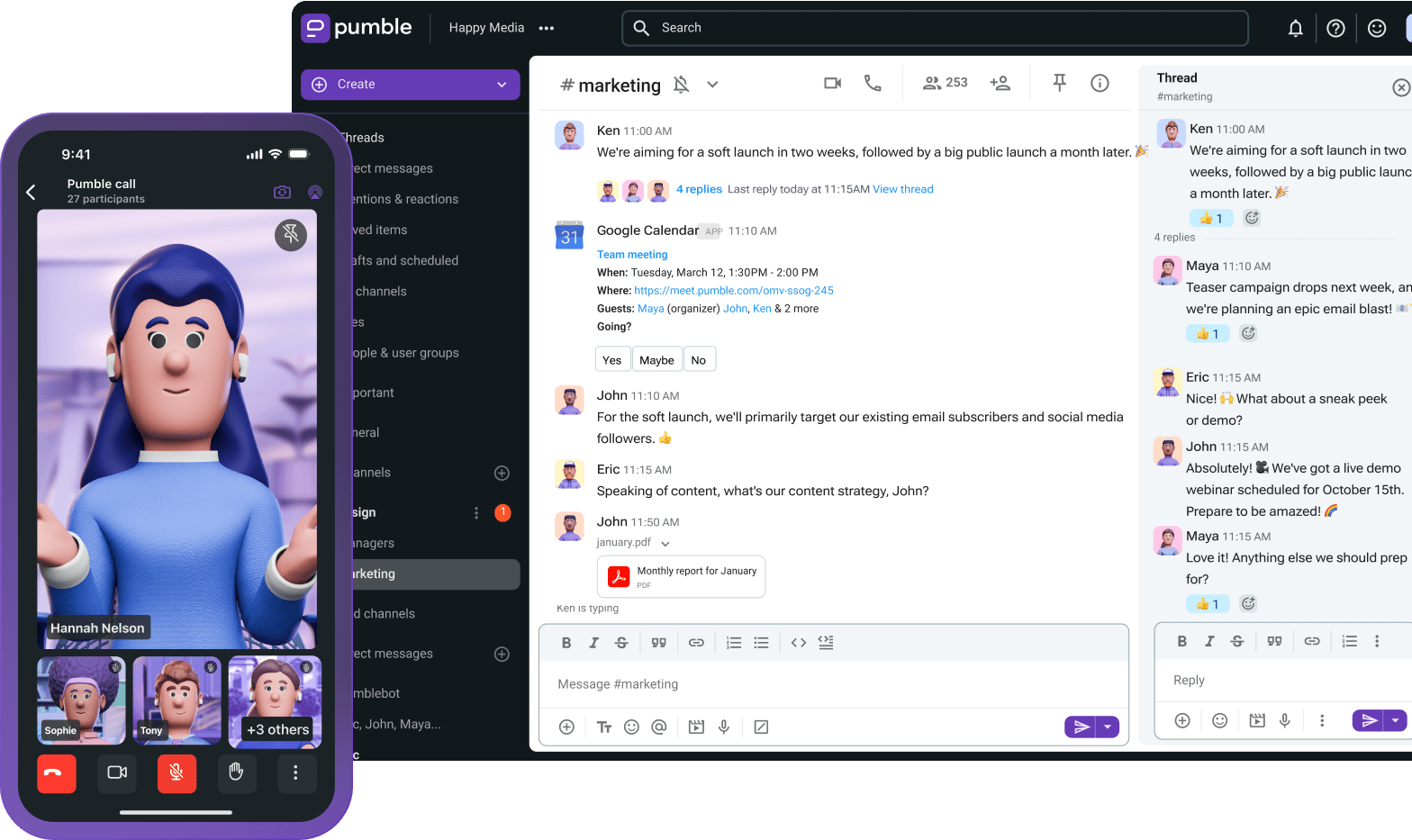
Do you want to stop tab switching between GitHub and your team communication app? Are you looking to speed up code review while keeping your tech and non-tech teams in sync?
You can do it all with Pumble — more specifically, the Pumble GitHub integration. Get real-time updates, reduce review delays, and ship code faster, all with a single integration.
Let’s take a closer look at how this integration centralizes your development workflow by turning your chat channels into real-time operational hubs.
- The Pumble GitHub integration reduces context switching for devs; it increases visibility, improves team alignment, and boosts cross-functional collaboration.
- The integration brings GitHub activity where collaboration already happens. That way, dev teams and non-tech team members stay aligned without living inside GitHub or sitting through endless status meetings.
- To prevent notification overflow, be smart about which repos you connect with which channels. Also, decide which events you want to get notified of.
- Mute noisy bots and repos with a lot of commits and keep the GitHub pull request notifications and reviews, for example.
Why GitHub activity belongs in your team chat
You might be thinking, “Why integrate GitHub with team chat apps? My team already lives in GitHub.”
Well, sure, but devs also ping-pong between GitHub and their communication app to keep everyone else informed. And, if they drop the ball due to constant context switching, the rest of the team learns about changes way too late and in one of two ways:
- By digging through GitHub for trapped context
- During yet another status meeting
While in-person and video meetings are important, not all information should be shared that way. And, while your dev team might live in GitHub, your project managers, product team, QA testers, designers, and all other cross-functional stakeholders don’t.
That means they miss out on critical GitHub updates.
Developing software requires constant communication between teams. In fact, a lack of communication, not bad code, creates most bottlenecks. Having GitHub visibility helps everyone stay aligned.
The Pumble GitHub integration gives devs a chance to get PR pings during development, which eliminates context switching and speeds up code review. It also benefits the wider team by delivering:
- Centralized, passive visibility — The moment a build fails, an issue opens, or a deployment triggers, the entire team is immediately notified.
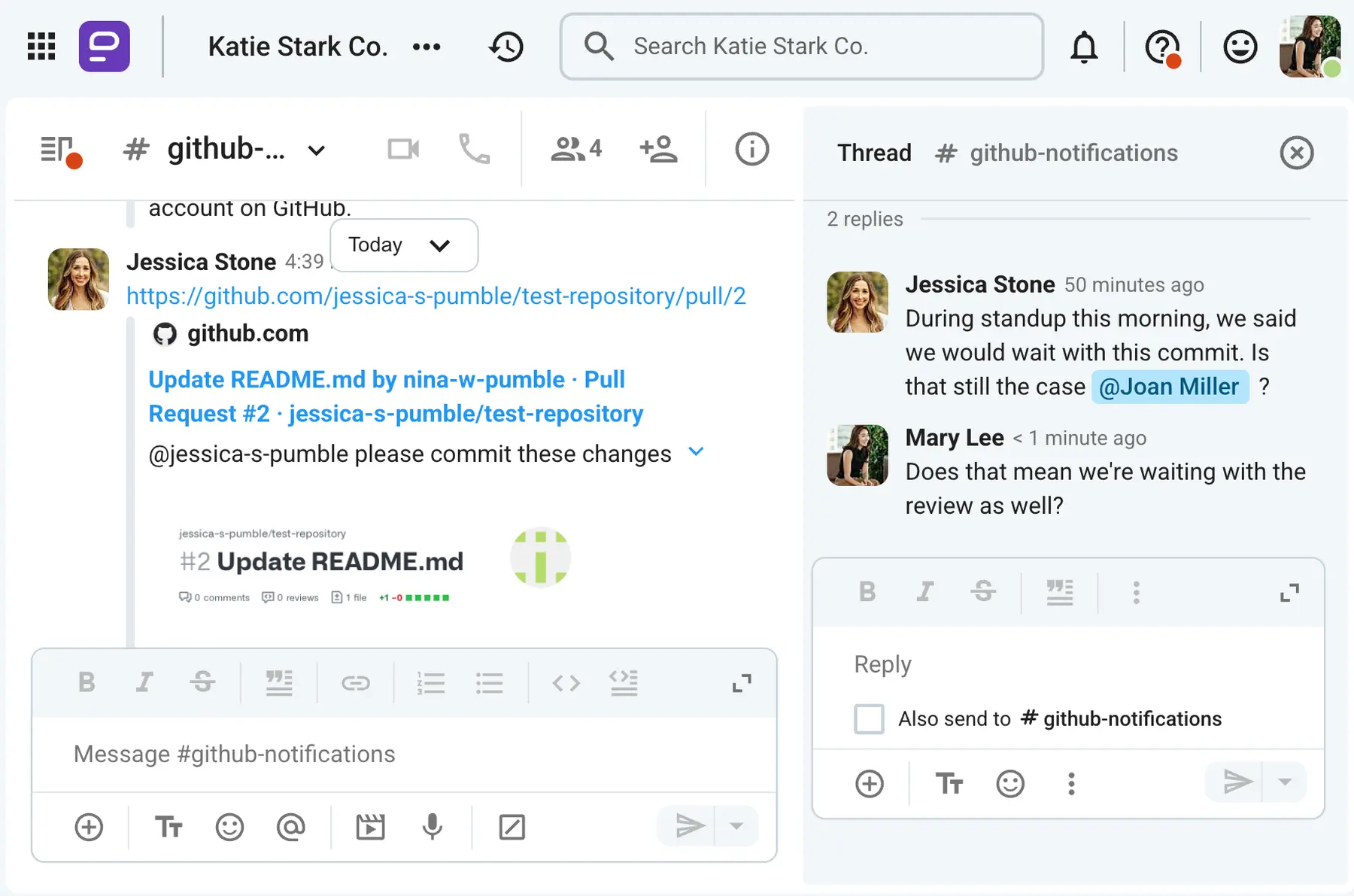
- Instant context — Sharing a GitHub link shows rich metadata (the author, code snippets, and priority labels). If this creates a discussion, it can happen in threads below the original message. That means replies are automatically grouped together, keeping technical conversations organized.
What the Pumble GitHub integration does
The Pumble GitHub integration brings GitHub activity where collaboration already happens. That way, dev teams and non-tech team members stay aligned without living inside GitHub or sitting through endless status meetings.
The integration sends notifications about all GitHub events, such as:
- Pull requests
- Issues
- Commits
- Code reviews
- Code releases
- Deployments
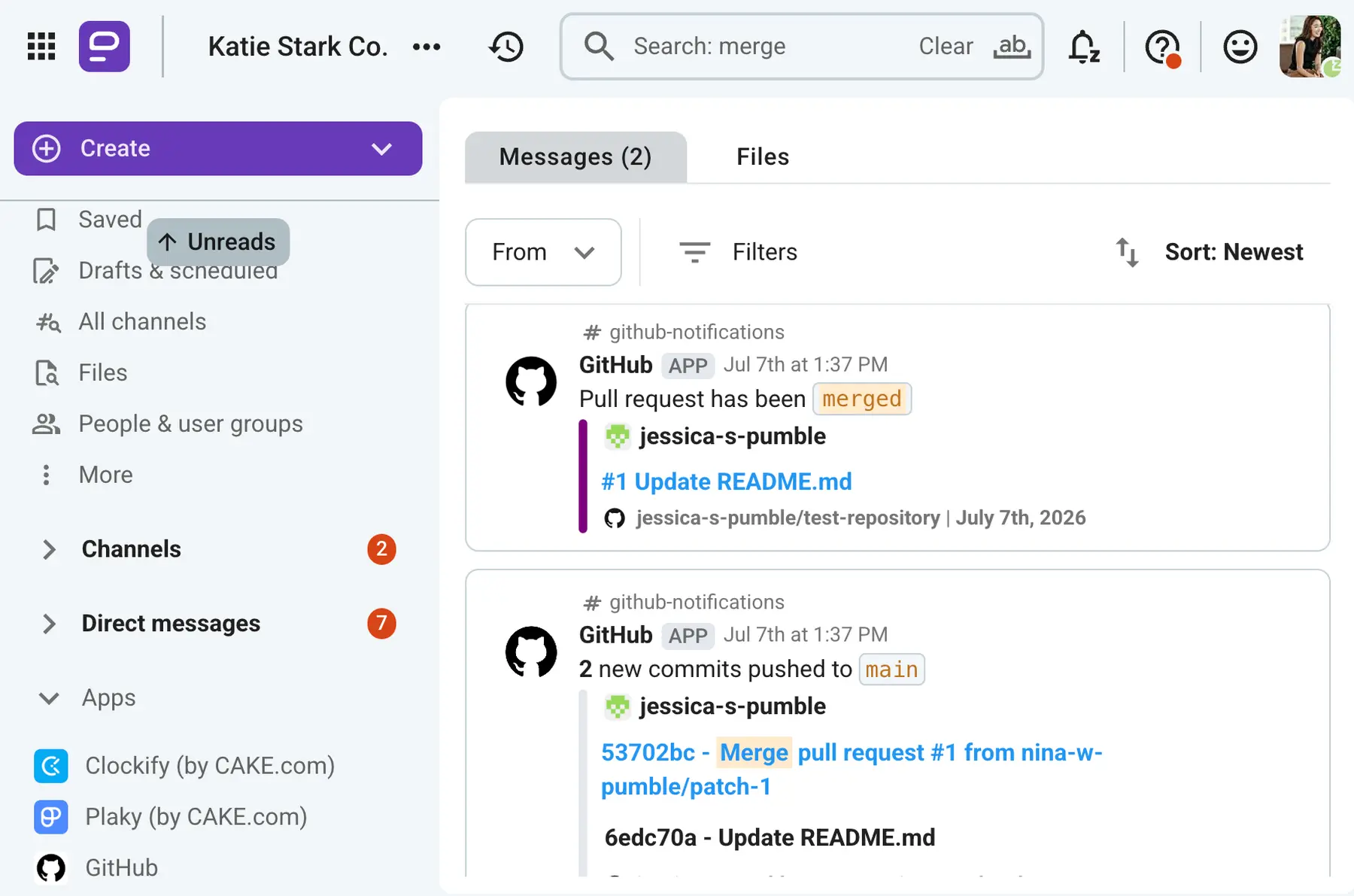
All of these events show up as direct messages in specific Pumble channels (the ones you chose). And, the best part is that they stay there — forever.
Given that Pumble offers unlimited message history on all plans — even the free one — all of your past GitHub events will stay searchable and available to the entire team. You can easily find all past pull requests and issues, and see how they were dealt with before.
This transforms Pumble into a searchable knowledge base with information that’s easily accessible to current and future employees, and it makes onboarding new employees much easier.
Get unlimited message history, forever
How to set up the GitHub integration in Pumble (a step-by-step guide)
To connect GitHub to Pumble, you only need to follow these setup steps:
- Install the GitHub integration.
- Authorize the GitHub app.
- Get the link for installation.
- Pick the relevant channels that will be linked with GitHub and subscribe to a repository.
- Confirm a test event.
Let’s go over each one in a bit more detail.
#1: Install the GitHub integration
Installing the GitHub integration in Pumble is easy, but you have to be a workspace owner to do it.
Click on the Apps section on Pumble’s left-hand side menu.
That will open a new page — Configure apps — where you’ll see a list of integrations you can install.
Select the Install button that’s next to GitHub.
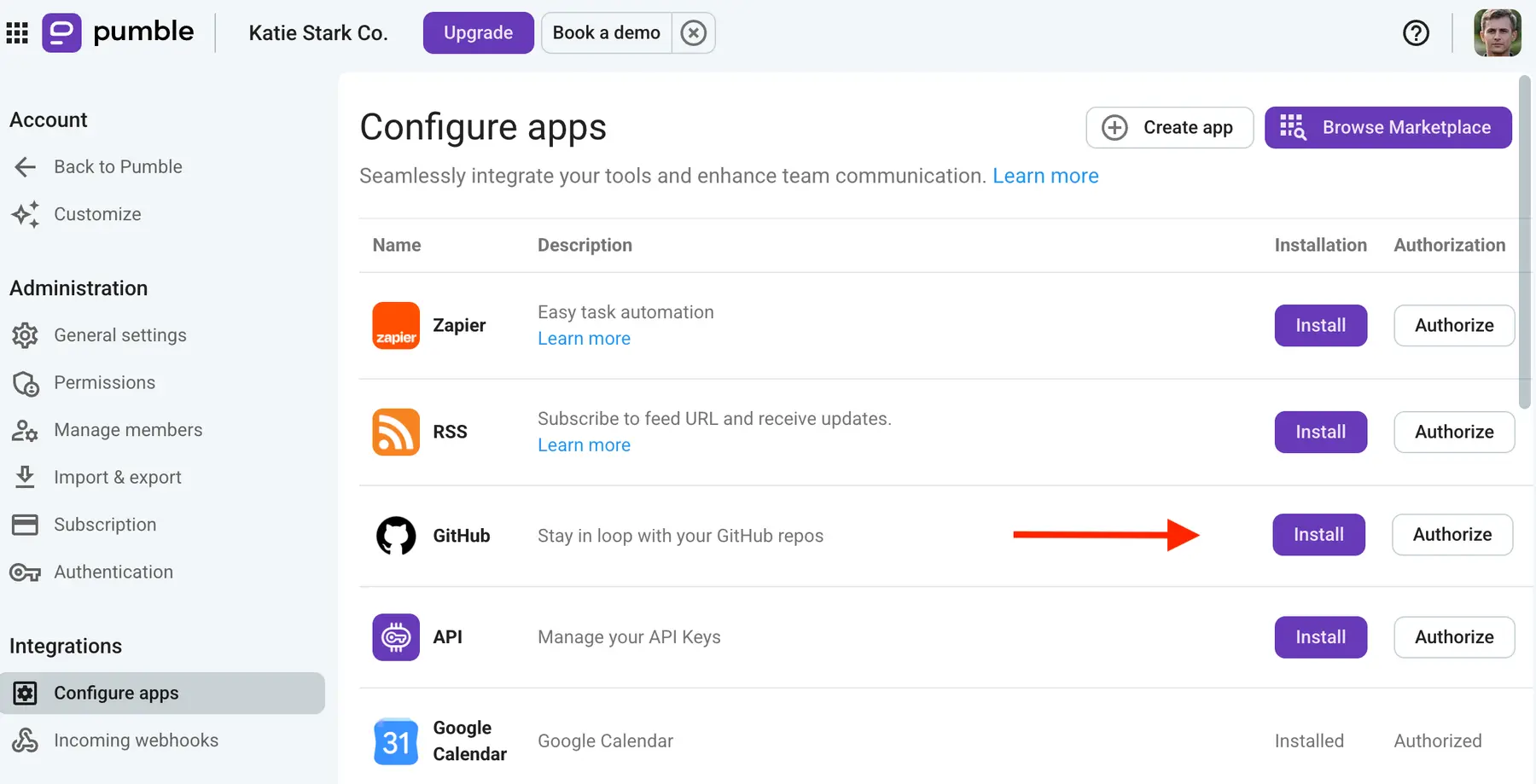
If you’re a Free plan user, you’ll be able to install up to 3 apps, on top of the CAKE.com’s native integrations with Clockify, a time tracker, and Plaky, a project management app.
If that’s not enough, you can always upgrade — Pro plan users can install up to 10 apps, while the Business plan and the Enterprise plan let users install as many apps as they want.

#2: Authorize the GitHub app
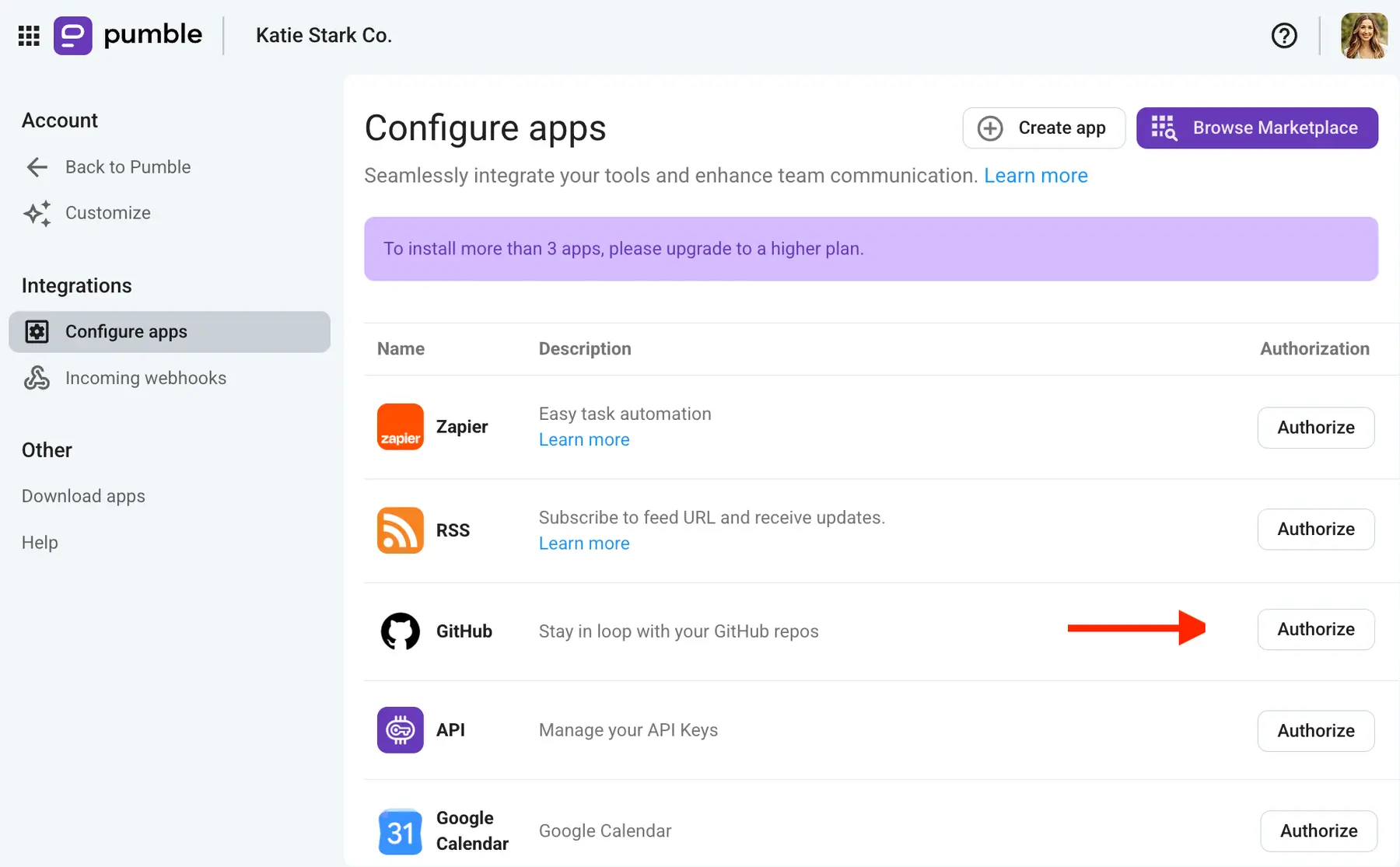
Once a workspace owner has installed the GitHub app, all users will be able to authorize it.
To do that, click on the same App section to be redirected to the Configure apps page. Once there, click the Authorize button next to the GitHub app.
#3: Get the link for installation
When you go to authorize the app, Pumble will request your permission to connect your workspace with GitHub. If you’re a member (or owner) of multiple workspaces, make sure you select the workspace you want to connect with GitHub.
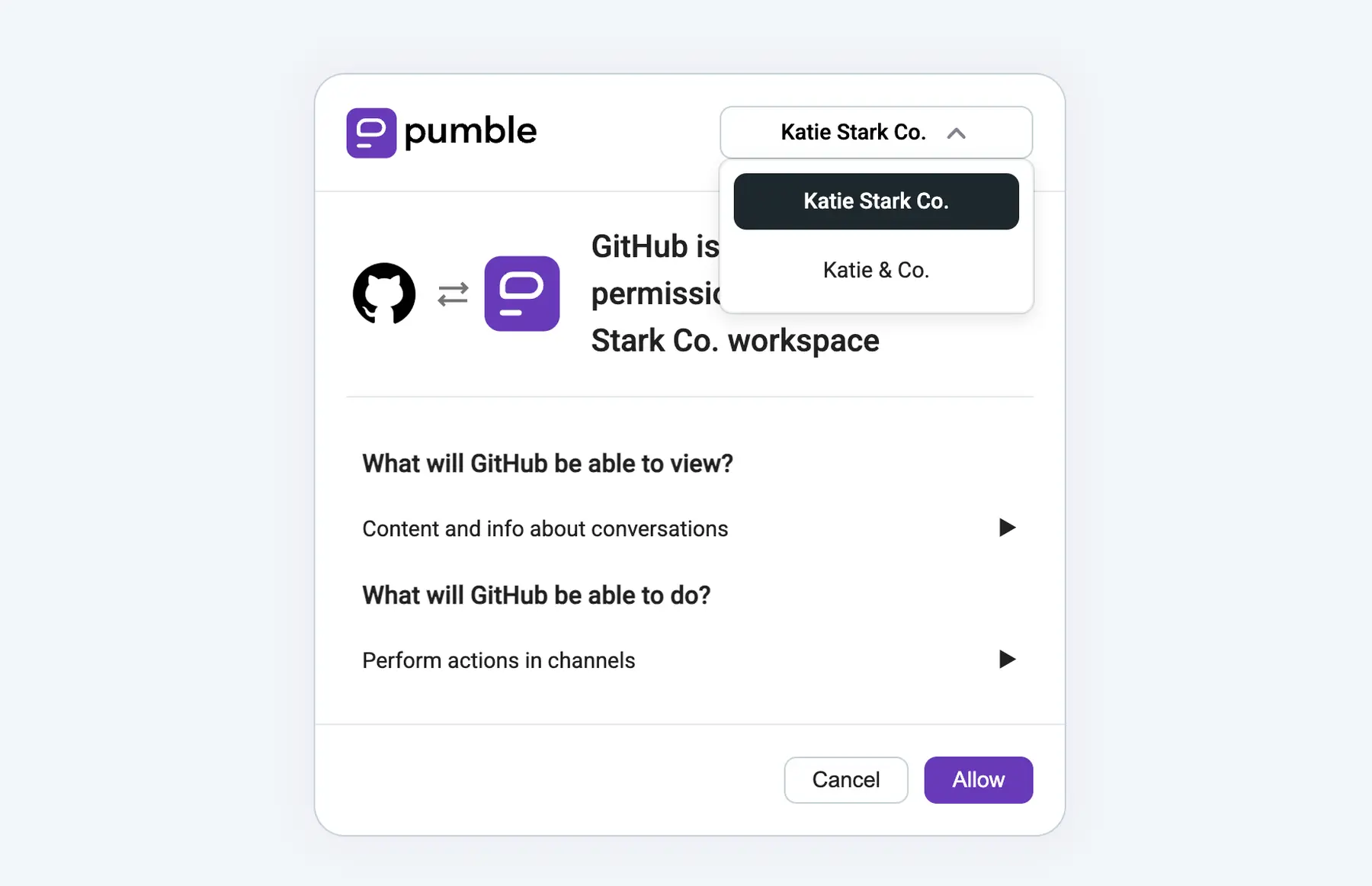
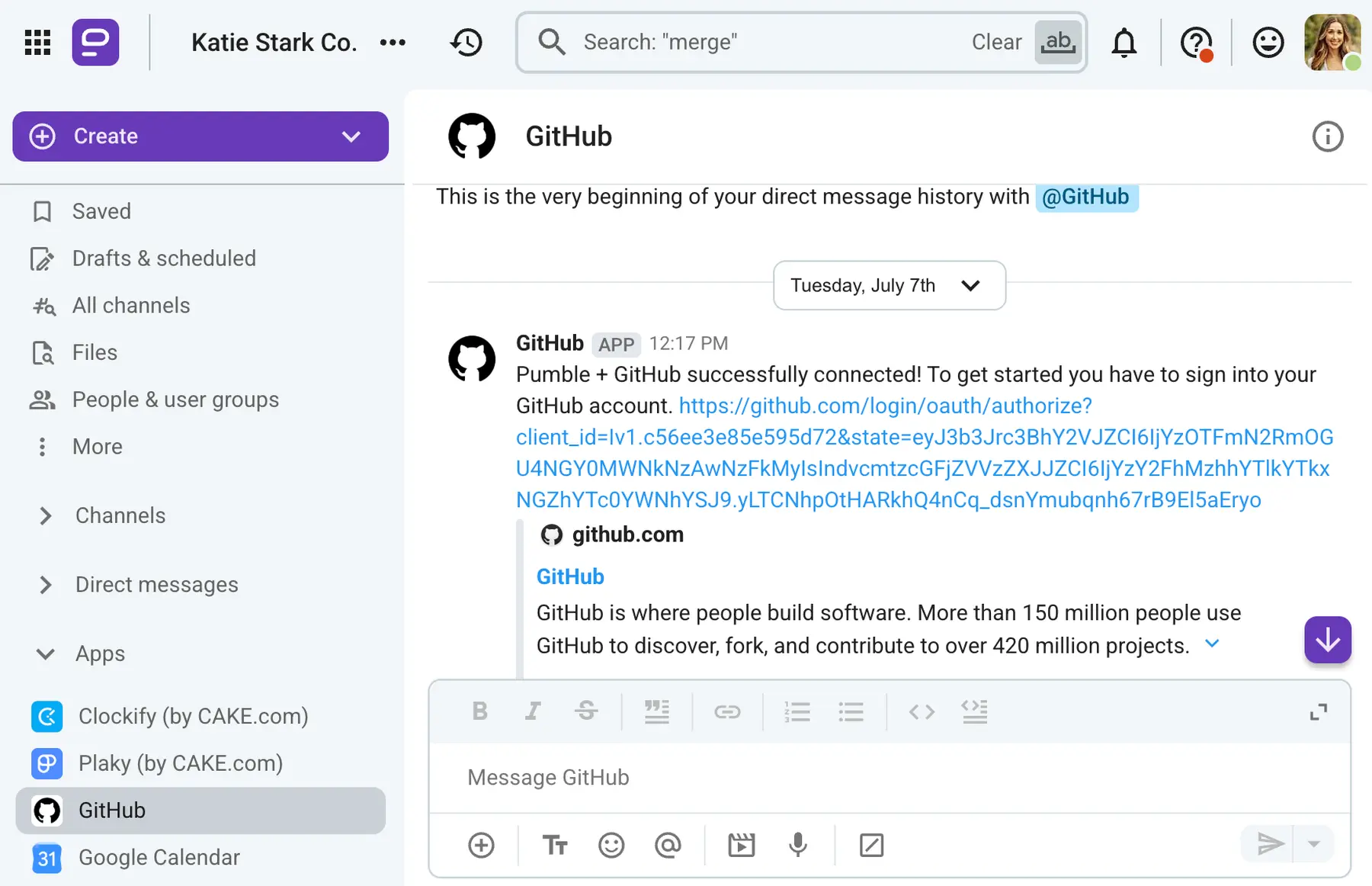
Once you click Allow, GitHub will connect with Pumble, and you’ll receive a message telling you to connect your GitHub account.
#4: Pick the relevant channels and subscribe repo(s)
You can pick which channels get GitHub notifications or create new channels just for that. In the image below, Jessica created a new channel and subscribed her test repo to it.
You can subscribe one or more repos to a channel by using the /github command.
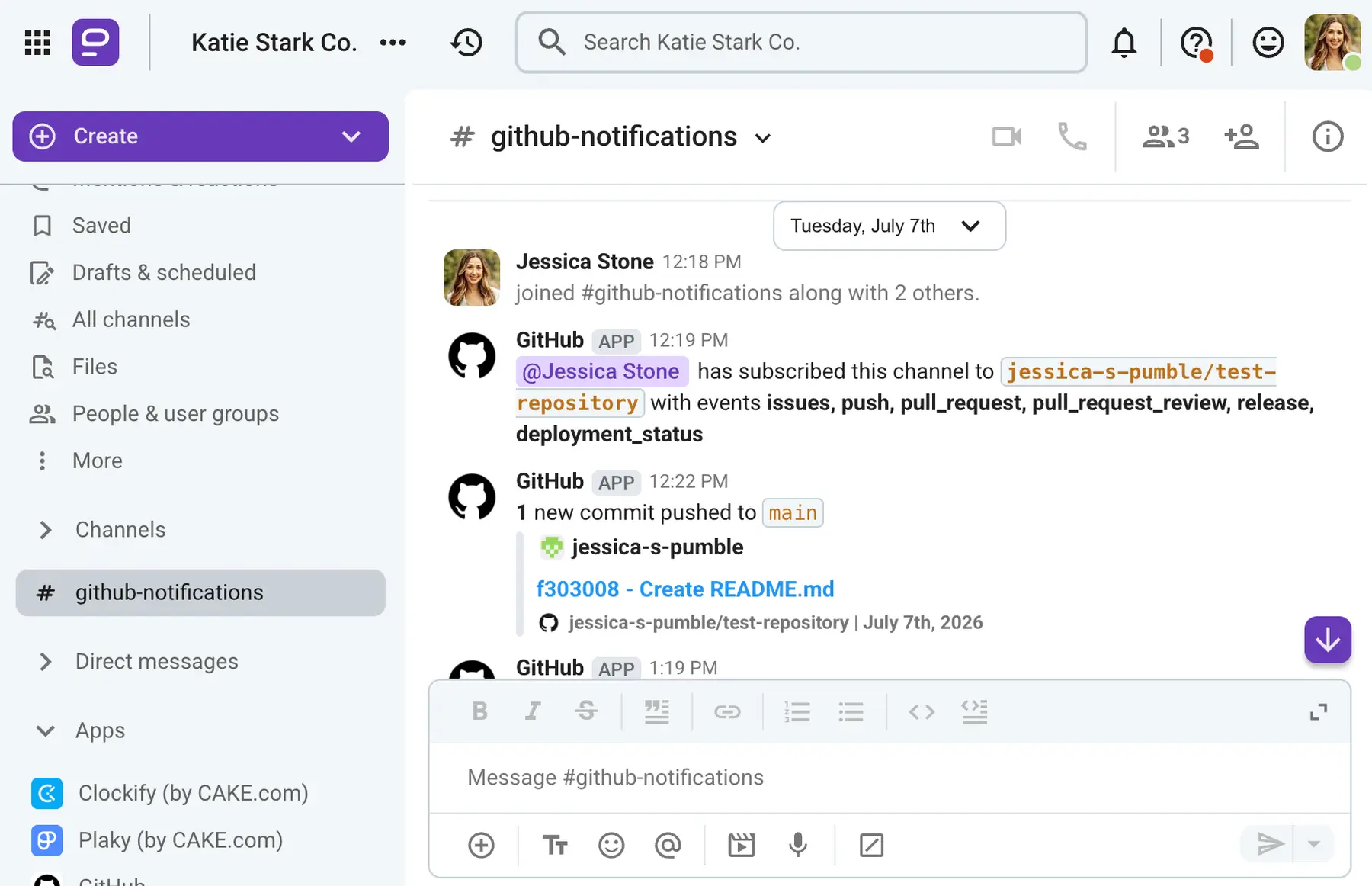
Although Jessica opted to have one channel for all GitHub notifications, you can create as many channels as you need and streamline the information coming from GitHub. For example, you can have specific channels for PRs (#dev_prs), code releases (#releases), code reviews (#reviews), etc.
#5: Confirm a test event
Once your repo is connected to one or more of your channels, you can do a test event to see how the notification system works. For example, you and your team members can open pull requests or issues, leave comments, push commits — it will all be displayed in the Pumble channel you subscribed the repo to.
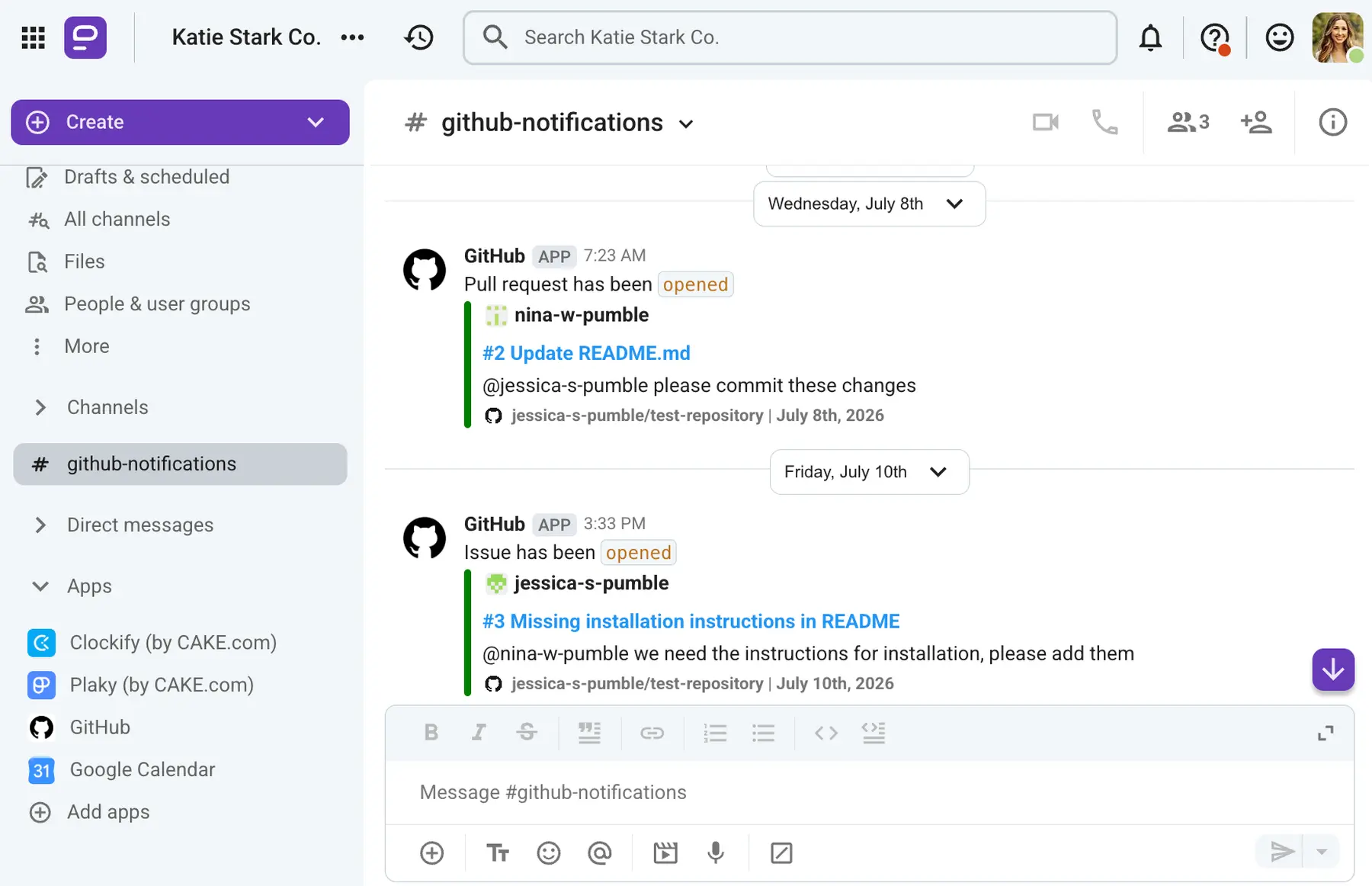
This really helps maintain visibility for everyone. Non-tech team members who don’t spend their days on GitHub will have a space where they can quickly browse thorough notifications and get updated on events as they happen.
Bonus step: Stop GitHub notifications from flooding a channel
Although staying updated is great, connecting GitHub with a team chat app can mean you get a bunch of notifications, firehose-style, every day.
The trick to handling that? Proper setup.
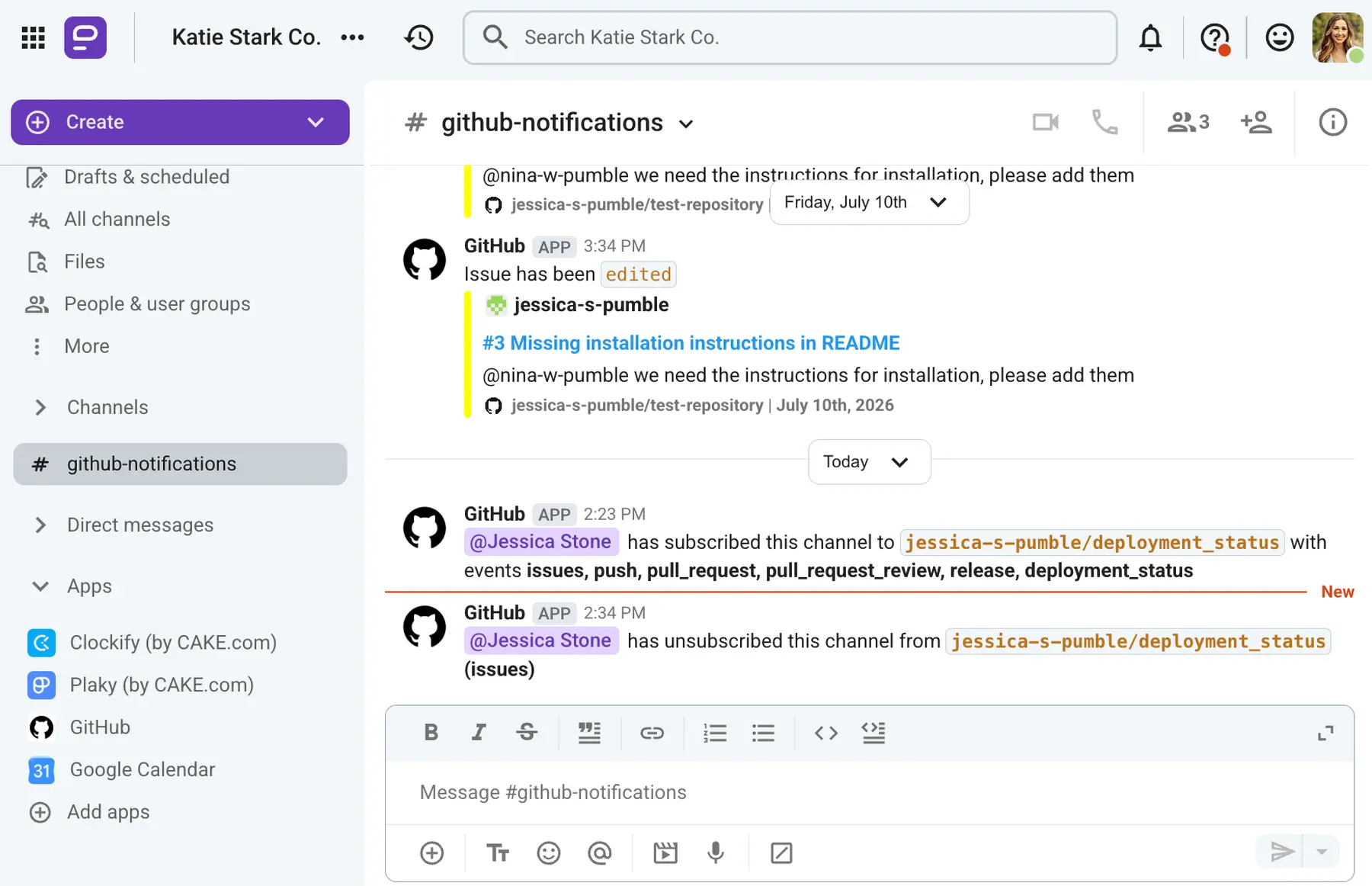
You need to be smart about which repo you subscribe to which channel and which notifications you opt to get. Just because you want better visibility for everyone doesn’t mean you should get flooded with notifications all the time.
You also need to decide which events you want to get notified of and which ones aren’t worth your attention. We suggest you mute noisy bots and repos with a lot of commits and keep the GitHub pull request and review notifications, for example.
GitHub event & command reference
Using GitHub and its integration is second nature to devs, but non-tech team members might not be as well-versed in all things Git. For example, they might not be familiar with GitHub commands and what each of them surfaces in Pumble.
So, here’s an overview of Pumble Github commands and events.
| Command | Description |
|---|---|
| /github help | Sends a message with essential GitHub commands and their descriptions. The message is only visible to you. |
| /github subscribe owner/repo | Subscribes the channel to notifications for that specific repository. |
| /github unsubscribe owner/repo | Unsubscribes the channel to notifications for that specific repository. |
| /github subscribe list | Lists all subscribed repos in that channel. |
| /github subscribe owner/repo issues, pull_request, release | Customize your notifications by subscribing to activity that is relevant to your Pumble channel by naming them (comma separated) at the end of subscribe command. |
| /github unsubscribe owner/repo issues, pull_request, release | Customize your notifications by unsubscribing to specific events by naming them (comma separated) at the end of subscribe command. |
| /github subscribe owner/repo push:mybranch/* | Branch filters for filtering commit notifications. By default, when you subscribe for commits feature, you will get notifications for your default branch (i.e., main or master). However, you can choose to filter on a specific branch, or a pattern of branches, or all branches. |
How CAKE.com teams use Pumble GutHub integration
Although it benefits everyone and ensures team alignment, this is first and foremost a GitHub integration for developers.
So, naturally, our developers ensured the integration is usable to them first (and who can blame them?).
The Pumble GitHub integration is one of the most used in the everyday life of a CAKE.com developer. It’s an integral part of how devs use Pumble.
According to Milos Trivundza, the backend engineering manager for CAKE.com’s Pumble, him and his engineering team currently use the integration to:
- Streamline the development workflow.
- Keep everyone aligned.
Let’s see how they do it.
Streamlining the development workflow
There are 2 main channels that CAKE.com devs use that are subscribed to the CAKE-com/pumble-node-sdk repo. The first one is the Backend team channel, and Milos and his team use it as their main development hub.

“All issues, PRs, and PR reviews come into this channel, which really boosts our visibility. We see the PRs as soon as they are opened, so we can review and merge them quickly.”
Visibility isn’t the only benefit, according to Milos. He also states that having a channel for all these events helps the team track code reviews better and monitor issues more closely.
“An issue lands in your Pumble notifications as soon as it’s opened, so bugs and task updates don’t go unnoticed.”
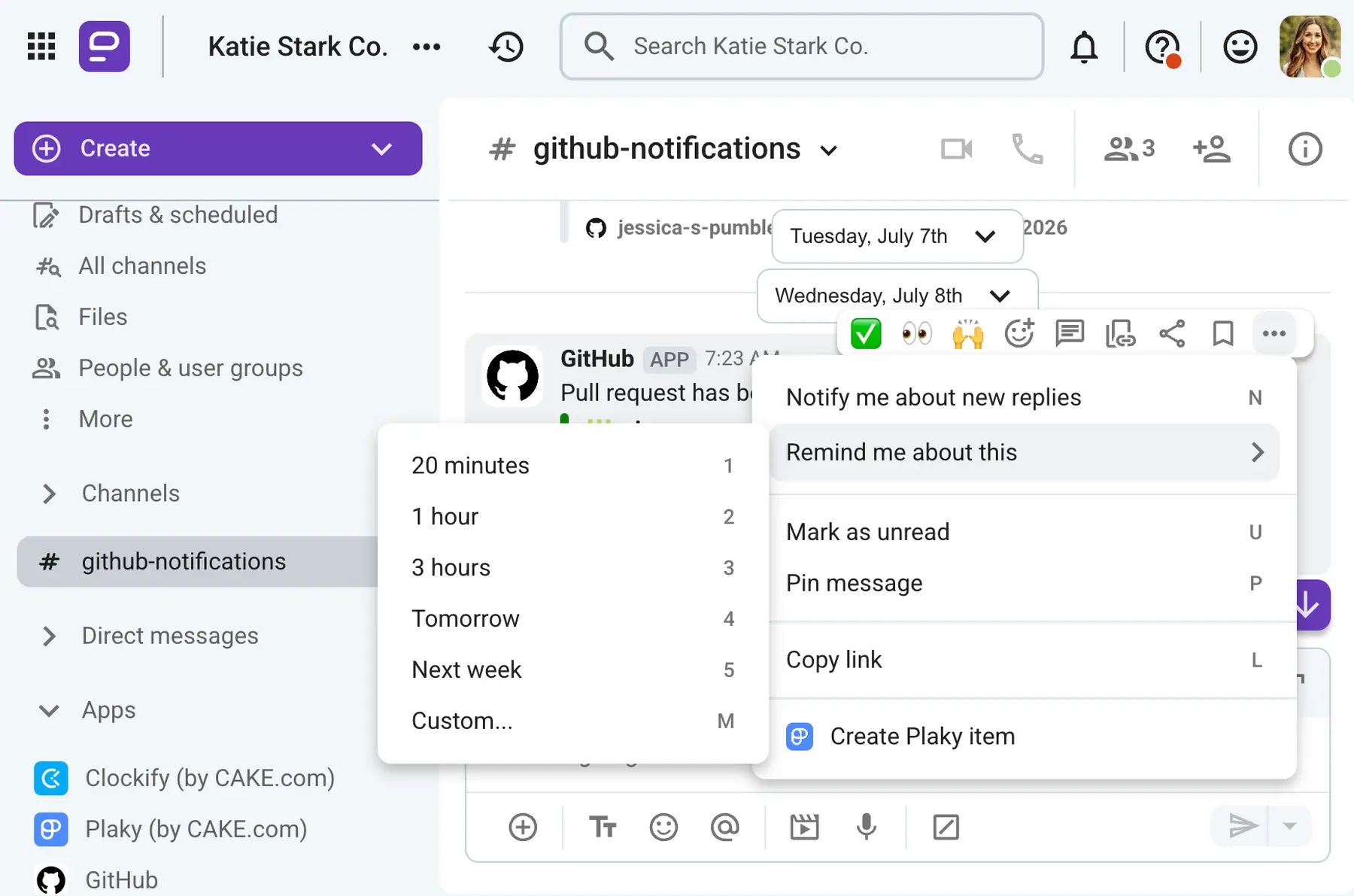
Of course, not every issue can be addressed immediately. However, the availability of information is a huge benefit — plus, GitHub offers PR reminders that won’t let your team forget about tasks. And, if that fails, you can always set a message reminder in Pumble as well.
Keeping everyone aligned
The other channel that is subscribed to the CAKE-com/pumble-node-sdk repo is the Deployment status channel. According to Milos, this channel is dedicated to tracking the lifecycle of all CAKE.com’s builds.
“This channel ensures the entire team is posted on whether a deployment succeeded, failed, or is currently in progress, maintaining high visibility over our production and staging environments.”
With this channel, the dev team is able to give everyone real-time updates about the running, complete, or broken software launches. That way, all departments — devs, sales, product, CS, etc. — are on the same page.
🎓 Dica profissional do Pumble
Interested to see how other teams use Pumble? Check out our resources:
Pumble vs. the GitHub + Slack integration
Now, you might be thinking, “Why use the Pumble GitHub integration when GitHub already has an official Slack app?”
While that’s true, Pumble is a cost-effective, reliable solution for everyone looking for a GitHub Slack integration alternative. While it doesn’t have some complex features that competitors offer, Pumble still has the same core GitHub-to-chat workflow.
This ensures team alignment and cross-functional visibility that won’t cost you an arm and a leg.
Plus, unlike Slack, it offers unlimited message history. That means that all messages you exchange — including those from the GitHub integration — remain a part of your company knowledge forever. So, all your past GitHub events remain easily searchable, even on the free plan.
Meanwhile, Slack caps its message history at 90 days for free users and deletes the messages after a year for those who don’t upgrade.
Perguntas frequentes
Here are some frequently asked questions about the Pumble GitHub integration.
Does Pumble integrate with GitHub?
Yes, Pumble integrates with GitHub, giving you an opportunity to bring GitHub pull requests and issues directly into Pumble with link previews.
How to connect GitHub with Pumble?
To connect GitHub to Pumble, follow these setup steps:
- Install the GitHub integration in your Pumble workspace.
- Authorize the GitHub app.
- Get the link for installation and sign into your GitHub account.
- Pick the relevant channels that will be linked with GitHub and subscribe to one or more repositories.
- Confirm a test event (pull request, issue, comment, etc.).
What are the main benefits of the Pumble GitHub integration?
The integration sends notification about GitHub events, which speeds up code reviews and improves dev productivity. The notifications also ensure better team alignment, as they allow everyone to have a clear view of what’s happening with software development. This makes cross-functional collaboration and development communication much easier.
Does Pumble have access to my code?
No, Pumble won’t get access to your code. When you go to install GitHub on Pumble, you can thoroughly review the permissions you give to GitHub.
Will GitHub get access to my Pumble messages, files, and documents?
No, GitHub can only send messages to specified channels. Pumble is a highly secure messaging app, and it won’t allow GitHub or any other app to access your message history. You can thoroughly review the permissions when you install the integration on Pumble.
Precisa de um aplicativo seguro? Experimente o Pumble
How do I stop GitHub notifications from flooding a channel?
To prevent notification overflow, think about which repos you connect with which channels. Not every channel needs to receive all GitHub notifications. Also, decide which events you want to get notified of.
For example, you can mute noisy CI/CD bots and repos with a lot of commits and keep the GitHub pull request notifications and reviews.
Is the Pumble GitHub integration free?
Yes, all Pumble plans (including the free one) offer free integrations, and GitHub is one of them. The number of integrations depends on the plan you’re on — the Free plan offers 3 integrations, Pro plan allows for 10, while Business and Enterprise plan users have unlimited integrations.
Connect GitHub to Pumble and give your productivity a boost
As dev teams grow, coordination and communication between people, tasks, and code become more complex. Important information about PRs, bugs, and code changes remains trapped on GitHub, leaving non-dev team members in the dark.
This divide slows down communication and increases the need for extra meetings and status reports.
With the Pumble GitHub integration, companies can group dev activities and communication, enabling teams to react to changes and issues more quickly. This, in turn, increases the transparency of the entire development process.
Increase visibility and boost productivity — with Pumble.
Como avaliamos esta publicação: Nossos escritores e editores monitoram as postagens e as atualizam quando novas informações ficam disponíveis, para mantê-las atualizadas e relevantes.