

Most managers rely on team communication apps like Pumble by CAKE.com to organize and track their team members’ daily activities.
But, if you’re trying to organize your team’s workload, you’d be better served by a project management app like Plaky by CAKE.com.
In fact, with the Pumble + Plaky integration, you can even connect your team chat and project management platforms to track your team more easily and boost efficiency.
But, before we tell you how the integration works and how you can make the most of it, let’s look at the consequences of using disconnected tools for team communication and project management.
- Investing in communication and project management tools that are seamlessly integrated is the best way to ensure effective team collaboration.
- Disconnected communication and project management tools slow down teams, leading to forgotten tasks, reduced accountability, and wasted time.
- The CAKE.com ecosystem — consisting of the team communication app, Pumble, the project management platform, Plaky, and the time tracking software, Clockify — can help you keep track of your team members and organize their workload without having to frequently switch tabs.
- Pumble serves as the main hub of the CAKE.com ecosystem, letting you connect team chat and project management with the help of the Pumble Plaky integration.
Why cross-functional teams should avoid disconnected tools
Not having your basic collaboration tools, like your team chat and project management platforms, connected can lead to fragmented processes and siloed workflows, resulting in:
- Forgotten tasks
- Loss of task ownership and accountability
- Wasted time and resources
So, if you’re trying to optimize workflows across your organization, analyzing the tools you’re using should be the natural first step of the process.
Though most of the tools your employees are using are independent apps, your core team collaboration software ecosystem should also be able to work in tandem.
That includes communication tools like Pumble, project management platforms like Plaky, and even time tracking apps like Clockify — but we’ll talk more about how those 3 work together later.
For now, let’s focus on what happens when you can’t connect team chat and project management platforms.
Simply put, having to switch between two tools made by entirely different software companies could seriously affect your team’s ability to focus.
Instead of being able to freely communicate while also keeping an eye on their workload, employees and managers alike have to put conversations and tasks on hold as they try to uncover:
- When different tasks and projects are due.
- Who’s in charge of different tasks.
- What the status of different projects is.
All of this slows down your team’s progress, which can affect your financial bottom line and, consequently, the overall success of your business.
So, ask yourself: is your current team collaboration software ecosystem helping or hindering your team?
To give you a hint, let’s talk about how the Pumble Plaky integration can elevate your team’s workflows.

The communication → action pipeline: How the Pumble + Plaky integration works
Communication and project management are two sides of the same coin, with one process generating work while the other organizes it.
So, it’s easy to see why connecting the tools that enable these processes might be beneficial.
The Pumble Plaky integration can reduce context switching and help you:
- Manage task assignment.
- Establish task ownership.
- Maintain project velocity.
But, before we talk about how these tools work together to turn communication into action, let’s take a moment to talk about what these tools can do, separately.
A brief overview of Pumble and Plaky by CAKE.com
Pumble and Plaky are both fully functional platforms for team communication and project management, respectively — and that’s how it should be.
On the one hand, Pumble has all the collaboration features you’ll need to connect with your team, letting you:
- Send direct messages or start group chats.
- Organize your communication into private or public channels.
- Use message threads to talk about separate topics.
- Share and quickly retrieve files and documents.
- Start voice calls or host video conferences complete with screen sharing and meeting recording features.
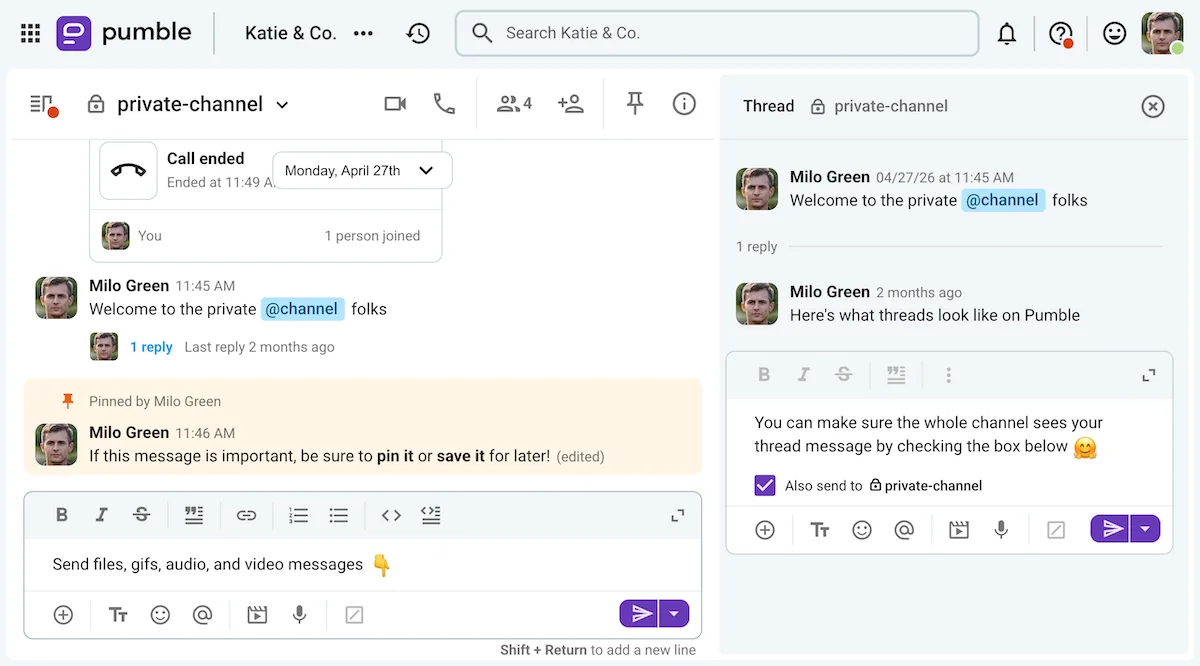
The app lets you onboard an unlimited number of users and send (and later search through) an unlimited number of messages, even on the free plan. On top of that, paid plans unlock many additional features you’ll find useful as your team expands.
Experimente o Pumble gratuitamente
On the other hand, Plaky is a task and project management tool your team can use to keep track of assignments and:
- Create visual task boards for different departments, teams, or projects.
- Create item cards with fields denoting task ownership, due dates, and more.
- Organize boards and tasks into separate groups.
- Share files and comment on different items.
- Customize notifications and tweak your workflows with automations.
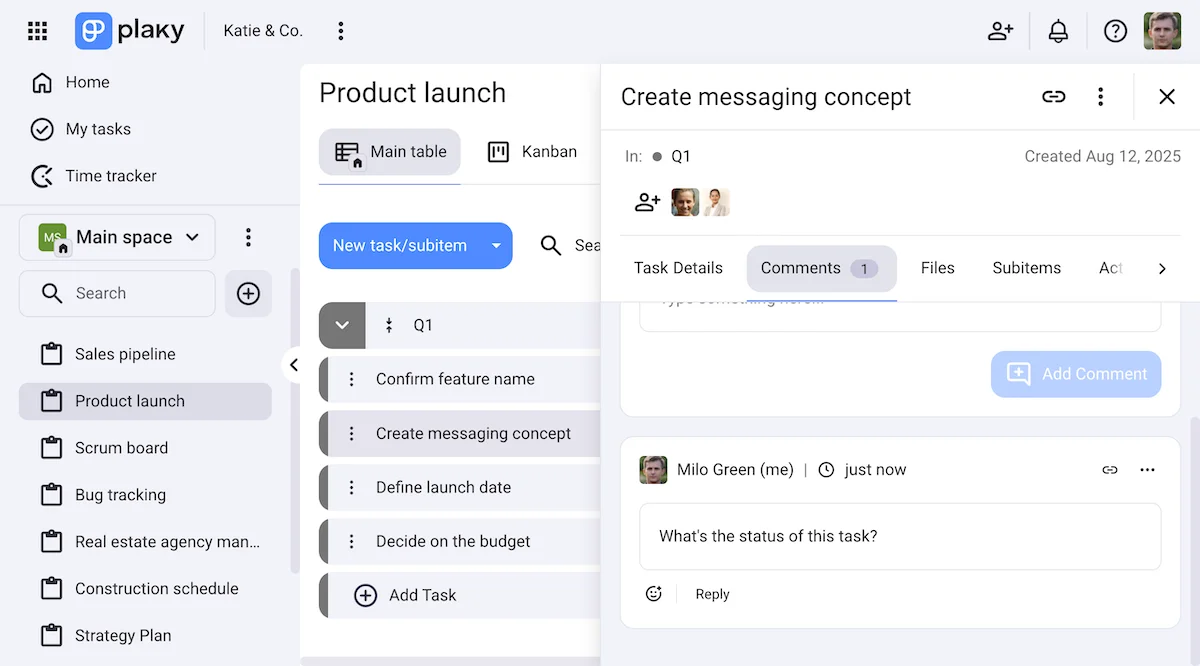
Naturally, both Pumble and Plaky have individual pricing plans, though you can also get them as a part of the CAKE.com Bundle, which also includes the time tracker, Clockify.
Now that you know a little bit about Pumble and Plaky, let’s talk about how the Pumble Plaky integration works.

An overview of the Pumble + Plaky integration
So, how can this integration help you reduce context switching between tools and maintain project velocity?
It’s simple: you and your team will have one less platform to obsessively check throughout the day.
You’re already checking your email and your communication app daily, right?
Well, if that app is Pumble, and you decide to connect it with Plaky, you’ll be able to monitor all of the Plaky items and boards you’re subscribed to directly inside your team communication app.
After connecting the two apps, you can easily customize your notification preferences, as shown below.
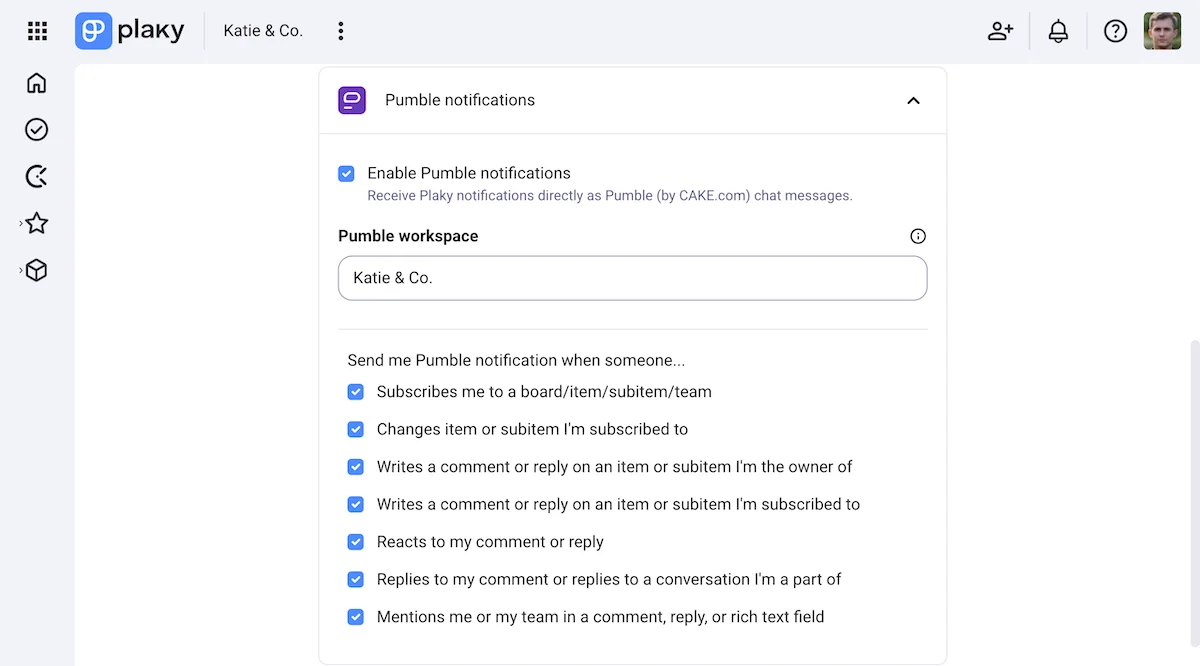
That will allow you to track your tasks and even keep an eye on your team member’s activities without context switching.
When you get a notification you want to follow up on, the app will also show you the link to the specific item you’re looking for, so you won’t have to sift through your boards needlessly.
On top of that, Pumble’s Plaky integration will soon also allow users to turn messages into tasks within the app, further reducing the need for context switching.
But even now, the integration can be used to optimize your workflow. Here’s how.
3 ways to make the most of the Pumble + Plaky integration
If you’re still not sure how connecting your team chat and project management platforms can enhance your workflow, let’s talk it through.
The Pumble Plaky integration lets you:
- Instantly turn chat decisions into concrete tasks.
- Establish task ownership and accountability.
- Maintain project velocity with real-time status updates.
Here’s how you can reap these benefits.
#1 Instantly turn chat decisions into concrete tasks
The worst thing about using completely fragmented tools for communication and project management is the extra time and effort it takes to turn decisions into tasks.
After discussing a task in your communication app, you’d have to log in on an entirely separate platform to start creating a ticket or an item card.
Instead of manually transferring the details between the two platforms, you can simply:
- Mention the person who’s going to be doing the work in the conversation about the task (if it took place in a channel they’re a part of).
- Link the original discussion of the task in the description of the Plaky item you create, for added context.
And, if you don’t know who the task in question should go to, discussing it on a connected app also has its perks.
In the image below, we can see that Milo is confused about who should design the ad campaign visuals. His coworker uses a Pumble thread to share the link to the design team’s Plaky board and explain the assignment process.
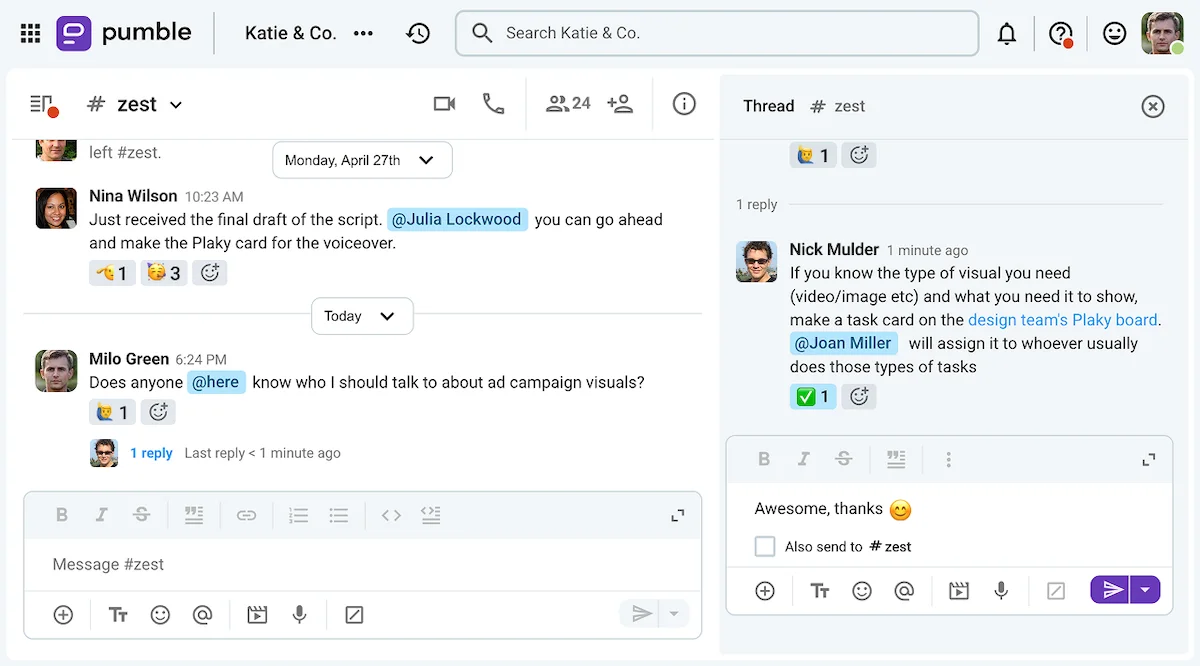
Now, Milo will be able to immediately:
- Create a Plaky task item on the right board.
- Message the mentioned coworker to get answers to any of his follow-up questions.
Any future updates about the card will be shared through the Pumble Plaky integration.
Of course, the process of turning communication into actionable tasks through Pumble will soon become even more intuitive.
After all, the CAKE.com team is actively expanding this integration to allow users to turn Pumble messages directly into Plaky items.
Be there when the update drops
#2 Establish task ownership and maintain accountability
As part of the CAKE.com ecosystem, both tools share a unified CAKE.com account to synchronize user information like emails and profile images across the two platforms.
Consequently, users can easily assign task ownership on Plaky, as long as they already know the assignee’s name and image on Pumble.
If Milo already knew who was usually in charge of visual assets or if he had already spoken to the person on Pumble, he’d be able to more easily assign the task to them on Plaky.
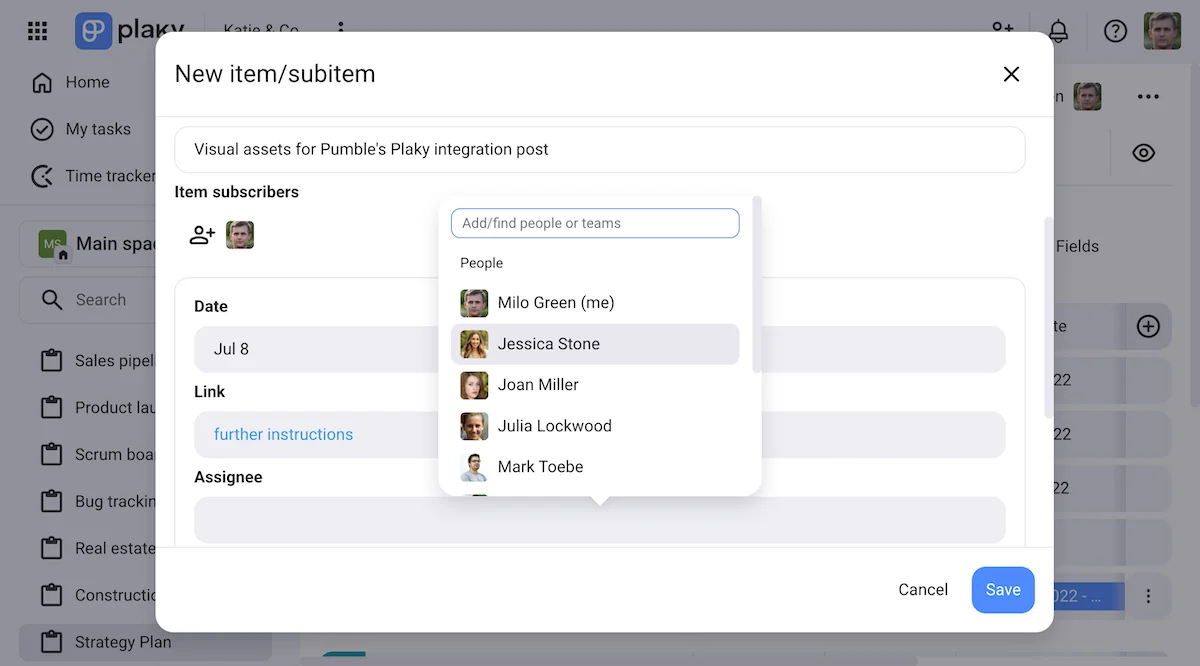
Once a user is attached to a Plaky item as an assignee or a subscriber, they, too, will receive updates through the Plaky integration.
Basically, the integration will notify users of any changes made to Plaky items they are subscribed to via a Pumble message specifying the types of changes that have been made.
On top of that, changes to Plaky items can also be reviewed through the Activity log within the item card, which can help teams maintain accountability and ownership of the tasks they worked on.
For example, if several people are working on a single Plaky item, they can:
- Separate the work into more manageable tasks with subitems.
- Track who made which changes in the Activity log.
- Use status changes and comments to check in.
#3 Maintain project velocity with real-time status updates
Ultimately, project management is all about timing. But, when you’re managing communication and collaboration on cross-functional teams, it can be difficult to keep everyone completely aligned.
In the interest of hitting those deadlines, you may even feel tempted to micromanage everyone involved by:
- Calling for daily sync meetings
- Checking in through Pumble DMs and channels
- Checking on their progress on Plaky
But, with the Plaky integration, you won’t need to do all that.
After all, the Pumble Plaky integration can help you let go of the need to constantly double check the status of the items you’re waiting to hear about.
When there’s a status change on the Plaky items you’re subscribed to, you’ll hear about it through Pumble — which is the platform you’ll be most likely to check throughout the day, anyway.
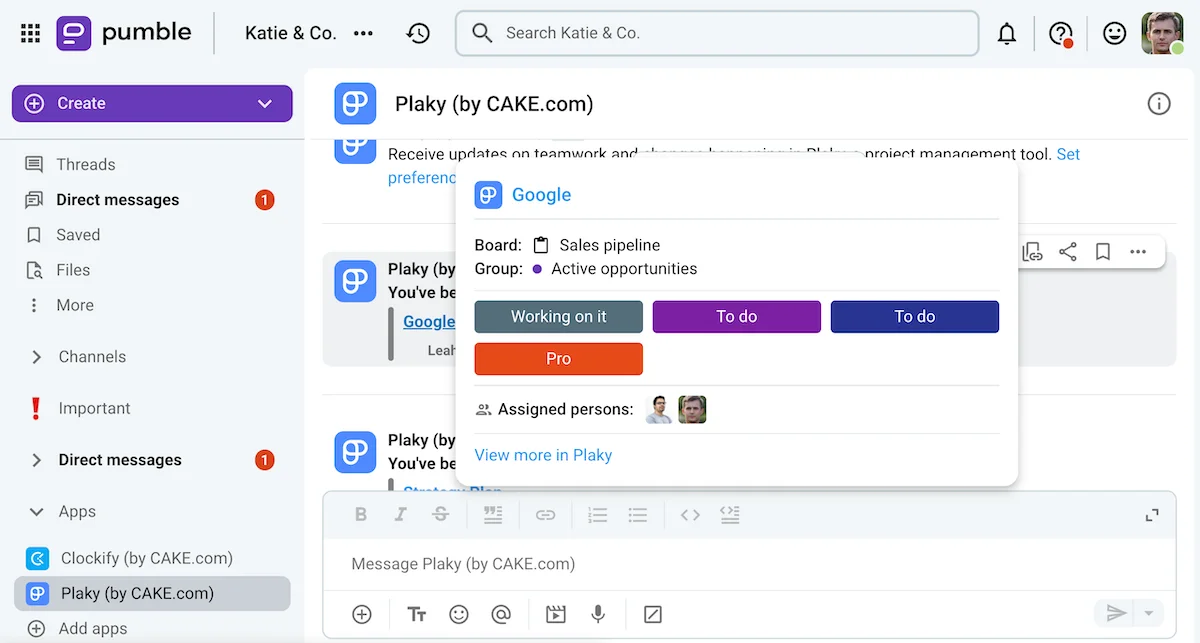
Upon seeing a notification from the Plaky integration, you’ll be able to:
- Hover over the blue text to see more information about the item in question.
- Click on the blue text to jump to that item on Plaky, if necessary.
This eliminates the need for context switching and sync meetings, letting your team focus on delivering great results without the added pressure.
Go to your Plaky items from Pumble
Complete the CAKE.com ecosystem with Clockify
What’s better than one integration that can help you reduce context switching?
How about two?
As we have previously established, Pumble and Plaky are actually two thirds of the CAKE.com ecosystem, with the final third being the world-renowned time tracking app, Clockify.
In addition to being a dependable time tracker, Clockify by CAKE.com also lets you:
- Submit and approve timesheets.
- Set budgets and hourly rates for different projects.
- Visualize and block out your time with a calendar view.
- Track time spent on different apps, websites, and documents.
- Set up a kiosk clock-in device to track employee work and break time.
- Analyze and export data with reporting features.
Just like Pumble and Plaky, Clockify is a completely self-sufficient app that doesn’t actually need the other parts of the CAKE.com ecosystem to function.
Yet, there are many benefits to connecting these 3 productivity tools.
For one, Plaky’s Clockify integration lets you start your time tracker within Plaky, making time tracking just a bit more convenient for your team.
On the other hand, Clockify’s integration on Pumble lets you:
- Get time tracking reminders when you track less than the required number of hours.
- Approve or deny your team members’ PTO or sick leave requests.
- See time off and timesheet notifications.
- Receive scheduled reports.
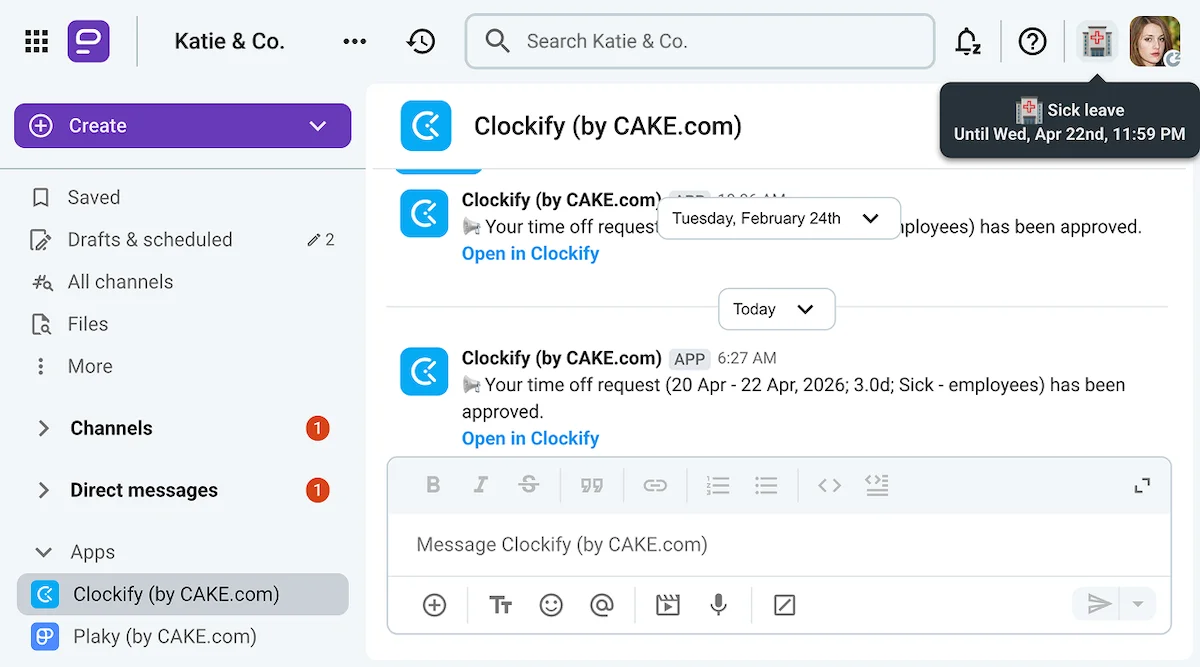
With these two integrations, Pumble becomes your main hub of work activity, significantly reducing the need for context switching.
You’ll just drop by, take a look at the latest notifications from the Plaky and Clockify integrations, and get back to your work before you know it.
🎓 DICA PROFISSIONAL PUMBLE
Interested in learning more about Pumble’s Clockify integration? Check out this guide:
Build a connected digital headquarters with the Pumble Plaky integration
At the end of the day, using a disconnected team collaboration software ecosystem can make you and your team waste precious time and energy.
Having to navigate across different platforms in search of answers or updates takes focus away from what really matters.
But, creating a sense of cohesion and connection between your core tools doesn’t have to be so complicated.
You just need to find a suite of tools that was built to make your work easier — and you just did!
The CAKE.com Suite gives you everything you’ll need to communicate, collaborate, and track your team’s activities — and it all starts with Pumble.
Once your team is all set with their CAKE.com accounts, connecting Pumble to Plaky and Clockify will let you stay up to date without adding more tabs to your rotation.
So, if you’re ready to build a connected digital headquarters from the ground up…
Como avaliamos esta publicação: Nossos escritores e editores monitoram as postagens e as atualizam quando novas informações ficam disponíveis, para mantê-las atualizadas e relevantes.