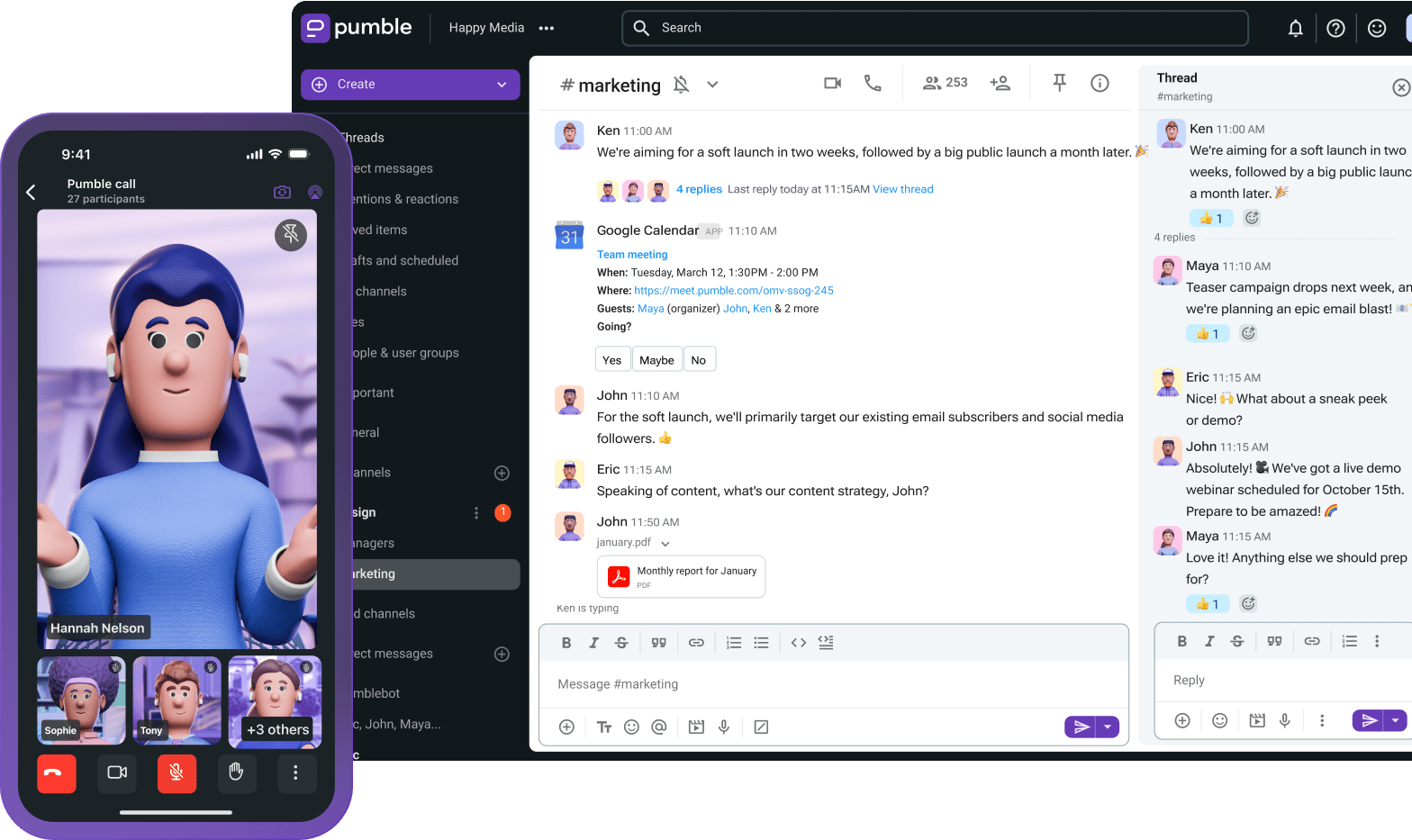
Pumble’s Enterprise plan is built for organizations that need tighter control, stronger protection, and a smarter way to manage communication in large teams.
So, if you’re handing strict compliance requirements or managing remote teams, read on to learn what you get with the Pumble Enterprise plan and how to use it.
- A growing organization needs strong protection and massive storage and communication capabilities. Pumble’s Enterprise plan offers exactly that — and so much more.
- For just $6.99 per user per month, Pumble’s Enterprise plan covers all your enterprise needs, including data protection, tighter access control, and unlimited integrations.
- With Single Sign-On and custom data retention, the Enterprise plan lets you centralize user authentication and maintain a cleaner, safer, and more organized workspace.
- The Pumble Enterprise plan comes with 100 GB of storage per seat, giving your teams plenty of room to work without constantly clearing out files.
- Enterprise Pumble customers receive dedicated support designed for faster response times and quicker issue resolution when critical problems show up.
Beyond business: Why large organizations choose the Pumble Enterprise plan
First, let’s take a closer look at what exactly urges companies to take the next step with Pumble’s Enterprise plan.
As companies grow, communication naturally gets more complicated. More people join the workspace, extra tools get plugged in, and sensitive information starts floating around every day.
Who has access to what?
How do you know which system you’re in charge of?
Is all of your data safe from internal and external security threats?
At that point, basic chat features don’t cut it anymore.
That’s where the Pumble Enterprise plan comes in.
While the Business plan already gives teams advanced collaboration and management features, the Enterprise plan takes things a step further by focusing on:
- Security,
- Compliance, and
- Centralized access control.
The Pumble Enterprise plan is designed for organizations that can’t afford to leave security gaps open or waste time putting out fires caused by scattered communication.
It allows large organizations to stay compliant and keep everything running smoothly from one place.
And, let’s not forget that Pumble’s pricing is notoriously fair — the Enterprise plan is just $6.99 per user per month (billed annually).
Start your free Enterprise trial
From advanced management to compliance and centralized security
Pumble’s Business plan is great for growing teams that need better organization and collaboration tools.
Some of its most valuable features and benefits include:
- Channels, direct messages, and threads for organized communication,
- Unlimited message history and users for creating your digital HQ,
- Audio and video conferencing (for up to 100 members) with screen sharing and meeting links,
- Unlimited integrations for streamlining your workflow,
- 24/7, 100% human support,
- User groups for better collaboration across departments and projects,
- Guest access for improved external collaboration, and
- Meeting recording to keep all teams in sync.
But what do you do once your company starts scaling across departments or even countries and the stakes inevitably get higher?
As an enterprise-level organization, you’ll often deal with strict compliance requirements for large volumes of sensitive data. Combine this with complex user roles and security risks tied to employee access (especially for global teams), and you get the idea why many organizations decide to move up to Enterprise.
The Pumble Enterprise plan helps your Security teams better protect your company ahead of time. With benefits including centralized authentication and custom data policies, it gives you tighter control over your workspace.
Let’s break it all down.
Security-first: Protecting your corporate data
When your business handles confidential conversations, financial records, or customer information, security is non-negotiable.
Let’s explore how Pumble’s enterprise functionalities keep your sensitive data under lock and key while still making collaboration easy for employees.
Single sign-on (SSO): Centralizing user authentication
Probably one of the biggest security headaches for large organizations is managing employee logins.
Let’s be honest, people tend to reuse weak passwords and forget their credentials. Even worse, they can continue accessing systems long after leaving the company. Handling employee logins without centralized authentication is a disaster waiting to happen.
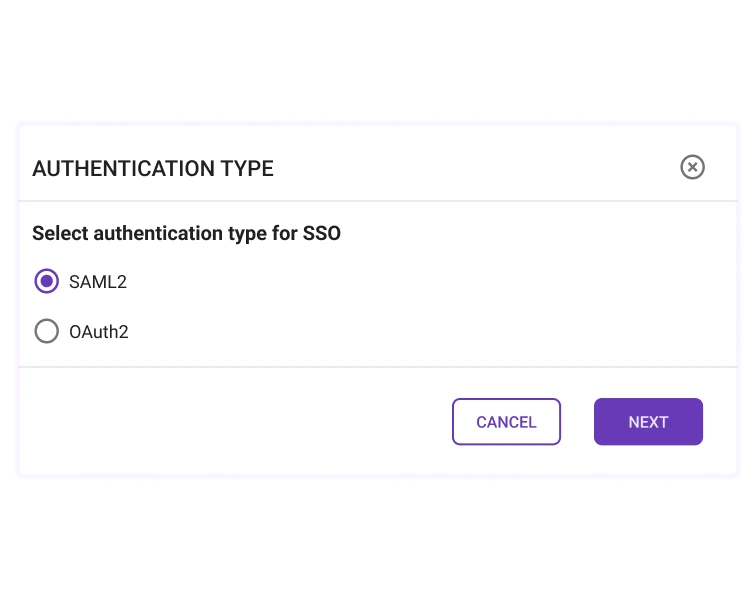
The Pumble Enterprise plan supports Single Sign-On (SSO), allowing employees to securely log in through a centralized identity provider instead of juggling multiple passwords.
Put simply, the SSO helps you reduce the risk of unauthorized access by applying stronger authentication policies.
The Pumble SSO configuration lets you simplify login management for employees. And, when employees leave the company, you can quickly remove their access to make sure no sensitive data leaves your workspace.
So, instead of patching together different login systems, your Security teams can keep everything under one roof.
Data encryption and advanced permissions
You don’t want to let every employee have access to every conversation or file in your Pumble workspace.
Large organizations often need layered permissions across departments and teams as well as for external partners. The Pumble Enterprise plan makes it easier to control who can see, share, or manage sensitive information.
The Enterprise plan comes with advanced admin permissions. As a workspace owner and admin, you can:
- Manage user access,
- Assign permissions,
- Control data visibility, and
- Enforce Multi-Factor-Authentification (MFA).
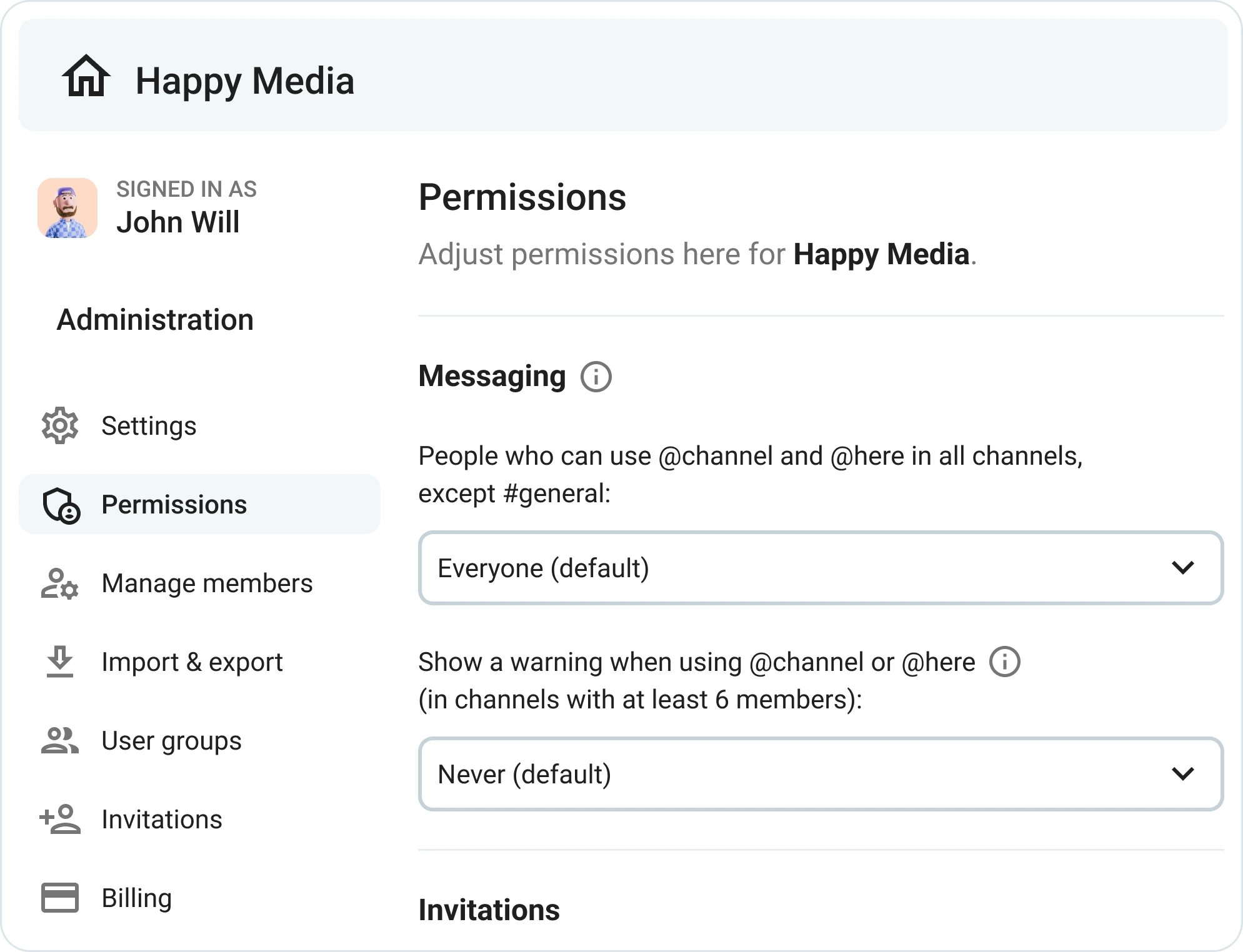
Here are some of the key security permission features available in Pumble Enterprise:
- In-transit encryption: All messages and files transfers between users and Pumble servers are protected with TLS encryption.
- At-rest encryption: Stored data, including message history, workspace settings, and shared files, is encrypted on Pumble’s servers.
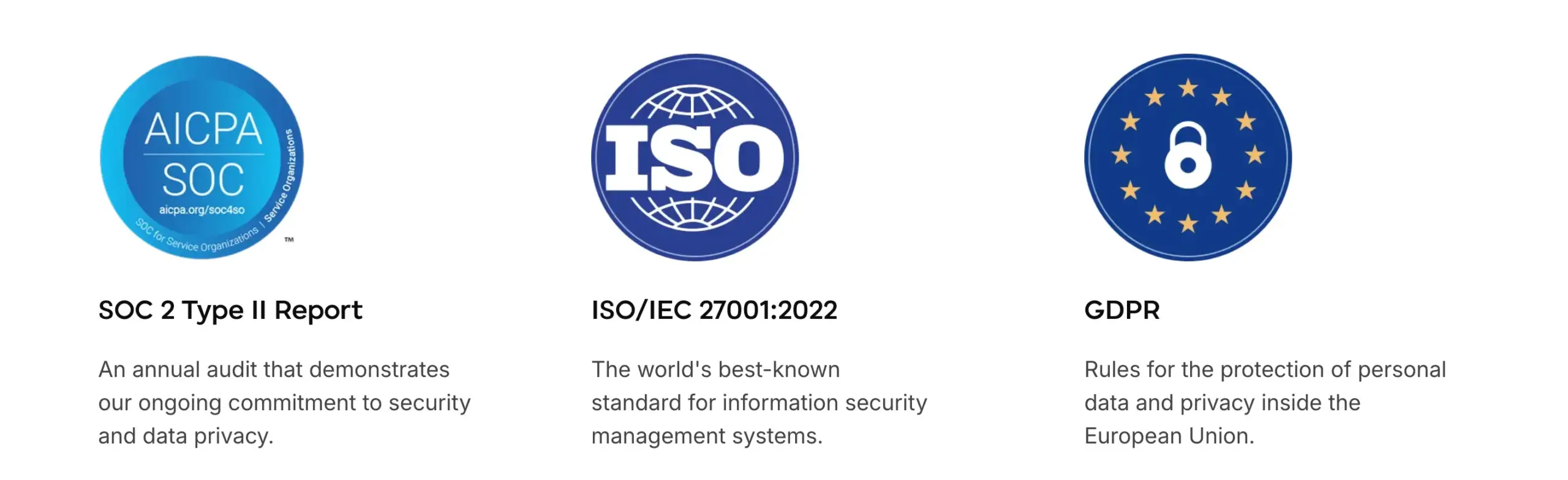
- Security compliance certifications: Pumble maintains ISO/IEC 27001:2013 and SOC 2 certifications, meaning its security practices are independently audited and verified.

Compliance and data governance
If you’re in industries like healthcare, finance, or legal services, compliance rules are part of your everyday business.
And when regulations come knocking, you need to know exactly:
- Where your company data is stored,
- How long it’s kept, and
- Who can access it.
Let’s get an in-depth look into how Pumble Enterprise answers these questions for you.
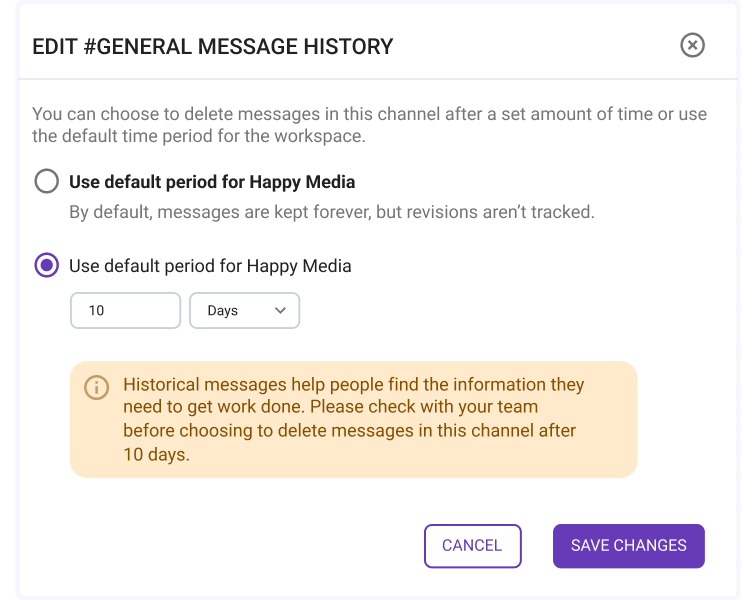
Custom data retention
The industry you’re in dictates how you’ll store your company data.
Some organizations must keep records for years. Others need to automatically delete messages after a specific period to stay compliant with internal policies or external regulations.
No matter the compliance requirements in your industry, the Pumble Enterprise plan gives you the tools to stay in control. It lets you create custom data retention policies, so you can decide exactly how long messages and files remain stored in your workspace.
Pumble’s data retention policy thus helps your organization meet industry compliance requirements and minimize legal and security risks.
By reducing unnecessary data storage, custom data retention also helps you maintain cleaner and more organized workspaces.
So, instead of manually cleaning things, you can automate retention policies and keep everything safe behind the scenes.
Scalability for the global workforce
As your business grows, so do your communication needs.
More employees require more meetings, which means more integrations and more shared files.
If your communication platform is not built for enterprise-scale collaboration, it’s bound to break under pressure.
The Pumble Enterprise plan is built differently. It won’t leave you high and dry when stakes are high, as it’s designed to grow alongside large organizations without missing a beat.
Massive storage and unlimited integrations
First things first, Enterprise is designed for large teams that deal with huge amounts of information every day.
Naturally, storage space disappears quickly in such teams, as it’s split between enormous amounts of project documents, contracts, design files, and reports.
The Pumble Enterprise plan saves the day with 100 GB of storage per seat, giving teams plenty of room to work without constantly clearing out files.
On top of that, organizations get unlimited integrations, making it easier to connect existing workflows and third-party tools without hitting frustrating limits. So, in addition to the integrations available in lower-tier plans (such as Gmail and Google Drive), the Pumble Enterprise plan opens the door to tools like Zendesk and Zoom.
While Pumble keeps expanding its list of native integrations, it also allows you to build custom add-ons for even greater flexibility. Moreover, you can explore the CAKE.com Marketplace — a growing collection of apps, integrations, and automations created and tested by CAKE.com.
To make collaboration even smoother, you can connect Pumble with Plaky, a project management tool built within the same CAKE.com ecosystem. Since the two apps work seamlessly together, you can instantly receive updates about task changes, comments, and item subscriptions directly in Pumble.
If you want an even more complete workflow, you can also integrate Clockify with Pumble and Plaky. This will add time tracking into your Pumble workspace, helping you manage your organization’s productivity, communication, and projects from a single space.

Enterprise-grade meetings
As a large organization, you need reliable communication during company-wide meetings, onboarding sessions, or cross-departmental updates.
With Pumble’s Enterprise plan, you get group video calls with up to 100 members, making it easier to bring entire teams together without switching between multiple platforms.
Pumble video conferencing is perfect for any occasion — from hosting global all-hands meetings to daily planning sessions with smaller teams.
Starting a meeting is simple — team members can jump into a video call from a channel or a direct message with just one click. This makes spontaneous problem-solving sessions and scheduled meetings much faster and more convenient.
For smoother collaboration during calls, Pumble also offers screen sharing, allowing teams to present reports or review project updates in real time.
You can also record and share your Pumble meetings for more convenient record-keeping. Combined with Pumble’s signature unlimited messaging history and file sharing inside the same workspace, this lets your teams keep all meeting-related communication in one place instead of scattered across multiple apps.
Like all Pumble features, these functionalities are intuitive and easy to use.

And since Pumble Enterprise is built for growing organizations, your meetings remain stable, organized, and accessible as your company scales.
Priority support: Fast resolutions for large teams
When communication tools go down in a large organization, productivity can grind to a halt.
Being an Enterprise Pumble customer means never being left to fend for yourself when you’re faced with a question or an issue. You receive dedicated 24-hour support designed for faster response times and quicker issue resolution if a critical problem pops up.
You don’t have to wait in long support queues. As a Pumble Enterprise member, you’ll get guaranteed help from dedicated support agents who understand the urgency of enterprise-level issues.
Most importantly, you can rest assured that all your issues will be addressed and resolved by an actual human, and not a bot posing as a customer support agent.
If you run a large team operating across time zones, you understand how this kind of support can make all the difference when time is of the essence.
Real-world Enterprise use cases
By now, you understand that the Pumble Enterprise plan is especially useful for organizations that need stronger security and compliance.
Let’s take a look at two examples of how different organizations might use the Enterprise plan to secure their business communication and achieve enterprise team chat security.
Regulated industries needing strict data governance
Organizations such as healthcare providers, financial institutions, legal firms, and government organizations often have strict rules around data retention and access control.
Pumble keeps these organizations compliant and their communication secure with features such as:
- Custom retention policies — to stay compliant,
- Advanced permissions — to manage sensitive information, and
- Centralized authentication — to manage employee log-in.
Global teams enforcing security through SSO
Does your company operate with distributed teams?
Then you’re probably struggling to manage access across multiple offices and departments.
Pumble’s Single Sign-On (SSO) helps your global organization standardize authentication and simplify onboarding for new hires.
Thanks to SSO, when employees leave your company, you can quickly remove their access.
With SSO, global organizations can easily maintain consistent security policies across the entire company.
FAQs about Pumble’s Enterprise plan
Does Pumble support Single Sign-On (SSO)?
Yes. The Pumble Enterprise plan supports SSO, allowing organizations to centralize authentication through their preferred identity provider for stronger access control and improved security.
How does Pumble handle data retention?
Pumble Enterprise users can create custom data retention policies that determine how long messages and files are stored. Organizations thus meet industry compliance requirements and manage company data more effectively.
What is the meeting limit on Pumble Enterprise?
The Enterprise plan supports group video calls with up to 100 members, making it suitable for larger team meetings, company-wide updates, and cross-department collaboration.
Scale with confidence using Pumble Enterprise
As your organization grows, so do the challenges that come with managing communication, security, and access across teams.
Standard collaboration tools may work for smaller teams, but large organizations need more control, stronger protection, and a centralized way to manage everything.
That’s where the Pumble Enterprise plan comes in. Advanced security, compliance-focused features, and centralized administration built on top of everything included in the Business plan, make Pumble Enterprise the stability and flexibility large organizations need to keep work moving smoothly.
Instead of juggling disconnected tools, you can bring your teams together in one secure digital workspace — Pumble by CAKE.com.
Simplify collaboration, strengthen security, and support your company growth with confidence.
Comece a usar o Pumble by CAKE.com
Como avaliamos esta publicação: Nossos escritores e editores monitoram as postagens e as atualizam quando novas informações ficam disponíveis, para mantê-las atualizadas e relevantes.