Customize Sections in Sidebar
Create custom sections for channels Move channels or DMs (direct messages) to custom sections Customize your whole sidebar
Channel order #
Custom sections #
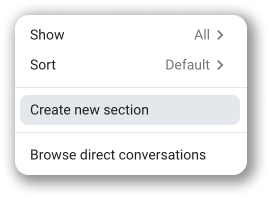
- Click on the 3 dots menu next to the Channels or Direct messages section in the sidebar
- Choose Create new section
Enter name of the section
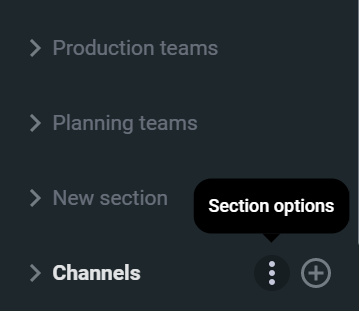
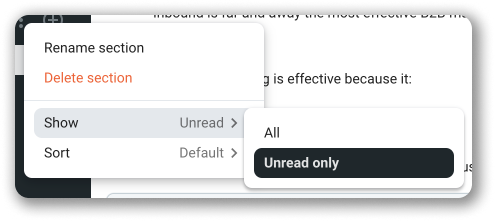
- Click on the 3 dots menu next to the Channels
- Hover over Show option
- Choose Unread only
Moving channels/DMs to sections #
Do the right-click - Hover over Move channel / Move conversation
Choose the section from the dropdown
Moving channel/DM to a non existing section: #
Do the right-click - Hover over Move channel / Move conversation
- Choose Move to new section from the dropdown
- Enter section name in CREATE NEW SECTION pop-up
Renaming and deleting sections #
To rename / delete section, simply press a right click button on the section’s name and choose Rename / Delete.
In the new pop-up you can type a new name and then confirm it by clicking on a purple Rename / Delete button.
Ordering sections #
Use cases #
For direct messages you can, for example, create a section named Developers, where you can place your private chats with every user that is a developer. When you want to chat with some of the developers in private chat, this will help you easily find a specific person.
For channels you can, for example, create a section Planning teams where you can place all the channels that are used for planning activities for your projects. When you want to post something in one of those channels, you will be able to easily find the channel.
Customize your sidebar #
Click on More in the left sidebar 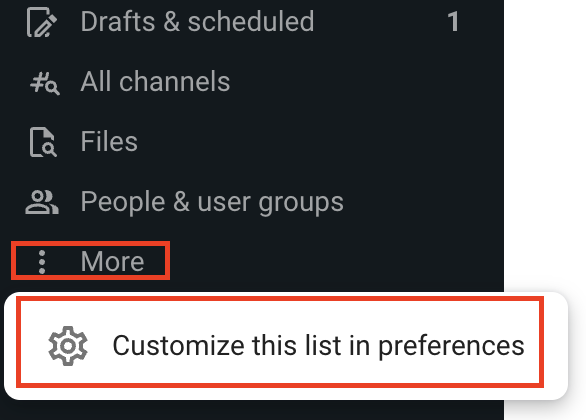
Select Customise this list in preferences
Click on your profile icon in the top right corner Select Preferences - Open Sidebar section in Preferences
Tick the checkboxes to choose what you want to include in your sidebar
Unchecked boxes (those you choose not to display in the sidebar) will be accessible via More dropdown in the left sidebar.