
Your sensitive business information is at risk.
But, the good news is, keeping your business communication private doesn’t have to be so difficult.
After all, secure business communication is all about having a system in place that makes the act of transmitting messages and data safe from eavesdropping and interception.
So, how do you know if you’ve already achieved secure enterprise communication or if that’s something you need to work on?
Answering some simple questions honestly should help you find out — so, let’s start there.
- Practicing secure business communication means having a system in place that makes the act of transmitting data safe from eavesdropping and interception.
- The core pillars of secure business communication include encryption, authentication, integrity, and non-repudiation.
- The best way to protect your business communications and data is to stop using risky means of communication like email, texting, and consumer-grade instant messaging apps.
- If you’re on the hunt for secure communication tools for companies, look for ones that have internationally recognized security certifications as well as security features like encryption, authentication options, and customizable permission settings.
- To further strengthen your security, you can set up a clear communication policy, control access to information, and train your employees to recognize potential threats.
What makes communication secure: A checkbox
Before we go any further into this topic, it might be worth taking a moment to examine the current state of your business communication practices.
Ask yourself the following questions:
- Who is able to access the communication you exchange with your coworkers or external business collaborators?
- Can you be certain of the identity of the people you are communicating with?
- Is it possible for anyone to edit the information and data you are sharing internally or externally?
Even if you want to confidently give the “correct” answers to these questions, take a moment to consider the truth of the matter.
If you respond honestly, these answers will show you whether you have truly achieved the core pillars of secure enterprise communication, which are shown in the table below.
| ELEMENTS OF SECURE COMMUNICATION | DEFINITION |
|---|---|
| Data encryption | Makes sure only you and the intended recipients of your message can access the transmitted information. |
| Identity authentication | Ensures that the people on either side of the communication channel are who they claim to be. |
| Systemic integrity | Secures the communication network and storage tools, to ensure data remains unaltered. |
| Non-repudiation | Provides proof of delivery and origin through digital signatures and time stamps. |
These are the core components of secure business communication.
But, even though some communication platforms are built on these principles, others are naturally more risky.
Keep your messages safe with Pumble
Stop using risky methods of communication
If you want to keep your business communication private, you should stop using risky methods of communication and switch to a more secure communication platform.
But, how do you know which platforms you should avoid?
Well, email, texts, and consumer-grade instant messaging apps all pose significant security risks for your business, making it vulnerable to:
- Cyber attacks and malware
- Unauthorized access
- Data breaches
Using email as your primary communication platform makes your organization particularly vulnerable to phishing attacks, which are the most common form of cybercrime.
In 2025 alone, the FBI’s Internet Crime Complaint Center received more than 191 thousand phishing reports and almost 25 thousand business email compromise complaints.
Though there were significantly fewer business email compromise reports, this type of crime had devastating financial consequences, resulting in more than $3 billion in damages this past year.
How does that happen?
It’s simple: all it takes is someone in your company clicking on a link or downloading an attachment they got in an email or a text.
Targets usually believe that the sender is a coworker or a client — someone they already have an established professional relationship with.
Of course, faking the sender of an email or a text is much easier than infiltrating a more secure communication platform, such as your internal communication app.
Then again, even employee communication apps can be compromised if they’re not built on a solid foundation.
With that in mind, let’s talk about how you can tell whether the solution you’re using is a truly secure business communication app.

How to choose a secure communication platform
When picking a secure business messaging app to switch to, the first item on your security checklist should be security certifications.
These exist to assure consumers that the SaaS company that makes their team communication app is compliant with the security rules and regulations of a certain industry.
However, certifications should only be used as a starting point for establishing whether an app is safe to use.
Beyond those, you should also consider the security measures listed in the table below.
| MEASURE | EXAMPLE | WHAT IT MEANS |
|---|---|---|
| Security certifications | ISO 27001 | An international standard certification for information security management systems |
| SOC 2 | An annual audit certification for System and Organization Controls | |
| Encryption | Encryption at rest | The encoding of inactive data stored on physical or cloud storage to protect against theft, loss, or unauthorized access |
| Encryption in transit | The encoding of data while it moves between senders and receivers to protect it against hacking and interception | |
| Authentication | Multi factor authentication (MFA) | A security process requiring users to provide 2 or more verification factors while logging into their account |
| Single Sign-On (SSO) | A process allowing users to access multiple software systems after logging in with a single set of credentials | |
| Access permissions | User roles | The ability to group users and adjust their security settings in bulk |
| Messaging and posting permissions | The ability to choose which users can message others or post within a platform or in specific channels | |
| Ability to invite new members | The ability to choose which users can give new users access to the secured communication platform | |
| Security practices | Monitoring | The ability to track and protect corporate communications through audit logs and access controls |
| Penetration testing | Cyberattack simulations for the purpose of evaluating the efficacy of security measures |
You can use this table as a checklist to quickly evaluate the communication platform you’re currently using.
If that process makes you realize that you need a more secure business communication app, there are plenty of worthy options on the market.
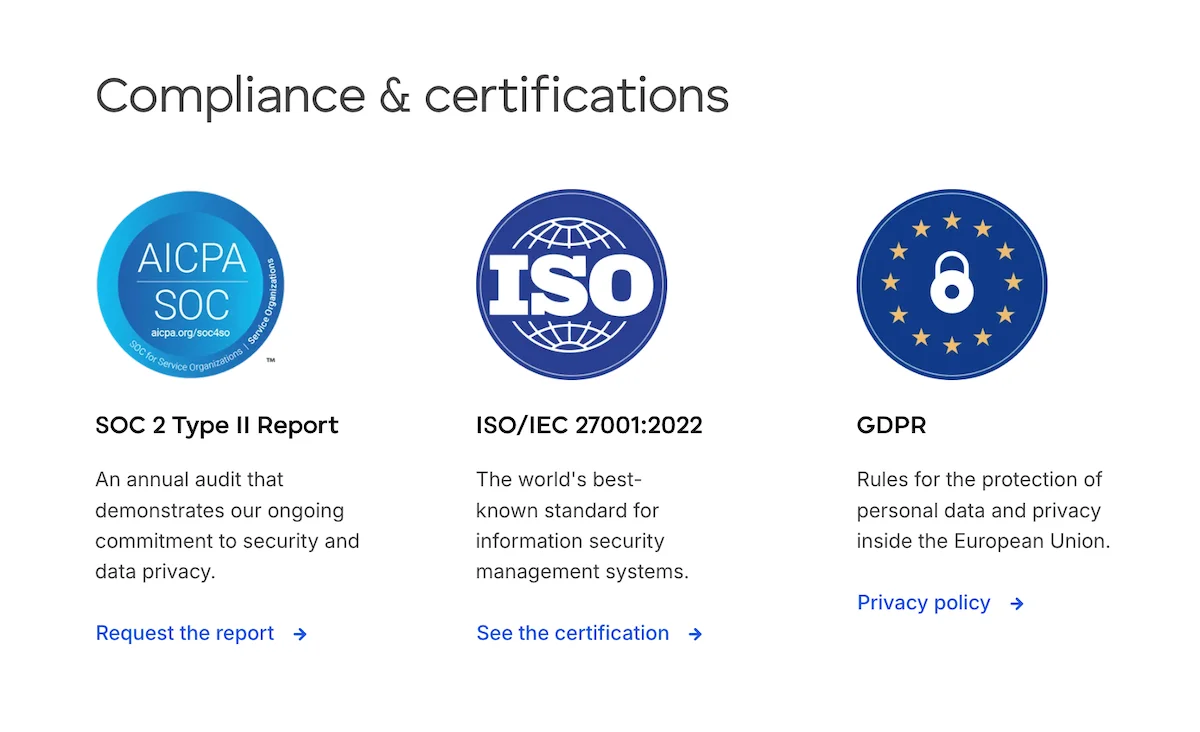
For what it’s worth, the team communication app, Pumble by CAKE.com, meets all of these criteria — and it has the certifications to prove it.
Communicate securely with Pumble
How to keep business communication private: Best practices you can implement
Using an encrypted business communication platform will certainly give you more privacy than using email or a consumer-grade instant messaging app.
However, there are other things you can do to protect your data, including:
- Having a clear communication policy
- Controlling access to sensitive information through permissions
- Training your team to handle security threats
Let’s talk about how to implement these security measures.
#1 Set a clear communication policy
If you’re running a small or medium-sized business, you might not think that you need to have a formal communication policy.
But, even smaller businesses can benefit from having guidelines outlining:
- Which communication channels should be used in which circumstances (for example, you might want to use private channels for some internal discussions and video calls for more sensitive topics).
- How different information and data is stored (will you rely on commercial cloud storage, set up self-hosted cloud storage, or opt for physical storage).
- Which apps or services should not be used due to security concerns (be sure to provide secure replacements for unapproved apps).
Having answers to these basic questions will prevent confusion and allow your employees to prioritize security as they work.
And, of course, you’ll always be able to edit or expand your original communication policy as new questions emerge.
Grow your business with Pumble
#2 Control access with authentication options and permissions
Simply choosing a secure business communication app that has authentication features and permission settings won’t mean anything unless you’re actively using those features.
To begin with, you can have your employees use Multi-Factor Authentication (MFA) and/or Single Sign-On (SSO) while logging into your internal communication software.
Most team communication apps that have SSO options let users log in through their Google, Microsoft, or Apple accounts.
In addition to having those options, Pumble users can also create a CAKE.com Account, which is its own form of SSO. These accounts can be used to log into Pumble as well as the rest of the CAKE.com Suite, which includes:
Strengthening your authentication practices through these options will enhance your security by making sure the people who are logging into your communication platform are who they claim to be.
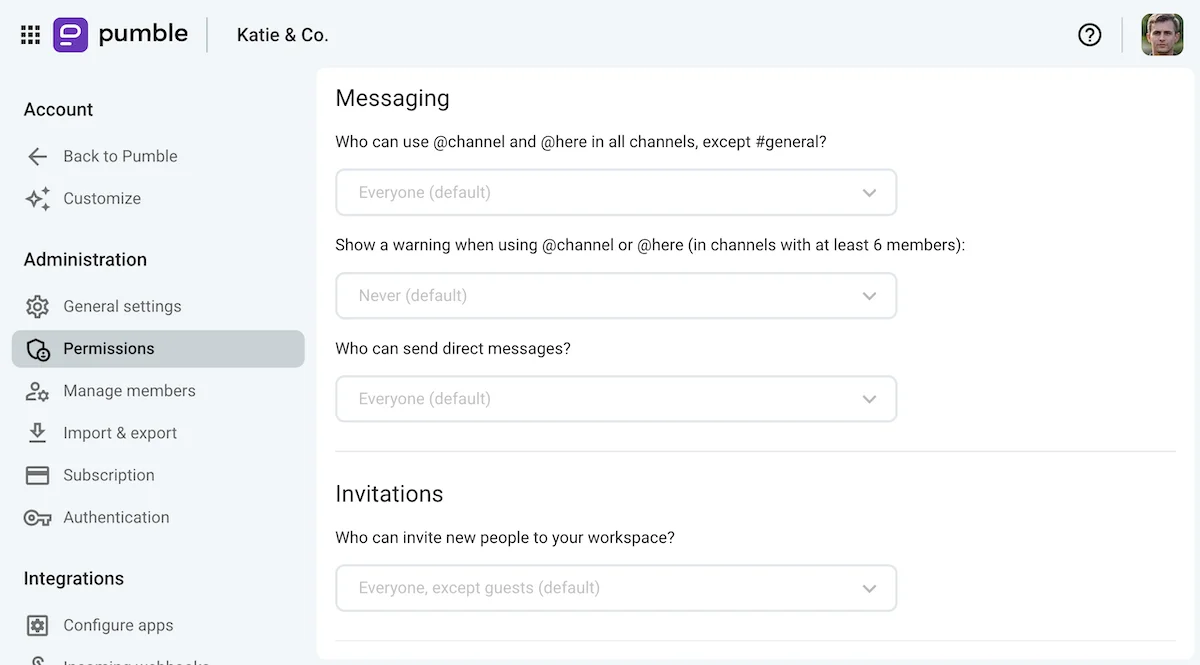
Once that is no longer in question, you’ll be able to fine tune your security settings through user groups and permissions settings, which let you control:
- Who can send messages and in which channels.
- Who can send direct messages.
- Who can invite new members into the workspace.
Explore Pumble’s permission settings
#3 Train your team to recognize security threats
Ultimately, most security threats can be detected and deflected if your workforce is trained to recognize them.
To achieve that, you can:
- Host educational workshops teaching employees how to recognize threats and what to do if they fail to do so on time.
- Have your employees watch videos and take tests to make sure their cybersecurity knowledge is up to date.
- Conduct internal phishing simulations to keep your employees on their toes.
Though having a security department can make implementing these measures easier, you can still educate your team by relying on online resources or hiring third-party contractors to run risk assessments.

Frequently asked questions about secure business communication
Looking for some quick answers to somewhat complicated security questions?
We’ve got you covered.
What is secure business communication and why does my business need it?
Securing your business communication is the practice of relying on business communication encryption and other measures to protect your internal data and communications from unauthorized access.
Without these security measures, your messages and data are at risk of being leaked or even stolen, which can even result in financial losses for your business.
Ensuring security and privacy should be the top priority for companies operating across all sectors and industries, but especially those whose work involves people’s financial information or other confidential data.
What are the 4 elements of secure communication?
The 4 elements of secure communication are:
- Encryption — making sure your data can’t be accessed by third parties at rest or in transit
- Authentication — making sure the people participating in the communication process are who they claim to be
- Integrity — using secure tools to exchange and store information
- Non-repudiation — providing proof of message delivery and origin
What encryption methods protect business communications?
The most notable encryption models used by business communication platforms are:
- TLS (Transport Layer Security), which ensures that all messages are encrypted in transit (while the message is being sent).
- End-to-End Encryption (E2EE), which makes it so only the sender and the receiver can decrypt the messages being exchanged.
How do I keep business communication private on the tools my team already uses?
You can make the most of the tools you have at your disposal by:
- Using authentication features like Multi-Factor Authentication or Single Sign-On
- Adjusting posting permissions and making sure only certain people can grant new people access to your platform
- Making certain channels private to keep sensitive information away from prying eyes
However, if the tools you’re using are more prone to cyberattacks, such as email or consumer-grade instant messenger apps, it’s only a matter of time before your messages and data become compromised.
What are the risks of using consumer-grade apps for business communication?
Using consumer-grade apps for business communication leaves you more susceptible to accidental data leaks and cyberattacks alike.
On top of that, depending on the industry you work in, you may be obligated to use communications systems that are compliant with certain HIPPA, FINRA, or other similar regulations.
Using consumer-grade tools that don’t have these certifications can lead to failed audits and regulatory fines.
How can I ensure communication compliance within my organization?
Getting a secure business messaging app and training your team to recognize and respond to potential threats should go a long way towards making your company compliant according to international security standards.
However, depending on your industry, you may have to get more specialized certifications.
For example, financial companies and healthcare providers have to be compliant with FINRA and HIPPA regulations, respectively.
Getting your business certified according to those standards usually goes beyond getting a secure communication app like Pumble.
On the other hand, if your business handles EU resident data, you also have to be compliant with EU laws like the General Data Protection Regulation (GDPR).
So, make sure to check what specific certifications your company needs, as your compliance requirements will likely depend on your industry and location.
What should I look for when choosing a secure communication platform?
When choosing a secure communication platform, use the following checklist:
- Does the app have internationally recognized security certifications like ISO 27001 and SOC 2?
- Does the app encrypt messages at rest and in transit?
- Does the app have authentication options like Multi-Factor Authentication or Single Sign-On?
- Does the app let you control access permissions and the ability to invite new members?
- Do the makers of the app consistently evaluate the security measures of their product through rigorous pen-testing?
Enjoy secure business communication with Pumble by CAKE.com
At CAKE.com, security isn’t just a checkbox item — it’s a fundamental aspect of our identity.
We adhere to strict security protocols and invest in the ongoing training and development of our personnel to ensure that Pumble remains a safe environment for your business communication.
As a result, Pumble:
- Meets ISO 27001 and SOC 2 compliance requirements.
- Encrypts your messages and data at rest and in transit.
- Offers different authentication options, including Multi-Factor Authentication and Single Sign-On.
- Lets you create user roles and customize permissions for all users, certain groups, and within specific channels.
- Undergoes continuous monitoring under the watchful eyes of our team of security experts.
Experience the peace of mind that comes with secure communication and join thousands of organizations worldwide who trust us to protect their data.
And, if you’re looking for more ways to improve your productivity with secure business tools, check out the CAKE.com Productivity Bundle.
Apart from Pumble, you also get the project management app, Plaky, and the industry leader time tracker Clockify.