
In the past, asking for sick leave would have been done via email or even a phone call.
However, both of those options require energy we may not have when we’re feeling ill.
With that in mind, learning how to say you’re not feeling well professionally and succinctly is the best way to protect your work-life balance, while also ensuring that your team can keep working without disruption.
So, what is it you need to communicate when asking for sick leave and how can asynchronous communication apps and sick leave time tracking tools help you achieve those results?
Let’s find out.
The new etiquette: Professionalism in the digital age
Changing the way we communicate at work has changed the way we ask for sick leave.
Though some things have changed, others have remained the same.
For example, many employees still feel pressured to work even when they can’t perform at full capacity, leading to instances of presenteeism.
Now, you’d think this issue would be less prevalent in the era of hybrid and remote work. After all, employee absences may be more noticeable in organizations that prioritize on-site work.
Yet, as more organizations transitioned to hybrid and remote work, many employees still found it difficult to disengage from work when sick, as Edward Hones, a workers’ rights attorney, noted:

“Ever since the rise of remote work, there has been a shift in perspective around sick leaves. Initially, remote employees hesitated to call in sick because the idea that they were in the comfort of their home put an unsaid pressure to push through.”
Luckily, many HR professionals quickly realized that this new form of presenteeism was causing employees to burn out. As a result, employers have started to encourage workers to take time off when needed, according to Hones:
“This shift in perspective is also why HR heads don’t mind if the employee calls in sick through an email or text message. HR teams focus on the message more than the communication source.”
So, if you were worried that requesting a sick leave as a remote worker or calling out sick via chat wouldn’t be seen as professional, you can rest assured. No one should hold it against you.
Now, you just have to learn how to tell your boss you’re sick without revealing any unnecessary details.
Why brevity and speed are more professional than detailed explanations
If there’s one benefit to using asynchronous communication platforms like Pumble by CAKE.com to ask for a day off, it’s that most people don’t feel the need to overcommunicate or use strange business phrases or industry jargon.
Instead of going into too much detail about your condition, you should maintain your professional boundaries by focusing on just two things:
- The duration of your absence, and
- Any work-related requests or handovers.
Once again, Edward Hones said it best:
“The aim is to communicate:
- Unavailability,
- A tentative expected duration, and
- Any urgent handovers.
‘I’m not feeling great, so I won’t be available for 3 days. I’ve communicated with Peter to finalize the shirt designs with the vendor.’
This information is more than enough for any HR leader. Anything more will be over communication and anything less leaves room for ambiguities.”
With this in mind, let’s get into our quick guide to notifying your manager or team that you’re sick.

💡 PUMBLE PRO TIP
Though it’s best to maintain professional boundaries when requesting sick leave, overcommunication still has its uses in remote work environments:
4 steps to notifying your team on Pumble
When you’re sick, the last thing you want to do is think of an appropriate “I’m not feeling well today” message for work.
But really, sending off a quick message doesn’t have to be so complicated, as long as you follow the steps outlined in this guide.
Step 1: Notify your manager
As soon as you know you won’t be able to be as productive as you’d like to be, you let your manager know by sending them a direct message.
When you go to draft the message, start the conversation the way you normally would, then go right into your explanation. Remember to focus on the duration of your absence and any work-related changes you’d like to propose.
If you realize that you’ll need to take the day off the night before, you can even schedule the message ahead of time.
The resulting message should look something like the one below.
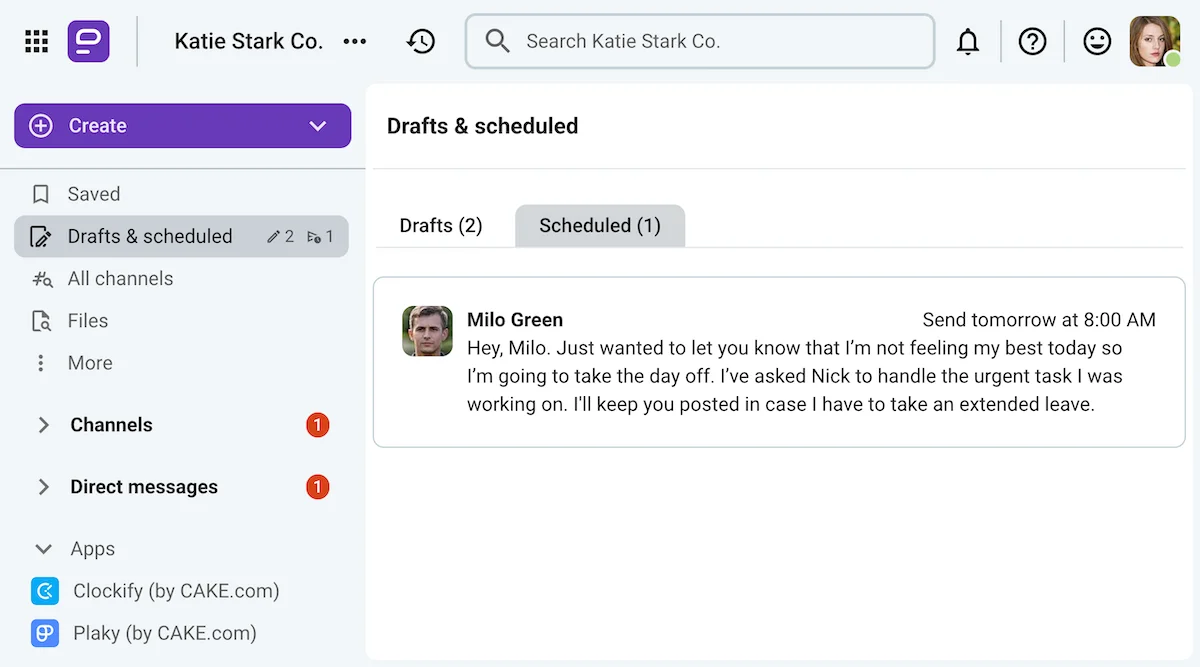
Try scheduling messages in Pumble
Of course, the exact wording of your message depends on your company culture and other variables, such as the sick leave policy you have. However, you should be able to ask for a day off by following one of the professional sick leave message templates we’ll propose after this guide.
💡 PUMBLE PRO TIP
Have you ever struggled to respond to a team member’s sick leave notice? Here’s an article that might help:
Step 2: Use Clockify to request time off
If your organization uses a sick leave time tracking tool like Clockify by CAKE.com, recording and extending your sick leave will be a breeze.
After all, there’s no need to make things more complicated when you’re already struggling. To record your sick leave, simply:
- Navigate to the Clockify time off requests page, then
- Make sure your request is using your sick days by choosing the correct time off policy, and
- Select a date range before submitting your request.
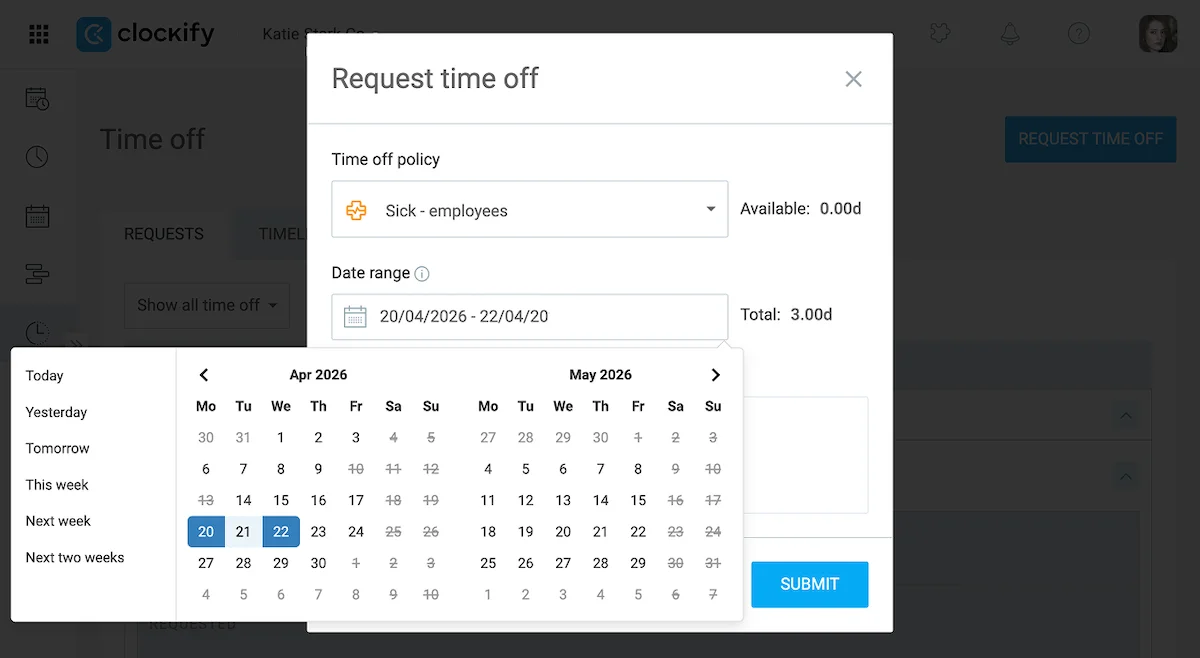
Thanks to Pumble’s Clockify integration, your supervisor will be able to approve your Clockify time off request in Pumble.
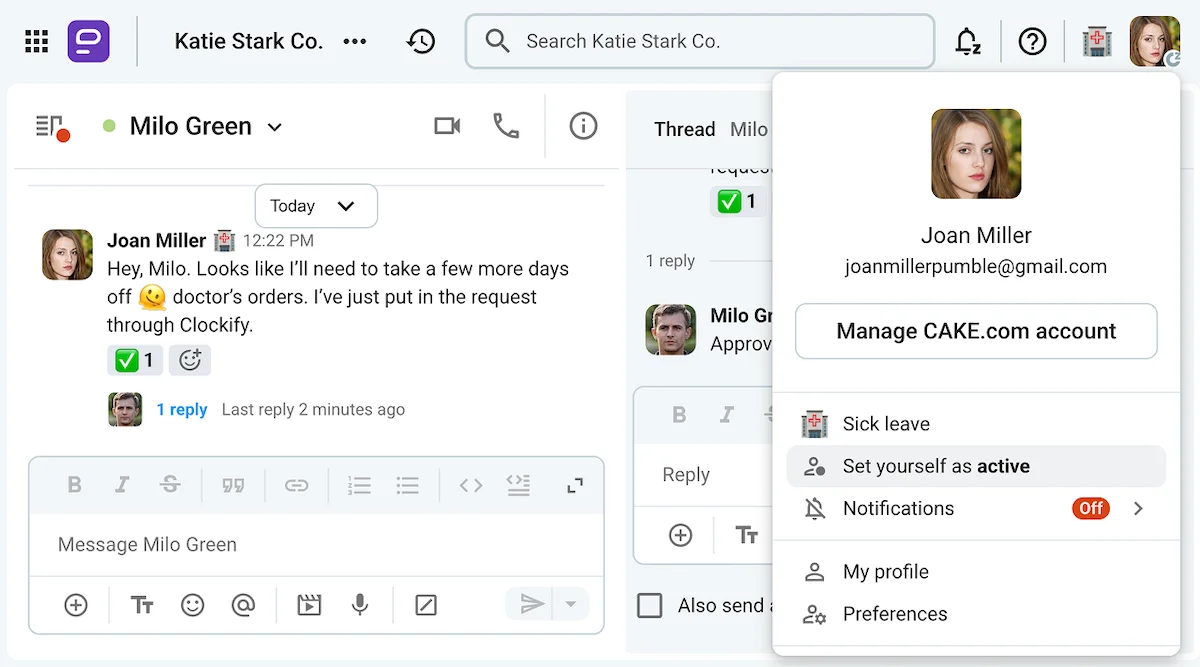
Once they’ve approved the request, you’ll get a notification through Pumble and your status will automatically change to reflect your availability (or lack thereof).
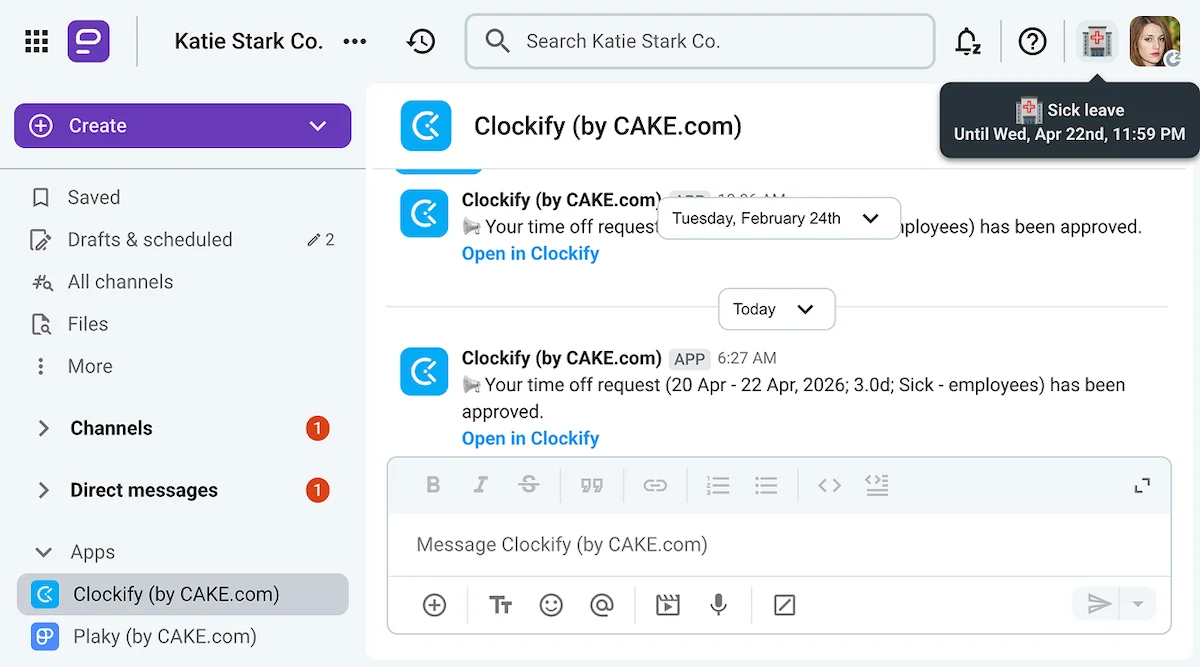
Basically, having Clockify connected to your Pumble workspace makes it easier for anyone who needs to be notified about your sick leave — from your manager to HR and finance departments.

Step 3: Let your team know about your absence
Now, if your Pumble workspace isn’t connected to Clockify, there are other ways to make sure everyone knows not to expect a reply from you. Namely, you could:
- Manually handle your Pumble status updates,
- Pause your notifications (which will be shown as a banner to anyone who goes to send you a direct message), and
- Send a message to the team’s Pumble channel.
If you don’t feel well enough to post that announcement yourself, you can always ask for help and have a manager or a trusted coworker break the news.
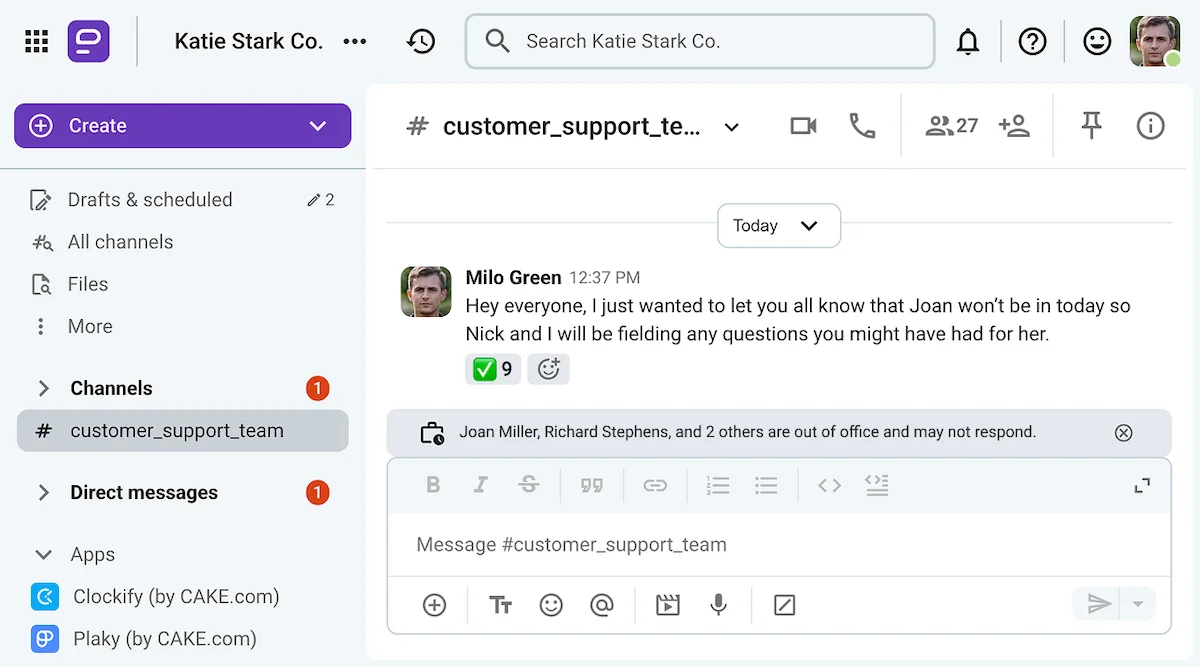
Depending on how your team works, that kind of announcement may not even be necessary. After all, changing your status should be enough for most people.
And, if Clockify changes your status automatically, it’ll also create an out-of-office status banner at the bottom of all chats and channels you’re a part of to signal your absence (as in the image above). This banner should be visible to all users who have enabled banners in their advanced preferences.
💡 PUMBLE PRO TIP
If an employee is taking a prolonged absence or leaving the company altogether, here’s a guide to help you draft that announcement:
Optional step: Update your manager as necessary
If you end up having to take a prolonged sick leave, your manager should probably know about it.
Well, since both Clockify and Pumble have mobile app versions, staying in touch should be fairly simple.
For example, if your initial message mentioned an upcoming doctor’s visit, a follow-up can include any pertinent information you might have received:
“Hey, Joan, I just wanted to let you know that my doctor advised me to rest for a few days. I’ll be off all week, but Mike says he can hold down the fort until I come back.”
But, if you just want to quickly update your manager without the whole team knowing you’re online, be sure to set yourself as away in Pumble before you go on sick leave.
That will prevent the app from switching on your online indicator and keep you grayed out to other users.
When you come back from sick leave, the app will ask you if you want to set yourself as active. Alternatively, you’ll be able to manually find the option as shown below.

Professional sick day message templates for 2026
Now that you know how to notify your manager that you’re sick, let’s get into the specifics.
Going forward, we’ll share simple message and email templates for requesting a sick day, as well as a template you can use to ask for understanding when you plan to keep working while you’re under the weather.
A short and direct message template for calling out sick via chat
The exact wording of your “I’m not feeling well today” message for work will change depending on its recipient.
Still, most of them will have roughly the same outline, starting with:
- A greeting, addressing the person or channel you’re sending the message to,
- A rough estimate of your availability in the coming days, and ending with
- Any urgent task handovers.
With that in mind, here are some examples of that kind of message.
“Good morning, Milo. I wanted to let you know that I’ve requested a sick day today. I’ve spoken to Nick about him wrapping up the task I was working on yesterday, so there should be no issues in my absence. I’ll be sure to update you if I end up seeing a doctor and having to extend my leave.”
“Hi, Mary. I’m afraid I’ll have to take a rain check for that meeting we had scheduled today. I’m not feeling well so I’ll just take a sick day and see how I feel tomorrow. I’ve asked Jennifer to answer any questions you might have until then.”
“Hello team. Just letting you know that I’m taking a sick leave. I’m not sure how long I’ll be gone, but if you have any questions for me in my absence, you can ask Andy or Claire.”
If you decide to use one of these examples as a template, replace the bolded parts with specifics related to your situation.
A professionally worded email template for calling in sick
If you want to notify your manager or your team about your sick leave via email, you’ll have to adjust the wording and formatting of your message to the medium by:
- Starting your email professionally,
- Explaining the reason for your absence and any work-related changes that will need to be made succinctly, and
- Ending the email with a suitable closing line.
Here are some examples you can adjust to suit your needs.
“Hi Mary,
I’m emailing you to inform you that I’m feeling unwell today, so I’ll take one of my paid sick leave days.
I’ll check my email periodically, but Karen and Patrick should be able to answer any questions you might have for me.
I appreciate your understanding,
Take care,
Jim Vardy”
“Hello Rob,
Unfortunately, I’ll have to take a sick leave this week. You’ll find my doctor’s note attached below.
I’ve asked my team to handle any urgent tasks without me and to message you with any questions they may have.
Thank you for understanding.
Kind regards,
Nick Mulder”
While you’re in your inbox, you can also set up an out-of-office message that will go out to anyone who tries to send you an email while you’re on sick leave.
💡 PUMBLE PRO TIP
Nowadays, most people rely on casual forms of communication, which is why writing more formal emails has become difficult. If you also struggle to write professional emails, check out these useful guides:

A brief message template for when you’re feeling unwell but still working
Though presenteeism is certainly not a positive metric in the modern workplace, sometimes, it’s just unavoidable.
There are plenty of reasons someone might work while feeling unwell, and remote work certainly makes that easier than ever.
So, if you’re feeling a bit out of sorts but not sick enough to take the day off, you could still tell your manager about it so they can:
- Understand if you don’t work as quickly as usual,
- Take some tasks off your plate, or even
- Extend your deadlines.
Here’s an example of a message you might send to achieve these results:
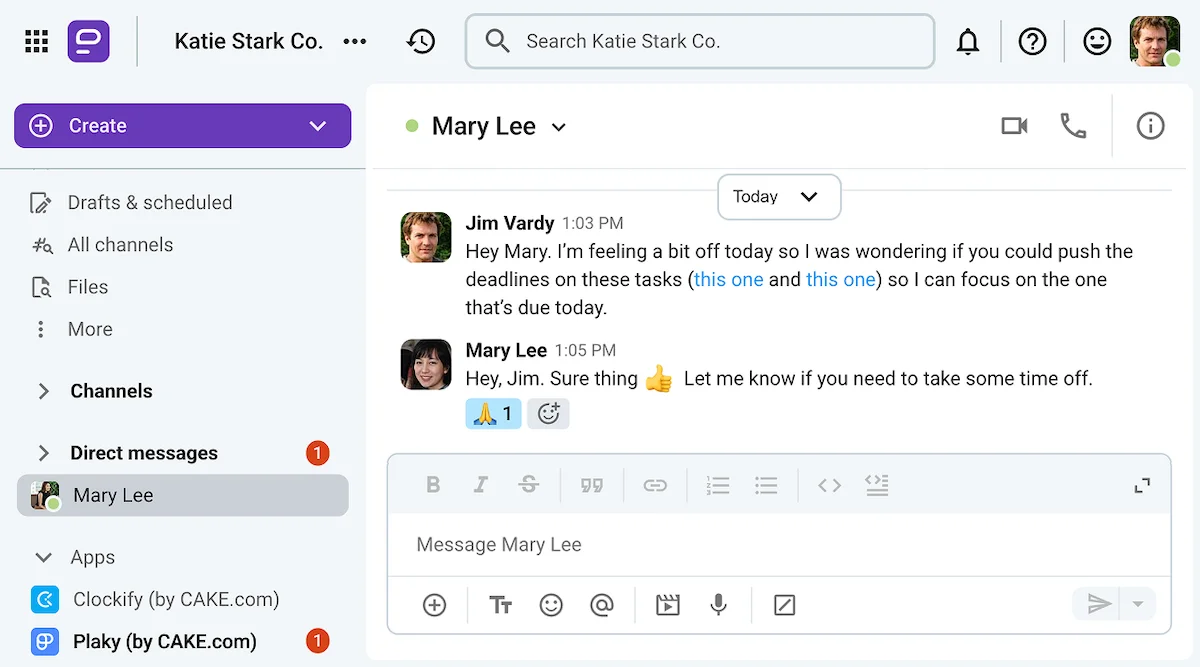
“Hey, Joan. I’m feeling a bit out of it today. I was wondering if you could take some of my tasks off my hands, so I can focus on the one I need to finish by EOD. If no one else can take on the others, could you just extend those deadlines?”
If your organization uses Pumble and Clockify, you could make your life easier by also incorporating the project management software, Plaky by CAKE.com into the mix.
If you do, you’ll be able to send your manager links to the exact tasks you’re talking about when you send a message like this. On top of that, Pumble’s Plaky integration will let you know when any changes are made to your task cards.
FAQ: Sick leave common challenges
Finally, let’s go over some of the most common questions people have about asking for sick leave.
What is the most professional way to call out sick in 2026?
Nowadays, requesting a sick day can be as easy as sending a DM, changing your Pumble status, and logging your time correctly with Clockify. So, there’s no need to reach for your phone — unless you have CAKE.com apps on there! In that case, you’ll be able to call in sick without even opening your laptop.
Is it okay to send a sick day message via Pumble or Slack?
Yes, sending a sick leave message via direct messages is perfectly acceptable. If your organization primarily communicates through team communication apps like Pumble or Slack, there’s no need to switch to email to ask for a day off.
How do I tell my boss I’m sick over chat?
Whether you’re notifying your boss of your inability to work via email, Pumble status update, or a simple DM, just keep your message as concise as possible:
- Explain how many days you anticipate you’ll have to take off, and
- Make a note of how you plan to mitigate the effects of your absence.
Do I need to provide specific details about my illness to my employer?
No, there’s no need to go into details when notifying your employer of your sick leave request. You don’t have to disclose your symptoms or the diagnosis you might have received unless you want to.
How do I handle urgent tasks when I’m too sick to work?
If your organization uses CAKE.com tools, you’ll have several options for dealing with urgent tasks while you’re on sick leave. On the one hand, you can use threaded discussions on Pumble to ask a colleague to take over tasks without distracting other users with notifications. These threaded conversations will save you both a lot of time.
Alternatively, you can go to your task cards on Plaky and mention your manager in the comments to ask them to reassign the most urgent tasks.
Protect your work-life balance with Pumble by CAKE.com
The team communication app Pumble by CAKE.com makes it easy to:
- Call in sick,
- Reassign your most urgent tasks, and
- Track the progress of your request.
However, though all of these things can be done with Pumble alone, the process can be further enhanced through Pumble’s native integrations with the time tracking app, Clockify, and the project management software, Plaky.
Pumble’s Clockify integration will show you when your sick leave is approved without having to check your email, while the Plaky integration will show you any changes that are made to your task cards in your absence.
And that’s just one way CAKE.com tools can make your work friction-free.
How we reviewed this post: Our writers & editors monitor the posts and update them when new information becomes available, to keep them fresh and relevant.