





As the makers of Pumble, a team communication tool, we’re naturally invested in building the best communication hub for teams.
But we also know it’s important to give a fair look at other options out there.
Chanty is often mentioned as a simple, lightweight tool for small teams, and on paper, it sounds appealing — unlimited message history, built-in task management, and a clean interface.
The real question is whether Chanty’s free plan can realistically support a small business as it grows, or if those early benefits start to fall short once your team scales.
So, let’s dive into our Chanty review to see how Chanty it up against real-world business needs.


Why trust us?
The apps we talk about are selected, tested, and written about by human reviewers who follow strict review and editorial guidelines. We pick solutions that are practical, purposeful, and can offer real value for the specific use case or business context we’re covering — while also being justified in their pricing. Our methodology is transparent, clear, and available to everyone:
Learn more about our review methodology here
Chanty’s free plan limitations
First, let’s take a detailed look at Chanty’s free plan.
At first glance, it looks like a solid offer. You get:
- Unlimited message history,
- Built-in task management,
- Unlimited public and private chats, and
- 20 GB of storage per team.

Chanty’s free plan
For a very small business — say a startup of 2 or 3 people — it checks most of the boxes. But the problems start as soon as your team begins to grow.
The most restrictive Chanty limitation is the 5-user cap.
That hard limit can be detrimental to teams that plan on growing. Bringing in new hires, freelancers, or even clients can become a juggling act, forcing you to decide who gets access to your workspace and who gets left behind.
This 5 user limit feels like a growth penalty that punishes your business for evolving.
For a tool that is supposed to centralize communication, the 5-user restriction makes it hard to use Chanty for long-term business communication.
Get unlimited users for free with PumbleGuest access is also very limited — you can only invite one one-channel guest, and one multi-channel guest.
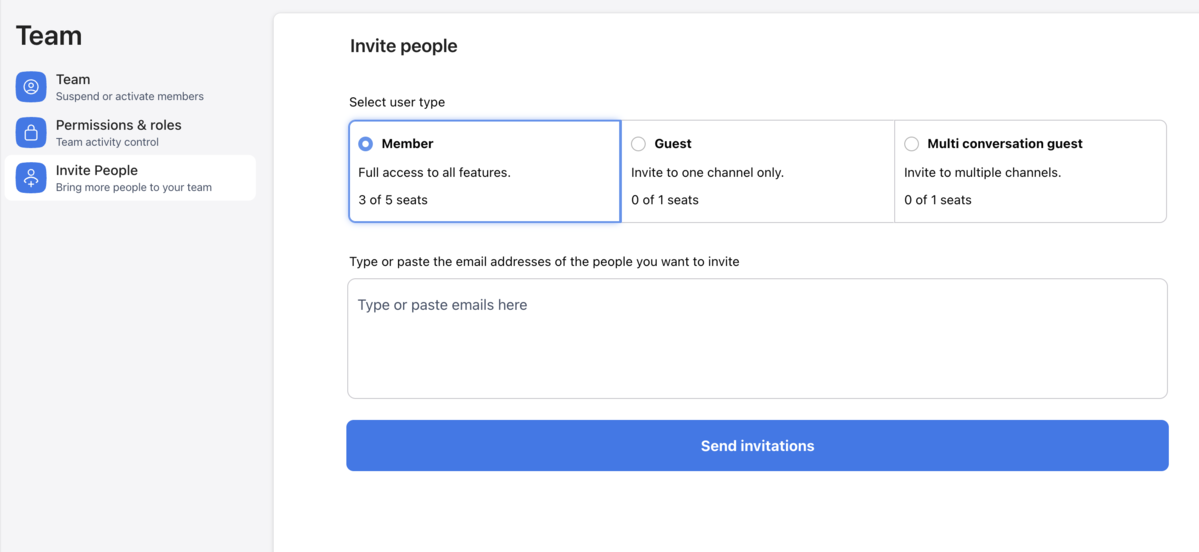
User limit in Chanty’s free plan
Another pain point for Chanty’s free plan is data mobility.
With Chanty’s free plan, you can’t import or export data. That means that if you ever want to migrate your messages and files to another platform, you’re stuck.
It also means that if you want to start using Chanty, you’ll be starting from zero — you won’t be able to import messages from your previous tool.
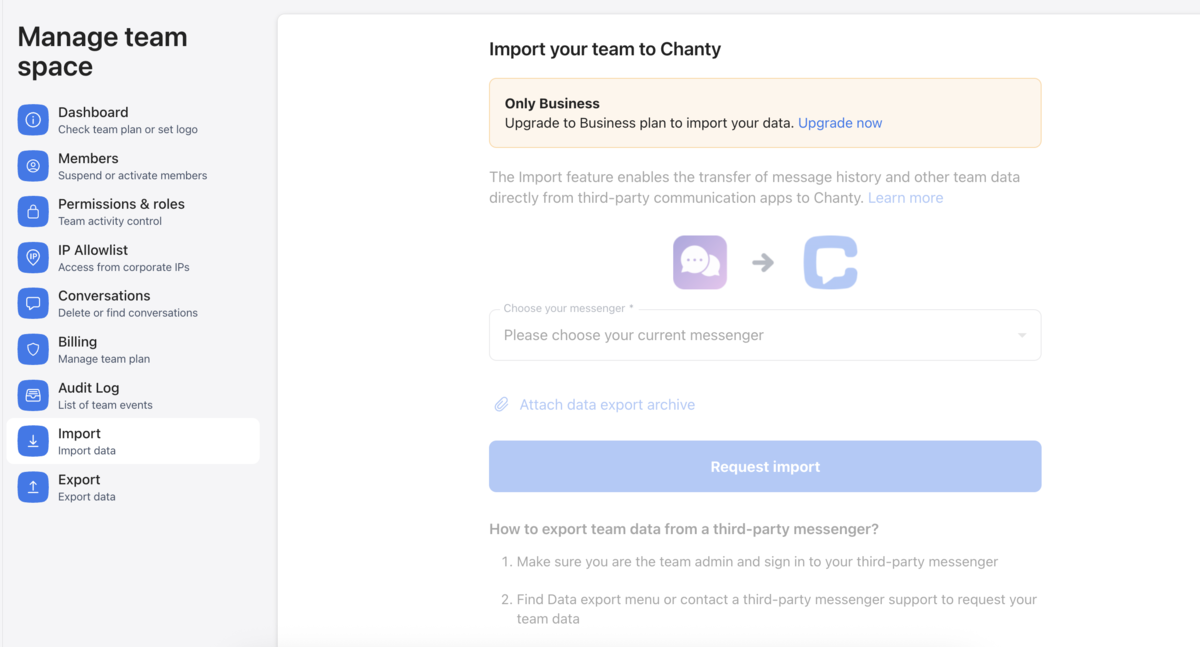
Importing to Chanty
This is not only annoying, but also a potential liability — you can’t create backups, so you could lose sensitive data.
Chanty’s free plan works for very small, static teams, but once you’re ready to hire, expand, or collaborate with outside partners, it simply can’t scale with you.
Try a tool that grows with your teamChanty pricing: Paid plans breakdown
After considering Chanty’s limitations in the free plan, let’s take a look at the paid features it offers.
Chanty has two paid tiers:
- The Business plan, priced at $4 per user per month ($3 per user per month if billed annually), and
- The Enterprise plan, which has no publicly available pricing; you have to contact their sales team.
Both of these plans address the biggest roadblocks of the free plan, but whether they’re worth the upgrade depends on how your team works.

Chanty paid plans
The Business plan is the first step up from the free plan and removes the most frustrating of all Chanty limitations — the 5-user cap.
You get access to:
- Up to 2,000 users,
- Group video and audio calls (including screen sharing),
- Increased storage of 20 GB per user,
- To-do lists and Task boards,
- Data import and export,
- Customizable roles and permissions,
- 3 guests per user with up to 2,000 multi-conversation guests, and
- Priority email support.
As for the Enterprise plan, it doesn’t have a publicly available price, so you’ll have to contact their sales team directly to figure out the custom price for your business.
This tier is aimed at larger organizations with stricter requirements, and it includes:
- White labeling and embedding,
- Advanced permissions and custom roles,
- Unlimited integrations,
- Advanced security and compliance features,
- Dedicated support line and SLA, and
- A customer success manager.
Although Chanty’s plans aren’t expensive per se, the cost can quickly add up as your team grows.
And, with Chanty’s free plan limitations, it’s inevitable that you’ll need to upgrade to paid plans if you plan on growing.
Get more for less with PumbleUser interface and ease of use
When I first opened Chanty, I liked how simple and straightforward it looked. Nothing felt overwhelming, and I could jump into conversations, tasks, or files without having to dig around.
Chanty’s workspace is clean and doesn’t have the extra noise you see in some other tools.
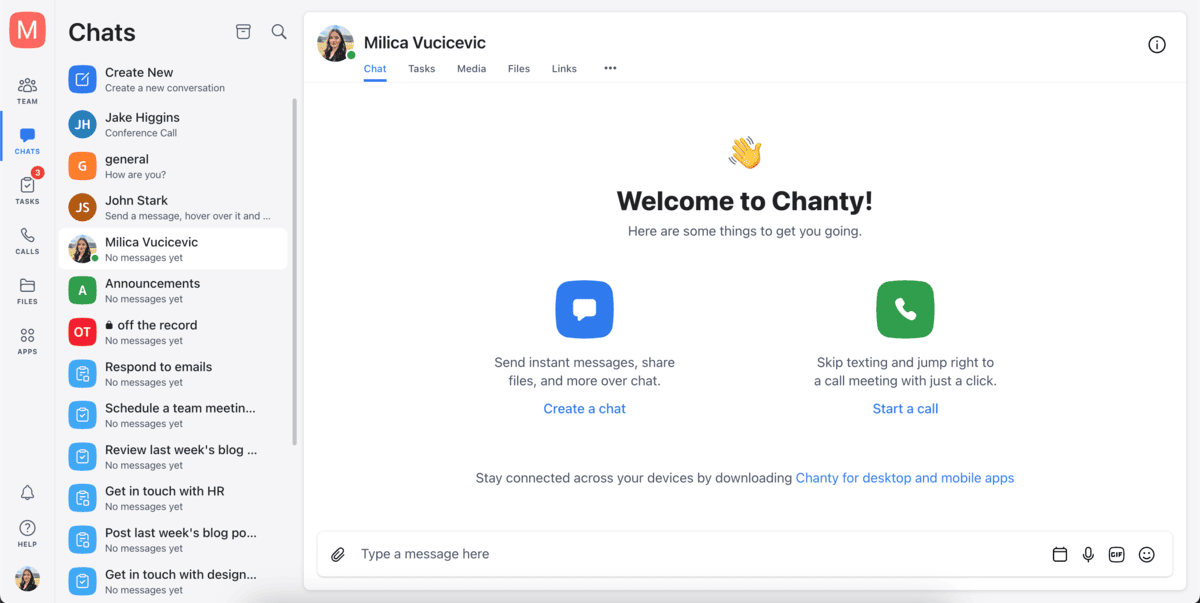
Chanty interface
However, after using it for a while, and having more tasks, channels, and conversations, I realized I’m not a big fan of how everything sits in the same place.
Your channels, private conversations, and tasks are all together in a continuous list in your sidebar. After a short while, it becomes crowded, so sometimes I have to stop and scan the list for longer than I’d like to find what I’m looking for.
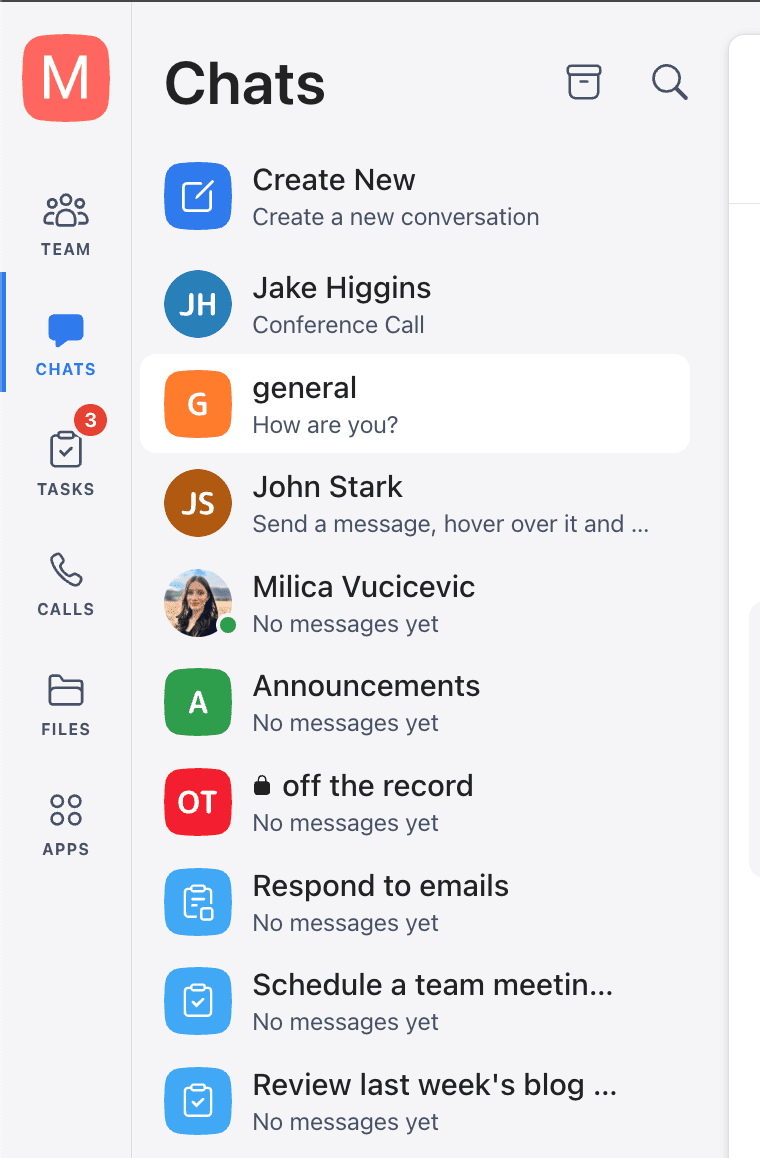
Sidebar in Chanty
Experience more intuitive navigationYes, you can always just search for what you need in the search bar, but I still feel like some separation of different types of communication channels would be useful.
Still, the overall interface is easy to figure out and get used to.
Communication features
Now, let’s take an in-depth look at Chanty’s communication and collaboration features.
Chanty offers:
- Direct messages,
- Channels,
- Threads,
- Voice and video calls,
- Voice messages, and
- Task management features.
Let’s take a look at each of these in more detail.
One-on-one conversations
Chanty makes one-on-one chats simple but still feature-rich.
Beyond instant messaging and file sharing, I was pleasantly surprised to see that it supports message scheduling. That feature comes in handy when I want to:
- Message someone after work hours without disturbing them,
- Send reminders, or
- Simply write and send a message before I forget about it.
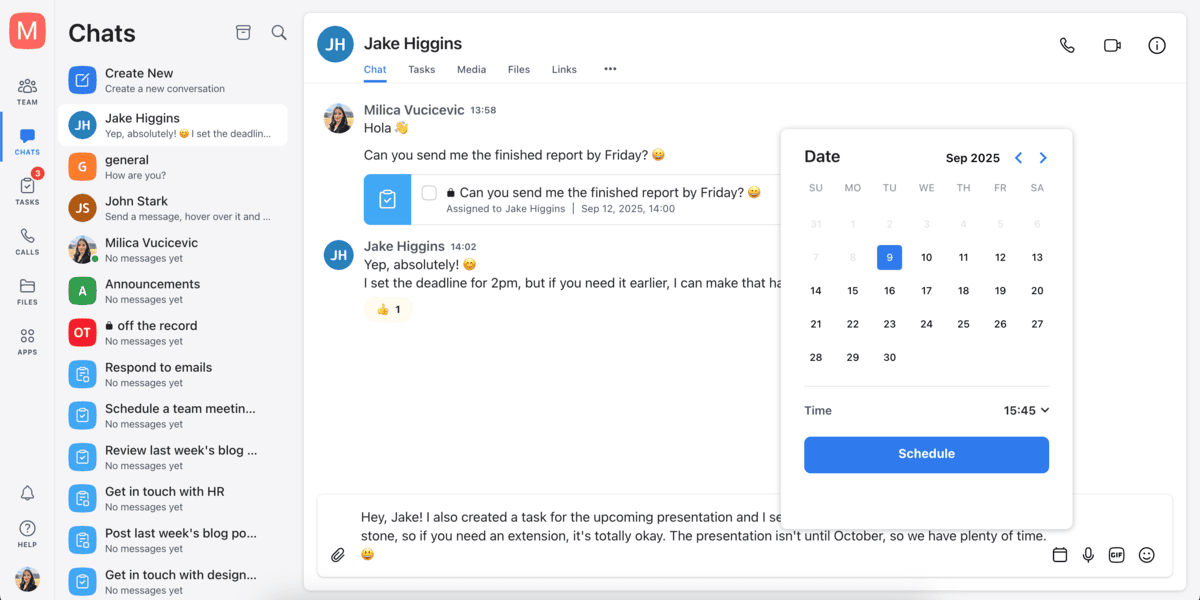
Scheduling a message in Chanty
Chanty also supports voice notes, which I really like — it makes it easier to drop a quick update without having to type everything out. You can even toggle the playback speed to 2x.
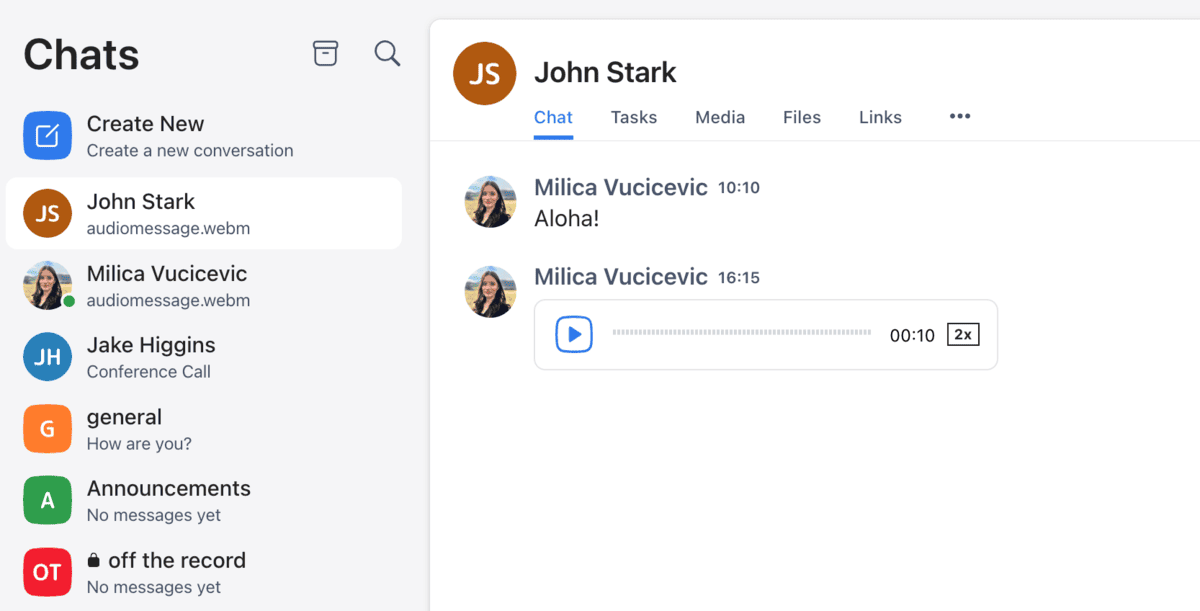
Voice note in Chanty
You can also edit messages after sending, which saves you from sending follow-up corrections when you make a typo.
Plus, Chanty offers disappearing messages.
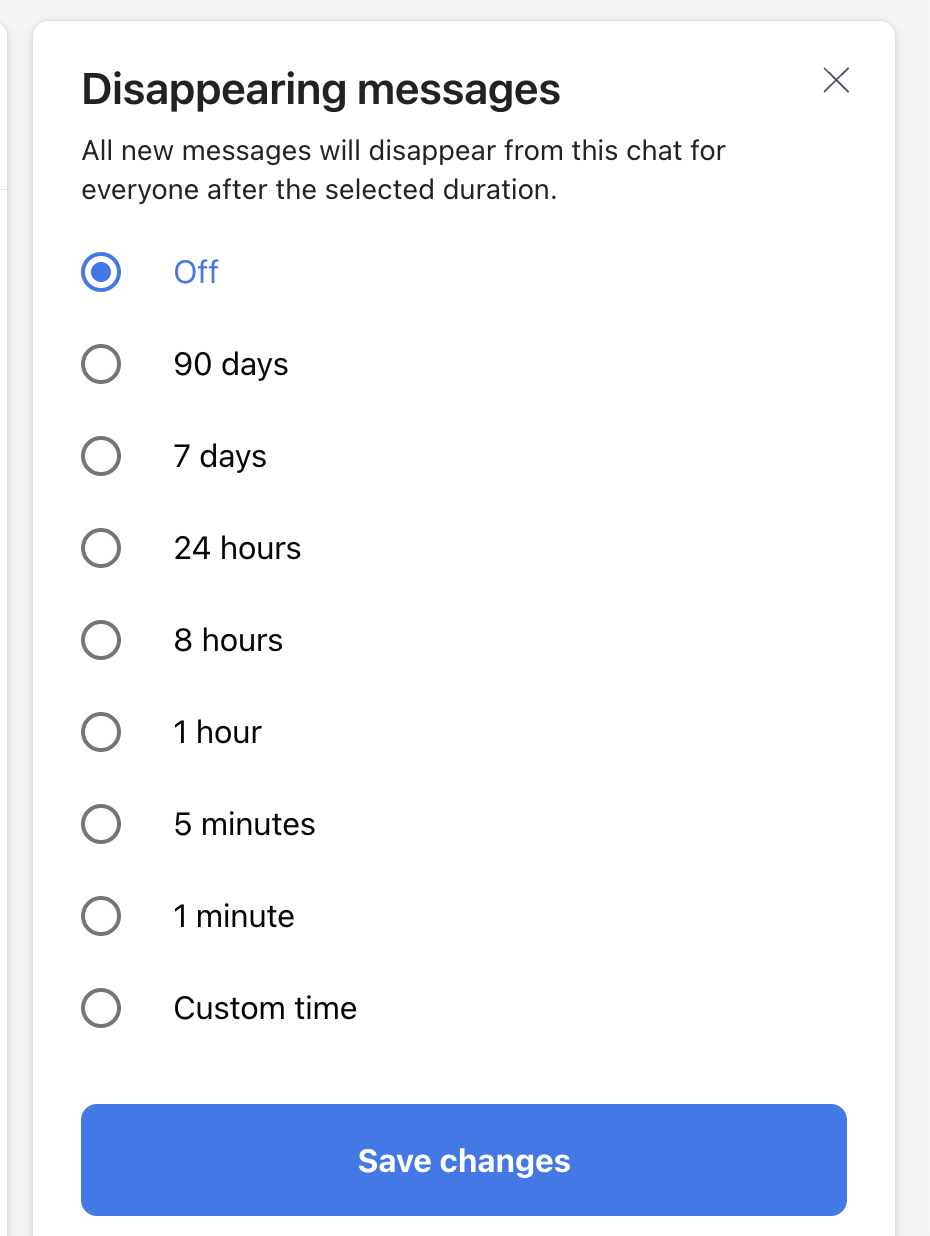
Disappearing messages in Chanty
My only gripe at this point isn’t the features, it’s the layout. When all chats and channels are mixed with tasks, it can be hard to locate what you need.
Still, once you’re inside a conversation, everything runs smoothly — the tools are useful and cover most of what I’d expect from a modern communication tool.
Channels and threads
Channels and threads in Chanty do their job well.
You can set up public or private channels, and you have the option to automatically add new members to certain channels.

Creating channels in Chanty
Within channels, you have dedicated spaces for:
- Chat,
- People,
- Tasks,
- Media,
- Files, and
- Links.
In a drop down menu, you also get access to:
- Activity,
- Saved messages, and
- Scheduled messages.
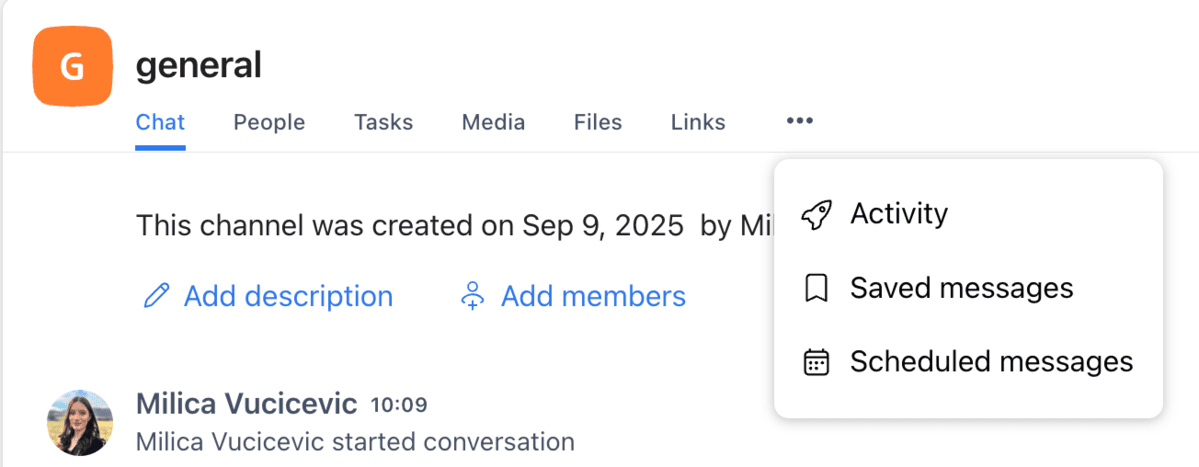
Chanty additional channel features
The same sidebar navigation issue pops up when trying to find relevant channels, but at this point I probably sound like a broken record.
On the plus side, Chanty offers threads, which are essential for keeping group conversations organized.
However, they are a bit clunky.
There are two things I didn’t like when testing Chanty’s threads:
- First, there is no separate space for threads in the sidebar, so once a thread gets buried, it’s tough to keep track of side discussions.
- Second, when you start a thread, the message still appears as a reply in the main channel space instead of showing up only in the right-hand side thread bar. That clutters the conversation, and, in my opinion, takes away from the whole point of threaded conversations in the first place.
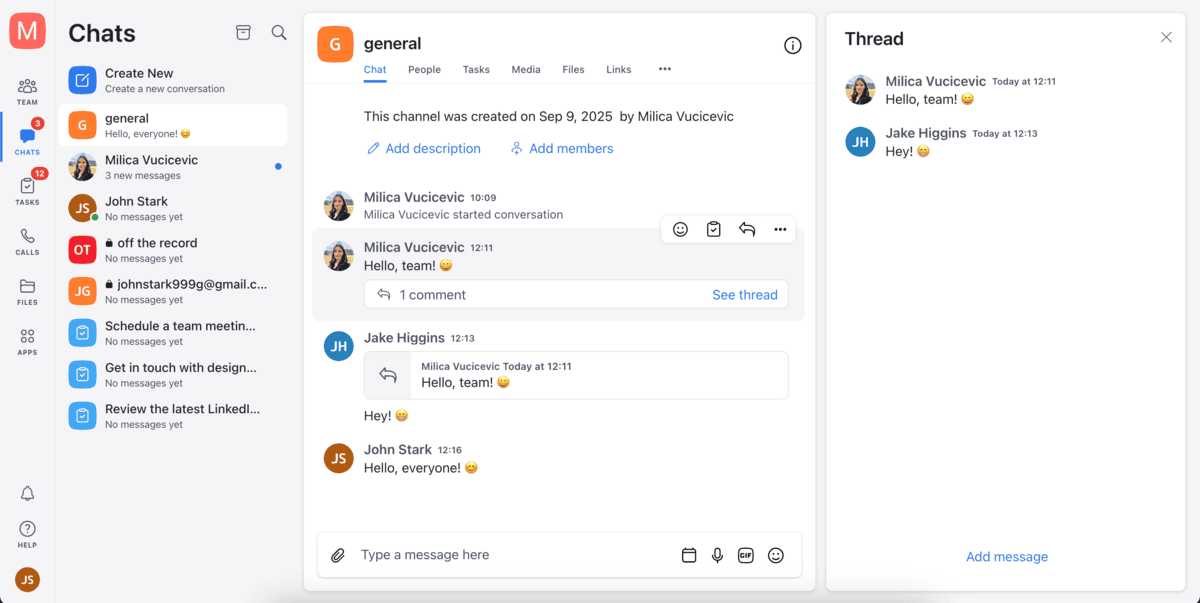
Channels and threads in Chanty
So, threads in Chanty work, but they’re far from smooth.
Organize your conversations in PumbleVoice calls and video conferencing
Chanty supports one-on-one voice calls and video conferencing in the free plan.
For quick one-on-one check-ins, it gets the job done, and it’s a convenient tool because you don’t need a third party app. However, the additional features (or lack thereof) and quality of calls feel basic.
In paid plans, Chanty offers screen sharing and up to 1,000 participants in calls.

Chanty video call
However, you don’t get in-call chats to share links or notes, no reactions to keep meetings interactive, and no background blur and noise suppression to clean up your environment.
There’s also no way to raise your hand, which makes group calls harder to manage when multiple people want to speak.
For quick informal meetings, Chanty will get the job done, but if your team relies heavily on video meetings, it’s probably going to be too bare-bones for productive team meetings.
Hold productive meetings with PumbleAdditionally, Chanty offers the VoIP feature, where you can make calls to phone numbers across the world.
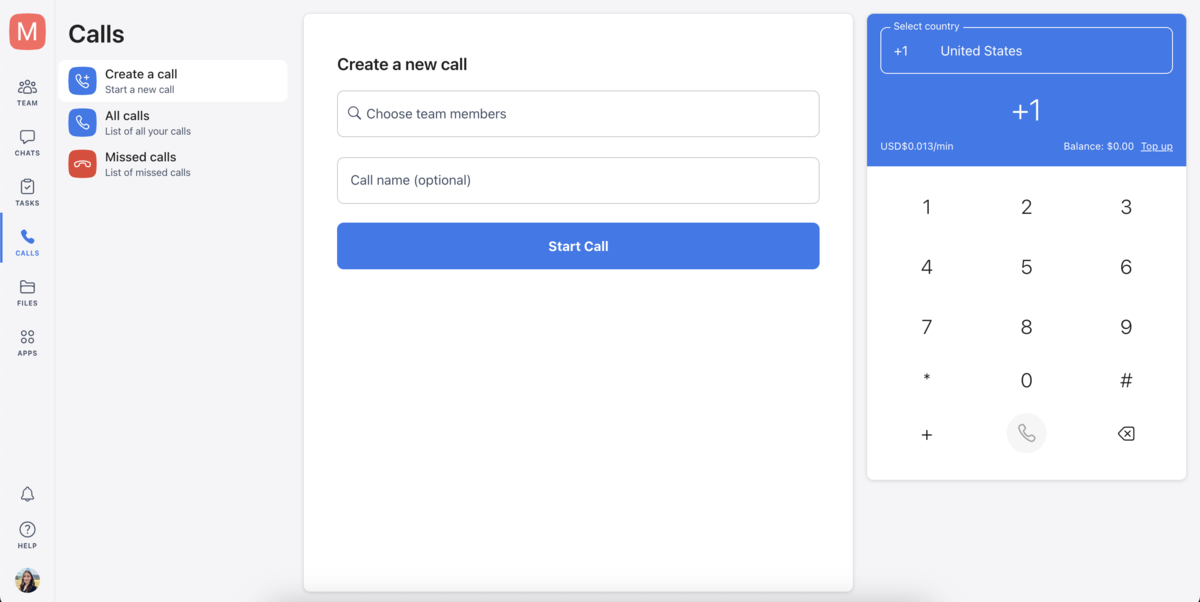
Regular and VoIP calls in Chanty
In the app, once you enter a phone number, it asks you to top up your credit if you want to make a call. I haven’t tried out this feature, so I’m not entirely sure how it works or if it’s good.
What’s strange is that there seems to be zero information about this feature on Chanty’s official website.
Task integration
What Chanty does well is tying communication to productivity.
Any message can be converted into a task, assigned to a team member, and tracked right inside the app.
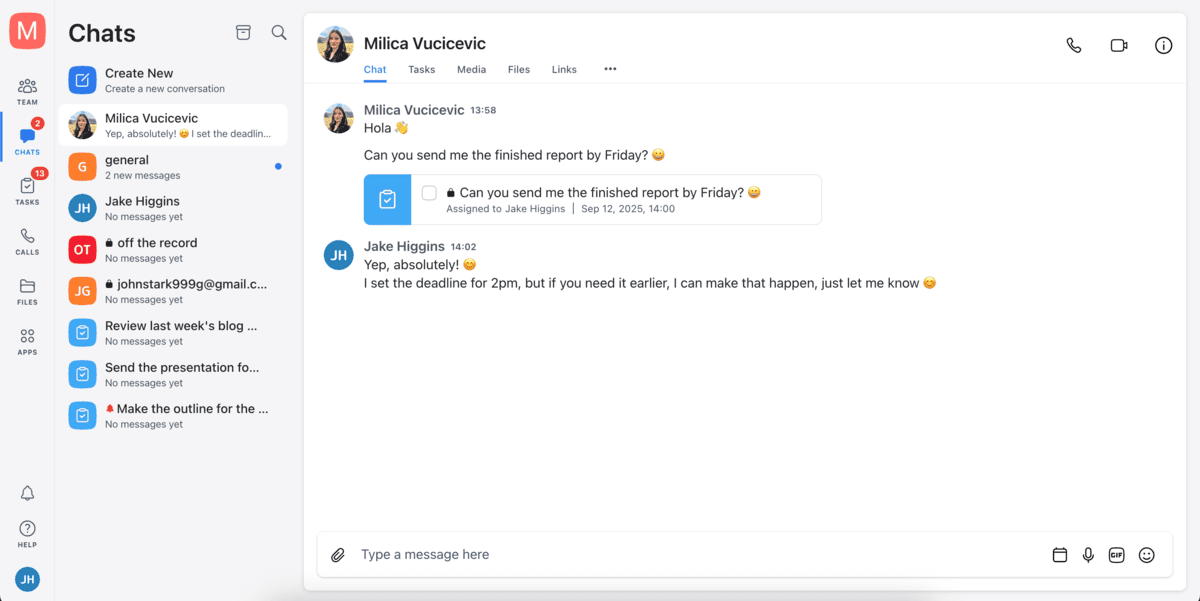
Creating a task from a message in Chanty
It’s a neat feature for smaller teams who don’t want to juggle between two different apps.
In Chanty, you can:
- Create and assign tasks,
- Turn messages into tasks, and
- Filter tasks by status, dates and people.
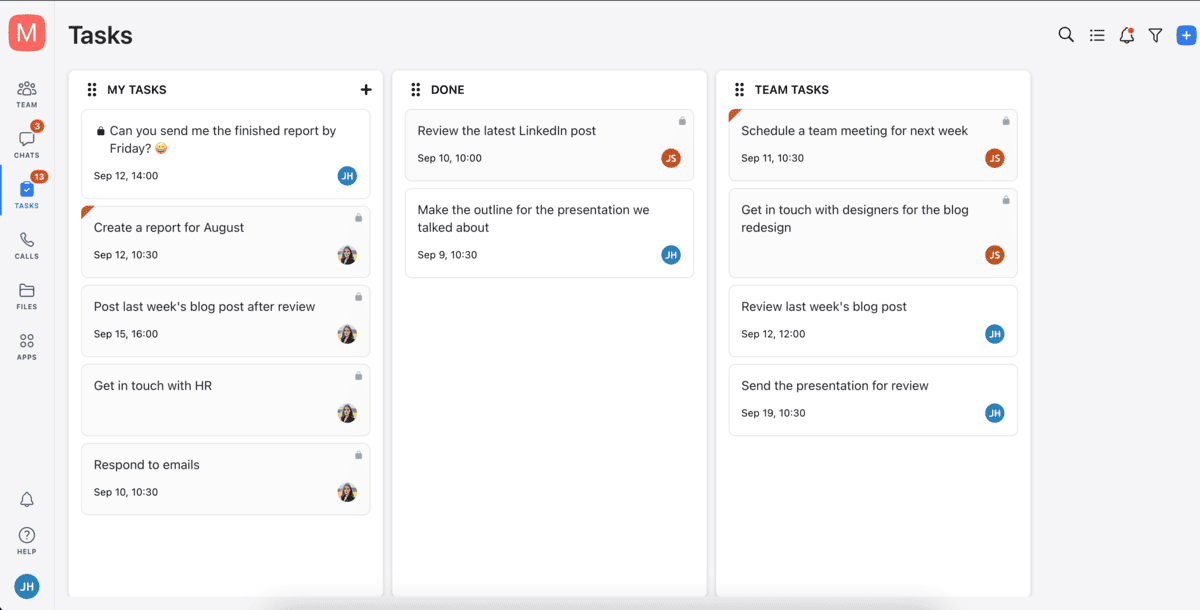
Task overview in Chanty
It definitely doesn’t replace a full project management system many teams need, but it’s useful for simple tasks and to-do lists.
File sharing and storage
Sharing files in Chanty is smooth — you can drag and drop documents, images, and links directly into chats or channels. The size limit for file uploading is 100 MB.
In each conversation, you have dedicated tabs for files, media, and links, so it’s easy to look through past shared content and find what you need.
Chanty also offers a search function especially for files, where you can search through:
- Files,
- Media,
- Links, and
- Saved messages.

Searching files in Chanty
One unexpected feature is that you can send code snippets using Chanty’s code editor. It supports many different programming languages and styles. Although I personally didn’t get much use out of this feature, I can see it being useful for software developers.
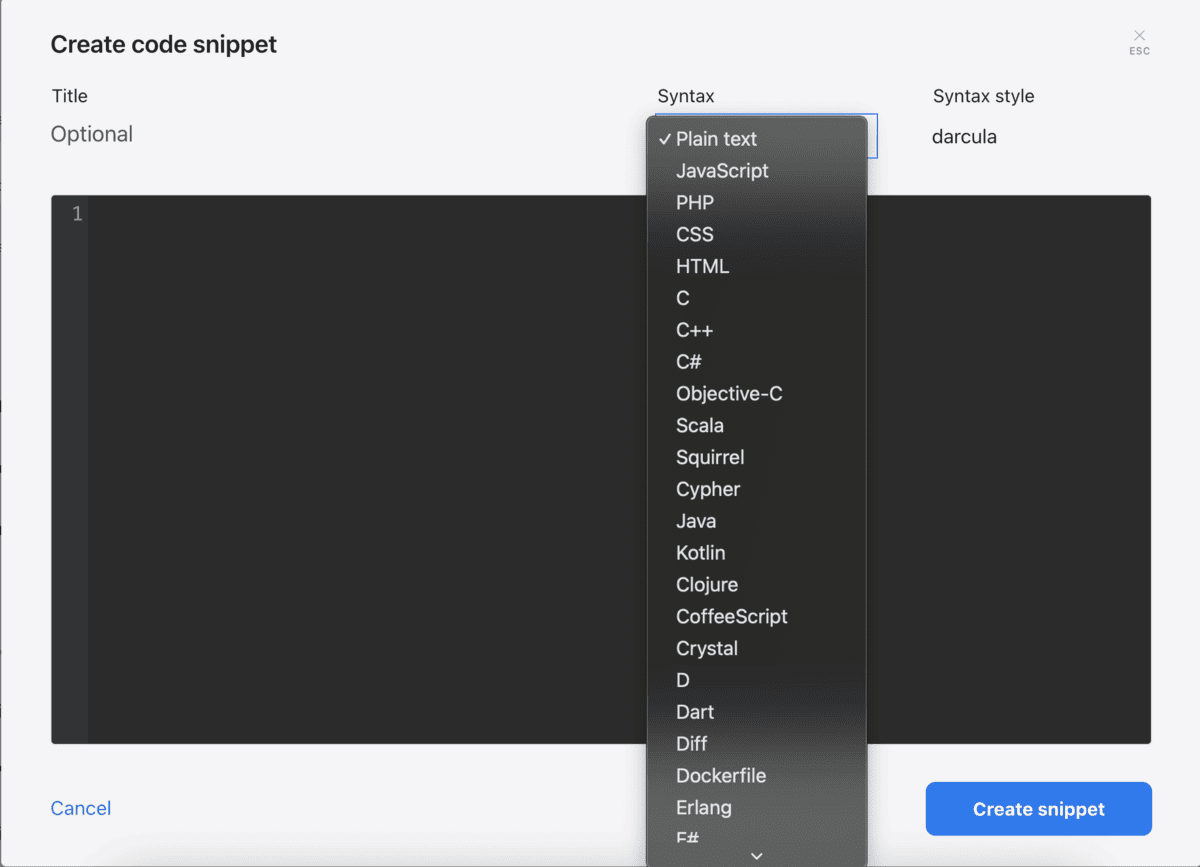
Chanty’s code editor
When it comes to storage, Chanty offers different storage limits for different plans:
- The free plan comes with 20 GB of storage per team.
- The Business plan comes with 20 GB of storage per user.
- The Enterprise plan comes with a custom storage limit.
Notifications
Chanty gives you a good level of control over notifications.
From the Notifications settings (accessible via the profile icon in the lower left corner), I could choose between 3 levels of alerts:
- For every new message,
- Only for direct messages, mentions, and task updates, or
- No notifications whatsoever.
I could also set different notification preferences for desktop and mobile — so no more duplicated alerts pinging me from multiple devices.
There is also an option to choose whether notifications include text previews, and which sound they play.
If you just need a complete break, you can snooze all notifications for 15 minutes up to 8 hours.
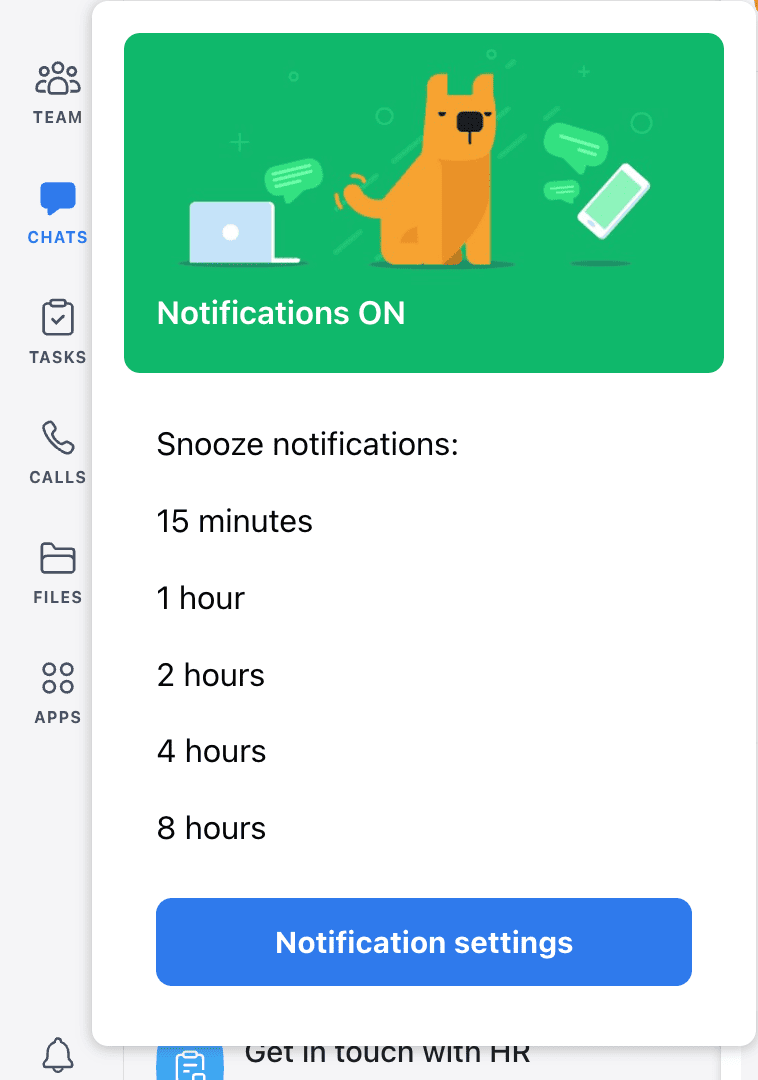
Snoozing notifications in Chanty
Alternativelly, you can always just mute specific conversations, whether it’s DMs or channels.
All in all, Chanty offers solid notification options for you to strike a good balance between staying informed and being productive.
Integrations
Chanty keeps integrations fairly simple.
It connects with some of the essential apps such as:
- Google Drive,
- Dropbox,
- Google Calendar,
- Trello, and
- Github.
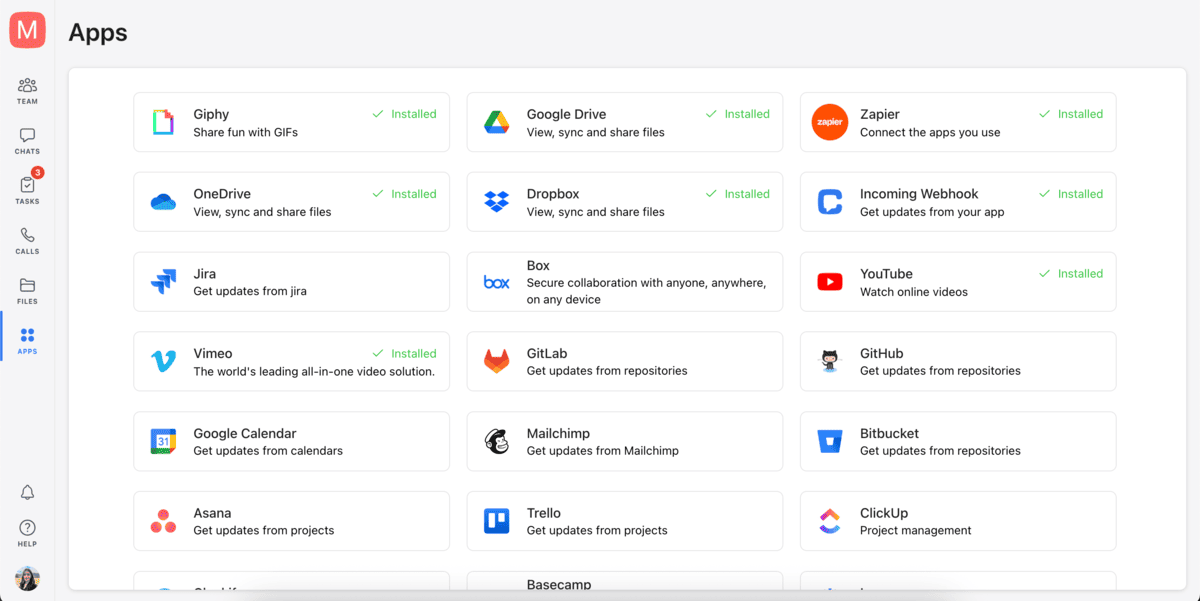
Integrations in Chanty
These are solid for file sharing, project tracking, and development updates.
For example, I can link a Trello board into channels and track cards without leaving Chanty, or attach files straight from Google Drive. It’s straightforward and covers the basics.
But beyond those, Chanty’s catalog is limited. It doesn’t have a big marketplace like some other apps, and many niche tools just aren’t available.
They do offer a Zapier integration, which helps bridge the gap by letting you indirectly connect Chanty with hundreds of other apps. Still, Zapier automations always feel like a workaround compared to having native integrations.
If your team mostly uses mainstream tools, Chanty’s integrations will probably be good enough. But if you rely on a wide variety of apps or want deep integrations between your chat app and the rest of your tools, Chanty may leave you wanting more.
Support
Support in Chanty depends heavily on which plan you’re on.
With the free plan, you’re limited to community support — you basically only have forums, articles, and self-help resources on hand.
You can submit a request for help via their Help center, but there is no agent support or live chat, and you never know when you’ll get an answer.
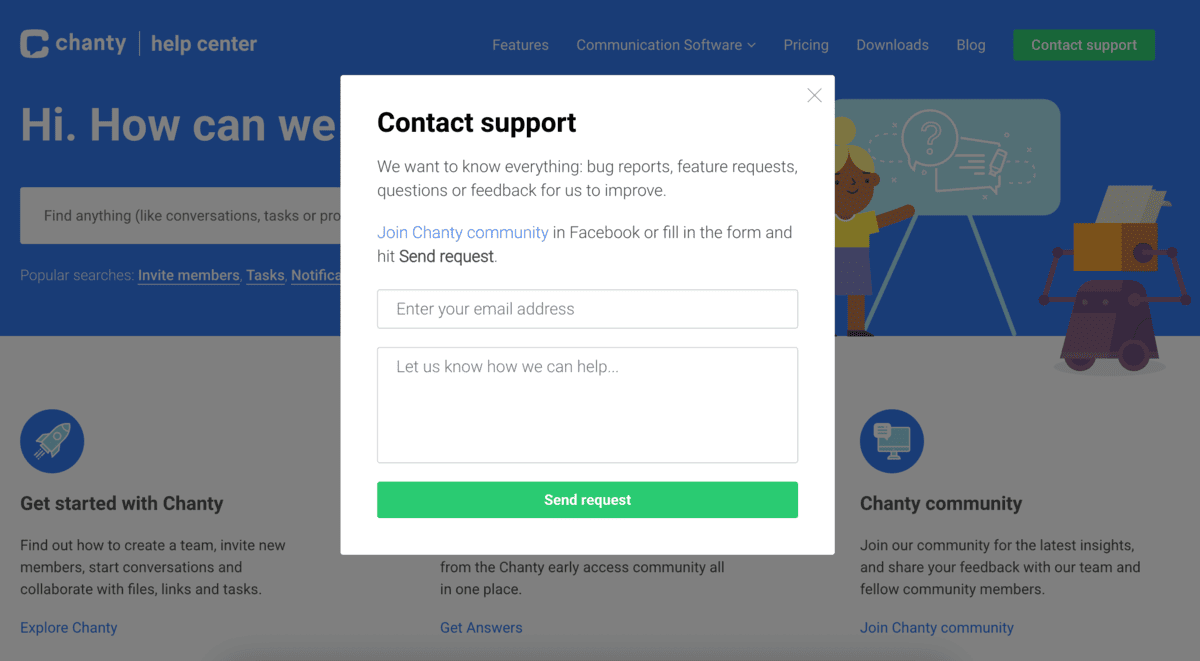
Help center in Chanty
The knowledge base is clear and covers the fundamentals of using Chanty, but if you’re stuck on something unusual, you’re pretty much on your own.
There were instances where I couldn’t even find basic information about some features on the Chanty website, so I can imagine that, if I encountered a unique problem, I probably wouldn’t be able to find a solution quickly.
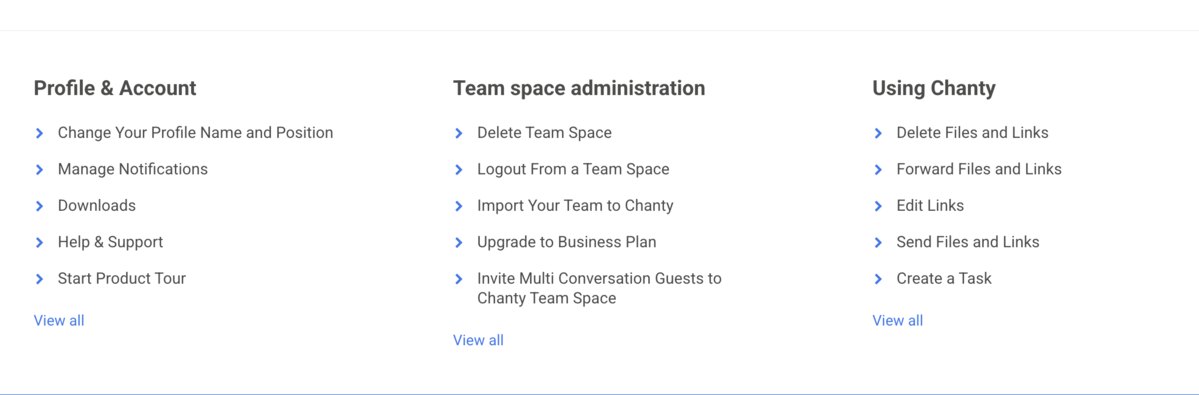
Some of the answered questions in Chanty’s help center
Also, the user community is actually a Facebook group, which isn’t very active, so peer-to-peer troubleshooting is limited. It has around 1,000 members and no new posts in the past month.
On the paid Business plan, Chanty offers a 24/7 support line, and, from what I've gathered, responses are helpful and quick.
For the Enterprise plan, you get a:
- Dedicated support line,
- Service-level agreement (SLA), and
- Customer success manager.
For smaller teams the level of support on the free plan may be enough — most issues can be resolved through the knowledge base or by submitting a ticket. But, compared to competitors with round-the-clock agent help, Chanty’s support feels a bit lackluster.
Get 24/7 live human support with PumbleSecurity
When it comes to security, Chanty offers solid protocols.
First, when you log in to Chanty, you log in with a unique password sent to your email. This is a much safer and convenient way of logging in, compared to having to remember your password.
If you want, you can also enable two-factor authentication, a feature that is essential for the safety of your account. It’s not on by default — you have to enable it through your account settings after setting up a password.
Chanty forces HTTPS via TLS (SSL) for all communication in their apps, as well as on their website. They also support forward secrecy and AES-128-GCM and ban insecure connections that use older security protocols.
Chanty security details
Chanty is also GDPR compliant, which is reassuring for teams that need to meet European security standards.
However, when it comes to data center security, Chanty falls behind. It’s compliant with the outdated SAS 70 standard, which is less secure than the latest SOC1 and 2 standards.
Chanty’s security standards are by no means bad, but if you’re dealing with sensitive data or simply feel better with more secure protocols, Chanty may not cut it for you.
Try Pumble, a secure team communication toolIs Chanty the right choice for your business?
Chanty positions itself as a straightforward communication tool for small teams and, in many ways, it delivers exactly that.
The interface is clean, message history is unlimited, and the built-in task management features are a nice touch for teams that want a lightweight chat and task management combo.
So, is Chanty good for work? Well, for very small groups that don’t plan on scaling, Chanty can be a solid starter option.
But the real test for any business tool is whether it can keep up with growth — and that’s where Chanty’s free plan falls short.
A 5-user cap, the lack of import and export, and the unreliable support make it tough to rely on as a long-term free hub.
Your team can grow without limits with Pumble
Although Chanty offers solid features and enough flexibility for very small teams, it simply can’t support a growing team.
For a communication tool that can scale with you, consider Pumble, a free Chanty alternative.
Unlike Chanty, which limits its free plan to just 5 users, Pumble’s free plan supports unlimited users along with unlimited message history. That means you can bring your entire team together — no matter how big or small it is — without worrying about paywalls or losing past conversations.
Flexibility is another big advantage. With Pumble, you can import your data from Slack or export your workspace whenever you want, even on the free plan.
And when questions or problems arise, Pumble sets itself apart with 24/7 live human support available to all users. You can contact the help center through email, chat, or phone, even if you’re a non-paying customer. With Pumble, you get real help, right away.
Additionally, the app is easy to navigate, with organized channels and threads that keep discussions tidy without cluttering the main feed.
For video calls, Pumble has the necessary features to make meetings productive and engaging, such as:
- In-call chat,
- Screen sharing,
- Reactions,
- Noise suppression and background effects, and
- Hand raising.
Finally, if you decide to upgrade, Pumble’s paid plans are more affordable and offer substantial value.
All of this makes Pumble a reliable, long-term communication hub for your growing team.
How Pumble and Chanty compare
To make the comparison clearer, here’s a side-by-side look at how Chanty and Pumble compare across their core features.
|
Features |
Chanty |
Pumble |
|---|---|---|
|
Free plan features |
– 5-user limit – Unlimited message history |
– Unlimited users – Unlimited message history – Importing from Slack – 24/7 support |
|
Pricing |
– Free plan available – Business: $4 per user per month – Enterprise: Contact sales |
– Free plan available – PRO: $2.99 per user per month – BUSINESS: $4.99 per user per month – ENTERPRISE: $7.99 per user per month |
|
Interface |
– Clean and simple – Lacks customization |
– Easy to navigate – Customizable |
|
Communication features |
– Public and private chats – Channels – Voice messages – Scheduled and disappearing messages – Audio and video calls |
– Public and private channels – Threads – Direct messages – Voice and video messages – Voice and video calls – Pinned and saved messages – Scheduled messages |
|
Task management |
Built-in task management |
Native integration with Plaky, a task management software |
|
File sharing and storage |
– Free: 20 GB per team – Business: 20 GB per user – Enterprise: Custom storage |
– FREE: 10 GB per workspace – BUSINESS: 10 GB per user – ENTERPRISE: 100 GB per user |
|
Notifications |
– Snoozing – Muting conversations – Notification schedule |
– DND – Customizable notifications – Notification schedule – Muting conversations |
|
Integrations |
Zapier, Google Drive, Dropbox, OneDrive, YouTube, GitHub |
– Gmail, Google Calendar, Google Drive, Zoom, Calendly, GitHub, GitLab – Plaky and Clockify |
|
Support |
– Community support for free users – 24/7 for paid plans |
24/7 on all plans (phone, email, chat) |
|
Security |
Standard |
Advanced |
Chanty can work if you’re a small team that plans on staying small. But if you want a communication platform that won’t limit you as your team expands, Pumble is the safer, more future-proof choice.
With unlimited users, unlimited message history, unlimited file size, and 24/7 live agent support, Pumble is built to grow with your business, not limit your growth.
Try Pumble today!Pumble also comes as part of CAKE.com’s Productivity Bundle, which includes 3 apps: Pumble (team communication), Plaky (project management), and Clockify (time tracking) for $12.99 per user per month.

