



Microsoft Teams pricing is changing globally. Beginning July 1, 2026, Microsoft is increasing prices across most Microsoft 365 Business and Enterprise suites, with hikes ranging from 5% to 43%, depending on the plan and region.
In this Microsoft Teams pricing guide, we’ll:
- Dive deep into each MS Teams pricing plan,
- Explain the features you get by subscribing to them,
- Explain what the new rates mean for IT admins and procurement leads reviewing renewals, and
- Offer more affordable solutions.
Let’s get into it!
Microsoft Teams’ pricing explained
Microsoft Teams’ pricing has historically seemed complicated, primarily because it’s divided into multiple categories.
The latest, 2026 edition of the MS Teams pricing plans comes in 3 categories.
In total, there are 9 Microsoft Teams plans:
- 3 in the Individuals,
- 4 in the Business, and
- 2 in the Enterprise Plans category.
Individuals mostly use the Home/Individuals Plans, while the Business Plans are ideal solutions for small and medium-sized companies.
Individuals Plans: Overview
The MS Teams Individuals Plans include:
- Free Microsoft Teams Plan,
- Microsoft 365 Personal, and
- Microsoft 365 Family.
These plans are a good choice for individuals, and the Free plan is a nice option for individuals and small businesses starting out.
Take a look at the comparison table below that shows these 3 Microsoft Teams plans and the most important features they offer.
| Features | Microsoft Teams Free plan | Microsoft 365 Personal | Microsoft 365 Family |
|---|---|---|---|
| Price | Free | $9.99 or $99.99 when billed annually (for one person) | $12.99 or $129.99 when billed annually (for up to 6 people) |
| License count | 1 | 1 | 1–6 |
| Participant capacity | 100 per meeting | 300 per meeting | 300 per meeting |
| Time limit | 60 minutes | 30 hours | 30 hours |
| Whiteboard | / | / | / |
|
Breakout rooms |
/ | / | / |
| Cloud storage | 5 GB | 1 TB per person | 1 TB per person |
| Live captions | / | English | English |
| Additional apps and services | / | Microsoft 365 apps and services | Microsoft 365 apps and services |
| Support | / | Ongoing | Ongoing |
Business Plans: Overview
There are 4 different Business Plans that you can choose from, plus 2 Enterprise-level plans for larger organizations.
Here’s the current overview of the Microsoft Teams Business plans and the most important features they offer.
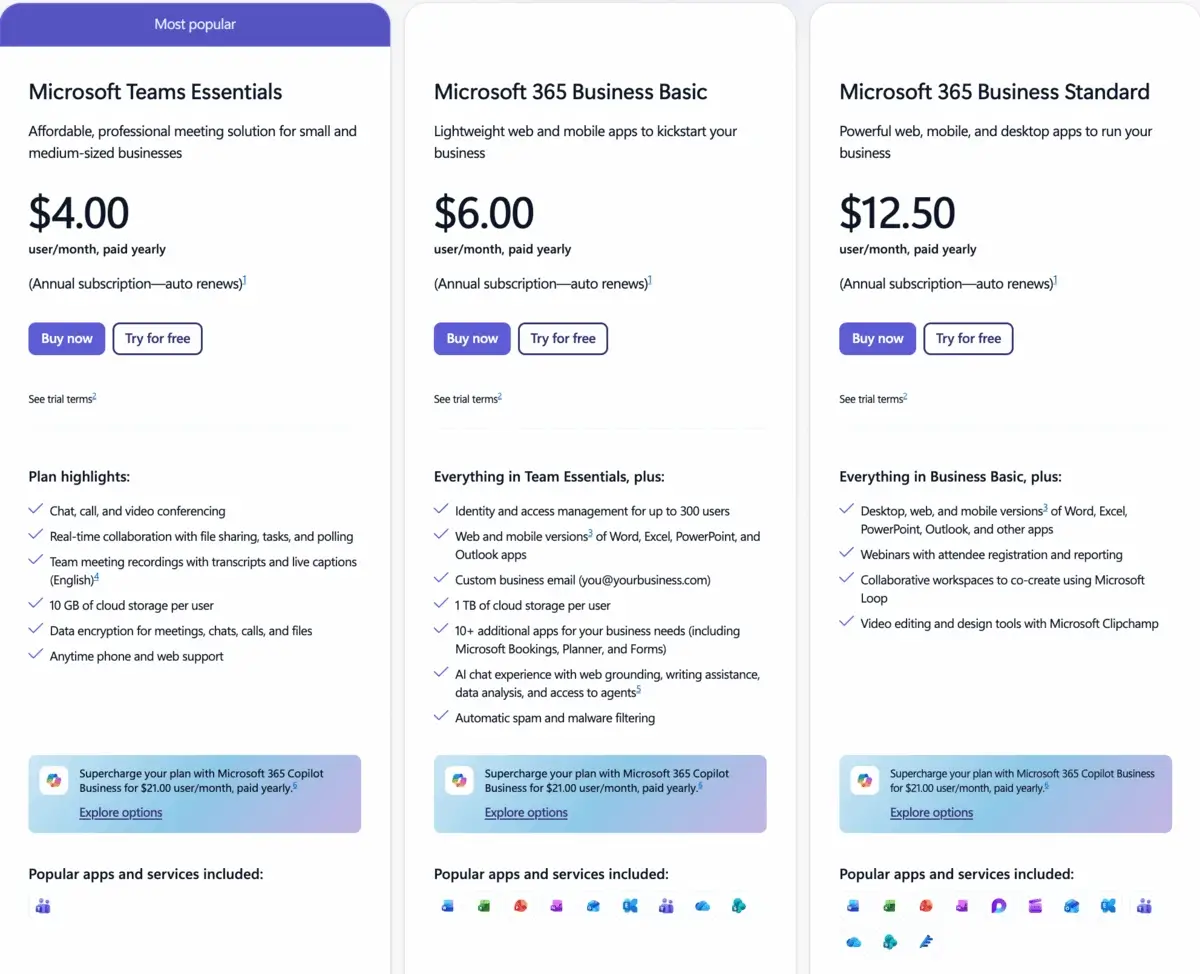
Microsoft Teams Business plans
In the following table, we’ll break down a simplified comparison of major plan shifts following the Microsoft 365 price increase July 2026 announcement.
| Plan | Price before July, 2026 | Price after July, 2026 | % Increase |
|---|---|---|---|
| Teams Essentials | $4 per user per month if paid annually | $4.50 per user per month if paid annually | +12.5% |
| Microsoft 365 Business Basic | $6 per user per month if paid annually | $7 per user per month if paid annually | +16.7% |
| Microsoft 365 Business Standard | $12.50 per user per month if paid annually | $14.50 per user per month if paid annually | +16% |
| Microsoft 365 Business Premium | $22 per user per month if paid annually | $23 per user per month if paid annually | +5% |
| Enterprise E3 | $36 per user per month if paid annually | $40 per user per month if paid annually | +11% |
| Enterprise E5 | $57 per user per month if paid annually | $60+ per user per month if paid annually | +5% |
However, if you don’t want to use Microsoft Teams, you should know that there is the “Unbundled Teams license”. Also known as No-Teams M365 SKU, this licence gives businesses the option to pair Microsoft 365 apps with a separate communication solution.
Here’s how these subscription plans look now compared to their prices starting July 1, 2026:
| Plan | Price before July, 2026 | Price after July, 2026 | % Increase |
|---|---|---|---|
| Microsoft 365 Business Basic | $4.40 per user per month if paid annually | $5.40 per user per month if paid annually | +23% |
| Microsoft 365 Apps for business | $8.25 per user per month if paid annually | $10 per user per month if paid annually | +21% |
| Microsoft 365 Business Standard | $12.50 per user per month if paid annually | $14 per user per month if paid annually | +12% |
| Microsoft 365 Business Premium | / | $22 per user per month if paid annually | / |
This unbundling strategy works best when you:
- Primarily need email and Office apps,
- Prefer a lightweight communication solution over MS Teams, and
- Want to reduce administrative overhead.
Although the tables we prepared give a pretty good insight into the differences between the 6 MS Teams Plans in terms of their current and future pricing, they don’t go into detail or cover additional features.
We’ll do that below, and as the Free plan and the 4 Business plans are the most popular options for businesses, we’ll cover everything they have to offer — starting with the Free plan.
Microsoft Teams Free plan
As mentioned, the free MS Teams option is designed for individuals or small teams that only have video calls from time to time and need to get started quickly.
But what does it include exactly? What are the limitations of the free plan?
What do you get with the Free plan?
The free version of Microsoft Teams includes the following:
- Unlimited chats,
- Unlimited 1:1 meetings that can last for up to 30 hours,
- Unlimited group meetings that can last up to 60 minutes,
- Up to 100 participants per meeting,
- Screen-sharing and file-sharing features,
- 5 GB of storage per user, and
- Customizable backgrounds.
The free version is available to users for an unlimited time.
Granted, it comes up short compared to other collaboration and communication apps.
For example, the free version of Pumble — the all-in-one communication app for teams by CAKE.com — offers substantially more. Pumble has more storage space than MS Teams and unlimited message history, making it one of the best Microsoft Teams alternatives.
Get better features with PumbleAside from that, the MS Teams’ Free plan also has some other downsides — let’s take a look.
Free plan limitations
The 3 most significant limitations of the Free plan are:
- Meeting length,
- Cloud storage, and
- Limited guest users.
The Free MS Teams plan lets you host up to 100 individuals in any single meeting. However, a meeting can’t last longer than 60 minutes.
Now, that might be enough, depending on the types of meetings you conduct. Still, it’s most likely that you won’t be able to review your meeting agenda within the 60-minute limit every time.
If you want your meetings to last longer (or have more participants), you’ll have to upgrade to one of the paid plans.
The same goes for storage. The Free plan limits you to 5 GB of cloud storage per person. Once you go over that, you won’t be able to share documents and files with others.
In addition to this, if you’re on the Free plan, you also can't use the following functionalities:
- Meeting recording,
- Scheduling meetings,
- Phone calls, and
- Audio conferencing.
Microsoft Teams Essentials plan
Microsoft Teams Essentials is priced at $4 per user per month when paid annually or $4.50 per user per month post-July 2026.
This plan gives you access to the core meeting features of Teams and is best suited for teams that need chat and video conferencing only.
It doesn’t come with the typical Office app bundling, so you won’t get other Microsoft apps such as Word, Excel, Outlook, etc.
Let’s look at what the Essentials plan offers.
What do you get with the Essentials plan?
Aside from having all the features included in the Free Plan, if you opt for the Essentials Plan, you’ll also get:
- Unlimited group meetings for up to 30 hours,
- Up to 300 participants per meeting,
- 10 GB of cloud storage per user, and
- Phone and web support.
Integrations with Outlook and Google Calendar are also available for easy meeting scheduling, as well as chats and a wide range of meeting features, such as:
- Virtual backgrounds,
- Meeting lobby,
- Together mode (bringing participants together virtually into a shared space),
- Live closed captions (in English),
- Collaborative annotations (so meeting attendees can collaborate in real time), and
- Live reactions.
You can also assign tasks to teammates, create polls for feedback, and create group chat templates.
Essentials plan limitations
The Essentials plan is a good option if you’re a small business and want the core features of Microsoft Teams without paying for extras you don’t need.
However, in the interest of full disclosure, let’s see what the limitations of this plan are.
Microsoft Teams Essentials doesn’t include:
- Identity, access, and user management for users,
- Live captions in meetings in more than one language (English is the default language),
- Breakout rooms in meetings,
- Custom business emails, and
- Advanced support.
If these “extras” sound like something you might miss, you should look into a more comprehensive plan — like the Microsoft 365 Business Basic Plan.
Microsoft 365 Business Basic plan
Each tier of Microsoft Teams pricing includes the previous tier’s functionalities. Therefore, the Microsoft Teams Business Basic plan includes everything the Essentials plan does.
So, the more money you spend, the more (and better) features you get.
Let’s see what they are.
What do you get with the Business Basic plan?
Business Basic costs $6 per month per user if paid annually. However, that cost will rise in 2026 to $7 per user per month, reflecting a 16.7% increase.
For that money, you’ll get:
- Identity, access, and user management for up to 300 employees,
- 1 TB of file storage per user,
- 10+ additional business apps like Bookings, Planner, Microsoft Forms, etc.,
- Anytime phone and web support, and
- Web and mobile versions of Microsoft Office apps, including Word, Excel, and PowerPoint.
Business Basic is made for teams that want comprehensive web connectivity. Users receive access to a collaboration center that brings together most of your organization's resources and staff on one platform.
This plan also includes 24/7 support for any questions, problems, or comments you may have while using the app.
Business Basic plan limitations
One of the most significant limitations of the business basic plan is that, although the plan includes Office apps, the offer is limited.
Unlike the Essentials plan, Business Basic has secure cloud services for:
- Teams,
- Exchange,
- OneDrive, and
- SharePoint.
However, the following apps are only available as web and mobile apps:
- Outlook,
- Word,
- Excel, and
- Power Point.
Microsoft 365 Business Standard plan
Business Standard comes after Business Basic and includes everything the Business Basic plan does (with a few extras). This plan currently costs $12.50 per user per month if paid annually and, starting July, 2026, it will cost $14.50 per user per month.
Now, let’s see what that money can get you.
What do you get with the Business Standard plan?
Aside from having access to all previously mentioned amenities, the Business Standard plan also offers users an opportunity to:
- Freely share files, as the cloud storage limit is 1 TB per user,
- Host webinars with attendee registration and reporting,
- Create collaborative workspaces via Microsoft Loop,
- Edit videos and access design tools via Clipchamp, and
- Add Copilot (AI tool) as an add-on.
That’s not all, as the Business Standard plan also includes email hosting with a custom email domain and a 1 TB limit for attachments.
To justify the higher price, this tier also adds:
- Desktop Office apps,
- Advanced webinar hosting,
- Expanded town hall vs. webinar registration controls, and
- Greater attendee reporting.
Business Standard limitations
Aside from the price — which is double the price of the previous tier — Business Standard also has another limitation: its nature can easily lead to information overload.
The Business Standard plan is the first on our list so far that encompasses the all-inclusive nature Microsoft was going for when they created Teams. However, that naturally also has drawbacks, as too many available tools can make it hard for users to adopt and use them.
So, if you’re a small business owner looking for the best tool for your team, you might be doing your employees a disservice by opting for a plan that includes this many features.
Microsoft Teams has a notoriously busy and complicated interface, unlike other communication and collaboration tools, and additional features only make it worse.
Collaborate efficiently with PumbleMicrosoft 365 Business Premium plan
Finally, the last (but not least) Microsoft Teams pricing plan on our list is the Microsoft 365 Business Premium.
This plan is a cloud-based suite of productivity apps and services with information protection and compliance capabilities included.
It costs $22 per month per user if you pay everything at once or $23 starting July 2026.
What do you get with Microsoft 365 Business Premium?
Microsoft 365 Business Premium includes everything that the Business Standard plan does, plus:
- Advanced security,
- Access and data control, and
- Cyberthreat protection.
Now, with the increased price, it adds:
- Advanced endpoint management,
- Entra ID integration,
- Conditional access policies, and
- Advanced device security.
However, Business Premium doesn’t automatically include Teams Premium features such as advanced AI summaries or “intelligent meeting recap”. Those require separate licensing.
Another obvious downside of this plan is the pretty steep price you’ll have to pay, especially if you run a large business.
Try Pumble and get more for lessTeams Premium licensing updates (2026)
Microsoft Teams Premium licensing updates continue in 2026, with add-ons required for:
- Intelligent Meeting Recap,
- Advanced webinar controls,
- AI-generated summaries, and
- Virtual appointment capabilities.
The Microsoft Copilot for Teams price (at $18 per user per month) remains separate and requires an additional Copilot license on top of an eligible Microsoft 365 plan.
If you want AI-powered summaries, you will likely need both a:
- Teams Premium add-on, and
- Copilot license.
This licensing model significantly increases total per-user cost.
Pricing & Plans for Enterprise
As far as the Enterprise pricing plans go, they now range from $39 to $60.
Let’s take a more in-depth look at the specifics these tiers offer.
| Microsoft 365 E3 | Microsoft 365 E5 |
| $36 per user per month when paid annually | $57 per user per month when paid annually |
| $39 starting July 1, 2026 | $60 starting July 1, 2026 |
| 1 to 5+ TB of cloud storage per user | Advanced compliance allowing data security for higher data risk and regulations |
| Shadow IT discovery to help mitigate data leakage and security threats | Scalable business analytics to help organizations turn large chunks of data into actionable insights |
Attendee Capacity Packs
Microsoft now requires Attendee Capacity Pack for events exceeding 3,000 participants.
These packs allow scaling up to 100,000 attendees for town halls and webinars.
What this means for large organizations hosting frequent all-hands meetings is that now they should budget separately for:
- Base Enterprise license,
- Teams Premium (if needed), and
- Attendee Capacity Packs.
Specialized Tiers: Education and Frontline
Microsoft offers specialized tiers under its Education and Frontline plans to meet the needs of specific teams.
The Frontline (F plans) are designed for deskless workers — such as retail associates, healthcare staff, and field technicians — who primarily need mobile access and limited app functionality rather than full desktop capabilities.
The F1 plan, priced at $3 per user per month starting July 1, provides essential tools for communication (via Teams) and basic productivity (read-only access to information).
The F3 plan, at $10 per user per month, from July on, expands on this by offering additional features and greater access to Microsoft 365 apps (Windows 11 Enterprise and advanced security).
Together, these plans provide cost-effective solutions for organizations with frontline employees in need of streamlined access to key resources.
For educational institutions, Microsoft offers education-focused plans (A1, A3, and A5) tailored to teachers, students, and school IT needs:
- The A1 plan provides web-based access to Word, Excel, PowerPoint, OneDrive, and Microsoft Teams for free for qualifying schools.
- A3 at ~$2.50–$6 per user per month (depending on region, licensing tier, and provider) adds full desktop Office apps, better security, and more collaboration features, making it more suitable for school staff and faculty.
- A5 at ~$6–$8 (depending on region, licensing tier, and provider) includes all A3 features plus advanced analytics, communication tools, and even stronger security and compliance functionality.
When does the Microsoft 365 price increase take effect in 2026?
The new pricing takes effect July 1, 2026 for new subscriptions and renewals.
Organizations renewing annual licenses before that date may be able to keep the 2025 pricing, depending on their licensing type and region.
Is Microsoft Teams the right solution for you?
Picking the right collaboration and communication tool can ensure productive team collaboration — just as choosing the wrong one can lead to organizational mayhem.
But the answer to the question“Is Microsoft Teams the right tool for me?” depends on your:
- Situation,
- Needs, and
- Budget.
Microsoft Teams operates within a broader Microsoft 365 ecosystem. For some organizations, that means:
- Managing Entra ID and SAML SSO configurations,
- Performing regular tenant license audits,
- Navigating layered add-ons, or
- Paying for bundled webinar or town hall tools not widely used.
Of course, the learning curve and the administrative load can be substantial.
Not to mention the steep pricing.
For example, let’s say that you run a 300-person organization and require a tool beyond a simple conferencing app.
So, you’re looking for something that gives you a lot of control and security, but you’re not sure what to get. You opt for a Microsoft Teams plan with the reputation of being “the most popular one” — the Microsoft Teams Essentials plan.
Now, 300 licenses of the Microsoft Teams Essentials plan come up to $1,200 per month if you pay annually, which means you’ll have to cough up $14,400 on the spot just to have access to Microsoft Teams for a year. And, let’s not forget these costs will rack up to $1,350 or $16,200, starting July.
Not to mention, you won’t even get extra control or additional security, as that isn’t included in the Essentials plan.
Does that sound like a lot of money for something that doesn’t even meet all your needs?
That’s because it is. Luckily, there are other options available.
What is Microsoft Teams’ alternative, Pumble by CAKE.com?
Pumble is an excellent all-in-one Microsoft Teams alternative. It’s a team collaboration software that allows teams of all sizes to communicate and work together better.
Unlike MS Teams, Pumble doesn’t limit its users — its free plan includes unlimited users and unlimited message history for everyone.
Get unlimited team communicationAside from that, Pumble lets all teams of sizes communicate and collaborate via:
- Direct messages,
- Group messages, threads, and dedicated channels,
- Audio and video calls,
- Audio and video messages,
- File sharing, and
- Video conferencing.
To top it off, Pumble also allows external contributors to enter a workspace via guest access.
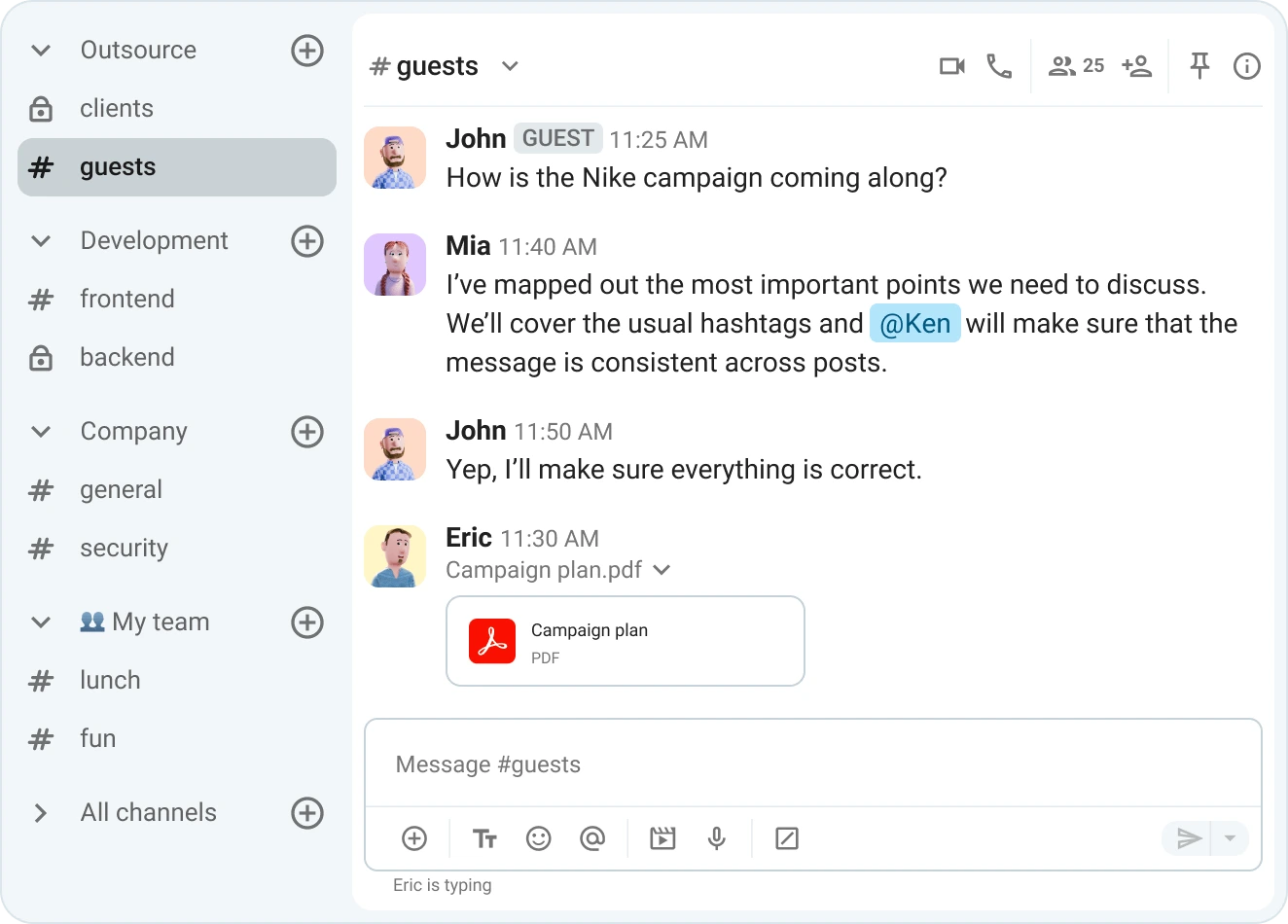
Share files, create channels, and invite guests into your Pumble workspace
Pumble by CAKE.com was created as a free app and will always offer a free plan, even though it is constantly evolving.
And the FREE plan is quite generous!
Pumble’s FREE plan offers:
- Unlimited users,
- Unlimited message history,
- Voice and video messages,
- 1:1 video and audio meetings,
- Up to 3 integrations,
- 10 GB of storage space, and
- Import and export features.
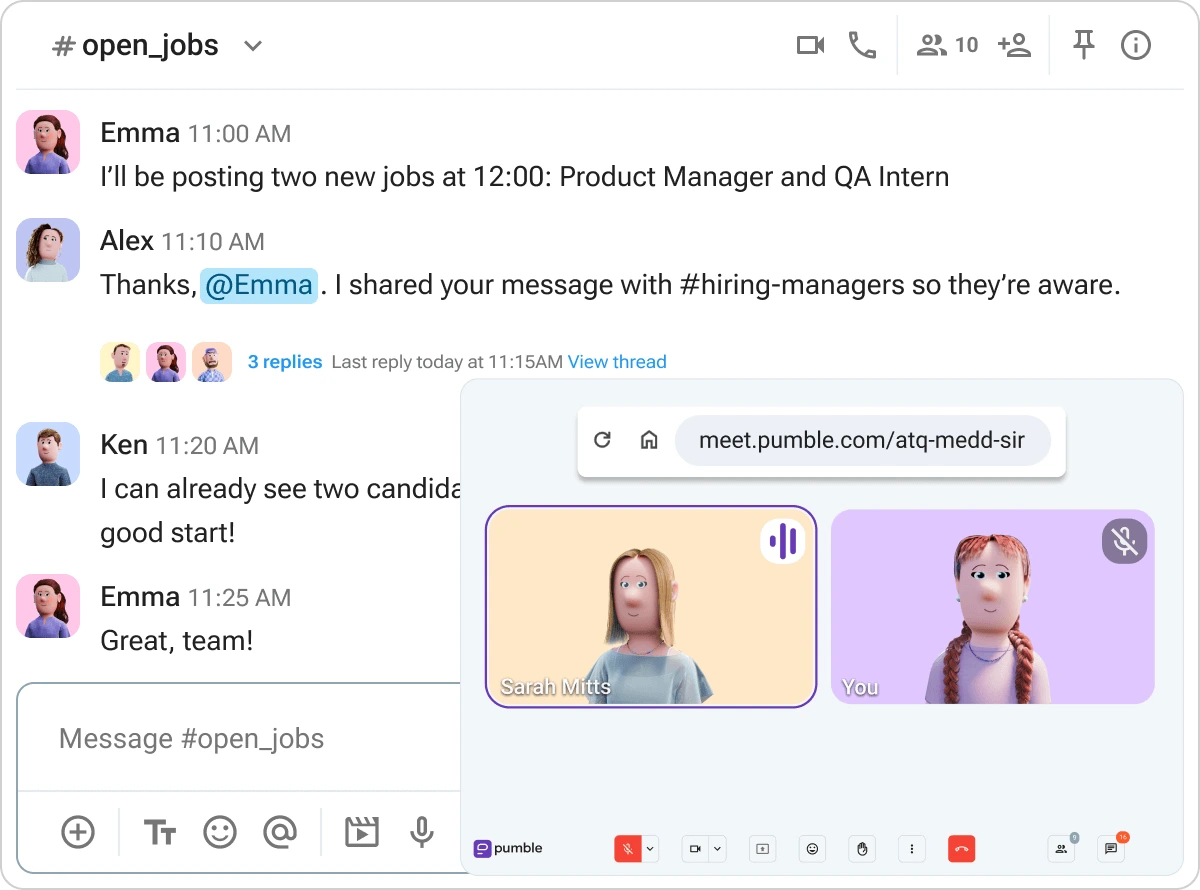
Connect with your team via messages, threads, or voice and video calls in Pumble
How do Microsoft Teams and Pumble by CAKE.com compare?
One of the most significant differences between Pumble and Microsoft Teams is that Pumble offers a substantial free option, while the MS Teams one is pretty limited.
Take a look at the table below to see how the two compare when it comes to the free options as well as their most popular plans.
| Features | Pumble FREE | Microsoft Teams Free | Pumble BUSINESS | Microsoft Teams Essentials |
|---|---|---|---|---|
| Price | $0 | $0 | $3.99 | $4.80 |
| User interface | Clean | Busy | Clean | Busy |
| Max number of users | Unlimited | 1 | Unlimited | 300 |
| Group video meetings | No | Yes | Yes | Yes |
| Meeting recording | No | No | Yes | Yes |
| Guest access | No | No | Yes | Yes |
| Permissions | No | No | Yes | No |
| Priority support | No | No | Yes | No |
| Cloud storage | 10 GB | 5 GB | 20 GB | 10 GB |
So, aside from having a more generous free plan and fewer limitations, Pumble also outshines MS Teams in the following categories:
- Pumble offers advanced levels of roles and permissions control that let you manage both users and workspaces, unlike MS Teams.
- MS Teams has no option to search any file in a specific folder. If you store 50 files in one folder, you must manually search through them. Pumble lets you easily search and find all files shared in DMs or channels via the File browser.
- Pumble chat is very user-friendly, unlike the cluttered, busy one in MS Teams.
Where does Pumble outperform Microsoft Teams?
Most importantly, Pumble wins in another vital category — the price.
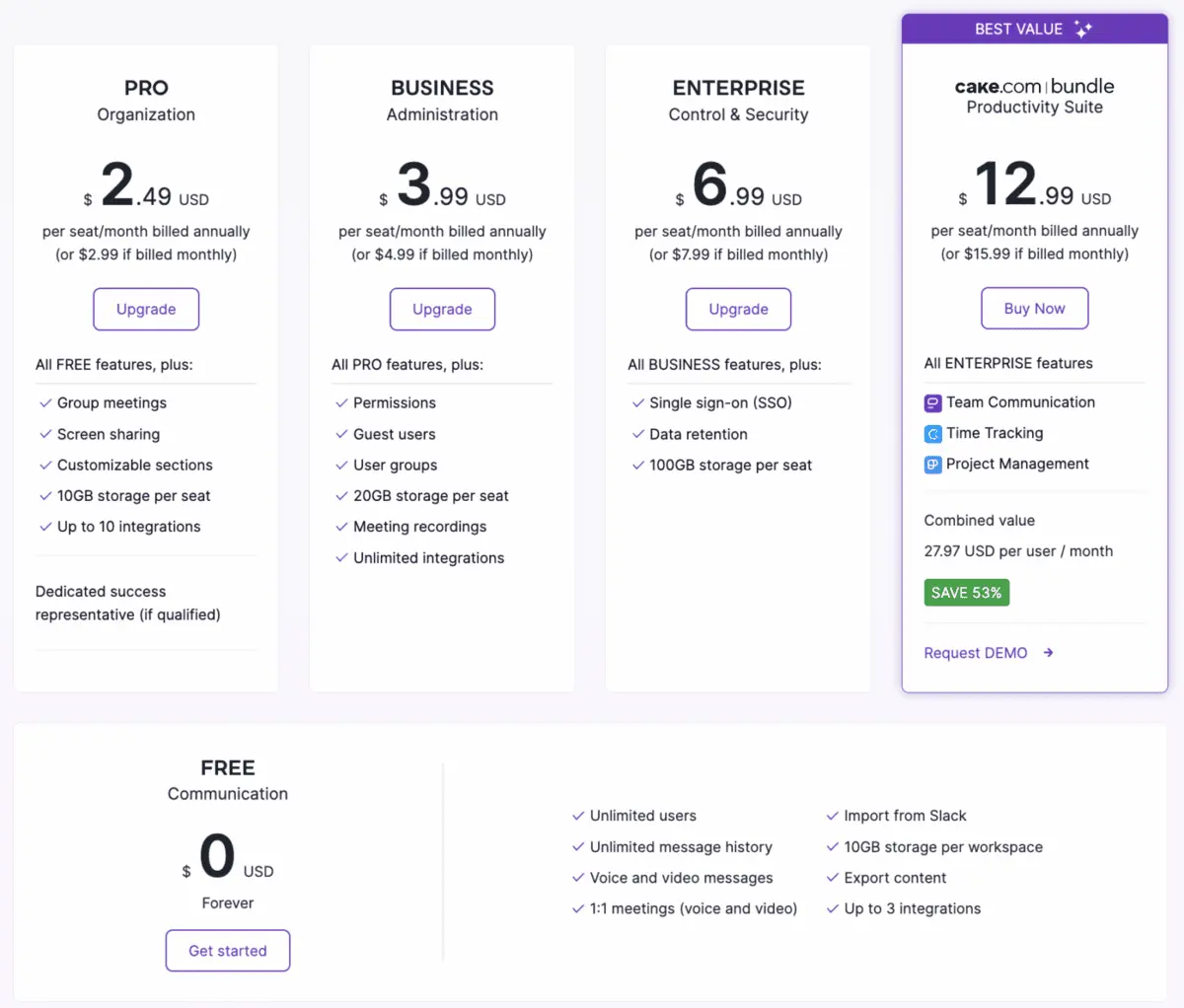
Pumble pricing plans
If we go back to the example we gave you before — where you’d have to pay $14,400, or $16,200 from July 2026 onward, for 300 Microsoft Teams Essentials licenses — you’ll see what we mean.
So, if you opt for Pumble instead of Microsoft Teams, you’d probably pick the Pumble PRO plan since it offers the same things as the Essentials plan (it even has the same storage limit of 10 GB per seat).
Pumble’s PRO plan costs $2.49 per user per month (if billed annually), meaning you’d pay $8,964 for the whole year ($747 per month) for your team of 300.
That means you’d save a whopping $7,236 or 44,67%.
And, even if you opted for the more expensive Pumble plan — Pumble BUSINESS — which offers more than the Essentials plan does, you’d still save money.
Pumble Business costs $3.99 per user per month ($14,364 for a year for a team of 300, or $1,197 per month), and it still offers features that the MS Teams Essentials plan doesn’t have, such as:
- Unlimited integrations, and
- 20 GB of storage per seat.

Most importantly, Pumble offers supreme security and support. With a 100% human support team that’s available 24/7, Pumble will be there whenever you need them, via:
- Phone,
- Chat,
- Email, and
- Priority customer support (included in both PRO and BUSINESS plans).
Microsoft Teams’ alternative: Pumble — for all your communication and collaboration needs
Microsoft Teams is an undeniably comprehensive tool. However, more features don’t always mean a better tool.
If you don’t need advanced compliance controls, enterprise-grade telephony, or large-scale town halls with 100,000 attendees, you may be paying for features you don’t use.
Moreover, with such pricey plans and annual ecosystem-driven increases, MS Teams might leave you looking for a more affordable alternative.
So, look no further than Pumble, an all-in-one communication and collaboration tool!
With budget-friendly prices, competitive features, and a mission of continuous improvement, Pumble might be your new favorite collaboration platform.
Stop paying for features you don’t use. Switch to Pumble for an affordable, high-performance team communication experience.
Get started with Pumble by CAKE.com