
Ever get the feeling that most work meetings are:
- Too frequent,
- Inconvenient, and
- Badly managed?
According to statistics on meetings and productivity, employees lose 31 hours to unproductive meetings every month. Moreover, a whopping 65% of employees believe that wasteful meetings prevent them from doing their jobs. Most of these employees also suffer from meeting fatigue.
So, how can you help your team eliminate pointless meetings that drain their time and energy?
Thanks to asynchronous collaboration tools like Pumble by CAKE.com, there’s no need to schedule a conference room or overbook your calendar.
With specialized features such as threaded discussions, video messages, and status updates, Pumble provides a suite of tools that allow businesses to sharpen their focus and put an end to unwanted meetings.
If that sounds good, stick around, and we’ll go over the top 10 Pumble features that will help you eliminate pointless meetings and stop meeting fatigue.
Benefits of cutting down on meetings — Why 2026 teams are going async
The dreaded “Got 5 minutes?” meetings rarely end at the 5 minute mark.
In 2026, more and more teams are stepping back and asking whether these quick syncs are actually helping or just breaking focus. The shift towards asynchronous work is not about avoiding communication, it is about making it more deliberate and less disruptive.
Here is what teams gain when they move away from constant calls and shift towards asynchronous communication:
- Protected focus — Instead of stopping mid-task to join a call, team members can respond to messages when they reach a natural pause in their focus. This protects deep work and leads to better output, especially for complex or time-sensitive tasks.
- Clearer communication — Writing things down forces clarity and accountability. Ideas are more structured, decisions are documented, and miscommunication is easier to spot and fix.
- Better documentation — Conversations don’t disappear when the call ends. Decisions, feedback, and context stay visible and searchable for anyone who needs them later.
- Less meeting fatigue — Fewer calls mean less mental drain. Employees don’t have to stay camera-ready all day, which reduces stress and meeting fatigue.
- More inclusive collaboration — Not everyone works best in live discussions. Asynchronous communication gives everyone time to think, contribute, and respond thoughtfully.
- Flexible work rhythms — Teams can collaborate across time zones or different schedules without slowing down progress.
Collaborate with your team in Pumble
Top 10 Pumble features to replace your next meeting
Pumble was built as a flexible remote work app that offers users different options to connect instead of defaulting to a meeting.
Let’s see which Pumble features promote effective asynchronous communication — and how they can eliminate pointless meetings.
#1: Threaded discussions — Replace brainstorming calls and keep feedback organized
Brainstorming calls often feel productive in the moment, but they are hard to follow later, as:
- Ideas get lost,
- People talk over each other, and
- Only a few voices dominate a conversation.
Pumble’s threaded discussions solve this by keeping everything organized and tied to context.
Instead of jumping on a call, a team can start a thread in a channel dedicated to a specific topic or problem. Each reply builds on the original message, so feedback stays grouped and easy to follow. You can revisit the thread at any time and immediately understand how the idea evolved.
For example, a team lead can post a message about a project in the relevant channel, and all the team members can comment in the thread with their opinions or share documents, visuals, and other relevant info.
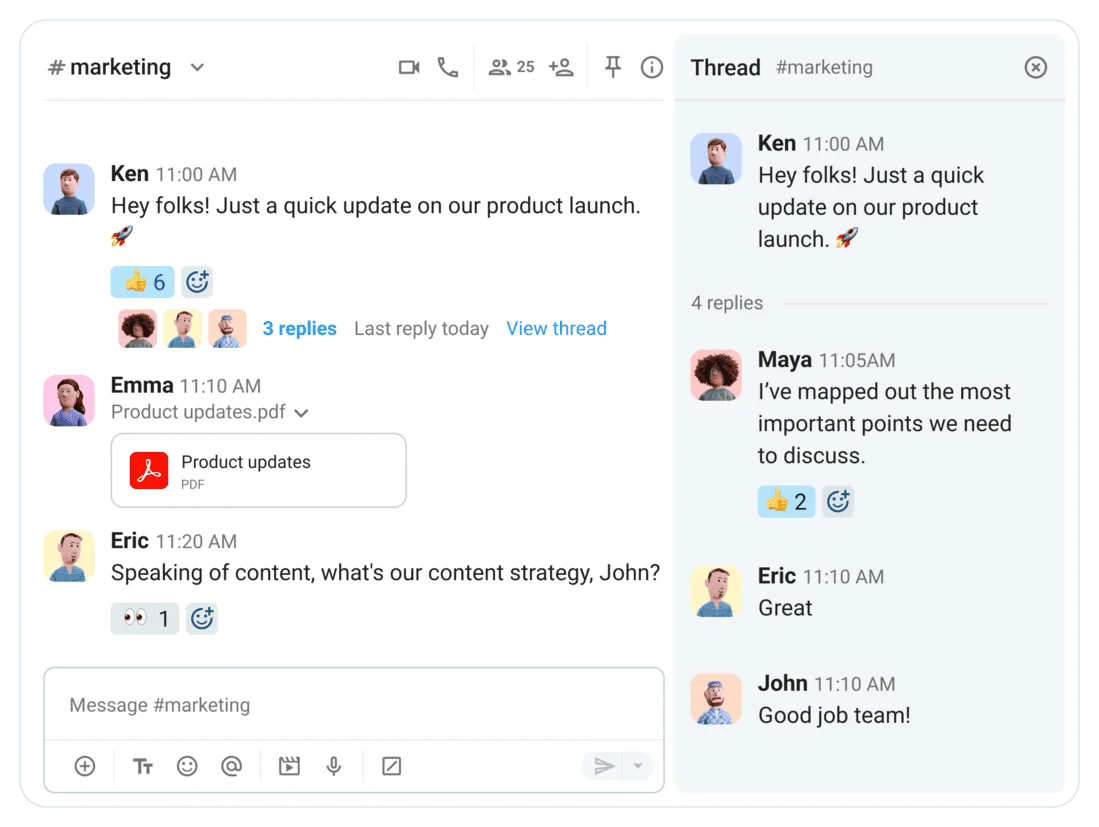
Additionally, with Pumble’s unlimited message history, your threaded discussions become a valuable knowledge base. You can:
- Search through past discussions,
- Avoid repeating conversations, and
- Find relevant files whenever you need them.
#2: Video messages — Replace screen-share walkthroughs with quick asynchronous clips
Now, you might be wondering how to avoid meetings while still preserving a sense of togetherness. Without face-to-face meetings, remote workers can feel disconnected from their colleagues.
The solution? Reintroducing that personal element with Pumble’s video messages. Instead of typing a bland review of a team member’s task, record a video to ensure your words hit all the right points.
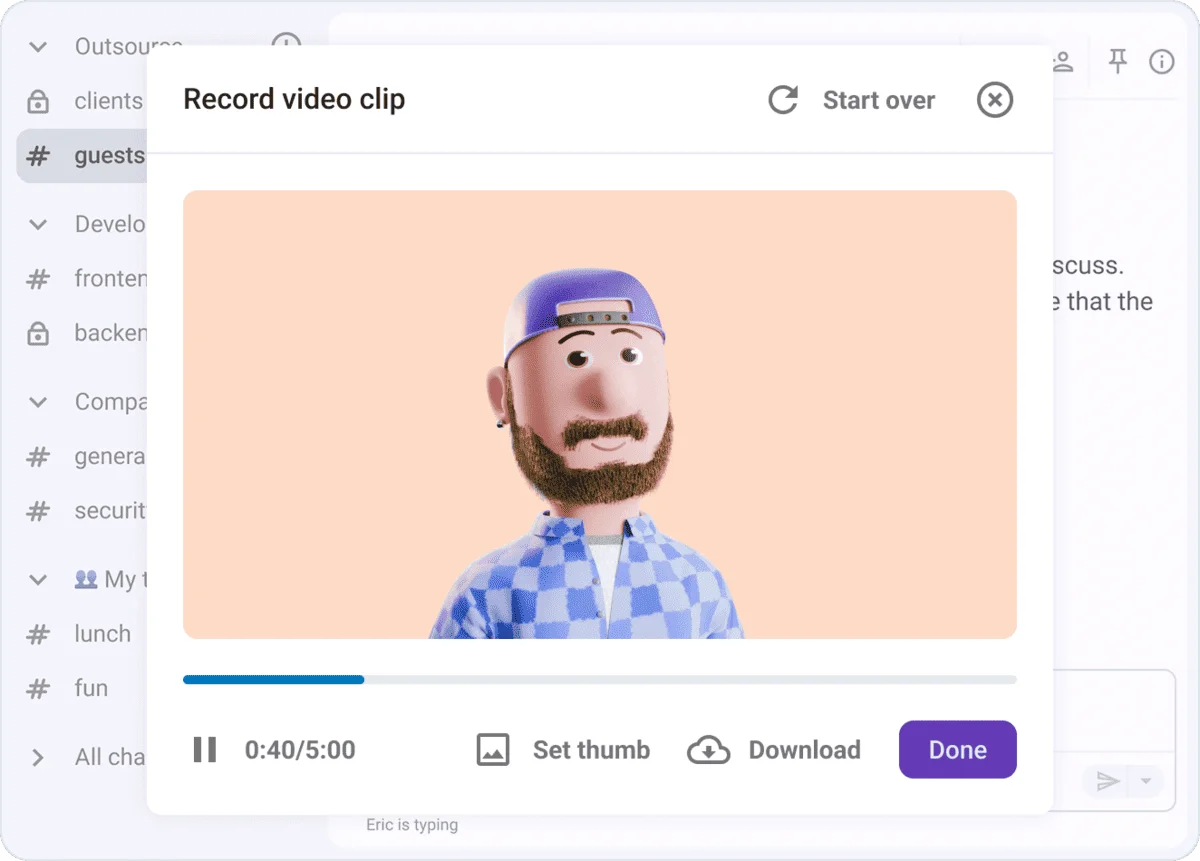
If you manage a team that does more technical work, like software development, you may need to share your screen to share additional information. Pumble video messages also provide that option.
You can record yourself reviewing someone’s work and point out what worked and what didn’t while sharing your screen. Just like that, you’ve sent constructive feedback and prevented miscommunication. Plus, they can rewatch the recording whenever they need to.

#3: Public & private channels — Eliminate status update meetings by making project progress transparent to all
Many collaboration tools have introduced channels — virtual spaces where you can share:
- Files,
- Messages,
- Resources, etc.
In Pumble by CAKE.com, you can create either public or private channels, ensuring that all relevant team members stay in the loop.
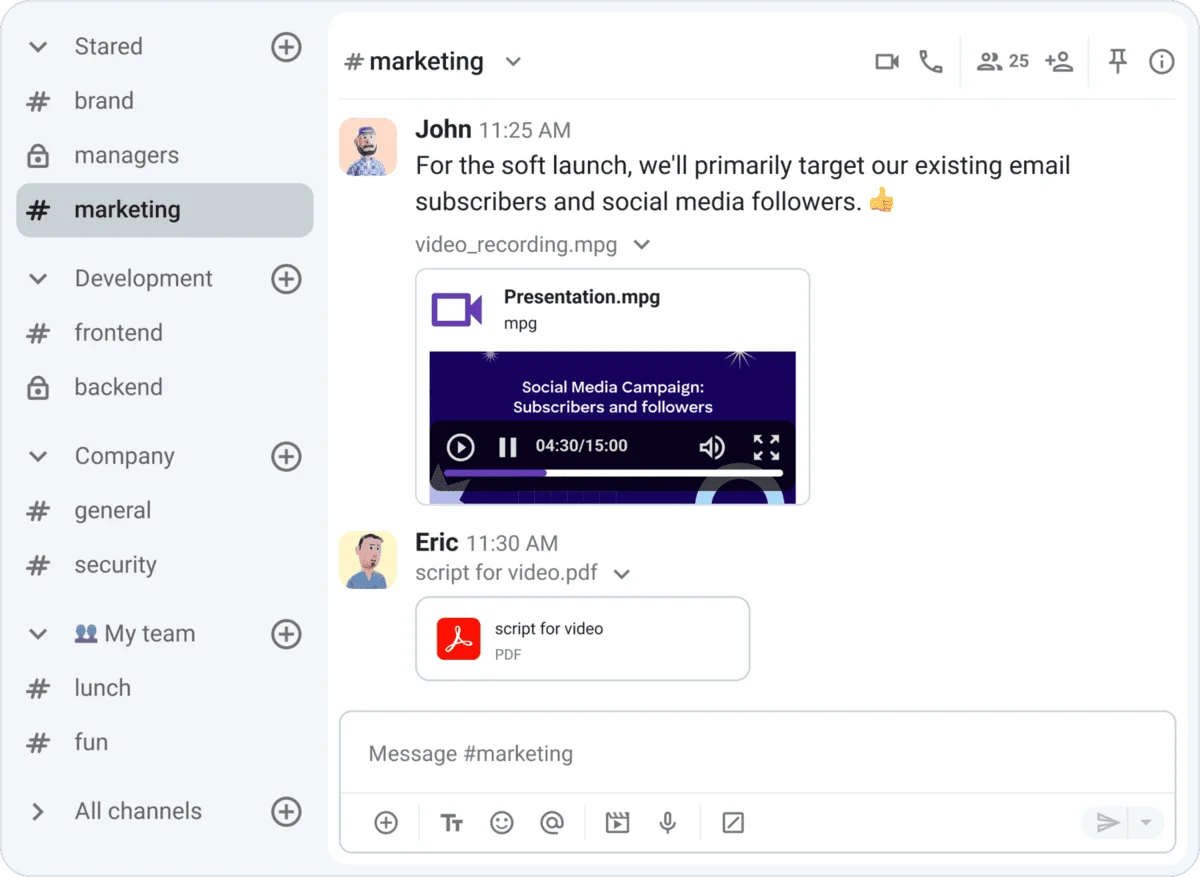
You can organize channels around projects, topics, accounts, or teams.
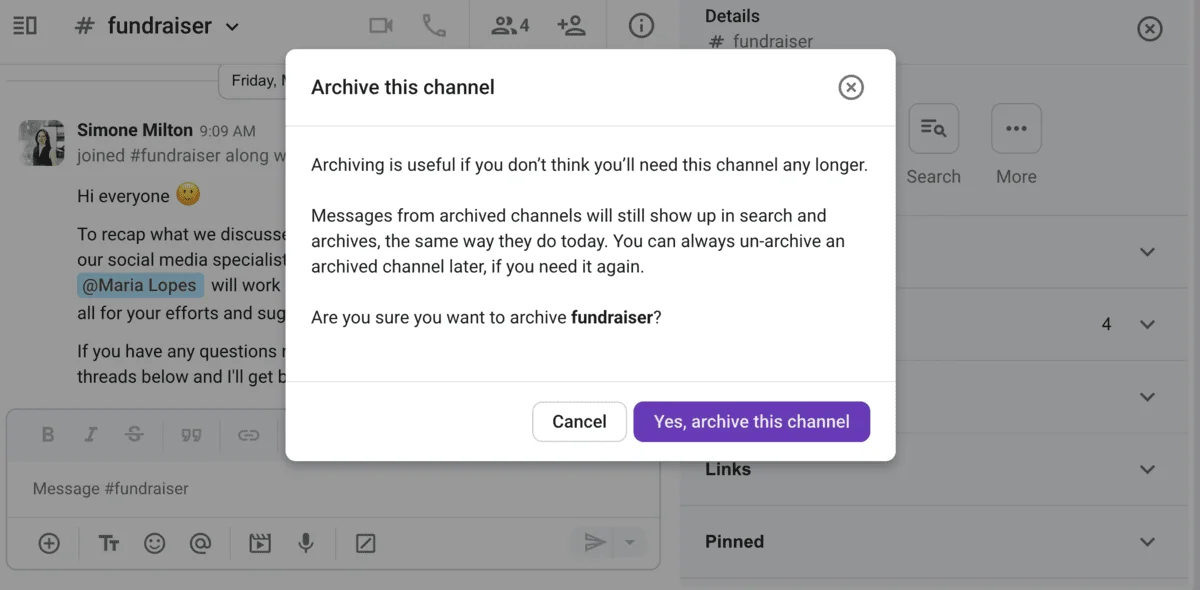
And, once a project or task is over and the channel becomes inactive, it doesn’t have to clutter your workspace — in a few simple clicks, you can archive it and close it to further activity.
Now, how can Pumble channels help you have fewer meetings?
Let’s say your sales team has a status update meeting every Wednesday from 11 a.m. to 1 p.m. Your meeting agenda likely includes:
- Information on monitoring sales targets,
- Team performance reviews, and
- Pipeline progress.
The above is all valuable information, but is it urgent?
Probably not, and even if the meeting doesn’t go over its designated limit, it can still gobble up precious time. Your team members might have to prepare documents beforehand, review notes, double-check numbers — when they could have been closing deals and making sales instead.
However, if you post this information in a #status_update channel, people can review it in their own time.
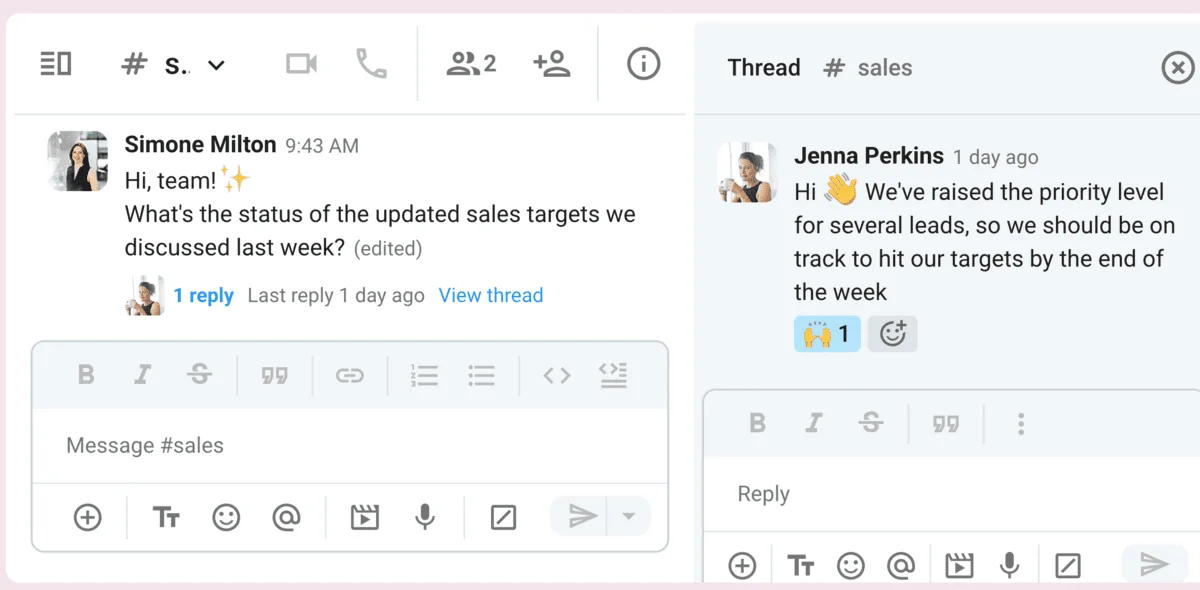
Should anyone have a question or want to add more detail, they can do so in a thread beneath the post. That’s how simple it is to stay connected in Pumble channels, without turning on your camera or microphone.
Optimize communication with Pumble
💡 Pumble Pro Tip
For more tips on how to get the most out of channels in Pumble, check out this guide:
#4: Voice messages — Replace tone-check calls with quick audio notes to convey nuance
For a long time, in-person meetings were the cornerstone of team collaboration. The truth is, we just didn’t have the right tools, so our choices were slim — either a physical meet-up or a video call.
Thankfully, that’s no longer our reality. With voice messages, workplace communication apps like Pumble by CAKE.com have broadened our collaboration options.
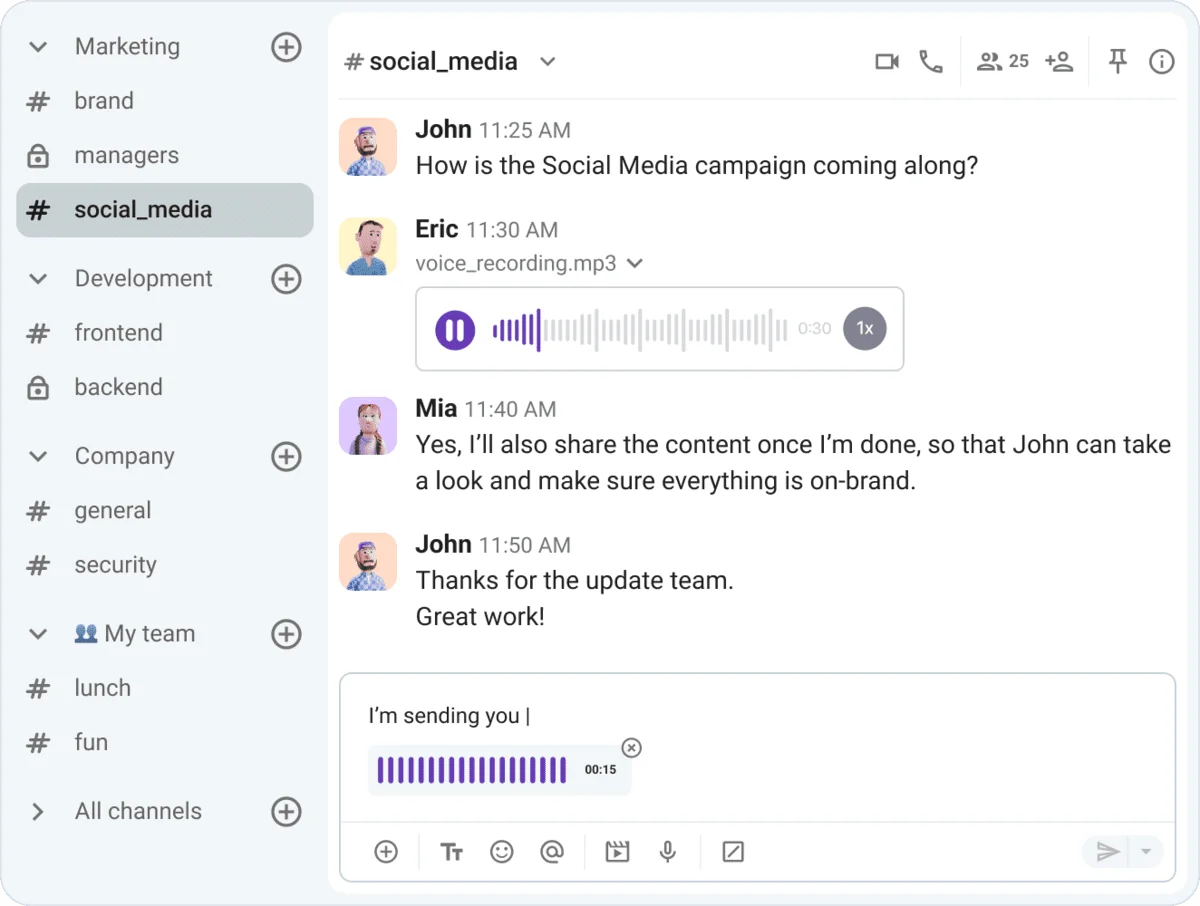
Ask yourself a simple question — does this topic or task require an immediate response or action? If the answer is “no,” you’re likely better off sending a voice message in a channel, thread, or chat.
For instance, if an important client has sent back feedback, you’ll want to share that information with your team. The feedback is too detailed for an email, but not extensive enough to warrant a full-blown meeting.
A simple way to forward the information is through a voice message — it’s quick, easy, effective, and doesn’t impede team collaboration.
#5: Unlimited message history — Eliminate catch-up meetings with searchable history
Some of the most time-consuming meetings for managers and team leaders are same-page meetings.
In theory, these meetings are supposed to help you work out the nuts and bolts of teamwork and collaboration, covering aspects like:
- Team alignment,
- Responsibility assignment, and
- Resource management.
Many times, all of this information could be shared and found independently in channels, without having to hold meetings.
You can organize your team, assign responsibilities, and share documents — all of which your team can find and reference whenever they need it, even weeks or months later.
Thankfully, Pumble offers all users unlimited access to full message history, even if you’re on the free plan, and is one of only a few tools that offer this kind of access to your information.
Get unlimited history in Pumble
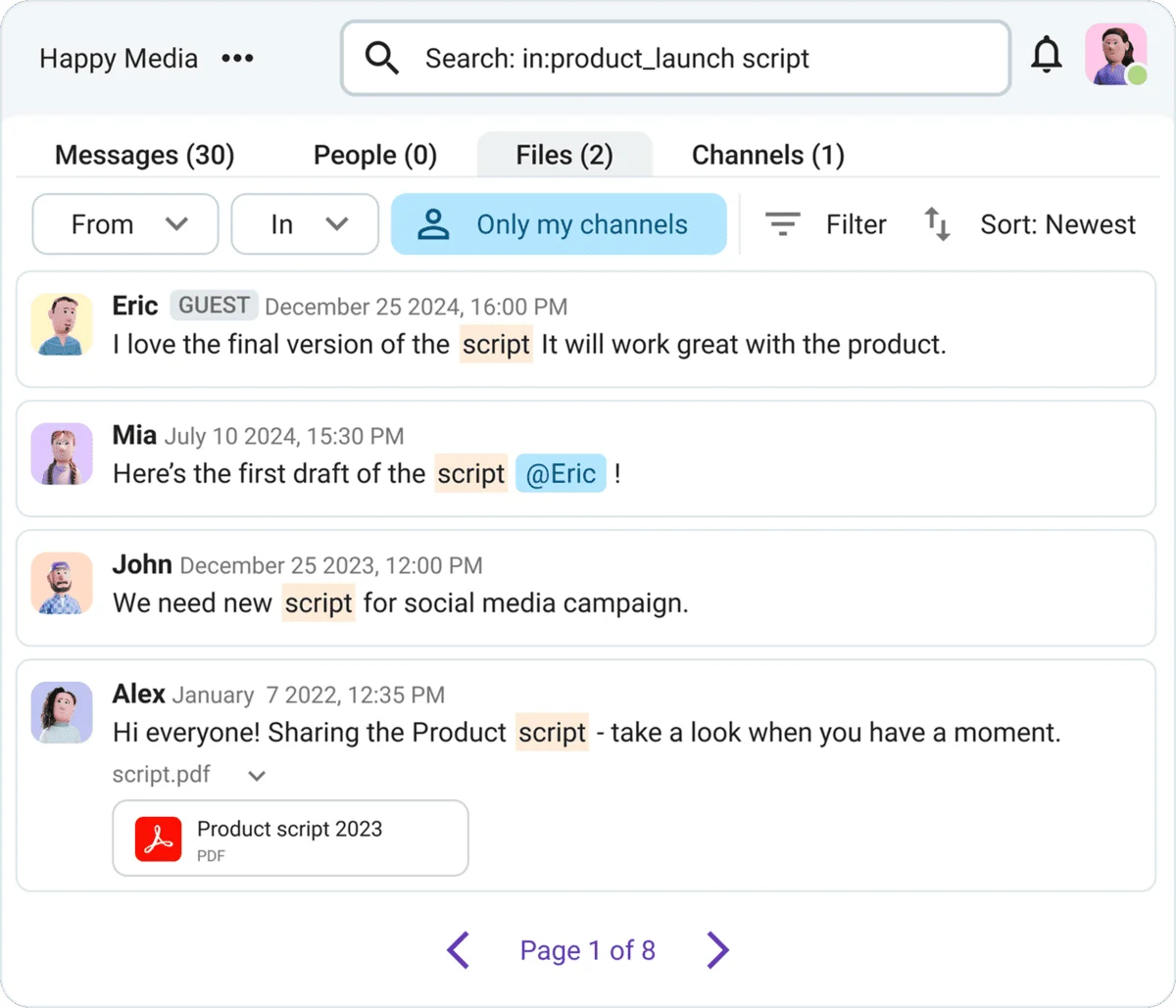
Whether pertinent information is buried in an old thread, archived channel, or forgotten DM, you’ll find it using Pumble’s search filters. There’s no cut-off period, so your information is safe forever. This eliminates the need to wait until a lengthy meeting to share knowledge and information.
#6: Integration with Plaky — Move from sync meetings to visual task boards
Daily or weekly meetings where teams talk about what they’ve been working on often repeat the same information without adding much value. They take time, interrupt work, and usually don’t give a clear picture of progress.
However, integrating Pumble with Plaky changes that by making work visible in real time. Plaky by CAKE.com is a project management tool where tasks are organized by project, status, priority, or whatever other parameters you need for your team.
You can easily see:
- Who’s responsible for what,
- How far along their tasks are, and
- Where projects might be blocked.
Instead of asking for updates, teams can open shared task boards and instantly get an idea of what everyone is working on.
For example, a product development team can track a feature launch in Plaky.
Team leads create tasks, assign developers to the project, and set deadlines. Then, developers take on the tasks and update their statuses as they progress from “in progress” to “review” to “done”. A manager doesn’t need to schedule daily sync meetings to check progress — it’s all right there in Plaky.
With the Pumble integration, you get all the notifications from Plaky sent directly to you in Pumble. You get notified of:
- Status updates,
- New tasks, or
- Comments on your current tasks.
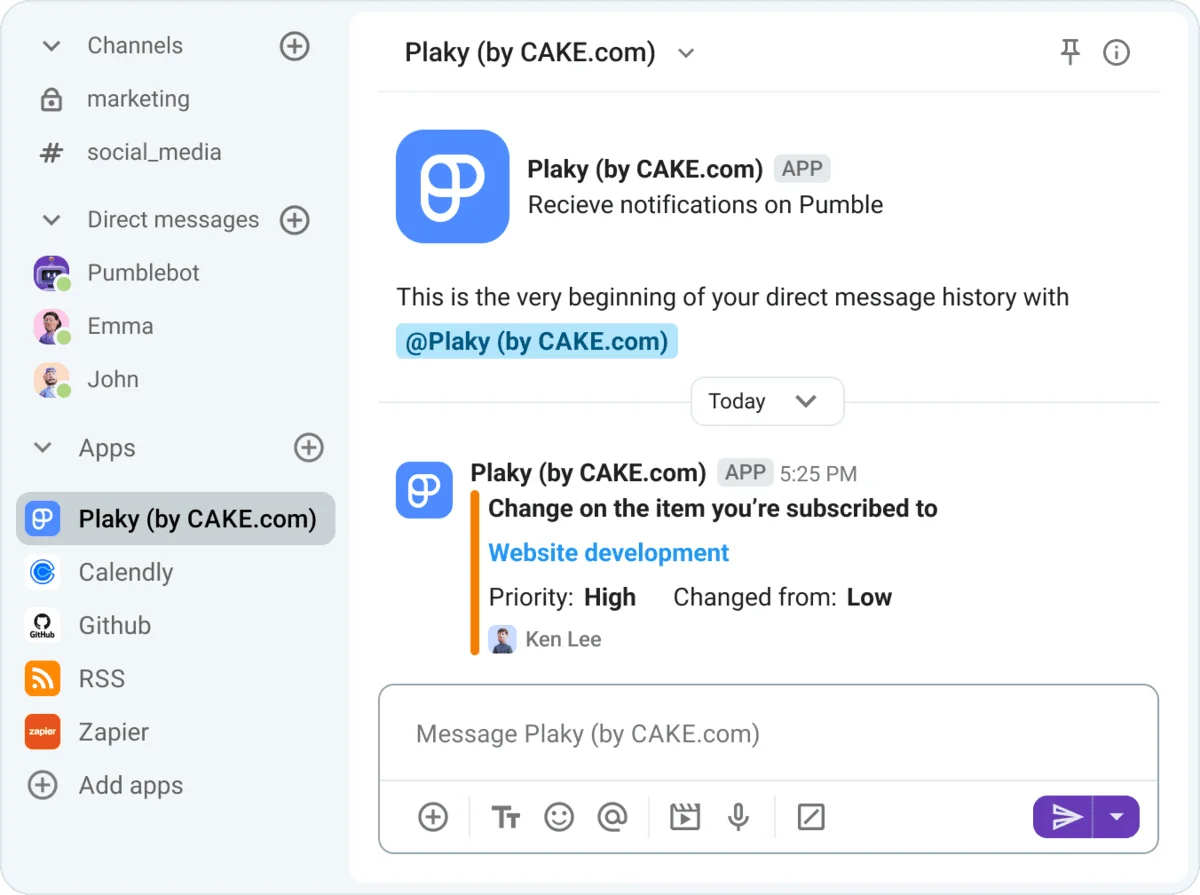
With this integration, work becomes more transparent, progress is easier to track, and teams spend less time talking about work and more time actually doing it.
Pumble and Plaky, along with Clockify, a renowned time tracker, are part of CAKE.com’s Productivity Bundle that gives users Enterprise-level access to all 3 tools at half the price. The bundle also allows you to integrate Pumble, Plaky, and Clockify to create a more connected workflow between the apps.

#7: Customizable sidebar — Organize your communication by topic or project to find info fast
A cluttered workspace slows everything down. When channels, conversations, and files are scattered, people end up asking questions that have already been answered or starting calls just to find basic information..
With Pumble’s customizable sidebar, you can group channels by project, client, or team, depending on how your work is structured. This means that everything related to a specific topic is in one place, making it easy to access and navigate.
Let’s say you run an agency with multiple clients. You can organize your Pumble sidebar so each client has its own section with channels for strategy, design, and communication. When a team member needs to find something related to that client, they know exactly where to look.
This setup also helps new team members get up to speed faster. They can explore structured channels on their own time instead of relying on colleagues to guide them through scattered information.
The result is less back-and-forth, fewer interruptions, and faster access to what you need.

#8: User groups & mentions — Stop all-hands for minor updates and notify only the relevant team members
There’s a place for regular check-ins in the workweek. Checking in with your team not only allows you to measure progress, but also increases employee engagement and builds rapport. However, are verbal check-ins the best way to go about it?
Not always. Without careful planning, even a simple checkup can add to meeting fatigue, compounding physical and mental exhaustion.
You can conduct check-ins with asynchronous communication tools and give team members the freedom to build a productive schedule — no meeting needed!
For example, if you want to follow up on a task or project, you can grab a coworker’s attention with a @mention in a message. Their Pumble app will ping with a notification, but won’t disturb other team members who may not have any significant updates to share.
💡 Pumble Pro Tip
To learn how to ask for status updates and better support your team, head to this guide:
You can take your @mentions one step further and create user groups — an umbrella term for people on the same team or with similar roles.
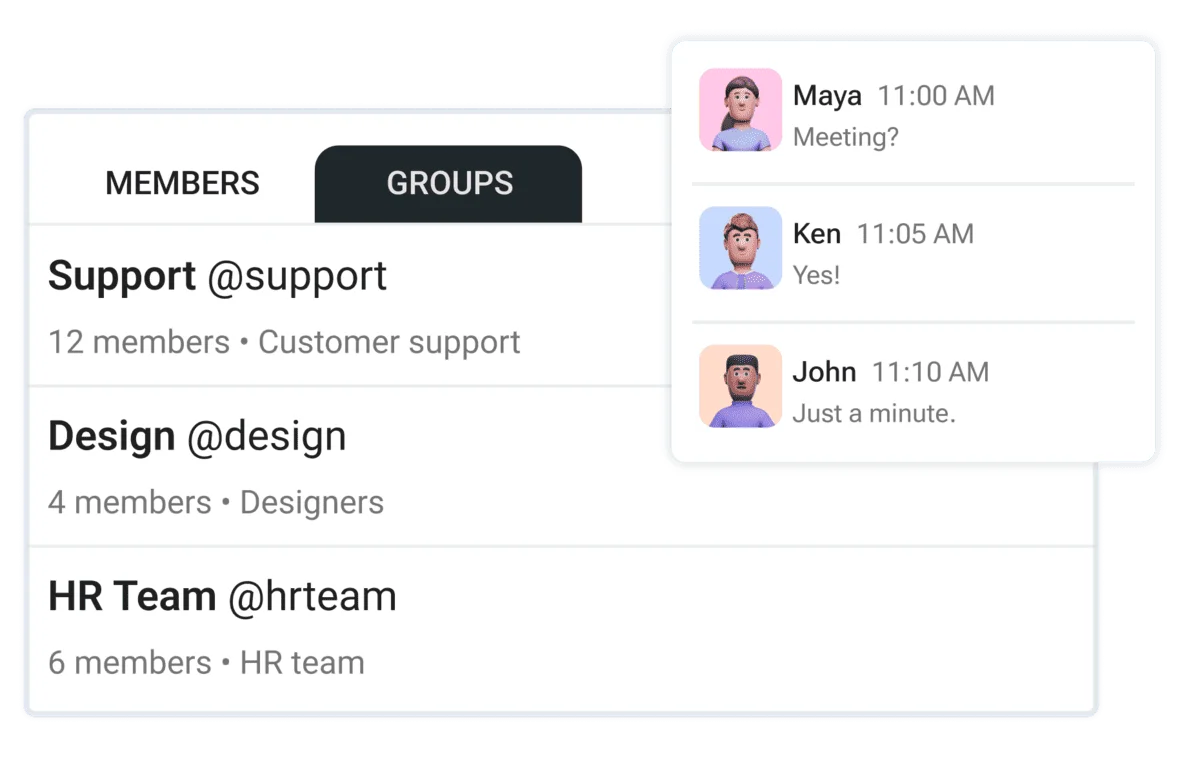
When you mention a user group, every member receives a notification, which is convenient for:
- Cross-functional collaboration: Some projects are more complex than others, demanding the involvement of multiple different teams. The easiest way to bring together the HR, engineering, customer support, and sales teams? A user group that will alert them when you need their input.
- Announcements: Want to make sure the PR and marketing teams are aware of new features they should highlight in campaigns and press briefs? Send an announcement, mention the relevant user group, and the tagged people will be on it.
- Crisis communication: Weathering a crisis usually involves people from several teams. User groups make it possible to cut through the notification fatigue of channels and messages and get to work right away.
Keep everyone updated with Pumble
#9: File sharing — Upload files directly to channels and threads for visual feedback
Have you ever joined a meeting only to have a 60-page beast of a document land in your inbox? The meeting then drags on for hours as you try to skim the document. When will you get to reviewing the content? At the next meeting, maybe.
These aren’t unimportant meetings, but they can be inefficient. That’s why using Pumble by CAKE.com as an alternative to meetings can help remote teams stay on track without wasting time.
When you use your team communication app to handle file and content management, it’s easier to ensure that a document is up to standard.
Let’s go back to the 60-page document we mentioned. If a colleague shares it in a channel, you can fit the document review into your schedule naturally, rather than trying to work around a two-hour meeting.
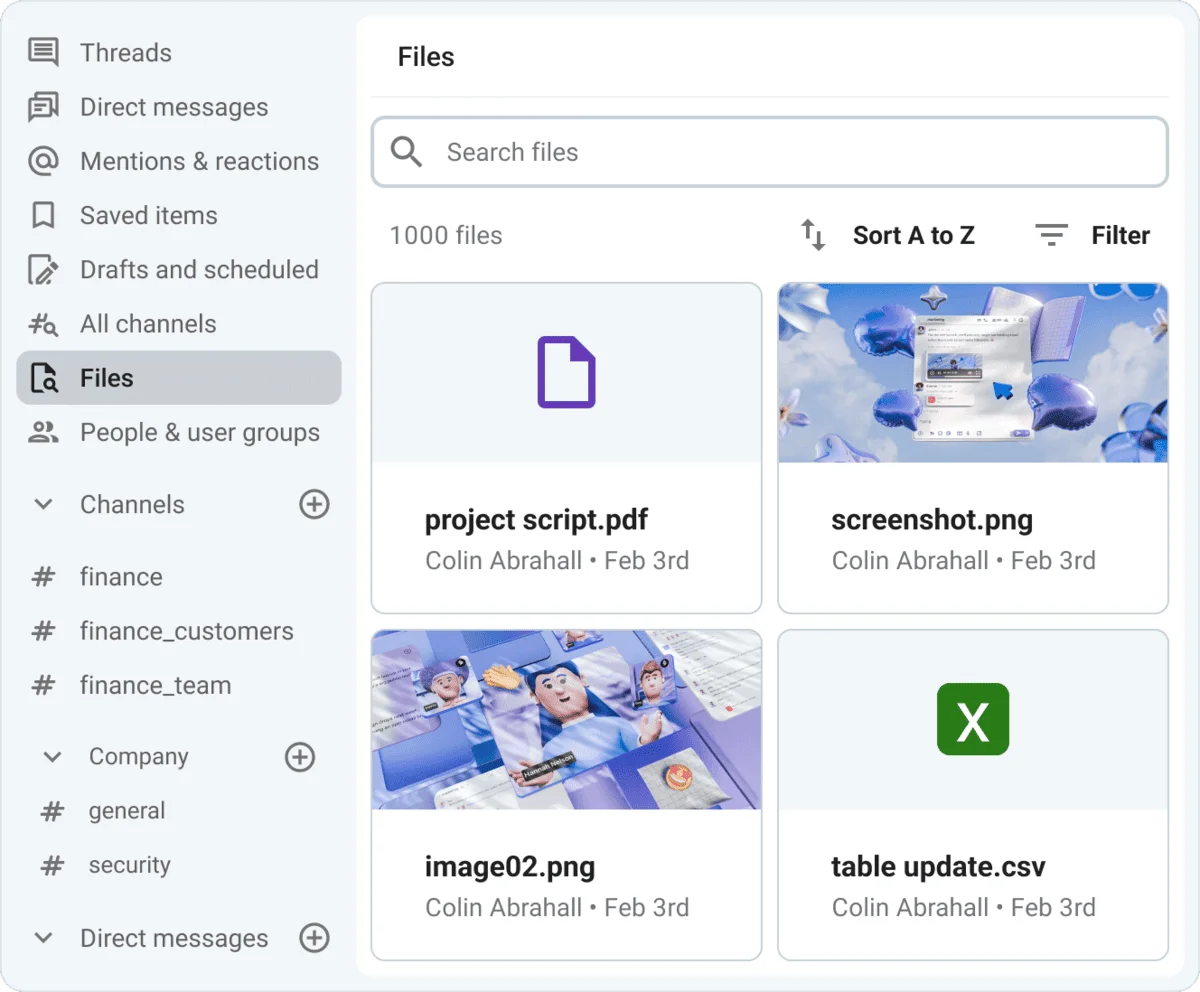
You can view all files shared within a channel in the right-hand sidebar, but if you need to locate a specific document, the search filter has you covered. Nearly everything is searchable in Pumble, including:
- PDFs,
- Spreadsheets,
- Presentations,
- Screenshots,
- Photos, and
- Audio and video files.
To help your team retrieve critical information faster, you can also pin messages containing important files. Teams can find pinned messages on the right-hand side of the channel, so everyone has immediate access to conversations and docs.
#10: Status emojis — Stop interruptions with clear visual cues
One of the biggest productivity disruptors are constant interruptions. Constant pings and “Are you available?” messages break focus and create pressure to respond immediately.
In Pumble, you can set a custom status to offer a simple and easy way to communicate availability without others disrupting your workflow.
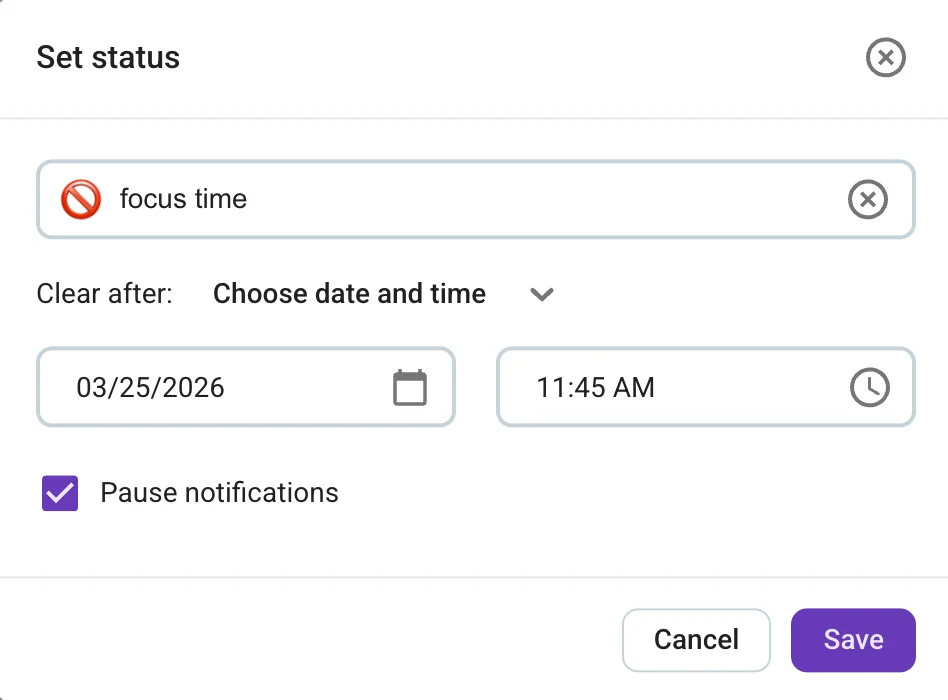
Instead of pinging you, team members can check your status with a glance and instantly understand whether it’s a good time to reach out.
For example, a developer working on a complex issue can set a status that reflects they are in focus mode. A teammate who sees this knows to hold off on non-urgent questions or schedule a message to be sent later. There’s no need to send a message and wonder why they’re not replying right away, or worse, interrupt at the wrong time.
Statuses can also reflect context beyond availability, such as:
- 🗓️ — In a meeting,
- 🍕 — Lunch break,
- 🌴 — Time off, or
- ☕ — Coffee break.
It’s a simple feature, but this small layer of visibility makes a noticeable difference in how smoothly teams work together.
Synchronous vs. asynchronous communication — When to call vs. when to chat
Not every situation needs a meeting. Knowing when to use asynchronous communication and when to stay synchronous makes a big difference in team efficiency.
Asynchronous communication works best for most day-to-day collaboration, such as:
- Sharing updates,
- Giving feedback,
- Asking simple questions, or
- Solidifying decisions.
It gives people time to think, reduces pressure, and keeps a written record of what was discussed.
Synchronous communication is still important, but it should be used intentionally. Calls are best for situations that require:
- Fast decision-making,
- Complex discussions, or
- Sensitive conversations.
If something would take dozens of messages to resolve or involves nuance that is hard to convey in writing, a quick call can be more efficient.
Here’s a good rule of thumb:
- If it can wait and benefit from clarity — use chat.
- If it is urgent or complex — jump on a call.
Host fewer meetings & fast-track productivity with Pumble by CAKE.com
Meetings definitely aren’t a thing of the past, but it’s essential to consider when they are needed and when other forms of communication could be more efficient.
With Pumble, you have multiple ways of connecting and collaborating with team members without having to tune in to a video call.
As a comprehensive communication solution, its robust features let you handle video conferencing when needed — all in a single app. It also works great for messaging and file management.
Unlike traditional virtual meeting software, Pumble increases the value of your time, giving you the space to prioritize your work and maximize efficiency.
Ready to eliminate pointless meetings?
How we reviewed this post: Our writers & editors monitor the posts and update them when new information becomes available, to keep them fresh and relevant.